
文章目录
-
- 基本概念
- 常见命令
- 实操案例
基本概念
常见命令
启动arthas-demo(案例程序)
执行如下命令下载 arthas-demo.jar,再用java -jar命令启动案例程序:
wget https://arthas.aliyun.com/arthas-demo.jar; java -jar arthas-demo.jar 启动arthas-boot(诊断工具程序)
执行如下命令下载arthas-boot.jar,再用java -jar命令启动:
wget https://arthas.aliyun.com/arthas-boot.jar; java -jar arthas-boot.jar [arthas@1266]$ help NAME DESCRIPTION help Display Arthas Help auth Authenticates the current session keymap Display all the available keymap for the specified connection. sc Search all the classes loaded by JVM sm Search the method of classes loaded by JVM classloader Show classloader info jad Decompile class getstatic Show the static field of a class monitor Monitor method execution statistics, e.g. total/success/failure count, average rt, fail rate, etc. stack Display the stack trace for the specified class and method thread Display thread info, thread stack trace Trace the execution time of specified method invocation. watch Display the input/output parameter, return object, and thrown exception of specified me thod invocation tt Time Tunnel jvm Display the target JVM information memory Display jvm memory info. perfcounter Display the perf counter information. ognl Execute ognl expression. mc Memory compiler, compiles java files into bytecode and class files in memory. redefine Redefine classes. @see Instrumentation#redefineClasses(ClassDefinition...) retransform Retransform classes. @see Instrumentation#retransformClasses(Class...) dashboard Overview of target jvm's thread, memory, gc, vm, tomcat info. dump Dump class byte array from JVM heapdump Heap dump options View and change various Arthas options cls Clear the screen reset Reset all the enhanced classes version Display Arthas version session Display current session information sysprop Display, and change the system properties. sysenv Display the system env. vmoption Display, and update the vm diagnostic options. logger Print logger info, and update the logger level history Display command history cat Concatenate and print files base64 Encode and decode using Base64 representation echo write arguments to the standard output pwd Return working directory name mbean Display the mbean information grep grep command for pipes. tee tee command for pipes. profiler Async Profiler. https://github.com/jvm-profiling-tools/async-profiler vmtool jvm tool stop Stop/Shutdown Arthas server and exit the console. 与linux同样规则的命令此处不再赘述。如:history,cat,echo,pwd,grep。Linux命令不懂的可以查看我这篇文章:Linux常用命令大全。
系统的实时数据面板 dashboard 命令
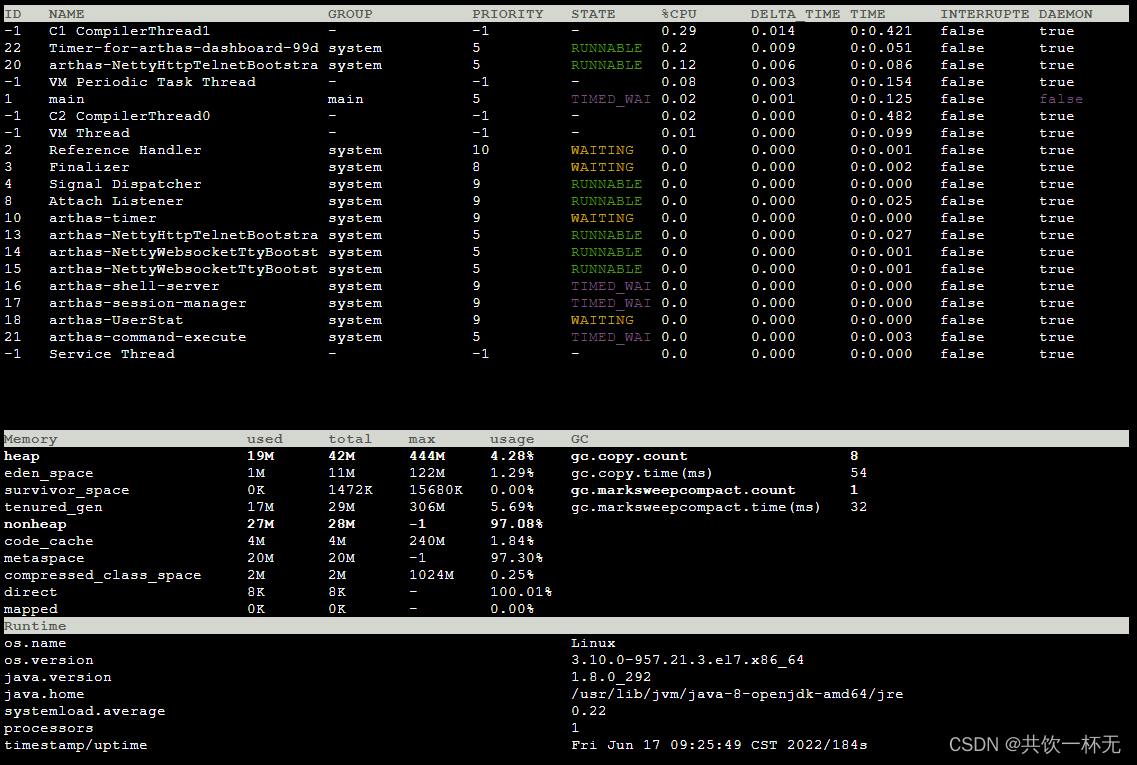

dashboard 命令可以查看当前系统的实时数据面板。可以查看到CPU、内存、GC、运行环境等信息。
输入 q 或者 Ctrl+C 可以退出dashboard命令。
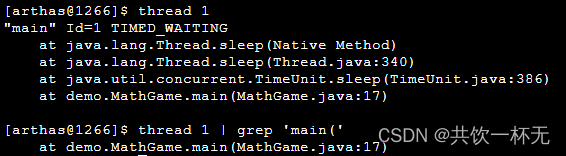
打印线程ID 的栈 thread
thread 1 命令会打印线程ID 1的栈。用 thread 1 | grep 'main(' 查找到main class。
查找JVM里已加载的类 sc/sm
可以通过 sc 命令来查找JVM里已加载的类,通过-d参数,可以打印出类加载的具体信息,很方便查找类加载问题。
[arthas@1266]$ sc -d *MathGame class-info demo.MathGame code-source /home/shell/arthas-demo.jar name demo.MathGame isInterface false isAnnotation false isEnum false isAnonymousClass false isArray false isLocalClass false isMemberClass false isPrimitive false isSynthetic false simple-name MathGame modifier public annotation interfaces super-class +-java.lang.Object class-loader +-sun.misc.Launcher$AppClassLoader@1b6d3586 +-sun.misc.Launcher$ExtClassLoader@107df6e5 classLoaderHash 1b6d3586 Affect(row-cnt:1) cost in 50 ms. sc支持通配,比如搜索所有的StringUtils:
sc *StringUtils 查找UserController的ClassLoader
[arthas@1266]$ sc -d com.example.demo.arthas.user.UserController | grep classLoaderHash classLoaderHash 19469ea2 sm命令则是查找类的具体函数。比如:
sm java.math.RoundingMode 通过-d参数可以打印函数的具体属性:
sm -d java.math.RoundingMode 查找特定的函数,比如查找构造函数:
sm java.math.RoundingMode <init> 反编译代码 jad命令
jad demo.MathGame
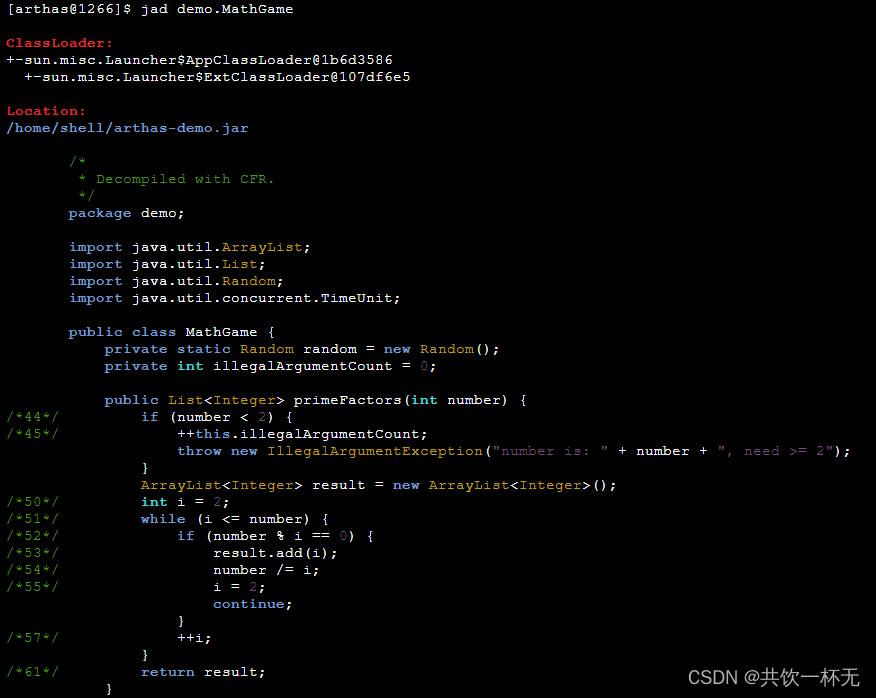
通过--source-only参数可以只打印出在反编译的源代码:
jad --source-only com.example.demo.arthas.user.UserController 动态执行代码 ognl 命令
在Arthas里,有一个单独的ognl命令,可以动态执行代码。这个有点秀啊???
调用static函数
ognl '@("hello ognl")' 获取静态类的静态字段
获取UserController类里的logger字段:
ognl --classLoaderClass org.springframework.boot.loader.LaunchedURLClassLoader @com.example.demo.arthas.user.UserController@logger 通过-x参数控制返回值的展开层数。比如:
ognl --classLoaderClass org.springframework.boot.loader.LaunchedURLClassLoader -x 2 @com.example.demo.arthas.user.UserController@logger 执行多行表达式,赋值给临时变量,返回一个List
ognl '#value1=@System@getProperty("java.home"), #value2=@System@getProperty("java.runtime.name"), {#value1, #value2}' - OGNL特殊用法请参考:https://github.com/alibaba/arthas/issues/71
- OGNL表达式官方指南:https://commons.apache.org/proper/commons-ognl/language-guide.html
查看函数的参数/返回值/异常信息 watch 命令
watch demo.MathGame primeFactors returnObj 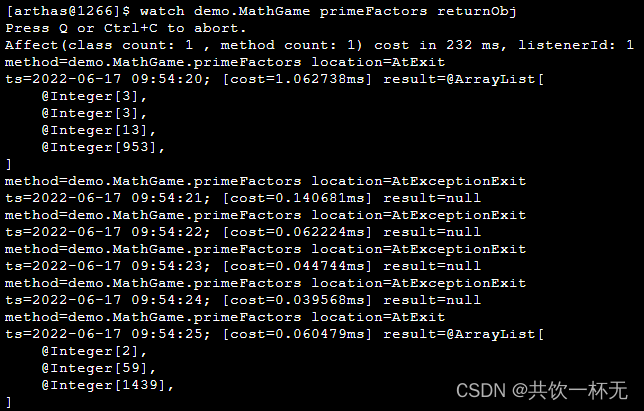
查看JVM信息 sysprop sysenv jvm dashboard
sysprop
sysprop :打印所有的System Properties信息。
指定单个key: sysprop user.dir。
通过grep过滤 :sysprop | grep user。
设置新的value: sysprop testKey testValue。
sysenv
sysenv 命令可以获取到环境变量。和sysprop命令类似。
jvm
jvm 命令会打印出JVM的各种详细信息。
dashboard
dashboard 命令可以查看当前系统的实时数据面板。
重置增强类 reset 命令
通过reset命令可以重置增强类,将被 Arthas 增强过的类全部还原,Arthas 服务端关闭时会重置所有增强过的类。Arthas在 watch/trace 等命令时,实际上是修改了应用的字节码,插入增强的代码。显式执行 reset 命令,可以清除掉这些增强代码。
reset 还原指定类:
reset demo.MathGame 还原所有增强类:
reset 查看当前会话信息 session
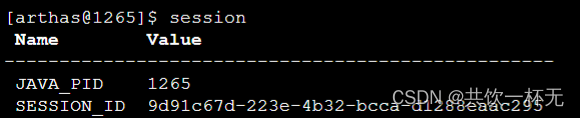
tee 命令
查看当前Arthas版本 version
[arthas@1710]$ version 3.6.2 退出Arthas
输入 exit 或者 quit 命令可以退出Arthas当前session。执行 stop 命令彻底退出Arthas。
?PS:所有命令都可以通过 -h 参数查看帮助信息。
实操案例
排查函数调用异常
通过curl 请求接口只能看到返回异常,但是看不到具体的请求参数和堆栈信息。
shell@Alicloud:~$ curl http://localhost:61000/user/0 {
   "timestamp":42,"status":500,"error":"Internal Server Error","exception":"java.lang.IllegalArgumentException","message":"id < 1","path":"/user/0"}
查看UserController的 参数/异常
在Arthas里执行:
watch com.example.demo.arthas.user.UserController * '{params, throwExp}' - 第一个参数是类名,支持通配
- 第二个参数是函数名,支持通配 访问 curl http://localhost:61000/user/0 ,watch命令会打印调用的参数和异常
watch com.example.demo.arthas.user.UserController * '{params, throwExp}' -x 2 返回值表达式
在上面的例子里,第三个参数是返回值表达式,它实际上是一个ognl表达式,它支持一些内置对象:
- loader
- clazz
- method
- target
- params
- returnObj
- throwExp
- isBefore
- isThrow
- isReturn
比如返回一个数组:
watch com.example.demo.arthas.user.UserController * '{params[0], target, returnObj}' 条件表达式
当异常时捕获
watch命令支持-e选项,表示只捕获抛出异常时的请求:
watch com.example.demo.arthas.user.UserController * "{params[0],throwExp}" -e 按照耗时进行过滤
watch命令支持按请求耗时进行过滤,比如:
watch com.example.demo.arthas.user.UserController * '{params, returnObj}' '#cost>200' 热更新代码
shell@Alicloud:~$ curl http://localhost:61000/user/0 {
   "timestamp":20,"status":500,"error":"Internal Server Error","exception":"java.lang.IllegalArgumentException","message":"id < 1","path":"/user/0"}
通过热更新代码,修改这个逻辑。
jad反编译UserController
jad --source-only com.example.demo.arthas.user.UserController > /tmp/UserController.java vim /tmp/UserController.java 比如当 user id 小于1时,也正常返回,不抛出异常:
@GetMapping(value={
   "/user/{id}"}) public User findUserById(@PathVariable Integer id) {
    logger.info("id: {}", (Object)id); if (id != null && id < 1) {
    return new User(id, "name" + id); // throw new IllegalArgumentException("id < 1"); } return new User(id.intValue(), "name" + id); }
sc查找加载UserController的ClassLoader
[arthas@1266]$ sc -d *UserController | grep classLoaderHash classLoaderHash 19469ea2 classLoaderHash 是19469ea2,后面需要使用它。
mc
保存好/tmp/UserController.java之后,使用mc(Memory Compiler)命令来编译,并且通过-c或者–classLoaderClass参数指定ClassLoader:
mc –classLoaderClass org.springframework.boot.loader.LaunchedURLClassLoader /tmp/UserController.java -d /tmp
[arthas@1266]$ mc --classLoaderClass org.springframework.boot.loader.LaunchedURLClassLoader /tmp/UserController.java -d /tmp Memory compiler output: /tmp/com/example/demo/arthas/user/UserController.class Affect(row-cnt:1) cost in 2879 ms. 也可以通过mc -c /tmp/UserController.java -d /tmp,使用-c参数指定ClassLoaderHash:
mc -c 19469ea2 /tmp/UserController.java -d /tmp redefine
再使用redefine命令重新加载新编译好的UserController.class:
[arthas@1266]$ redefine /tmp/com/example/demo/arthas/user/UserController.class redefine success, size: 1, classes: com.example.demo.arthas.user.UserController 热修改代码结果
redefine成功之后,再次访问 user/0 ,结果正常
shell@Alicloud:~$ curl http://localhost:61000/user/0 {
   "id":0,"name":"name0"}
动态更新应用Logger Level
查找UserController的ClassLoader
[arthas@1266]$ sc -d *UserController | grep classLoaderHash classLoaderHash 19469ea2 用ognl获取logger
ognl –classLoaderClass org.springframework.boot.loader.LaunchedURLClassLoader ‘@com.example.demo.arthas.user.UserController@logger’
[arthas@1266]$ ognl --classLoaderClass org.springframework.boot.loader.LaunchedURLClassLoader '@com.example.demo.arthas.user.UserController@logger' @Logger[ serialVersionUID=@Long[], FQCN=@String[ch.qos.logback.classic.Logger], name=@String[com.example.demo.arthas.user.UserController], level=null, effectiveLevelInt=@Integer[20000], parent=@Logger[Logger[com.example.demo.arthas.user]], childrenList=null, aai=null, additive=@Boolean[true], loggerContext=@LoggerContext[ch.qos.logback.classic.LoggerContext[default]], ] 可以知道UserController@logger实际使用的是logback。可以看到level=null,则说明实际最终的level是从root logger里来的。
单独设置UserController的logger level
ognl --classLoaderClass org.springframework.boot.loader.LaunchedURLClassLoader '@l(@ch.qos.logback.classic.Level@DEBUG)' 再次获取UserController@logger,可以发现已经是DEBUG了。
修改logback的全局logger level
通过获取root logger,可以修改全局的logger level:
ognl --classLoaderClass org.springframework.boot.loader.LaunchedURLClassLoader '@org.slf4j.LoggerFactory@getLogger("root").setLevel(@ch.qos.logback.classic.Level@DEBUG)' 获取Spring Context,在获取 bean,再调用函数

使用tt命令获取到spring context
tt即 TimeTunnel,它可以记录下指定方法每次调用的入参和返回信息,并能对这些不同的时间下调用进行观测。官方tt说明:https://arthas.aliyun.com/doc/tt.html
tt -t org.springframework.web.servlet.mvc.method.annotation.RequestMappingHandlerAdapter invokeHandlerMethod 访问user/1,
curl http://localhost:61000/user/1 使用tt命令从调用记录里获取到spring context
tt -i 1000 -w 'target.getApplicationContext()' 获取spring bean,并调用函数
tt -i 1000 -w ‘target.getApplicationContext().getBean(“helloWorldService”).getHelloMessage()’
结果如下:
[arthas@1266]$ tt -i 1000 -w 'target.getApplicationContext().getBean("helloWorldService").getHelloMessage()' @String[Hello World] Affect(row-cnt:1) cost in 1 ms. 排查HTTP请求返回401
请求接口没有权限的时候一般就返回401 Unauthorized。
401通常是被权限管理的Filter拦截了,那么到底是哪个Filter处理了这个请求,返回了401?
跟踪所有的Filter函数
开始trace:
trace javax.servlet.Filter * 可以在调用树的最深层,找到AdminFilterConfig$AdminFilter返回了401
+---[3.ms] javax.servlet.FilterChain:doFilter() | `---[3.ms] com.example.demo.arthas.AdminFilterConfig$AdminFilter:doFilter() | `---[0.17259ms] javax.servlet.http.HttpServletResponse:sendError() 通过stack获取调用栈
stack javax.servlet.http.HttpServletResponse sendError 'params[0]==401' 查找Top N线程
查看所有线程信息
thread 查看具体线程的栈
查看线程ID 2的栈:
thread 2 查看CPU使用率top n线程的栈
thread -n 3 查看5秒内的CPU使用率top n线程栈
thread -n 3 -i 5000 查找线程是否有阻塞
thread -b 保持热爱,奔赴下一场山海。???

发布者:全栈程序员-站长,转载请注明出处:https://javaforall.net/225260.html原文链接:https://javaforall.net




