
文章目录
AOP方法的执行顺序
package com.handsome.aop; import lombok.extern.slf4j.Slf4j; import org.aspectj.lang.ProceedingJoinPoint; import org.aspectj.lang.annotation.*; import org.springframework.stereotype.Component; / * @Author Handsome * @Date 2022/7/2 11:58 * @Version 1.0 */ @SuppressWarnings({
   "all"}) @Aspect @Component @Slf4j public class AopTest {
    // 定义切入点 @Pointcut(value = "execution( public * com.handsome.controller.*.*(..))") public void myPointcut() {
    } @Before("myPointcut()") public void before() {
    System.out.println("@Before"); } @After("myPointcut()") public void after() {
    System.out.println("@After"); } @Around("myPointcut()") public Object around(ProceedingJoinPoint joinPoint) throws Throwable {
    Object obj = null; System.out.println("before @Around"); obj = joinPoint.proceed(); System.out.println("after @Around"); return obj; } @AfterReturning("myPointcut()") public void afterReturn() {
    System.out.println("@AfterReturning"); } @AfterThrowing("myPointcut()") public void afterThrowing() {
    System.out.println("抛出异常~"); } }
执行结果
before @Around @Before @AfterReturning @After after @Around 使用AOP实现自定义注解功能
1.先导入AOP依赖
    <dependency> <groupId>org.springframework.boot
     groupId> <artifactId>spring-boot-starter-aop
      artifactId>
       dependency>
2.编写一个注解
package com.handsome.aop; import java.lang.annotation.*; / * @Author Handsome * @Date 2022/6/22 9:20 * @Version 1.0 */ @SuppressWarnings({
   "all"}) // Tpye Method代表可以放在方法上 @Target({
   ElementType.METHOD}) @Retention(RetentionPolicy.RUNTIME) @Documented public @interface VerifyMailbox {
    boolean value() default true; }
3.使用AOP对注解进行增强 完成验证邮箱的逻辑
package com.handsome.aop; import com.baomidou.mybatisplus.core.conditions.query.QueryWrapper; import com.handsome.pojo.User; import com.handsome.service.VerifyMailboxService; import com.handsome.utils.MyCacheMap; import lombok.extern.slf4j.Slf4j; import org.aspectj.lang.ProceedingJoinPoint; import org.aspectj.lang.annotation.Around; import org.aspectj.lang.annotation.Aspect; import org.aspectj.lang.annotation.Pointcut; import org.aspectj.lang.reflect.MethodSignature; import org.springframework.beans.factory.annotation.Autowired; import org.springframework.stereotype.Component; import org.springframework.web.context.request.RequestContextHolder; import org.springframework.web.context.request.ServletRequestAttributes; import javax.servlet.http.HttpServletRequest; import javax.servlet.http.HttpSession; import java.lang.reflect.Method; / * @Author Handsome * @Date 2022/6/22 9:22 * @Version 1.0 */ @SuppressWarnings({
   "all"}) @Aspect // 切面 定义了通知和切点的关系 @Component @Slf4j public class VerifyMailboxAOP {
    @Autowired VerifyMailboxService verifyMailboxService; @Pointcut(value = "@annotation(com.handsome.aop.VerifyMailbox)") public void myAnnotationPointcut() {
    } // 环绕通知 对方法进行增强 @Around("myAnnotationPointcut()") public Object aroundPointcut(ProceedingJoinPoint pjp) {
    MethodSignature methodSignature = (MethodSignature) pjp.getSignature(); Method method = methodSignature.getMethod(); VerifyMailbox verifyMailbox = method.getAnnotation(VerifyMailbox.class); boolean value = verifyMailbox.value(); if (value) {
    // 获取请求信息 HttpServletRequest request = ((ServletRequestAttributes) RequestContextHolder.getRequestAttributes()).getRequest(); // 获取请求用户的session HttpSession session = request.getSession(); // 获取请求用户的信息 User user = (User) session.getAttribute("loginUser"); // 获取用户的角色Id Integer roleId = user.getRoleId(); // 判断是否为普通用户,是则需要验证,否则则不需要验证 if (roleId == 2) {
    // 进行邮箱验证 // System.out.println("进行邮箱验证~"); // 获取用户ID String userUid = user.getUid(); // 去map中查是否验证 String success = (String) MyCacheMap.verifySuccessMap.get(userUid); if (success == null) {
    // 根据用户Uid去验证邮箱表查看是否验证 com.handsome.pojo.VerifyMailbox daoUser = verifyMailboxService.getOne(new QueryWrapper<com.handsome.pojo.VerifyMailbox>().eq("uid", userUid)); if (daoUser == null) {
    // 未验证则返回去验证页 return "verify/verify"; } else {
    // 存放用户验证成功的UID MyCacheMap.verifySuccessMap.put(userUid, "Success"); } } // 已验证则继续进行原操作 } else {
    // System.out.println("站长或管理员无需验证,直接放行~"); } } else {
    // 直接放行 // System.out.println("未开启邮箱验证,直接放行~"); } // 调用方法 Object obj = null; try {
    obj = pjp.proceed(); } catch (Throwable e) {
    // 获取方法类名 String classNameError = pjp.getTarget().getClass().toString(); // 获取方法名 String methodNameError = pjp.getSignature().getName(); log.error("在" + classNameError + "的" + methodNameError + "中,发生了异常:{}", e); return e.getMessage(); } return obj; } }
4.在需要进行邮箱验证的方法上添加自定义注解
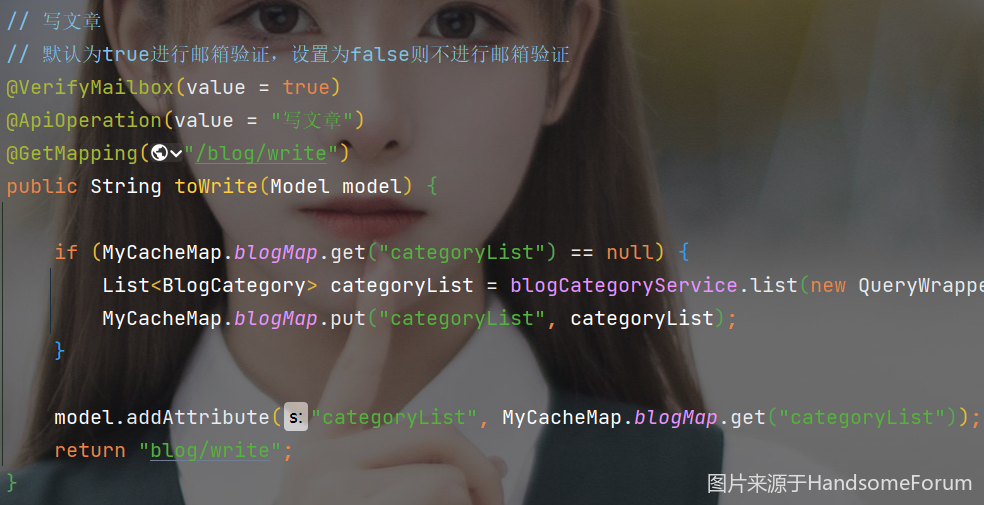

5.自定义注解说明
使用AOP获取用户请求IP
1.编写获取请求用户IP的工具类
package com.handsome.utils; import lombok.extern.slf4j.Slf4j; import javax.servlet.http.HttpServletRequest; import java.net.InetAddress; / * @Author Handsome * @Date 2022/6/7 11:09 * @Version 1.0 */ @SuppressWarnings({
   "all"}) @Slf4j public class IPAddressUtils {
    / * 获取IP地址 */ public static String getIpAdrress(HttpServletRequest request) {
    String ipAddress = request.getHeader("X-Forwarded-For"); if (ipAddress == null || ipAddress.length() == 0 || "unknown".equalsIgnoreCase(ipAddress)) {
    ipAddress = request.getHeader("Proxy-Client-IP"); } if (ipAddress == null || ipAddress.length() == 0 || "unknown".equalsIgnoreCase(ipAddress)) {
    ipAddress = request.getHeader("WL-Proxy-Client-IP"); } if (ipAddress == null || ipAddress.length() == 0 || "unknown".equalsIgnoreCase(ipAddress)) {
    ipAddress = request.getRemoteAddr(); if ("127.0.0.1".equals(ipAddress) || "0:0:0:0:0:0:0:1".equals(ipAddress)) {
    // 根据网卡取本机配置的IP InetAddress inet = null; try {
    inet = InetAddress.getLocalHost(); } catch (Exception e) {
    log.error("根据网卡获取本机配置的IP异常=>", e.getMessage()); } if (inet.getHostAddress() != null) {
    ipAddress = inet.getHostAddress(); } } } // 对于通过多个代理的情况,第一个IP为客户端真实IP,多个IP按照','分割 if (ipAddress != null && ipAddress.length() > 15) {
    if (ipAddress.indexOf(",") > 0) {
    ipAddress = ipAddress.substring(0, ipAddress.indexOf(",")); } } return ipAddress; } }
2.使用AOP对controller方法进行增强
 // 定义切入点 @Pointcut(value = "execution( public * com.handsome.controller.*.*(..))") public void myPointcut() {
    }
3.使用IP工具类获取用户请求IP
 // 环绕通知 @Around("myPointcut()") public Object myLogger(ProceedingJoinPoint pjp) throws Throwable {
    String userIP = null; try {
    // 获取请求信息 HttpServletRequest request = ((ServletRequestAttributes) RequestContextHolder.getRequestAttributes()).getRequest(); // 获取请求用户IP userIP = IPAddressUtils.getIpAdrress(request); if (userIP == null) {
    return "error/limit"; } } catch (Exception e) {
    log.error("获取request出错=>" + e.getMessage()); } }
我的学习论坛
版权声明:本文内容由互联网用户自发贡献,该文观点仅代表作者本人。本站仅提供信息存储空间服务,不拥有所有权,不承担相关法律责任。如发现本站有涉嫌侵权/违法违规的内容, 请联系我们举报,一经查实,本站将立刻删除。
发布者:全栈程序员-站长,转载请注明出处:https://javaforall.net/225798.html原文链接:https://javaforall.net




