
大家好,又见面了,我是你们的朋友全栈君。如果您正在找激活码,请点击查看最新教程,关注关注公众号 “全栈程序员社区” 获取激活教程,可能之前旧版本教程已经失效.最新Idea2022.1教程亲测有效,一键激活。
Jetbrains全家桶1年46,售后保障稳定
1、查看本地是否已经安装了vld扩展,如果没有任何输出,那就准备安装吧!
[root@taiwu ~]# /home/work/lib/php5.6.7/bin/php -m | grep vld
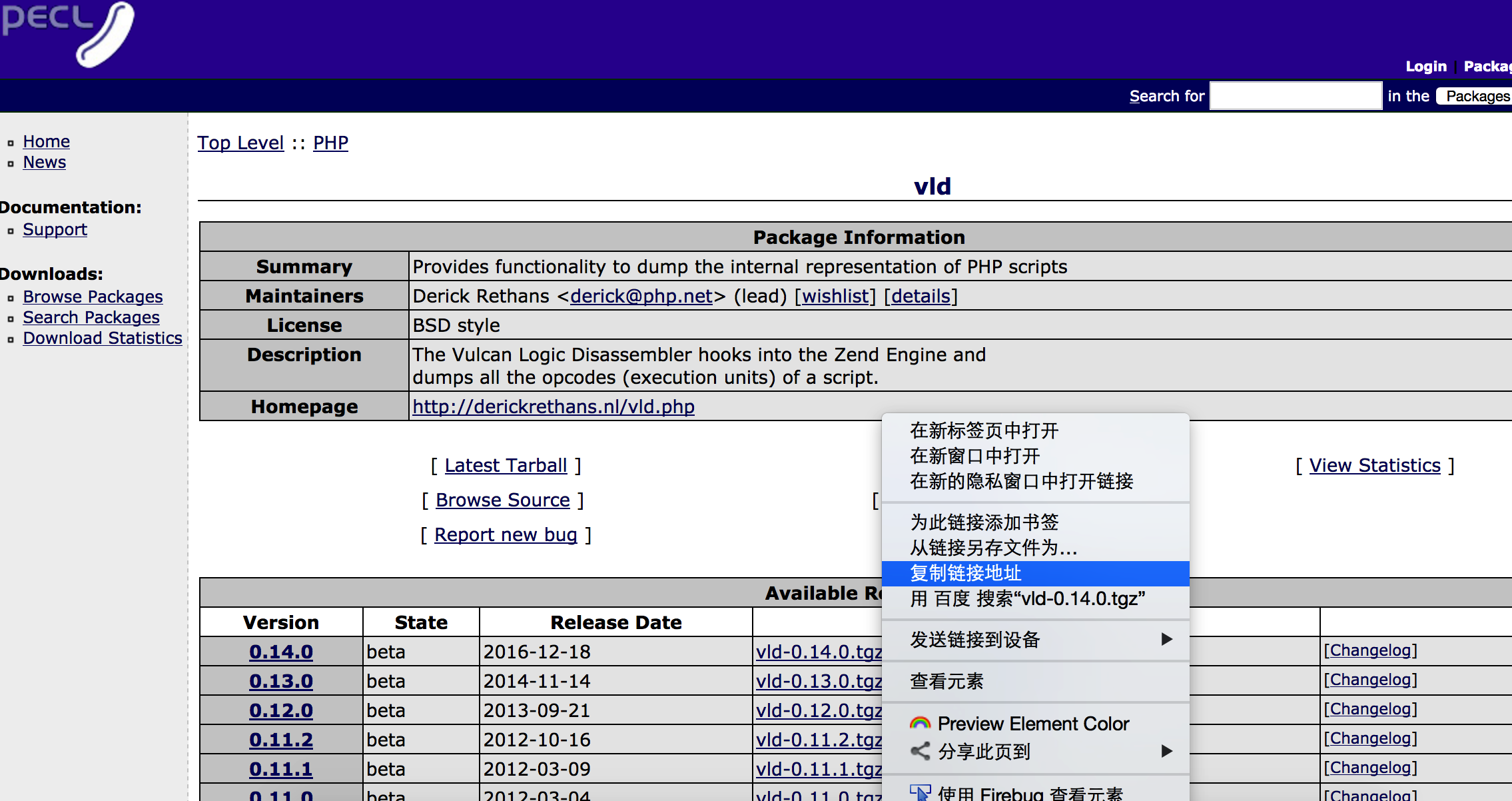
2、去官方网站下载vld(http://pecl.php.net/package/vld), 找到最新版本,右键复制地址链接就能得到下载地址,通过浏览器直接下载也行。
我是通过wget命令在centos的命令行执行,进行下载(wget http://pecl.php.net/get/vld-0.14.0.tgz)

[root@liuchao taiwu]# wget http://pecl.php.net/get/vld-0.14.0.tgz
--2018-03-01 17:15:47--  http://pecl.php.net/get/vld-0.14.0.tgz
正在解析主机 pecl.php.net... 104.236.228.160
正在连接 pecl.php.net|104.236.228.160|:80... 已连接。
已发出 HTTP 请求,正在等待回应... 200 OK
长度:20506 (20K) [application/octet-stream]
正在保存至: “vld-0.14.0.tgz”

100%[===================================================================================================================================>] 20,506      31.0K/s   in 0.6s

2018-03-01 17:15:49 (31.0 KB/s) - 已保存 “vld-0.14.0.tgz” [20506/20506])

[root@taiwu taiwu]# ls -al
总用量 28
drwxr-xr-x. 2 root root    27  3月  1 17:15 .
dr-xr-x--x. 7 root root  4096  3月  1 17:15 ..
-rw-r--r--. 1 root root 20506 12月 19 2016 vld-0.14.0.tgz
3、执行安装vld扩展的步骤
- 解压下载的tar包,进入解压后的目录
tar zxvf vld-0.14.0.tgz cd vld-0.14.0 - 执行
/home/work/lib/php5.6.7/bin/phpize - 知道php-config路径(用命令locate php-config可以得到),然后执行
./configure --with-php-config=/home/work/lib/php5.6.7/bin/php-config --enable-vld - 然后执行
make && make install
[root@liuchao taiwu]# ls
vld-0.14.0.tgz
[root@liuchao taiwu]# tar zxvf vld-0.14.0.tgz
package.xml
vld-0.14.0/branchinfo.c
vld-0.14.0/branchinfo.h
vld-0.14.0/Changelog
vld-0.14.0/config.m4
vld-0.14.0/config.w32
vld-0.14.0/CREDITS
vld-0.14.0/LICENSE
vld-0.14.0/README.rst
vld-0.14.0/Makefile.in
vld-0.14.0/php_vld.h
vld-0.14.0/set.c
vld-0.14.0/set.h
vld-0.14.0/srm_oparray.c
vld-0.14.0/srm_oparray.h
vld-0.14.0/vld.c
[root@liuchao taiwu]# cd vld-0.14.0
[root@liuchao vld-0.14.0]# /home/work/lib/php5.6.7/bin/phpize
Configuring for:
PHP Api Version:         20131106
Zend Module Api No:      20131226
Zend Extension Api No:   220131226
[root@liuchao vld-0.14.0]# locate php-config
/home/work/lib/php5.6.7/bin/php-config
/home/work/lib/php5.6.7/php/man/man1/php-config.1
/home/work/lib/php5.6.7_1/bin/php-config
/home/work/lib/php5.6.7_1/php/man/man1/php-config.1
[root@liuchao vld-0.14.0]# ./configure --with-php-config=/home/work/lib/php5.6.7/bin/php-config --enable-vld
checking for grep that handles long lines and -e... /bin/grep
checking for egrep... /bin/grep -E
checking for a sed that does not truncate output... /bin/sed
checking for cc... cc
checking for C compiler default output file name... a.out
checking whether the C compiler works... yes
checking whether we are cross compiling... no
checking for suffix of executables...
checking for suffix of object files... o
checking whether we are using the GNU C compiler... yes
checking whether cc accepts -g... yes
checking for cc option to accept ISO C89... none needed
checking how to run the C preprocessor... cc -E
checking for icc... no
checking for suncc... no
checking whether cc understands -c and -o together... yes
checking for system library directory... lib
checking if compiler supports -R... no
checking if compiler supports -Wl,-rpath,... yes
checking build system type... x86_64-unknown-linux-gnu
checking host system type... x86_64-unknown-linux-gnu
checking target system type... x86_64-unknown-linux-gnu
checking for PHP prefix... /home/work/lib/php5.6.7
checking for PHP includes... -I/home/work/lib/php5.6.7/include/php -I/home/work/lib/php5.6.7/include/php/main -I/home/work/lib/php5.6.7/include/php/TSRM -I/home/work/lib/php5.6.7/include/php/Zend -I/home/work/lib/php5.6.7/include/php/ext -I/home/work/lib/php5.6.7/include/php/ext/date/lib
checking for PHP extension directory... /home/work/lib/php5.6.7/lib/php/extensions/no-debug-non-zts-20131226
checking for PHP installed headers prefix... /home/work/lib/php5.6.7/include/php
checking if debug is enabled... no
checking if zts is enabled... no
checking for re2c... re2c
checking for re2c version... 0.13.7.5 (ok)
checking for gawk... gawk
checking whether to enable vld support... yes, shared
checking for ld used by cc... /usr/bin/ld
checking if the linker (/usr/bin/ld) is GNU ld... yes
checking for /usr/bin/ld option to reload object files... -r
checking for BSD-compatible nm... /usr/bin/nm -B
checking whether ln -s works... yes
checking how to recognize dependent libraries... pass_all
checking for ANSI C header files... yes
checking for sys/types.h... yes
checking for sys/stat.h... yes
checking for stdlib.h... yes
checking for string.h... yes
checking for memory.h... yes
checking for strings.h... yes
checking for inttypes.h... yes
checking for stdint.h... yes
checking for unistd.h... yes
checking dlfcn.h usability... yes
checking dlfcn.h presence... yes
checking for dlfcn.h... yes
checking the maximum length of command line arguments... 1572864
checking command to parse /usr/bin/nm -B output from cc object... ok
checking for objdir... .libs
checking for ar... ar
checking for ranlib... ranlib
checking for strip... strip
checking if cc supports -fno-rtti -fno-exceptions... no
checking for cc option to produce PIC... -fPIC
checking if cc PIC flag -fPIC works... yes
checking if cc static flag -static works... no
checking if cc supports -c -o file.o... yes
checking whether the cc linker (/usr/bin/ld -m elf_x86_64) supports shared libraries... yes
checking whether -lc should be explicitly linked in... no
checking dynamic linker characteristics... GNU/Linux ld.so
checking how to hardcode library paths into programs... immediate
checking whether stripping libraries is possible... yes
checking if libtool supports shared libraries... yes
checking whether to build shared libraries... yes
checking whether to build static libraries... no

creating libtool
appending configuration tag "CXX" to libtool
configure: creating ./config.status
config.status: creating config.h
[root@liuchao vld-0.14.0]# make && make install
/bin/sh /root/taiwu/vld-0.14.0/libtool --mode=compile cc  -I. -I/root/taiwu/vld-0.14.0 -DPHP_ATOM_INC -I/root/taiwu/vld-0.14.0/include -I/root/taiwu/vld-0.14.0/main -I/root/taiwu/vld-0.14.0 -I/home/work/lib/php5.6.7/include/php -I/home/work/lib/php5.6.7/include/php/main -I/home/work/lib/php5.6.7/include/php/TSRM -I/home/work/lib/php5.6.7/include/php/Zend -I/home/work/lib/php5.6.7/include/php/ext -I/home/work/lib/php5.6.7/include/php/ext/date/lib  -DHAVE_CONFIG_H  -g -O2   -c /root/taiwu/vld-0.14.0/vld.c -o vld.lo
mkdir .libs
 cc -I. -I/root/taiwu/vld-0.14.0 -DPHP_ATOM_INC -I/root/taiwu/vld-0.14.0/include -I/root/taiwu/vld-0.14.0/main -I/root/taiwu/vld-0.14.0 -I/home/work/lib/php5.6.7/include/php -I/home/work/lib/php5.6.7/include/php/main -I/home/work/lib/php5.6.7/include/php/TSRM -I/home/work/lib/php5.6.7/include/php/Zend -I/home/work/lib/php5.6.7/include/php/ext -I/home/work/lib/php5.6.7/include/php/ext/date/lib -DHAVE_CONFIG_H -g -O2 -c /root/taiwu/vld-0.14.0/vld.c  -fPIC -DPIC -o .libs/vld.o
/bin/sh /root/taiwu/vld-0.14.0/libtool --mode=compile cc  -I. -I/root/taiwu/vld-0.14.0 -DPHP_ATOM_INC -I/root/taiwu/vld-0.14.0/include -I/root/taiwu/vld-0.14.0/main -I/root/taiwu/vld-0.14.0 -I/home/work/lib/php5.6.7/include/php -I/home/work/lib/php5.6.7/include/php/main -I/home/work/lib/php5.6.7/include/php/TSRM -I/home/work/lib/php5.6.7/include/php/Zend -I/home/work/lib/php5.6.7/include/php/ext -I/home/work/lib/php5.6.7/include/php/ext/date/lib  -DHAVE_CONFIG_H  -g -O2   -c /root/taiwu/vld-0.14.0/srm_oparray.c -o srm_oparray.lo
 cc -I. -I/root/taiwu/vld-0.14.0 -DPHP_ATOM_INC -I/root/taiwu/vld-0.14.0/include -I/root/taiwu/vld-0.14.0/main -I/root/taiwu/vld-0.14.0 -I/home/work/lib/php5.6.7/include/php -I/home/work/lib/php5.6.7/include/php/main -I/home/work/lib/php5.6.7/include/php/TSRM -I/home/work/lib/php5.6.7/include/php/Zend -I/home/work/lib/php5.6.7/include/php/ext -I/home/work/lib/php5.6.7/include/php/ext/date/lib -DHAVE_CONFIG_H -g -O2 -c /root/taiwu/vld-0.14.0/srm_oparray.c  -fPIC -DPIC -o .libs/srm_oparray.o
/bin/sh /root/taiwu/vld-0.14.0/libtool --mode=compile cc  -I. -I/root/taiwu/vld-0.14.0 -DPHP_ATOM_INC -I/root/taiwu/vld-0.14.0/include -I/root/taiwu/vld-0.14.0/main -I/root/taiwu/vld-0.14.0 -I/home/work/lib/php5.6.7/include/php -I/home/work/lib/php5.6.7/include/php/main -I/home/work/lib/php5.6.7/include/php/TSRM -I/home/work/lib/php5.6.7/include/php/Zend -I/home/work/lib/php5.6.7/include/php/ext -I/home/work/lib/php5.6.7/include/php/ext/date/lib  -DHAVE_CONFIG_H  -g -O2   -c /root/taiwu/vld-0.14.0/set.c -o set.lo
 cc -I. -I/root/taiwu/vld-0.14.0 -DPHP_ATOM_INC -I/root/taiwu/vld-0.14.0/include -I/root/taiwu/vld-0.14.0/main -I/root/taiwu/vld-0.14.0 -I/home/work/lib/php5.6.7/include/php -I/home/work/lib/php5.6.7/include/php/main -I/home/work/lib/php5.6.7/include/php/TSRM -I/home/work/lib/php5.6.7/include/php/Zend -I/home/work/lib/php5.6.7/include/php/ext -I/home/work/lib/php5.6.7/include/php/ext/date/lib -DHAVE_CONFIG_H -g -O2 -c /root/taiwu/vld-0.14.0/set.c  -fPIC -DPIC -o .libs/set.o
/bin/sh /root/taiwu/vld-0.14.0/libtool --mode=compile cc  -I. -I/root/taiwu/vld-0.14.0 -DPHP_ATOM_INC -I/root/taiwu/vld-0.14.0/include -I/root/taiwu/vld-0.14.0/main -I/root/taiwu/vld-0.14.0 -I/home/work/lib/php5.6.7/include/php -I/home/work/lib/php5.6.7/include/php/main -I/home/work/lib/php5.6.7/include/php/TSRM -I/home/work/lib/php5.6.7/include/php/Zend -I/home/work/lib/php5.6.7/include/php/ext -I/home/work/lib/php5.6.7/include/php/ext/date/lib  -DHAVE_CONFIG_H  -g -O2   -c /root/taiwu/vld-0.14.0/branchinfo.c -o branchinfo.lo
 cc -I. -I/root/taiwu/vld-0.14.0 -DPHP_ATOM_INC -I/root/taiwu/vld-0.14.0/include -I/root/taiwu/vld-0.14.0/main -I/root/taiwu/vld-0.14.0 -I/home/work/lib/php5.6.7/include/php -I/home/work/lib/php5.6.7/include/php/main -I/home/work/lib/php5.6.7/include/php/TSRM -I/home/work/lib/php5.6.7/include/php/Zend -I/home/work/lib/php5.6.7/include/php/ext -I/home/work/lib/php5.6.7/include/php/ext/date/lib -DHAVE_CONFIG_H -g -O2 -c /root/taiwu/vld-0.14.0/branchinfo.c  -fPIC -DPIC -o .libs/branchinfo.o
/bin/sh /root/taiwu/vld-0.14.0/libtool --mode=link cc -DPHP_ATOM_INC -I/root/taiwu/vld-0.14.0/include -I/root/taiwu/vld-0.14.0/main -I/root/taiwu/vld-0.14.0 -I/home/work/lib/php5.6.7/include/php -I/home/work/lib/php5.6.7/include/php/main -I/home/work/lib/php5.6.7/include/php/TSRM -I/home/work/lib/php5.6.7/include/php/Zend -I/home/work/lib/php5.6.7/include/php/ext -I/home/work/lib/php5.6.7/include/php/ext/date/lib  -DHAVE_CONFIG_H  -g -O2   -o vld.la -export-dynamic -avoid-version -prefer-pic -module -rpath /root/taiwu/vld-0.14.0/modules  vld.lo srm_oparray.lo set.lo branchinfo.lo
cc -shared  .libs/vld.o .libs/srm_oparray.o .libs/set.o .libs/branchinfo.o   -Wl,-soname -Wl,vld.so -o .libs/vld.so
creating vld.la
(cd .libs && rm -f vld.la && ln -s ../vld.la vld.la)
/bin/sh /root/taiwu/vld-0.14.0/libtool --mode=install cp ./vld.la /root/taiwu/vld-0.14.0/modules
cp ./.libs/vld.so /root/taiwu/vld-0.14.0/modules/vld.so
cp ./.libs/vld.lai /root/taiwu/vld-0.14.0/modules/vld.la
PATH="$PATH:/sbin" ldconfig -n /root/taiwu/vld-0.14.0/modules
----------------------------------------------------------------------
Libraries have been installed in:
   /root/taiwu/vld-0.14.0/modules

If you ever happen to want to link against installed libraries
in a given directory, LIBDIR, you must either use libtool, and
specify the full pathname of the library, or use the `-LLIBDIR'
flag during linking and do at least one of the following:
   - add LIBDIR to the `LD_LIBRARY_PATH' environment variable
     during execution
   - add LIBDIR to the `LD_RUN_PATH' environment variable
     during linking
   - use the `-Wl,--rpath -Wl,LIBDIR' linker flag
   - have your system administrator add LIBDIR to `/etc/ld.so.conf'

See any operating system documentation about shared libraries for
more information, such as the ld(1) and ld.so(8) manual pages.
----------------------------------------------------------------------

Build complete.
Don't forget to run 'make test'.

Installing shared extensions:     /home/work/lib/php5.6.7/lib/php/extensions/no-debug-non-zts-20131226/
[root@liuchao vld-0.14.0]#
最终可以看到,扩展安装到了如下目录中( /home/work/lib/php5.6.7/lib/php/extensions/no-debug-non-zts-20131226/)
4、安装好了vld扩展以后,进行配置php.ini
*通过locate命令轻松找到php.ini的路径
[root@liuchao vld-0.14.0]# locate php.ini
/home/work/lib/php5.6.7/etc/php.ini
[root@liuchao vld-0.14.0]# vi /home/work/lib/php5.6.7/etc/php.ini
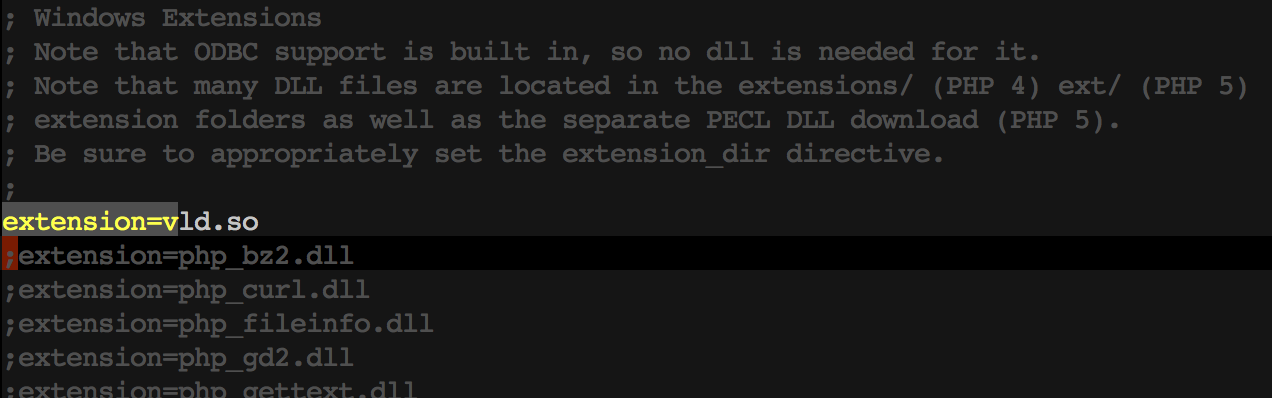
配置文件中已经有了扩展的路径配置

加上扩展配置(extension=vld.so)
5、对应通过命令行执行的php,已经可以用vld了
- 创建一个php脚本
[root@liuchao vld-0.14.0]# echo '<?php echo 123;' > 1.php - 执行脚本
[root@liuchao vld-0.14.0]# /home/work/lib/php5.6.7/bin/php -dvld.active=1 1.php
Finding entry points
Branch analysis from position: 0
Jump found. (Code = 62) Position 1 = -2
filename:       /root/taiwu/vld-0.14.0/1.php
function name:  (null)
number of ops:  2
compiled vars:  none
line     #* E I O op                           fetch          ext  return  operands
-------------------------------------------------------------------------------------
   1     0  E >   ECHO                                                     123
   2     1      > RETURN                                                   1

branch: #  0; line:     1-    2; sop:     0; eop:     1; out1:  -2
path #1: 0,
123[root@liuchao vld-0.14.0]#
版权声明:本文内容由互联网用户自发贡献,该文观点仅代表作者本人。本站仅提供信息存储空间服务,不拥有所有权,不承担相关法律责任。如发现本站有涉嫌侵权/违法违规的内容, 请联系我们举报,一经查实,本站将立刻删除。
发布者:全栈程序员-站长,转载请注明出处:https://javaforall.net/226702.html原文链接:https://javaforall.net




