
gradle lint
gradle中有lint任务,可以直接执行lint静态代码检查,但是前提是你的build.gradle设置了lintOptions选项:
android { compileSdkVersion 23 buildToolsVersion "21.1.2" lintOptions { abortOnError false }然后我们在项目的根目录下执行gradle lint:
localhost:Sunshine-Version-2 wuxian$ gradle lint :app:preBuild UP-TO-DATE :app:preDebugBuild UP-TO-DATE :app:checkDebugManifest :app:preReleaseBuild UP-TO-DATE :app:prepareComAndroidSupportAppcompatV72102Library UP-TO-DATE :app:prepareComAndroidSupportSupportV42102Library UP-TO-DATE :app:prepareDebugDependencies :app:compileDebugAidl UP-TO-DATE :app:compileDebugRenderscript UP-TO-DATE :app:generateDebugBuildConfig UP-TO-DATE :app:generateDebugAssets UP-TO-DATE :app:mergeDebugAssets UP-TO-DATE :app:generateDebugResValues UP-TO-DATE :app:generateDebugResources UP-TO-DATE :app:mergeDebugResources UP-TO-DATE :app:processDebugManifest UP-TO-DATE :app:processDebugResources UP-TO-DATE :app:generateDebugSources UP-TO-DATE :app:processDebugJavaRes UP-TO-DATE :app:compileDebugJavaWithJavac UP-TO-DATE :app:compileLint :app:checkReleaseManifest :app:prepareReleaseDependencies :app:compileReleaseAidl UP-TO-DATE :app:compileReleaseRenderscript UP-TO-DATE :app:generateReleaseBuildConfig UP-TO-DATE :app:generateReleaseAssets UP-TO-DATE :app:mergeReleaseAssets UP-TO-DATE :app:generateReleaseResValues UP-TO-DATE :app:generateReleaseResources UP-TO-DATE :app:mergeReleaseResources UP-TO-DATE :app:processReleaseManifest UP-TO-DATE :app:processReleaseResources UP-TO-DATE :app:generateReleaseSources UP-TO-DATE :app:processReleaseJavaRes UP-TO-DATE :app:compileReleaseJavaWithJavac UP-TO-DATE :app:lint
Ran lint on variant release: 58 issues found
Ran lint on variant debug: 58 issues found
Wrote HTML report to file:/Users/wuxian/Documents/sourcecode/self/Sunshine-Version-2/app/build/outputs/lint-results.html
Wrote XML report to /Users/wuxian/Documents/sourcecode/self/Sunshine-Version-2/app/build/outputs/lint-results.xml

BUILD SUCCESSFUL

Total time: 17.941 secs

This build could be faster, please consider using the Gradle Daemon: http://gradle.org/docs/2.4/userguide/gradle_daemon.html 在build/outputs/目录下会生成一个lint-result.html文件,打开一看如下:

报告做的太次了
更多参数
lintOptions { // set to true to turn off analysis progress reporting by lint quiet true // if true, stop the gradle build if errors are found abortOnError false // if true, only report errors ignoreWarnings true // if true, emit full/absolute paths to files with errors (true by default) //absolutePaths true // if true, check all issues, including those that are off by default checkAllWarnings true // if true, treat all warnings as errors warningsAsErrors true // turn off checking the given issue id's disable 'TypographyFractions','TypographyQuotes' // turn on the given issue id's enable 'RtlHardcoded','RtlCompat', 'RtlEnabled' // check *only* the given issue id's check 'NewApi', 'InlinedApi' // if true, don't include source code lines in the error output noLines true // if true, show all locations for an error, do not truncate lists, etc. showAll true // Fallback lint configuration (default severities, etc.) lintConfig file("default-lint.xml") // if true, generate a text report of issues (false by default) textReport true // location to write the output; can be a file or 'stdout'
        textOutput 'stdout'
        // if true, generate an XML report for use by for example Jenkins
        xmlReport false
        // file to write report to (if not specified, defaults to lint-results.xml)
        xmlOutput file("lint-report.xml")
        // if true, generate an HTML report (with issue explanations, sourcecode, etc)
        htmlReport true
        // optional path to report (default will be lint-results.html in the builddir)
        htmlOutput file("lint-report.html")

        // set to true to have all release builds run lint on issues with severity=fatal // and abort the build (controlled by abortOnError above) if fatal issues are found checkReleaseBuilds true // Set the severity of the given issues to fatal (which means they will be // checked during release builds (even if the lint target is not included) fatal 'NewApi', 'InlineApi' // Set the severity of the given issues to error error 'Wakelock', 'TextViewEdits' // Set the severity of the given issues to warning warning 'ResourceAsColor' // Set the severity of the given issues to ignore (same as disabling the check) ignore 'TypographyQuotes' }
总结
这种方式适合自动化CI系统中采集结果。
手动分析

选在分析代码后,弹出对话框,你可以选择分析整个项目/单个模块/文件bulabula:
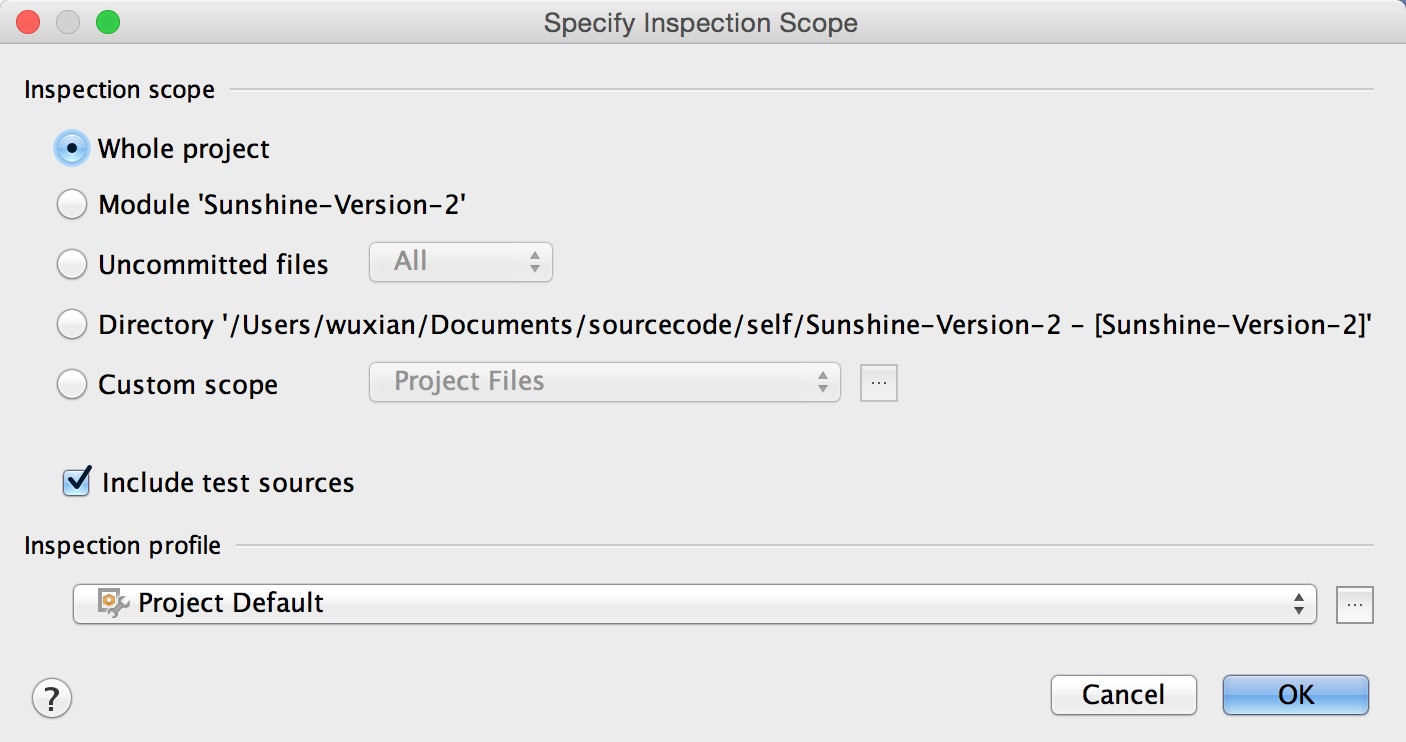
点击OK后,等待一段时间后分析完毕,会自动弹出结果窗口

会根据检查类型不同分不同菜单,点击相应菜单进入不同的问题点:

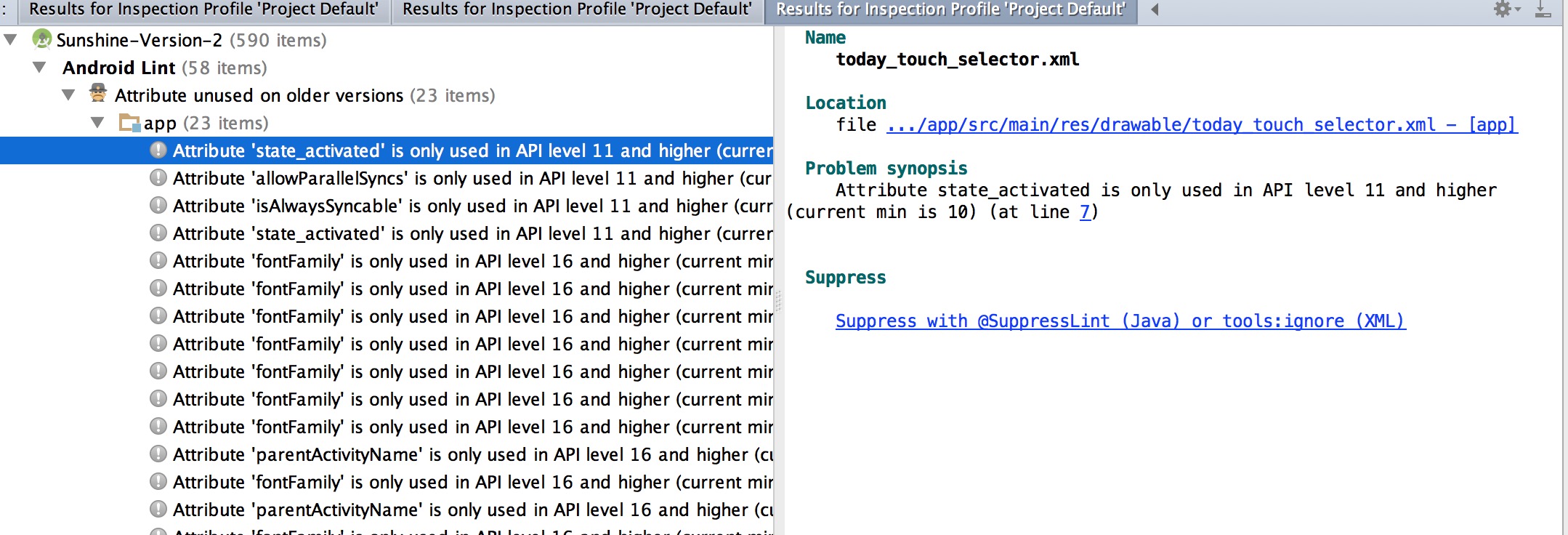
点击问题点后右边会出现该问题的详细信息,文件名,文件位置,出现问题的点在文件中的位置以及问题描述,还会告诉你忽略这个问题的解决方法,有可能还会显示解决方法。
总结
这个方法适合开发自查!
lint命令行
lint工具位于sdk目录下的tools下,如果在命令行执行lint找不到该命令,那么需要将lint的根目录配置到环境变量中,配置成功后,执行lint命令输出如下:
58deMacBook-Pro-5:tools wuxian$ lint Usage: lint [flags]

    Flags:
   --help This message.
   --help

      Help on the given topic, such as "suppress".

   --list List the available issue id's and exit.
   --version Output version information and exit.
   --exitcode Set the exit code to 1 if errors are found.
   --show List available issues along with full explanations.
   --show

      Show full explanations for the given list of issue
     id
   's. Enabled Checks:
   --disable

      Disable the list of categories or specific issue
     id
   's. The list should be a comma-separated list
   of issue id
   's
   or categories.
   --enable

      Enable the specific list of issues. This checks all
     the
   default issues plus the specifically enabled issues. The list should be a comma-separated list
   of issue id
   's
   or categories.
   --check

      Only check the specific list of issues. This will
     disable everything
   and re-enable the given list
   of issues. The list should be a comma-separated list
   of issue id
   's
   or categories. -w,
   --nowarn Only check for errors (ignore warnings) -Wall Check
   all warnings, including those off by
   default -Werror Treat
   all warnings as errors
   --config

      Use the given configuration file to determine whether
     issues are enabled
   or disabled.
   If a project contains a lint.xml
   file,
   then this config
   file will be used as a fallback. Output Options:
   --quiet Don't show progress.
   --fullpath Use full paths in the error output.
   --showall Do not truncate long messages, lists of alternate locations, etc.
   --nolines Do not include the source file lines with errors in the output. By
   default, the error output includes snippets
   of source code
   on the line containing the error, but this flag turns it off.
   --html

      Create an HTML report instead. If the filename is a
     directory (
   or a
   new filename without an extension), lint will create a separate
   report
   for each scanned project.
   --url filepath=url Add links to HTML report, replacing local path prefixes
   with url prefix. The mapping can be a comma-separated list
   of path prefixes
   to corresponding URL prefixes, such as C:\temp\Proj1=http://buildserver/sources/temp/Proj1.
   To turn off linking
   to files,
   use
   --url none
   --simplehtml

      Create a simple HTML report

   --xml

      Create an XML report instead.
     Project Options:
   --resources

      Add the given folder (or path) as a resource
     directory
   for the project. Only valid
   when running lint
   on a single project.
   --sources

      Add the given folder (or path) as a source directory

   for the project. Only valid
   when running lint
   on a single project.
   --classpath

      Add the given folder (or jar file, or path) as a
     class directory
   for the project. Only valid
   when running lint
   on a single project.
   --libraries

      Add the given folder (or jar file, or path) as a
     class
   library
   for the project. Only valid
   when running lint
   on a single project.
   Exit Status:
   0 Success.
   1 Lint errors detected.
   2 Lint usage.
   3 Cannot clobber existing
   file.
   4 Lint help.
   5 Invalid command-line argument.
版权声明:本文内容由互联网用户自发贡献,该文观点仅代表作者本人。本站仅提供信息存储空间服务,不拥有所有权,不承担相关法律责任。如发现本站有涉嫌侵权/违法违规的内容, 请联系我们举报,一经查实,本站将立刻删除。
发布者:全栈程序员-站长,转载请注明出处:https://javaforall.net/226980.html原文链接:https://javaforall.net



