
水平居中
- 行内元素
首先看父元素是不是块级元素,如果是
要实现水平居中,则直接给父元素设置 text-align:center;
<style> .father{ text-align: center; } </style> <body> <div class="father"> <span class="son">行内元素</span> </div> </body> 效果:


附:此时我们发现父元素的大小完全由行内元素撑开。
父元素不是块级元素
将父元素设置为块级元素,再给父元素设置text-align:center;
- 块级元素
两种方案:
方案一、
分为宽度定不定两种情况
1.定宽度:需要谁居中,给其设置marigin:0 auto;
.sun{ width: 100px; height: 100px; background-color: red; margin:0px auto; } </style> <body> <div class="sun"></div> </body> 效果:
2.不定宽度:默认子元素的宽度和父元素一样,这时需要设置子元素为:display:inline-block或display:inline;即将其转换成行内块级/行内元素。给父元素设置text-align:center;
.father{
    text-align: center; width: 100px; height: 100px; background-color: red; } .sun{
background: green; display: inline; } </style> <body> <div class="father"> <div class="sun">我是块级元素</div> </div> <style> .father{
position: relative; width: 100px; height: 100px; background-color: aqua; margin-left: 100px; } .son{
position: absolute; width: 50px; height: 50px; background-color: red; left: 50%; margin-left: -25px; } </style> <body> <div class="father"> <div class="son"> </div> </div> </body> 效果: 可以看出元素son是相对于father元素的水平居中。
2.不定宽
<style> .father{
    position: relative; width: 300px; height: 300px; background-color: aqua; margin-left: 100px; } .son{
    position: absolute; /* width: 50px; */ height: 50px; background-color: red; left:50%; transform:translateX(-50%) ; } </style> <body> <div class="father"> <div class="son"> 我是块级元素 </div> </div>
效果: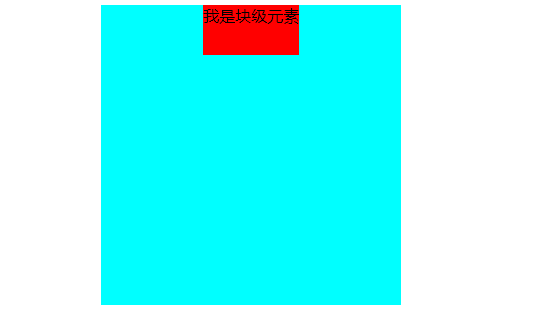
子元素是相对定位的情况下
可以使用margin:0px auto;实现水平居中。
 .father{
    position: relative; width: 300px; height: 300px; background-color: aqua; margin-left: 100px; } .son{
position: relative; width: 50px; height: 50px; background-color: red; margin: 0px auto; } </style> <body> <div class="father"> <div class="son"> 我是块级元素 </div> </div> </body> <style> .father{
width: 300px; height: 300px; background-color: aqua; display: flex; justify-content: center; } .son{
width: 50px; height: 50px; background-color: red; } </style> <body> <div class="father"> <div class="son"> 我是块级元素 </div> </div> </body> 版权声明:本文内容由互联网用户自发贡献,该文观点仅代表作者本人。本站仅提供信息存储空间服务,不拥有所有权,不承担相关法律责任。如发现本站有涉嫌侵权/违法违规的内容, 请联系我们举报,一经查实,本站将立刻删除。
发布者:全栈程序员-站长,转载请注明出处:https://javaforall.net/227428.html原文链接:https://javaforall.net




