
? 相关文章


- ?从零开始学习CANoe 系列文章目录汇总,点击跳转?
- ?本章节内容演示源码下载,点击跳转?
?前言
- ?希望能够以最简单的方式,一步一步的,教会大家学习CANoe
- CANoe是目前汽车电子开发中常用的工具,因为其封闭性(Vector独有),开发的时候,有很多局限性;Python 因为其开源,容易上手,海量的库,让很多开发者爱不释手,那么可以通过Python 来写脚本吗?答案是肯定的,CANoe 留有COM可以供第三方软件调用,下面我们就Python 怎么和CANoe实现数据交互展开讲解
- ?测试软硬件环境: Win10 x64 ;CANoe 11 SP2 x64 ;VH7640
? 引入库
导入 win32库,这个库是实现COM编程的:
ipip install pywin32 ? 打开关闭CANoe
- 1️⃣ 首先我们先随便打开一个CANoe 工程,我这里打开的是一个Demo工程:
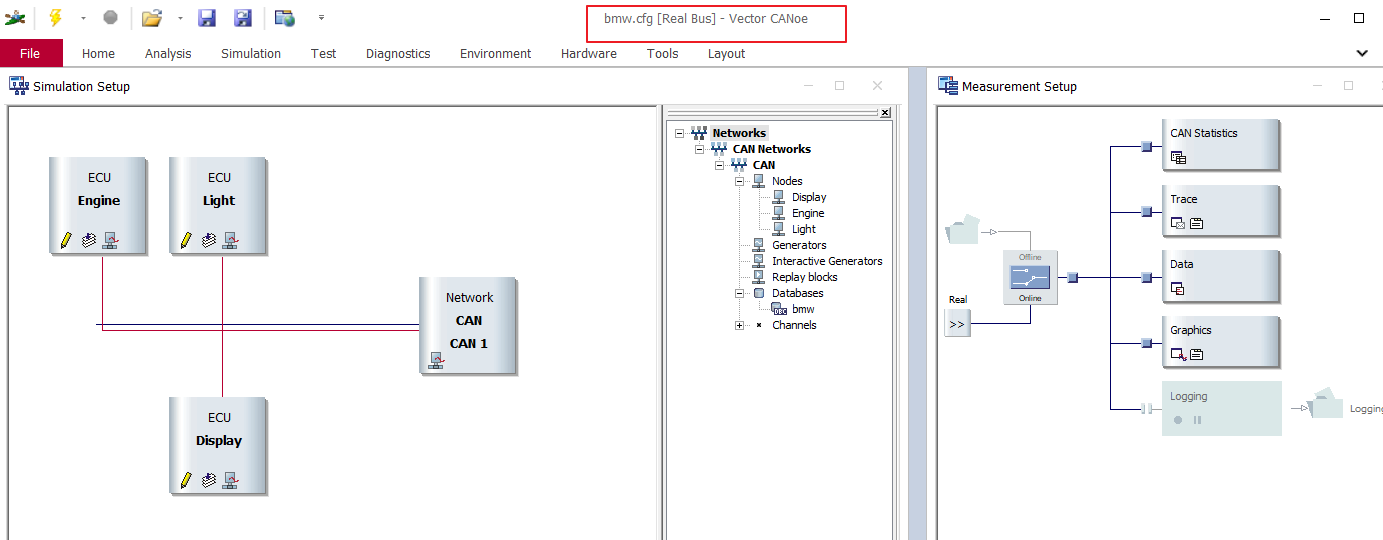
- 2️⃣ 我们引入win32com 库 编写相关代码,创建一个类,名字就叫做CANoe ,并写了一个 init()函数,在这个函数中,我们就简单实现了两件事,一是打开CANoe软件,二十打印CANoe的软件版本。
# Standard library imports import os import sys from win32com.client import * from win32com.client.connect import * # Vector Canoe Class class CANoe: def __init__(self): self.application = None self.application = DispatchEx("CANoe.Application") self.ver = self.application.Version print('Loaded CANoe version ', self.ver.major, '.', self.ver.minor, '.', self.ver.Build, '...')#, sep,'' self.Measurement = self.application.Measurement.Running app = CANoe() #实例化对象 - 3️⃣ 我们把上面打开的CANoe工程关闭,然后 实例化类 app = CANoe() ,运行看下结果:
结果是CANoe再次打开了上面我们打开的CANoe工程,而且打印出来打开的CANoe的软件版本。
Loaded CANoe version 11 . 0 . 55 …
Process finished with exit code 0
? 打开指定的cfg 文件
- 4️⃣ 为了区别,我另存为了一个cfg文件,bmw2.cfg
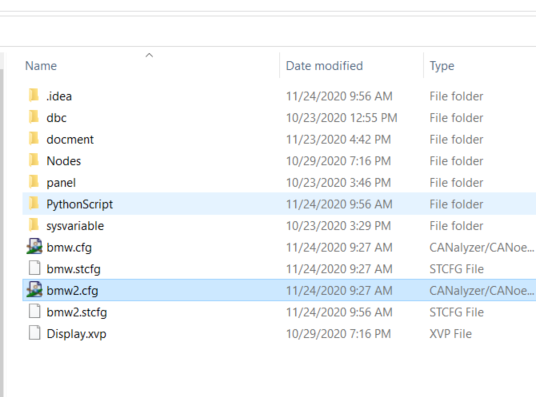
- 5️⃣ 创建两个function,一个打开cfg,一个关闭cfg:
# coding: utf-8 """API for setup/usage of Canoe COM Client interface. """ # -------------------------------------------------------------------------- # Standard library imports import os import sys import time from win32com.client import * from win32com.client.connect import * # Vector Canoe Class class CANoe: def __init__(self): self.application = None self.application = DispatchEx("CANoe.Application") self.ver = self.application.Version print('Loaded CANoe version ', self.ver.major, '.', self.ver.minor, '.', self.ver.Build, '...')#, sep,'' self.Measurement = self.application.Measurement.Running def open_cfg(self, cfgname): # open CANoe simulation if (self.application != None): # check for valid file and it is *.cfg file if os.path.isfile(cfgname) and (os.path.splitext(cfgname)[1] == ".cfg"): self.application.Open(cfgname) print("opening..."+cfgname) else: raise RuntimeError("Can't find CANoe cfg file") else: raise RuntimeError("CANoe Application is missing,unable to open simulation") def close_cfg(self): if (self.application != None): # self.stop_Measurement() self.application.Quit() self.application = None app = CANoe() #定义CANoe为app app.open_cfg(r"C:/Users/Desktop/BMW/bmw2.cfg") #导入某个CANoe congif time.sleep(2) app.close_cfg() - 6️⃣ 执行脚本之后,我们会发现CANoe软件被打开,并且加载了bmw2.cfg,等待两秒之后,CANoe软件被关闭。
? RUN
- 7️⃣ 在上面的两个步骤之后,我们就应该Run起来我们的工程了。
在上面的代码基础上,我们再次添加了两个function.一个是开始Runstart_Measurement,一个是停止runstop_Measurement
# coding: utf-8 """API for setup/usage of Canoe COM Client interface. """ # -------------------------------------------------------------------------- # Standard library imports import os import sys import subprocess import time from win32com.client import * from win32com.client.connect import * # Vector Canoe Class class CANoe: def __init__(self): self.application = None self.application = DispatchEx("CANoe.Application") self.ver = self.application.Version print('Loaded CANoe version ', self.ver.major, '.', self.ver.minor, '.', self.ver.Build, '...')#, sep,'' self.Measurement = self.application.Measurement.Running def open_cfg(self, cfgname): # open CANoe simulation if (self.application != None): # check for valid file and it is *.cfg file if os.path.isfile(cfgname) and (os.path.splitext(cfgname)[1] == ".cfg"): self.application.Open(cfgname) print("opening..."+cfgname) else: raise RuntimeError("Can't find CANoe cfg file") else: raise RuntimeError("CANoe Application is missing,unable to open simulation") def close_cfg(self): # close CANoe simulation if (self.application != None): print("close cfg ...") # self.stop_Measurement() self.application.Quit() self.application = None def start_Measurement(self): retry = 0 retry_counter = 5 # try to establish measurement within 5s timeout while not self.application.Measurement.Running and (retry < retry_counter): self.application.Measurement.Start() time.sleep(1) retry += 1 if (retry == retry_counter): raise RuntimeWarning("CANoe start measuremet failed, Please Check Connection!") def stop_Measurement(self): if self.application.Measurement.Running: self.application.Measurement.Stop() else: pass app = CANoe() #定义CANoe为app app.open_cfg(r"C:/Users/Desktop/BMW/bmw2.cfg") #导入某个CANoe congif time.sleep(5) app.start_Measurement() ? 数据交互——读写信号
- 8️⃣ 在上面的步骤中,我们已经能够打开响应的cfg工程,并且能够RUN起来,接下开我们实现读写CANoe中的信号
在下面代码中,我新建了两个function:
get_SigVal():获取指定的信号,返回值DoEvents():纯粹为了堵塞进程
# coding: utf-8 """API for setup/usage of Canoe COM Client interface. """ # -------------------------------------------------------------------------- # Standard library imports import os import sys import subprocess import time import msvcrt from win32com.client import * from win32com.client.connect import * # Vector Canoe Class class CANoe: def __init__(self): self.application = None self.application = DispatchEx("CANoe.Application") self.ver = self.application.Version print('Loaded CANoe version ', self.ver.major, '.', self.ver.minor, '.', self.ver.Build, '...')#, sep,'' self.Measurement = self.application.Measurement.Running def open_cfg(self, cfgname): # open CANoe simulation if (self.application != None): # check for valid file and it is *.cfg file if os.path.isfile(cfgname) and (os.path.splitext(cfgname)[1] == ".cfg"): self.application.Open(cfgname) print("opening..."+cfgname) else: raise RuntimeError("Can't find CANoe cfg file") else: raise RuntimeError("CANoe Application is missing,unable to open simulation") def close_cfg(self): # close CANoe simulation if (self.application != None): print("close cfg ...") # self.stop_Measurement() self.application.Quit() self.application = None def start_Measurement(self): retry = 0 retry_counter = 5 # try to establish measurement within 5s timeout while not self.application.Measurement.Running and (retry < retry_counter): self.application.Measurement.Start() time.sleep(1) retry += 1 if (retry == retry_counter): raise RuntimeWarning("CANoe start measuremet failed, Please Check Connection!") def stop_Measurement(self): if self.application.Measurement.Running: self.application.Measurement.Stop() else: pass def get_SigVal(self, channel_num, msg_name, sig_name, bus_type="CAN"): """ @summary Get the value of a raw CAN signal on the CAN simulation bus @param channel_num - Integer value to indicate from which channel we will read the signal, usually start from 1, Check with CANoe can channel setup. @param msg_name - String value that indicate the message name to which the signal belong. Check DBC setup. @param sig_name - String value of the signal to be read @param bus_type - String value of the bus type - e.g. "CAN", "LIN" and etc. @return The CAN signal value in floating point value. Even if the signal is of integer type, we will still return by floating point value. @exception None """ if (self.application != None): result = self.application.GetBus(bus_type).GetSignal(channel_num, msg_name, sig_name) return result.Value else: raise RuntimeError("CANoe is not open,unable to GetVariable") def set_SigVal(self, channel_num, msg_name, sig_name, bus_type,setValue): if (self.application != None): result = self.application.GetBus(bus_type).GetSignal(channel_num, msg_name, sig_name) result.Value = setValue else: raise RuntimeError("CANoe is not open,unable to GetVariable") def DoEvents(self): pythoncom.PumpWaitingMessages() time.sleep(1) app = CANoe() #定义CANoe为app app.open_cfg(r"C:/Users/Desktop/BMW/bmw2.cfg") #导入某个CANoe congif time.sleep(5) app.start_Measurement() while not msvcrt.kbhit(): EngineSpeed = app.get_SigVal(channel_num=1, msg_name="EngineState", sig_name="EngineSpeed", bus_type="CAN") print(EngineSpeed) app.DoEvents() - 9️⃣ 执行上面的代码可以得到下面的输入结果:

– ? 如何设置信号呢 ;通过set_SigVal 可以设置signal.
while not msvcrt.kbhit(): EngineSpeed = app.get_SigVal(channel_num=1, msg_name="EngineState", sig_name="EngineSpeed", bus_type="CAN") print(EngineSpeed) app.set_SigVal(channel_num=1, msg_name="EngineState", sig_name="EngineSpeed", bus_type="CAN", setValue=1) app.DoEvents() ? 数据交互——读写环境变量
- 1️⃣ 新建了两个function:
get_EnvVar():获取指定的环境变量,返回值set_EnvVar():设置指定的环境变量值。
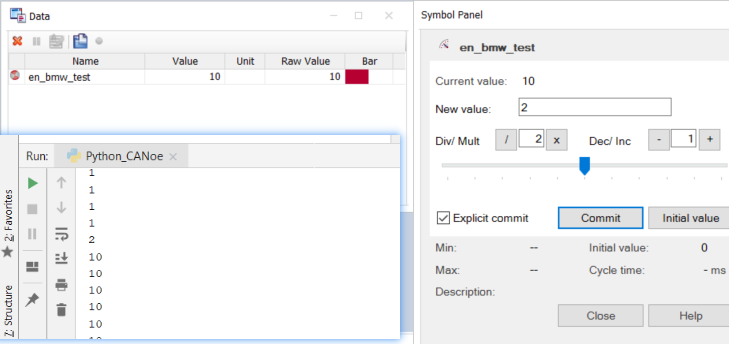
# coding: utf-8 """API for setup/usage of Canoe COM Client interface. """ # -------------------------------------------------------------------------- # Standard library imports import os import sys import subprocess import time import msvcrt from win32com.client import * from win32com.client.connect import * # Vector Canoe Class class CANoe: def __init__(self): self.application = None self.application = DispatchEx("CANoe.Application") self.ver = self.application.Version print('Loaded CANoe version ', self.ver.major, '.', self.ver.minor, '.', self.ver.Build, '...')#, sep,'' self.Measurement = self.application.Measurement.Running def open_cfg(self, cfgname): # open CANoe simulation if (self.application != None): # check for valid file and it is *.cfg file if os.path.isfile(cfgname) and (os.path.splitext(cfgname)[1] == ".cfg"): self.application.Open(cfgname) print("opening..."+cfgname) else: raise RuntimeError("Can't find CANoe cfg file") else: raise RuntimeError("CANoe Application is missing,unable to open simulation") def close_cfg(self): # close CANoe simulation if (self.application != None): print("close cfg ...") # self.stop_Measurement() self.application.Quit() self.application = None def start_Measurement(self): retry = 0 retry_counter = 5 # try to establish measurement within 5s timeout while not self.application.Measurement.Running and (retry < retry_counter): self.application.Measurement.Start() time.sleep(1) retry += 1 if (retry == retry_counter): raise RuntimeWarning("CANoe start measuremet failed, Please Check Connection!") def stop_Measurement(self): if self.application.Measurement.Running: self.application.Measurement.Stop() else: pass def get_SigVal(self, channel_num, msg_name, sig_name, bus_type="CAN"): """ @summary Get the value of a raw CAN signal on the CAN simulation bus @param channel_num - Integer value to indicate from which channel we will read the signal, usually start from 1, Check with CANoe can channel setup. @param msg_name - String value that indicate the message name to which the signal belong. Check DBC setup. @param sig_name - String value of the signal to be read @param bus_type - String value of the bus type - e.g. "CAN", "LIN" and etc. @return The CAN signal value in floating point value. Even if the signal is of integer type, we will still return by floating point value. @exception None """ if (self.application != None): result = self.application.GetBus(bus_type).GetSignal(channel_num, msg_name, sig_name) return result.Value else: raise RuntimeError("CANoe is not open,unable to GetVariable") def get_EnvVar(self, var): if (self.application != None): result = self.application.Environment.GetVariable(var) return result.Value else: raise RuntimeError("CANoe is not open,unable to GetVariable") def set_EnvVar(self, var, value): result = None if (self.application != None): # set the environment varible result = self.application.Environment.GetVariable(var) result.Value = value checker = self.get_EnvVar(var) # check the environment varible is set properly? while (checker != value): checker = self.get_EnvVar(var) else: raise RuntimeError("CANoe is not open,unable to SetVariable") def DoEvents(self): pythoncom.PumpWaitingMessages() time.sleep(1) app = CANoe() #定义CANoe为app app.open_cfg(r"C:/Users/Desktop/BMW/bmw2.cfg") #导入某个CANoe congif time.sleep(5) app.start_Measurement() while not msvcrt.kbhit(): bmw_test = app.get_EnvVar("en_bmw_test") print(bmw_test) if(bmw_test==2): app.set_EnvVar("en_bmw_test",10) app.DoEvents() - 2️⃣ while 循环中我们先读取环境变量
en_bmw_test的值,如果这个值等于2,则我们把它设置成10。
我们先在CANoe中的Data的面板中设置环境变量en_bmw_test= 1 ,pythonz中读到的是1,然后设置成2,读到了2,紧接着可以看到变量编程了10。
? 数据交互——读写系统变量
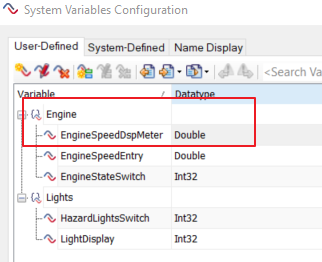
- 1️⃣ CANoe工程中有定义的系统变量如下图,我们就以读写
Engine::EngineSpeedDspMeter为例。
- 2️⃣新建了两个function:
get_SysVar():获取指定的系统变量,返回值set_SysVar():设置指定的系统变量值。
# coding: utf-8 """API for setup/usage of Canoe COM Client interface. """ # -------------------------------------------------------------------------- # Standard library imports import os import sys import subprocess import time import msvcrt from win32com.client import * from win32com.client.connect import * # Vector Canoe Class class CANoe: def __init__(self): self.application = None self.application = DispatchEx("CANoe.Application") self.ver = self.application.Version print('Loaded CANoe version ', self.ver.major, '.', self.ver.minor, '.', self.ver.Build, '...')#, sep,'' self.Measurement = self.application.Measurement.Running def open_cfg(self, cfgname): # open CANoe simulation if (self.application != None): # check for valid file and it is *.cfg file if os.path.isfile(cfgname) and (os.path.splitext(cfgname)[1] == ".cfg"): self.application.Open(cfgname) print("opening..."+cfgname) else: raise RuntimeError("Can't find CANoe cfg file") else: raise RuntimeError("CANoe Application is missing,unable to open simulation") def close_cfg(self): # close CANoe simulation if (self.application != None): print("close cfg ...") # self.stop_Measurement() self.application.Quit() self.application = None def start_Measurement(self): retry = 0 retry_counter = 5 # try to establish measurement within 5s timeout while not self.application.Measurement.Running and (retry < retry_counter): self.application.Measurement.Start() time.sleep(1) retry += 1 if (retry == retry_counter): raise RuntimeWarning("CANoe start measuremet failed, Please Check Connection!") def stop_Measurement(self): if self.application.Measurement.Running: self.application.Measurement.Stop() else: pass def get_SigVal(self, channel_num, msg_name, sig_name, bus_type="CAN"): """ @summary Get the value of a raw CAN signal on the CAN simulation bus @param channel_num - Integer value to indicate from which channel we will read the signal, usually start from 1, Check with CANoe can channel setup. @param msg_name - String value that indicate the message name to which the signal belong. Check DBC setup. @param sig_name - String value of the signal to be read @param bus_type - String value of the bus type - e.g. "CAN", "LIN" and etc. @return The CAN signal value in floating point value. Even if the signal is of integer type, we will still return by floating point value. @exception None """ if (self.application != None): result = self.application.GetBus(bus_type).GetSignal(channel_num, msg_name, sig_name) return result.Value else: raise RuntimeError("CANoe is not open,unable to GetVariable") def get_EnvVar(self, var): if (self.application != None): result = self.application.Environment.GetVariable(var) return result.Value else: raise RuntimeError("CANoe is not open,unable to GetVariable") def set_EnvVar(self, var, value): result = None if (self.application != None): # set the environment varible result = self.application.Environment.GetVariable(var) result.Value = value checker = self.get_EnvVar(var) # check the environment varible is set properly? while (checker != value): checker = self.get_EnvVar(var) else: raise RuntimeError("CANoe is not open,unable to SetVariable") def get_SysVar(self, ns_name, sysvar_name): if (self.application != None): systemCAN = self.application.System.Namespaces sys_namespace = systemCAN(ns_name) sys_value = sys_namespace.Variables(sysvar_name) return sys_value.Value else: raise RuntimeError("CANoe is not open,unable to GetVariable") def set_SysVar(self, ns_name, sysvar_name, var): if (self.application != None): systemCAN = self.application.System.Namespaces sys_namespace = systemCAN(ns_name) sys_value = sys_namespace.Variables(sysvar_name) sys_value.Value = var else: raise RuntimeError("CANoe is not open,unable to GetVariable") def DoEvents(self): pythoncom.PumpWaitingMessages() time.sleep(1) app = CANoe() #定义CANoe为app app.open_cfg(r"C:/Users/Desktop/BMW/bmw2.cfg") #导入某个CANoe congif time.sleep(5) app.start_Measurement() while not msvcrt.kbhit(): EngineSpeedDspMeter = app.get_SysVar("Engine","EngineSpeedDspMeter") print(EngineSpeedDspMeter) if(EngineSpeedDspMeter==2): #app.set_SysVar("Engine","EngineSpeedDspMeter",3) #这里曾将出现问题许久没解决 app.set_SysVar("Engine","EngineSpeedDspMeter",3.0) app.DoEvents() - 3️⃣
运行结果,根据下图可以看出get_SysVar是没问题的,可以正常得到环境变量的值,但是在设置环境变量的时候,报了如下的错误,我看了Vector的 VB代码,是允许设置系统变量的值的,但是我没有去执行测试,这个问题暂时先搁置,后面有缘再解决吧。



?总结

? 如上就是这篇博客的内容了,COM口编程很丰富且负责,本文主要简单阐述了Python 如何启动CANoe,以及信号,变量的交互;但这对我们想要用Python实现自动话测试还远远不够,接下来博主将继续通过Python 如何加载TestSetup ,tse ,生成报告,以及UI设计来实现Python 与CANoe更精彩的交互

- ?要有最朴素的生活,最遥远的梦想,即使明天天寒地冻,路遥马亡!
- ? 有微信的小伙伴可以关注下浪哥车载诊断,一个行业内小小圈子,群里有
网盘资料,源码,还有各路大神闲时交流交流技术,聊聊工作机会啥的。- ?如果这篇博客对你有帮助,请 “点赞” “评论”“收藏”一键三连 哦!码字不易,大家的支持就是我坚持下去的动力。

版权声明:本文内容由互联网用户自发贡献,该文观点仅代表作者本人。本站仅提供信息存储空间服务,不拥有所有权,不承担相关法律责任。如发现本站有涉嫌侵权/违法违规的内容, 请联系我们举报,一经查实,本站将立刻删除。
发布者:全栈程序员-站长,转载请注明出处:https://javaforall.net/227602.html原文链接:https://javaforall.net



