
项目依赖的module版本很新,用到了es2020的语法,在vuecli4版本上死活编译不成功,升级5后解决,这个过程中在配置vue.config.js中遇到了很多问题,记录下给大家一个参考~
vuecli官网英文已经更新为最新的cli5但中文还停留在cli4,导致我最开始在查资料时一直没有查到官方资料,后来偶然间切换英文才发现。
1.配置scss,pretendData变为additionalData


2.启用css moudles
这个vuecli官网也有记录Working with CSS | Vue CLI
值得注意的是,在vuecli4中使用requireModuleExtension,默认为true,默认情况下,只有 *.module.[ext] 结尾的文件才会被视作 CSS Modules 模块。详见配置参考 | Vue CLI
而在vuecli5中,如果将所有样式文件视为 CSS 模块,才需要设置
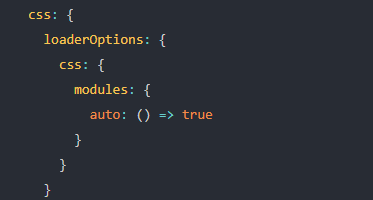
这里其实跟cli4中赋值是相反的,在cli4版本中requireModuleRxtension为true表示只有以.module结尾的才被当做css Modules模块,而在cli5版本中,为true时是将所有样式文件都当做了css Moudles模块。
就是在这里开始我配置错了,导致项目样式加载不出来,找了很久的原因。后来发现在页面上样式id并不是我文件中写的id才发现这个问题。
3.hotOnly
devServer配置中的hotOnly为true改为hot:’only’,若为false可以省略该属性
4.configureWebpack中的fileName
使用compression-webpack-plugin9版本,在配置plugin的fileName时,在compression-webpack-plugin5版本中,配置fileName为”[path].gzip[query]”,升级到9.0+版本后,改为”[path][base].gzip”
5.完整的vue.config.js
最后,贴出完整的vue.config.js供大家参考
const { defineConfig } = require("@vue/cli-service") const path = require("path") const CompressionWebpackPlugin = require("compression-webpack-plugin") const productionGzipExtensions = ["js", "css"] const resolve = (dir) => path.join(__dirname, dir) module.exports = defineConfig({ // 基本路径 publicPath: "/", // 输出文件目录 outputDir: "", assetsDir: "static", // eslint-loader 是否在保存的时候检查 lintOnSave: false, runtimeCompiler: true, // 关键点在这 filenameHashing: true, // 调整内部的 webpack 配置。 chainWebpack: (config) => { config.resolve.alias .set("@", resolve("src")) .set("assets", resolve("src/assets")) .set("components", resolve("src/components")) .set("types", resolve("src/types")) .set("public", resolve("public")) config.module .rule("vue") .use("vue-loader") .tap((options) => ({ ...options, compilerOptions: { // 忽略自定义标签警告 vue3 app.config.compilerOptions.isCustomElement 配置有问题 isCustomElement: (tag) => { return ["xml", "block", "mutation", "category"].includes(tag) }, }, })) }, // 生产环境是否生成 sourceMap 文件 productionSourceMap: false, // css相关配置 css: { // 开启 CSS source maps? sourceMap: false, // css预设器配置项 loaderOptions: { scss: { additionalData: `@import './src/assets/styles/variables.scss';`, }, sass: { implementation: require("sass"), // This line must in sass option }, css: { modules: { auto: () => false, }, }, }, }, // webpack-dev-server 相关配置 devServer: { /* 自动打开浏览器 */ open: process.platform === "darwin", port: 8080, https: false, // hot: 'only', /* 使用代理 */ proxy: { "/robogo": { /* 目标代理服务器地址 */ target: process.env.VUE_APP_BASE_API, /* 允许跨域 */ changeOrigin: true, ws: true, }, "/loki": { /* 目标代理服务器地址 */ target: process.env.VUE_APP_BASE_API, /* 允许跨域 */ changeOrigin: true, ws: true, }, }, }, configureWebpack: { resolve: { fallback: { path: require.resolve("path-browserify"), stream: require.resolve("readable-stream"), crypto: require.resolve("crypto-browserify"), perf_hooks: false, module: false, "@blueprintjs/core": false, "@blueprintjs/icons": false, domain: false, fs: false, pnpapi: false, punycode: false, }, }, module: { rules: [ { test: /\.mjs$/, include: /node_modules/, type: "javascript/auto", }, ], }, plugins: [ new CompressionWebpackPlugin({ filename: "[path][base].gzip", algorithm: "gzip", test: new RegExp("\\.(" + productionGzipExtensions.join("|") + ")$"), threshold: 10240, //内容超过10KB进行压缩 minRatio: 0.8, }), ], externals: [ { "./cptable": "var cptable", }, ], }, // 第三方插件配置 pluginOptions: {}, }) 发布者:全栈程序员-站长,转载请注明出处:https://javaforall.net/228192.html原文链接:https://javaforall.net



