
16、Vue CLI 脚手架
16.1、什么是CLI
命令行界面(英语:command-line interface,缩写:CLI)是在图形用户界面得到普及之前使用最为广泛的用户界面,它通常不支持鼠标,用户通过键盘输入指令,计算机接收到指令后,予以执行。也有人称之为字符用户界面(CUI)
16.2 什么是Vue CLI <====> (maven 项目构建工具)
Vue CLI 是一个基于 Vue.js 进行快速开发的完整系统。 使用Vue 脚手架之后我们开发的页面将是一个完整系统(项目)。 前端系统
16.3 Vue CLI优势
- 通过
vue-cli搭建交互式的项目脚手架。 - 通过
@vue/cli+@vue/cli-service-global快速开始零配置原型开发 - 一个运行时依赖 (
@vue/cli-service),该依赖:- 可升级;
- 基于 webpack 构建,并带有合理的默认配置; webpack 前端打包工具 index.html vue组件 用户组件 学生组件 … 路由 dist目录
- 可以通过项目内的配置文件进行配置; cli 项目配置文件 添加
- 可以通过插件进行扩展。 cli 项目里
- 一个丰富的官方插件集合,集成了前端生态中最好的工具。 webpack打包工具===>dist目录 nodejs 服务器(tomcat java) 热部署插件 npm包
- 一套完全图形化的创建和管理 Vue.js 项目的用户界面
16.4 Vue CLI安装
1、环境准备
# 1.下载nodejs http://nodejs.cn/download/ windows系统: .msi 安装包(exe)指定安装位置 .zip(压缩包)直接解压缩指定目录 mac os 系统: .pkg 安装包格式自动配置环境变量 .tar.gz(压缩包)解压缩安装到指定名 # 2.配置nodejs环境变量 1.windows系统: 计算上右键属性----> 高级属性 ---->环境变量 添加如下配置: NODE_HOME= nodejs安装目录 PATH = xxxx;%NODE_HOME% 2.macos 系统 推荐使用.pkg安装直接配置node环境 # 3.验证nodejs环境是否成功 node -v # 4.npm介绍 node package mangager nodejs包管理工具 前端主流技术 npm 进行统一管理 maven 管理java后端依赖 远程仓库(中心仓库) 阿里云镜像 npm 管理前端系统依赖 远程仓库(中心仓库) 配置淘宝镜像 # 5.配置淘宝镜像 npm config set registry https://registry.npm.taobao.org npm config get registry # 6.配置npm下载依赖位置 windows: npm config set cache "D:\nodereps\npm-cache" npm config set prefix "D:\nodereps\npm_global" mac os: npm config set cache "/Users/chenyannan/dev/nodereps" npm config set prefix "/Users/chenyannan/dev/nodereps" # 7.验证nodejs环境配置 npm config ls ; userconfig /Users/chenyannan/.npmrc cache = "/Users/chenyannan/dev/nodereps" prefix = "/Users/chenyannan/dev/nodereps" registry = "https://registry.npm.taobao.org/" 2、安装脚手架
# 0.卸载脚手架 npm uninstall -g @vue/cli //卸载3.x版本脚手架 npm uninstall -g vue-cli //卸载2.x版本脚手架 # 1.Vue Cli官方网站 https://cli.vuejs.org/zh/guide/ # 2.安装vue Cli npm install -g vue-cli 3、第一个vue脚手架项目
Vue-cli目录结构
[外链图片转存失败,源站可能有防盗链机制,建议将图片保存下来直接上传(img-2QDNftWz-40)(Vue实战笔记(三).assets/image-.png)\
# 1.创建vue脚手架第一个项目 vue init webpack 项目名 # 2.创建第一个项目 hello ------------->项目名 -build ------------->用来使用webpack打包使用build依赖 构建一些依赖文件 -config ------------->用来做整个项目配置目录 主要用来对 开发 测试 环境进行配置 -node_modules ------>用来管理项目中使用依赖 -src ------>用来书写vue的源代码[重点] +assets ------>用来存放静态资源 [重点] components ------>用来书写Vue组件 [重点] router ------>用来配置项目中路由[重点] App.vue ------>项目中根组件[重点] main.js ------>项目中主入口[重点] -static ------>其它静态 -.babelrc ------> 将es6语法转为es5运行 -.editorconfig ------> 项目编辑配置 -.gitignore ------> git版本控制忽略文件 -.postcssrc.js ------> 源码相关js -index.html    ------> 项目主页 -package.json ------> 类似与pom.xml 依赖管理 jquery 不建议手动修改 -package-lock.json ----> 对package.json加锁 -README.md ----> 项目说明文件 # 3.如何运行在项目的根目录中执行 npm run dev 运行前端系统 # 4.如何访问项目 http://localhost:8080 # 5.Vue Cli中项目开发方式 注意: 一切皆组件   一个组件中   js代码  html代码  css样式
	 	1. VueCli开发方式是在项目中开发一个一个组件对应一个业务功能模块,日后可以将多个组件组合到一起形成一个前端系统 2. 日后在使用vue Cli进行开发时不再书写html,编写的是一个个组件(组件后缀.vue结尾的文件),日后打包时vue cli会将组件编译成运行的html文件
rc 目录
src目录是项目的源码目录,所有代码都会写在这里!
main.js
项目的入口文件,我们知道所有的程序都会有一个入口
// The Vue build version to load with the `import` command // (runtime-only or standalone) has been set in webpack.base.conf with an alias. import Vue from 'vue' // 引入VUE核心库 import App from './App' // 引入一个当前目录下的名字为App.vue的组件 import router from './router' Vue.config.productionTip = false // 是否要在生产环境当中给予提示功能。 /* eslint-disable no-new */ new Vue({
el: '#app', router, components: {
App }, template: '
import Vue from 'vue':ES6 写法,会被转换成 require(“vue”); (require 是 NodeJS 提供的模块加载器)其实就相当于import App from './App':意思同上,但是指定了查找路径,./ 为当前目录Vue.config.productionTip = false:关闭浏览器控制台关于环境的相关提示new Vue({}):实例化 Vueel: '#app':查找 index.html 中 id 为 app 的元素template: ':模板,会将 index.html 中替换为
' components: { App }:引入组件,使用的是 import App from ‘./App’ 定义的 App 组件;
App.vue
<template> <div id="app"> <img src="./assets/logo.png"> <h1>自定义脚手架</h1> <!--展示路由--> <router-view/> </div> </template> <script> export default {
    name: 'App' } </script> <style> #app {
font-family: 'Avenir', Helvetica, Arial, sans-serif; -webkit-font-smoothing: antialiased; -moz-osx-font-smoothing: grayscale; text-align: center; color: #2c3e50; margin-top: 60px; } </style> - template:HTML 代码模板,会替换 < App /> 中的内容
- export default{…}:导出 NodeJS 对象,作用是可以通过 import 关键字导入
- name: ‘App’:定义组件的名称
- components: { HelloWorld }:定义子组件
- 在hello,Vue中,关于 < style scoped> 的说明:CSS 样式仅在当前组件有效,声明了样式的作用域,是当前的界面私有的! 不加代表全局有效。
index.js 配置路由
import Vue from 'vue' import Router from 'vue-router' import HelloWorld from '@/components/HelloWorld' Vue.use(Router) //注册路由 new Vue({router,}) export default new Router({
    routes: [ {
    path: '/', name: 'HelloWorld', component: HelloWorld } ] })
HelloWorld.vue
<!-- 一个组件代表一个业务功能:html标签 js代码 css代码 --> <template> <div class="hello"> </div> </template> <script> export default {
    name: 'HelloWorld', data () {
    return {
    msg: '欢迎Vue' } } } </script> <!-- Add "scoped" attribute to limit CSS to this component only --> <style scoped> h1, h2 {
    font-weight: normal; } ul {
    list-style-type: none; padding: 0; } li {
    display: inline-block; margin: 0 10px; } a {
    color: #42b983; } </style>
4、如何开发Vue脚手架
注意:在Vue cli 中一切皆组件
1、我们在HelloWorld.vue的同级目录下新建两个Student和User组件。
![[外链图片转存失败,源站可能有防盗链机制,建议将图片保存下来直接上传(img-liUgTnMu-1627871421742)(Vue实战笔记(三).assets/image-20210721204921996.png)]](https://img-blog.csdnimg.cn/41464533b7cf4b1a82b403952aaba234.png)
![[外链图片转存失败,源站可能有防盗链机制,建议将图片保存下来直接上传(img-liUgTnMu-1627871421742)(Vue实战笔记(三).assets/image-20210721204921996.png)]](https://javaforall.net/wp-content/uploads/2020/11/2020110817443450.jpg)
2、Student.vue和User.vue组件
Student.vue组件
<template> <div class="hello"> <h1>hello world {
    {
    msg}} </h1> <h3>我是学生管理的主页</h3> </div> </template> <script> export default {
     name: 'Student', data () {
     return {
msg: '学生管理' } } } </script> User.vue组件
<template> <div class="hello"> <h1>hello world {
    {
    msg}} </h1> <h3>我是用户管理的主页</h3> </div> </template> <script> export default {
     name: 'HelloWorld', data () {
     return {
msg: '用户管理' } } } </script> 3、在App.vue组件中引入这两个组件的链接,进行路由切换
<template> <div id="app"> <img src="./assets/logo.png"> <h1>自定义脚手架</h1> <router-link to="/">主页</router-link> <router-link to="/user">用户管理</router-link> <router-link to="/student">学生管理</router-link> <!--展示路由--> <router-view/> </div> </template> 4、启动项目,测试一下
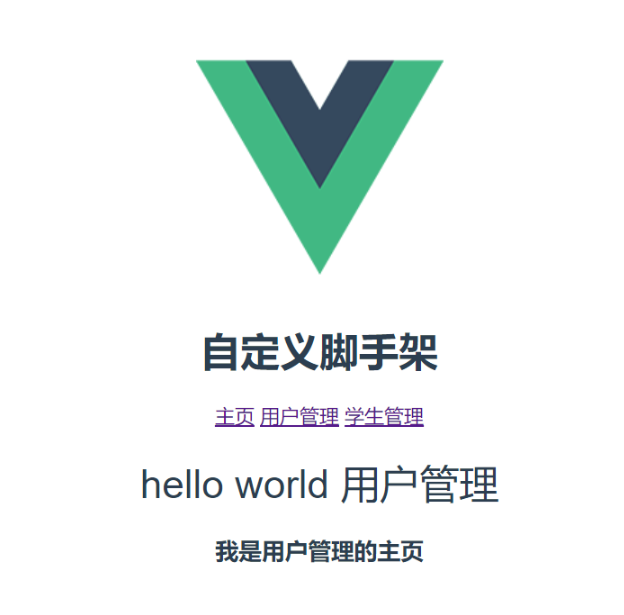
17、在脚手架中使用axios
17.1、安装axios
# 1.安装axios npm install axios --save # 2.配置main.js中引入axios import axios from 'axios'; Vue.prototype.$http=axios; # 3.使用axios 在需要发送异步请求的位置:this.$http.get("url").then((res)=>{
    }) this.$http.post("url").then((res)=>{
    })
18、Vue Cli脚手架项目部署
# 1.在项目根目录中执行如下命令: npm run build 注意:vue脚手架打包的项目必须在服务器上运行不能直接双击运行 # 2.打包之后当前项目中变化 在打包之后项目中出现dist目录,dist目录就是vue脚手架项目生产目录或者说是直接部署目录 19、webstorm开发vue cli项目
19.1、简介
19.2、安装
官网地址:http://www.jetbrains.com/webstorm/
选择好安装路径
19.3、使用webstorm
webstorm和idea同属于一家开发公司,因此使用方式基本一样。
使用webstorm初始化项目
1、我们新建一个webstromcodes项目。
2、打开Terminal终端,输入vue init webpack vue_day5 ,进行vue-day5项目的创建。
3、接下来的步骤和使用Vue Cli脚手架开发一样。
4、显示如下页面,项目初始化成功。
![[外链图片转存失败,源站可能有防盗链机制,建议将图片保存下来直接上传(img-aCUzAuOB-1627871421744)(Vue实战笔记(三).assets/image-20210722212053257.png)]](https://img-blog.csdnimg.cn/549231dbd2db4cb3b7db8333b59b8ace.png)
可以看下目录结构,和使用Vue CLI脚手架开发目录结构一致。
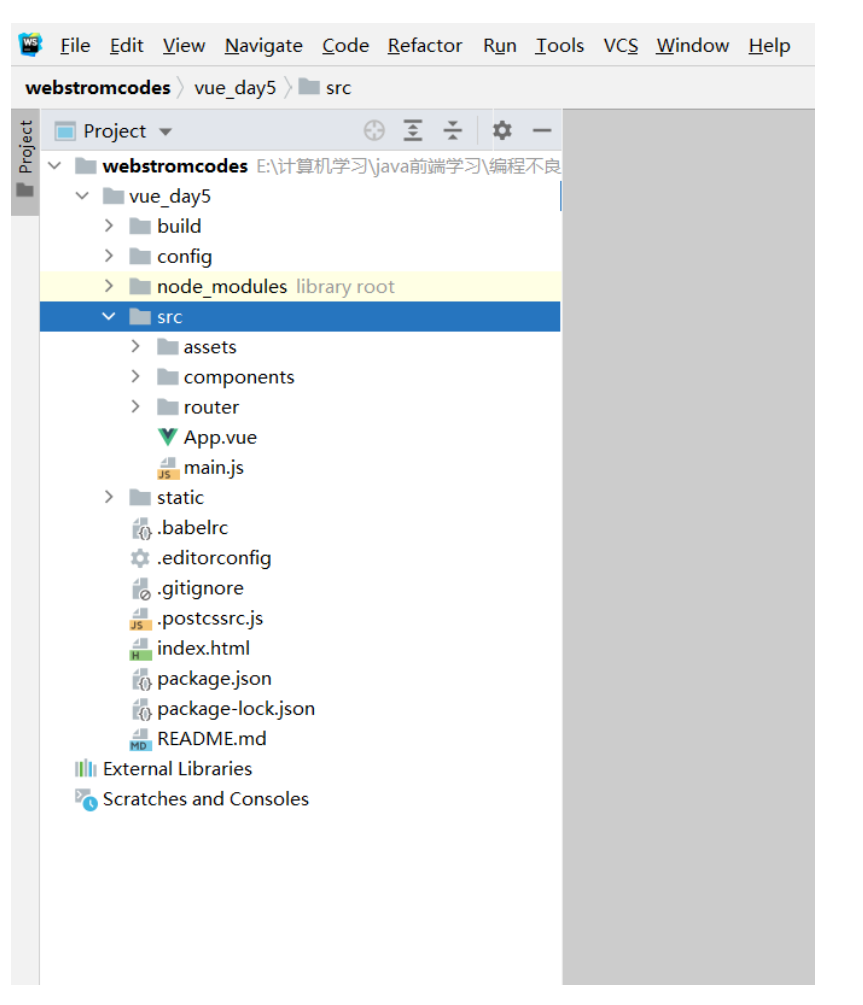
5、在Terminal终端输入cd vue_day5,进入当前项目根目录,项目目录中包含package.json才是根目录,可以输入dir查看当前目录结构。
6、最后我们输入npm run dev启动项目,出现如下界面:
![[外链图片转存失败,源站可能有防盗链机制,建议将图片保存下来直接上传(img-83zniwev-1627871421745)(Vue实战笔记(三).assets/image-20210722212849013.png)]](https://img-blog.csdnimg.cn/a20796d293d24a1c9bf6421a37954341.png)
说明项目成功运行!!!输入http://localhost:8080 ,打开浏览器查看一下,出现默认界面。
main.js 项目中主入口
//引入vue.js import Vue from 'vue' //引入app.vue 组件 import App from './App' //引入router目录中 /index.js import router from './router' Vue.config.productionTip = false /* eslint-disable no-new */ new Vue({
el: '#app', //指定vue实例作用范围 router, components: {
App }, template: '
19.4、开发vue cli项目(一)
1、Student组件
template> <div class="hello"> <h1>{
     {
      msg }}</h1> </div> </template> <script> export default {
      name: 'HelloWorld', data () {
      return {
      msg: '欢迎进入我的系统!!!' } } }
2、User组件
<template> <div> <h1>用户管理</h1> <table border="1" width="100%"> <tr> <th>编号</th> <th>姓名</th> <th>年龄</th> <th>工资</th> <th>操作</th> </tr> <tr v-for="(user,index) in users" :key="user.id" > <td>{
     {
     user.id}}</td> <td>{
     {
     user.name}}</td> <td>{
     {
     user.age }}</td> <td>{
     {
     user.des}}</td> <td><a href="">删除</a> <a href="">修改</a></td> </tr> </table> </div> </template> <script> export default {
      name: "User", data(){
      return {
      users:[],//定义数组 }; }, methods:{
      }, computed:{
      }, created() {
      //初始化阶段发送请求查询所有用户信息 this.$http.get("http://localhost:8990/users").then(res=>{
      console.log(res.data); this.users = res.data; }); } }
3、App组件
<!--组件html标签--><template> <div id="app"> <!--展示vue脚手架logo--> <img src="./assets/1.jpg" class="aa"> <br> <!--主页--> <router-link to="/">主页</router-link> <!--用户管理--> <router-link to="/user">用户管理</router-link> <!--学生管理--> <router-link to="/student">学生管理</router-link> <!--展示路由组件--> <router-view/> </div></template><!--组件中js代码--><script>export default {
      name: 'App'}</script>
4、index.js
import Vue from 'vue' import Router from 'vue-router' //@ 代表src目录 import HelloWorld from '@/components/HelloWorld' import User from '@/components/User' import Student from "../components/Student"; Vue.use(Router) export default new Router({
      routes: [ {
      path: '/', name: 'HelloWorld', component: HelloWorld }, {
      path: '/user', name: 'user', component: User },{
      path: '/student', name: 'student', component: Student } ] })
启动项目测试一下:
![[外链图片转存失败,源站可能有防盗链机制,建议将图片保存下来直接上传(img-ylfeDATy-1627871421747)(Vue实战笔记(三).assets/image-20210724091247957.png)]](https://img-blog.csdnimg.cn/66afcbc7e6e04ff8916f7e9ce53aeb97.png)
成功查询到数据!!!
19.5、开发vue cli项目(二)
20、VueX 状态管理
20.1、简介&安装
# 1.简介 - Vuex 是一个专为 Vue.js 应用程序开发的状态管理模式。它采用集中式存储管理应用的所有组件的状态,并以相应的规则保证状态以一种可预测的方式发生变化 # 2.安装vuex - npm install vuex --save # 3.创建vue cli中创建store文件夹 # 4.在stroe中创建index.js文件 import Vue from 'vue' import Vuex from 'vuex' //1.安装vuex Vue.use(Vuex); //2.创建store对象 const store = new Vuex.Store({
}); //3.暴露store对象 export default store; # 5.在main.js中引入stroe并注册到vue实例 import Vue from 'vue' import App from './App' import router from './router' import store from "./stroe";//引入store Vue.config.productionTip = false /* eslint-disable no-new */ new Vue({
el: '#app', router, components: {
App }, template: '
20.2、state属性
# 1.state属性 - 作用: 用来全局定义一些共享的数据状态 # 2.语法 const store = new Vuex.Store({
      state:{
      counter:0,//定义共享状态 }, } # 3.使用 {
     {
     $store.state.counter}} ===> {
     {
     this.$store.state.counter}}
20.3、mutations 属性
# 1.mutations 属性 - 作用: 用来定义对共享的数据修改的一系列函数 # 2.语法 const store = new Vuex.Store({
      state:{
      counter:0,//定义共享状态 }, mutations:{
      //增加 increment(state){
      state.counter++ }, //减小 decrement(state){
      state.counter-- } } }); # 3.使用 this.$store.commit('decrement'); this.$store.commit('increment'); # 4.mutations传递参数 - a.定义带有参数的函数 mutations:{
      //addCount 参数1:state 对象 参数2:自定义参数 addCount(state,counter){
      console.log(counter); return state.counter += counter ; } } - b.调用时传递参数 this.$store.commit('addCount',11);
20.4、getters 属性
# 1.getters 属性 - 官方: 允许我们在 store 中定义“getter”(可以认为是 store 的计算属性)。就像计算属性一样,getter 的返回值会根据 它的依赖被缓存起来,且只有当它的依赖值发生了改变才会被重新计算。 - 作用: 用来定义对共享的数据的计算相关的一系列函数 相当于 computed 属性 会对结果进行缓存 # 2.语法 getters:{
      //平方 mathSqrts(state){
      console.log("--------"); return state.counter*state.counter; }, //乘以一个数字 mathSqrtsNumber(state,getters){
      return getters.mathSqrts*3; }, //传递参数 mathSqrtsNumbers(state,getters){
      return function (number){
      return number; } } } # 3.使用 - 1.{
     {
     $store.getters.mathSqrts}} - 2.{
     {
     $store.getters.mathSqrtsNumber}} - 3.{
     {
     $store.getters.mathSqrtsNumbers(3)}}
20.5、练习
index.js
import Vue from 'vue' //vue.js import Vuex from 'vuex' //vuex.js //1. vue中使用vuex Vue.use(Vuex); //2. 创建store对象 export default new Vuex.Store({
       //state: 用来定义所有组件共享的数据 state:{
       counter:0, }, //mutations: 用来定义对共享数据的修改方法 mutations:{
       incrCounter(state){
       state.counter++; }, decrCounter(state){
       state.counter--; }, incrCounterCount(state,count){
       state.counter += count; }, }, //getters: 相当于store共享数据计算属性,该计算属性中方法只会执行一次,只有计算属性值发生变化才会重新计算,相当于之前的computed属性 getters:{
       incrCount(state){
       //二次渲染计算 return state.counter + 10; }, match(state,getters){
       return getters.incrCount * 2; } } });
User.vue
<template> <div> <h1>用户管理--{
      {
      this.$store.state.counter}}--{
      {
      this.$store.getters.incrCount}}--{
      {
      this.$store.getters.match}}</h1> <input type="button" value="点我修改共享数据counter++" @click="changeStoreCounter"> <input type="button" value="点我修改共享数据counter--" @click="decrStoreCounter"> <input type="button" value="点我修改共享数据counter+5" @click="changeStoreCounterFive"> <router-link to="/user/add" style="float: left">添加用户信息</router-link> <table border="1" width="100%"> <tr> <th>编号</th> <th>姓名</th> <th>年龄</th> <th>工资</th> <th>操作</th> </tr> <tr v-for="(user,index) in users" :key="user.id" > <td>{
      {
      user.id}}</td> <td>{
      {
      user.name}}</td> <td>{
      {
      user.age }}</td> <td>{
      {
      user.des}}</td> <td><a href="javascript:;" @click="delUser(user.id)">删除</a> <router-link to="/user/add?id=user.id&name" >修改</router-link></td> </tr> </table> <hr> <!--显示子组件路由--> <router-view></router-view> </div> </template> <script> export default {
       name: "User", data(){
       return {
       users:[],//定义数组 }; }, methods:{
       findAll(){
       this.$http.get("http://localhost:8990/users").then(res=>{
       console.log(res.data); this.users = res.data; }); }, delUser(id){
       //友情提醒删除 if(window.confirm("您确定要删除这条记录吗?")){
       this.$http.delete("http://localhost:8990/delete/"+id).then(res=>{
       alert("用户信息删除成功!"); this.findAll(); 调用查询所有 }).catch(err=>{
       alert("用户信息删除失败!"); }); } }, changeStoreCounter(){
       //修改共享数据counter++ this.$store.commit('incrCounter'); }, decrStoreCounter(){
       //修改共享数据counter-- this.$store.commit('decrCounter'); }, changeStoreCounterFive(){
       //修改共享数据counter+5 this.$store.commit('incrCounterCount',5); } }, computed:{
       }, created() {
       //初始化阶段发送请求查询所有用户信息 this.findAll(); }, //user /user/add /user/edit beforeRouteUpdate(to,from,next){
       //当前组件中路由更新时自动触发的函数 this.findAll(); next(); //放行后路由后续操作 }, } </script> <style scoped> th{
background-color: beige; } </style> 
发布者:全栈程序员-站长,转载请注明出处:https://javaforall.net/228438.html原文链接:https://javaforall.net




