
一、项目功能简介
(1)《SpringBoot水果商城后台管理系统》该项目采用技术:
《SpringBoot水果商城后台管理系统》该项目采用的技术实现如下:HTML+CSS+JavaScript+jsp+SpringBoot+Mybatis+Mysql
- 后台使用SpringBoot+mybatis框架
- 前端采用jsp+js+css等界面非常的美观大方
- mysql数据库+tomcat服务器
(2)管理员功能介绍:
1、管理员登录(如果验证码错误报:验证码有误,密码或账户错误报账户或密码错误)
2、强制登录,如果管理员没有登录,不能进入系统(显示管理员名字为登录成功)
3、退出登录(注销Session的形式进行退出登录)



(3)水果功能介绍:
1、分页展示所有
2、删除
3、批量删除
4、全选
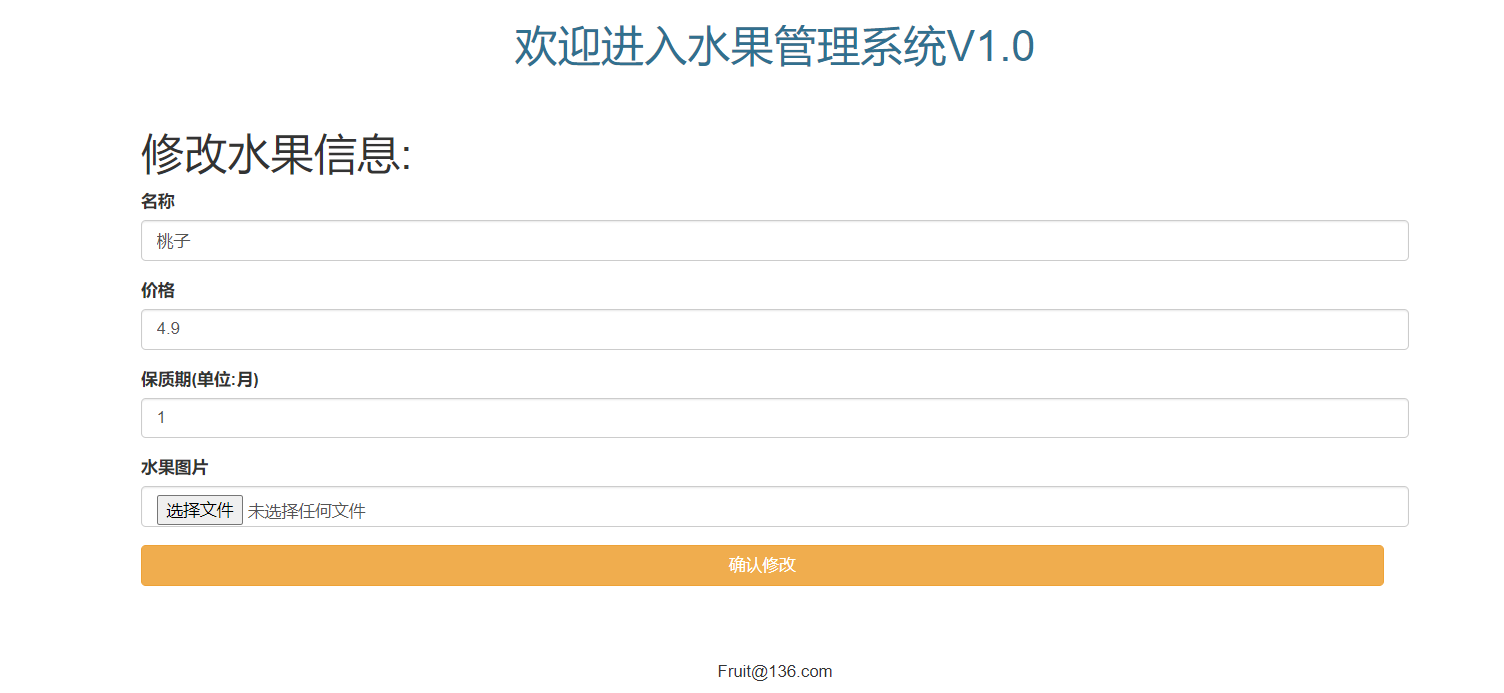
6、修改(先进行数据回显之后进行修改)
7、图片上传和图片在页面显示功能


二、数据库设计
(1)数据库创建
-- 创建员工表 create table admin( id int primary key auto_increment, username varchar(20) not null, password varchar(20) not null ) -- 添加管理员数据 insert into admin values(null,'王恒杰',''); insert into admin values(null,'杨福君','whj63135'); insert into admin values(null,'邓正武',''); -- 查询管理员 select *from admin; -- 创建水果表 create table fruit( id int primary key auto_increment, image varchar(30) not null, name varchar(20) not null, price double not null, month int not null, createTime date ); -- 查询水果表 select * from fruit; -- 添加水果信息 insert into fruit values(null,'/img.jpg','苹果','5.00',5,NOW()); (2)数据库设计文档
数据库名: fruitmall
文档版本: V1.0.0
文档描述: 数据库表设计描述
| 表名 | 说明 |
|---|---|
| admin | 管理员 |
| fruit | 水果管理 |
表名: admin
说明: 管理员
| 序号 | 名称 | 数据类型 | 长度 | 小数位 | 允许空值 | 主键 | 默认值 | 说明 |
|---|---|---|---|---|---|---|---|---|
| 1 | id | int | 10 | 0 | N | Y | ||
| 2 | username | varchar | 20 | 0 | N | N | ||
| 3 | password | varchar | 20 | 0 | N | N |
表名: fruit
说明: 水果
| 序号 | 名称 | 数据类型 | 长度 | 小数位 | 允许空值 | 主键 | 默认值 | 说明 |
|---|---|---|---|---|---|---|---|---|
| 1 | id | int | 10 | 0 | N | Y | ||
| 2 | image | varchar | 30 | 0 | N | N | ||
| 3 | name | varchar | 20 | 0 | N | N | ||
| 4 | price | double | 23 | 0 | N | N | ||
| 5 | month | int | 10 | 0 | N | N | ||
| 6 | createTime | date | 10 | 0 | Y | N |
三、导入项目相关依赖和配置application.yml
(1)导入相关依赖
    <parent> <groupId>org.springframework.boot
     groupId> <artifactId>spring-boot-starter-parent
      artifactId> <version>2.2.5.RELEASE
       version>
        parent> <dependencies>
        <dependency> <groupId>org.springframework.boot
         groupId> <artifactId>spring-boot-starter-web
          artifactId>
           dependency>
           <dependency> <groupId>mysql
            groupId> <artifactId>mysql-connector-java
             artifactId> <version>8.0.16
              version>
               dependency>
               <dependency> <groupId>org.mybatis.spring.boot
                groupId> <artifactId>mybatis-spring-boot-starter
                 artifactId> <version>2.1.2
                  version>
                   dependency>
                   <dependency> <groupId>com.alibaba
                    groupId> <artifactId>druid
                     artifactId> <version>1.1.12
                      version>
                       dependency>
                       <dependency> <groupId>javax.servlet
                        groupId> <artifactId>jstl
                         artifactId> <version>1.2
                          version>
                           dependency>
                           <dependency> <groupId>org.springframework.boot
                            groupId> <artifactId>spring-boot-starter-test
                             artifactId>
                              dependency>
                              <dependency> <groupId>org.springframework.boot
                               groupId> <artifactId>spring-boot-starter-aop
                                artifactId>
                                 dependency>
                                 <dependency> <groupId>org.apache.tomcat.embed
                                  groupId> <artifactId>tomcat-embed-jasper
                                   artifactId>
                                    dependency>
                                     dependencies>
(2)配置application.yml
server: port: 8080 #端口号 servlet: context-path: /fruitmall #水果商城 jsp: init-parameters: development: true #开启jsp页面的调试模式 spring: mvc: view: prefix: / #前缀 suffix: .jsp #后缀 # 数据源 datasource: type: com.alibaba.druid.pool.DruidDataSource #数据源类型 driver-class-name: com.mysql.cj.jdbc.Driver #加载驱动 url: jdbc:mysql://localhost:3306/fruitmall?useSSL=false&serverTimezone=UTC username: root password: root mybatis: mapper-locations: classpath:com/tjcu/mapper/*Mapper.xml #指定mapper文件所在的位置,其中classpath必须和mapper-locations分开 type-aliases-package: com.tjcu.entity 四、管理员核心功能
1、前端
<%@page isELIgnored="false" contentType="text/html; harset=utf-8" pageEncoding="UTF-8" %>
<%@taglib prefix="c" uri="http://java.sun.com/jsp/jstl/core" %>
<html> <head> <title>login
     title> <link rel="stylesheet" type="text/css" href="${pageContext.request.contextPath}/css/bootstrap.min.css"/>
      head> <body> <div id="wrap" class="container-fluid"> <div id="top_content" class="row" style="margin: 0 auto;"> <div class="col-sm-8 col-sm-offset-2"> <div id="header"> <div id="topheader"> <h1 class="text-center text-info">欢迎进入水果管理系统V1.0
       h1>
        div> <div id="navigation">
         div>
          div>
           div>
            div> <div class="row" style="margin-top: 20px;"> <div class="col-sm-8 col-sm-offset-2"> <div id="content"> <form method="post" action="${pageContext.request.contextPath}/admin/login"> <div class="form-group"> <label for="username">用户名
             label> <input type="text" v-model="username" id="username" class="form-control" name="username"/>
              div> <div class="form-group"> <label for="password">密码
               label> <input type="password" id="password" v-model="password" class="form-control" name="password"/>
                div> <br> <tr> <td valign="middle" align="right"> 验证码: <img id="num" src="${pageContext.request.contextPath}/admin/generateImageCode" /> <a href="javascript:;" onclick="document.getElementById('num').src = '${pageContext.request.contextPath}/admin/generateImageCode?'+(new Date()).getTime()">换一张
                 a>
                  td> <td valign="middle" align="left"> <input type="text" class="inputgri" name="adminCode" />
                   td>
                    tr> <input type="submit" style="width: 98%" class="btn btn-danger" value="登录»"/>
                     form>
                      div> ${requestScope.msg}
                       div>
                        div> <div class="row" style="margin-top: 40px;"> <div class="col-sm-8 col-sm-offset-2"> <h5 class="text-center">
                         h5>
                          div>
                           div>
                            div>
                             body>
                              html>
2、控制层
package com.tjcu.controller; import com.tjcu.entity.Admin; import com.tjcu.service.AdminService; import com.tjcu.utils.VerifyCodeUtils; import org.springframework.beans.factory.annotation.Autowired; import org.springframework.stereotype.Controller; import org.springframework.web.bind.annotation.RequestMapping; import javax.servlet.ServletOutputStream; import javax.servlet.http.HttpServletRequest; import javax.servlet.http.HttpServletResponse; import javax.servlet.http.HttpSession; import java.io.IOException; import static javax.swing.text.html.CSS.getAttribute; / * @author 王恒杰 * @date 2021/11/28 16:22 * @Description: */ @Controller @RequestMapping("admin") public class AdminAction {
    @Autowired private AdminService adminService; @RequestMapping("login") public String login(Admin admin, HttpServletRequest request,String adminCode){
    //1.比较验证是否一致 HttpSession session = request.getSession(); String code = session.getAttribute("code").toString(); if(code.equals(adminCode)){
    Admin login = adminService.login(admin.getUsername(), admin.getPassword()); if(login!=null){
    request.setAttribute("admin",login); session.setAttribute("admin",login); return "forward:/fruit/showAll?pageNumber=1"; }else {
    request.setAttribute("msg","用户名或者密码输入错误"); return "login"; } }else {
    request.setAttribute("msg","验证码输入错误"); return "login"; } } / * 用来生成验证码方法 */ @RequestMapping("generateImageCode") public void generateImageCode(HttpSession session, HttpServletResponse response) throws IOException {
    //1.生成随机字符串 String code = VerifyCodeUtils.generateVerifyCode(4); //2.保存随机字符串到Session中 session.setAttribute("code",code); //3.将随机字符串生成图片 //4.通过response响应图片 response.setContentType("image/png");//指定响应类型 ServletOutputStream os = response.getOutputStream(); VerifyCodeUtils.outputImage(80,30,os,code); } @RequestMapping("cancel") public String cancel(HttpServletRequest request){
    request.getSession().invalidate(); request.setAttribute("msg","管理员已经退出登录!"); return "login"; } }
五、水果相关功能核心代码
1、全选jquery实现
<script> $("#selectAll").click(function () {
    //:checkbox 获取当前选中的单选按钮或者复选框 //:checkbox:gt(0) 获取当前复选框大于0的复选框 //prop修改标签的属性 标签对象.prop(“属性名”,”属性值”); //prop获取标签的属性 标签对象.prop(“属性名”); //checked:选中 //注意:在单选框和复选框中checked只要出现checked就是选中,不管他是否等于true还是false $(":checkbox:gt(0)").prop("checked",$("#selectAll").prop("checked")) })
2、确认删除jquery实现
<%--单个删除--%> <script> function delRow(id,pageNumber){
    if(window.confirm("你确定删除这个商品吗?")){
    location.href="${pageContext.request.contextPath}/fruit/drop?pageNumber="+pageNumber+"&id="+id; } } </script>
3、修改和数据回显前端页面
<%@page isELIgnored="false" contentType="text/html; harset=utf-8" pageEncoding="UTF-8" %>
<%@taglib prefix="c" uri="http://java.sun.com/jsp/jstl/core" %>
\
<%@taglib prefix="fmt" uri="http://java.sun.com/jsp/jstl/fmt" %>
<html> <head> <title>update
     title> <link rel="stylesheet" type="text/css" href="${pageContext.request.contextPath}/css/bootstrap.min.css"/>
      head> <body> <div id="wrap"> <div id="top_content" class="row" style="margin: 0 auto;"> <div class="col-sm-8 col-sm-offset-2"> <div id="header"> <div id="topheader"> <h1 class="text-center text-info">欢迎进入水果管理系统V1.0
       h1>
        div> <div id="navigation">
         div>
          div>
           div>
            div> <div class="row" style="margin-top: 20px;"> <div class="col-sm-8 col-sm-offset-2"> <div id="content"> <p id="whereami">
             p> <h1> 修改水果信息:
              h1> <form action="${pageContext.request.contextPath}/fruit/update" method="post" enctype="multipart/form-data"> <input type="hidden" name="id" value="${requestScope.fruit.id}"> <div class="form-group"> <label for="name">名称
               label> <input type="text" class="form-control" name="name" id="name" value="${requestScope.fruit.name}" placeholder="输入水果名称">
                div> <div class="form-group"> <label for="price">价格
                 label> <input type="text" class="form-control" name="price" id="price" value="${requestScope.fruit.price}" placeholder="输入水果价格">
                  div> <div class="form-group"> <label for="age">保质期(单位:月)
                   label> <input type="text" class="form-control" id="age" name="month" value="${requestScope.fruit.month}" placeholder="输入水果保质期">
                    div> <div class="form-group"> <label for="photos">水果图片
                     label> <input type="file" ref="file" id="photos" class="form-control" name="photo"/>
                      div> <input type="submit" style="width: 98%" class="btn btn-warning" value="确认修改" />
                       form>
                        div>
                         div>
                          div> <div id="footer"> <div class="row" style="margin-top: 40px;"> <div class="col-sm-8 col-sm-offset-2"> <h5 class="text-center">
                           h5>
                            div>
                             div>
                              div>
                               div>
                                body>
                                 html>
4、分页前端页面实现
 <%--colspan:跨列数--%> <td colspan="7" align="center"> <c:if test="${requestScope.pageNumber>1}"> <a href="${pageContext.request.contextPath}/fruit/showAll?pageNumber=${requestScope.pageNumber-1}">上一页</a> </c:if> <c:if test="${requestScope.pageNumber<=1}"> 上一页 </c:if> <%--当前页数--%> <c:forEach begin="1" end="${requestScope.totalPage}" var="page"> <a href="${pageContext.request.contextPath}/fruit/showAll?pageNumber=${page}">${
   page}</a> </c:forEach> <%--下一页数--%> <c:if test="${requestScope.pageNumber

    >
    <a href
    =
    "${pageContext.request.contextPath}/fruit/showAll?pageNumber=${requestScope.pageNumber+1}"
    >下一页
    <
    /a
    >
    <
    /c
    :
    if
    >
    <c
    :
    if test
    =
    "${requestScope.pageNumber>=requestScope.totalPage}"
    > 下一页
    <
    /c
    :
    if
    >
    <
    /td
    >
    <
    /tr
    >
5、Controller层
/ * @author 王恒杰 * @date 2021/11/27 23:38 * @Description: */ @Controller @RequestMapping("fruit") public class FruitAction {
    @Autowired private FruitService fruitService; / * 添加水果 */ @RequestMapping("add") public String add(MultipartFile photo, Fruit fruit,HttpServletRequest request) throws IOException {
    //获取文件存储的真实路径 String realPath = request.getSession().getServletContext().getRealPath("photo"); //文件拷贝 photo.transferTo(new File(realPath,photo.getOriginalFilename())); //水果的图片名 fruit.setImg(photo.getOriginalFilename()); fruitService.add(fruit); return "redirect:/fruit/showAll?pageNumber=1"; } / * 修改水果 */ @RequestMapping("update") public String update(MultipartFile photo, Fruit fruit,HttpServletRequest request) throws IOException {
    //获取文件存储的真实路径 String realPath = request.getSession().getServletContext().getRealPath("photo"); //文件拷贝 photo.transferTo(new File(realPath+"/"+photo.getOriginalFilename())); //水果的图片名 fruit.setImg(photo.getOriginalFilename()); //修改时间 fruit.setCreatTime(new Date()); fruitService.update(fruit); return "redirect:/fruit/showAll?pageNumber=1"; } / * 查询水果 数据回显 */ @RequestMapping("query") public String query(Integer id, HttpServletRequest request) {
    System.out.println(id); Fruit query = fruitService.query(id); System.out.println(query); request.setAttribute("fruit", query); return "update"; } / * 删除水果 */ @RequestMapping("drop") public String drop(Fruit fruit,Integer pageNumber) {
    System.out.println(pageNumber); System.out.println(fruit.getId()); fruitService.drop(fruit.getId()); return "redirect:/fruit/showAll?pageNumber="+pageNumber; } / * 批量删除 */ @RequestMapping("batchDelete") public String batchDelete(Collection collection) {
    fruitService.batchDelete(collection.getIds()); return "redirect:/fruit/showAll?pageNumber=1"; } / * 分页实现 */ @RequestMapping("showAll") public String pageFruit(Integer pageNumber,HttpServletRequest request) {
    List<Fruit> fruits = fruitService.pageFruit(pageNumber); request.setAttribute("fruits",fruits); //当前页 request.setAttribute("pageNumber",pageNumber); //总页数 Integer integer = fruitService.TotalPage(); request.setAttribute("totalPage",integer); return "showAll"; } }
六、源码下载及使用攻略
源码已经上传到gitee上面了,
原创不易,如果觉得不错请给我一个三连、点赞、收藏、加关注!!!
需要源码资料的同学可以去我gitee的下载源码
gitee地址:《SpringBoot水果商城后台管理系统》下载相关源码
版权声明:本文内容由互联网用户自发贡献,该文观点仅代表作者本人。本站仅提供信息存储空间服务,不拥有所有权,不承担相关法律责任。如发现本站有涉嫌侵权/违法违规的内容, 请联系我们举报,一经查实,本站将立刻删除。
发布者:全栈程序员-站长,转载请注明出处:https://javaforall.net/229922.html原文链接:https://javaforall.net




