


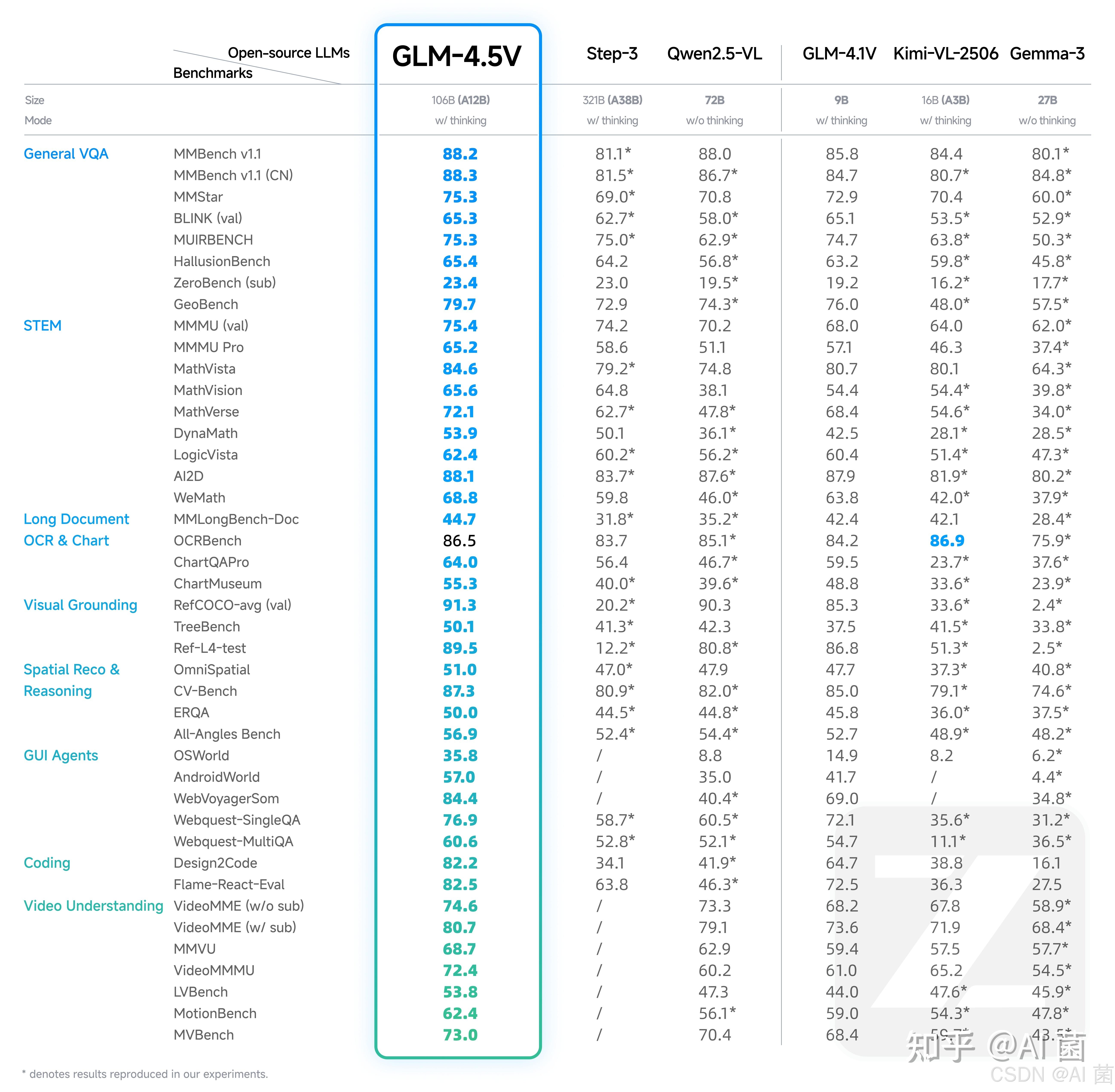
沉寂了很长时间,在2025年8月,智谱终于开源了其升级版的视觉语言大模型GLM-4.5V,该模型基于文本基座模型 GLM-4.5-Air(106B参数,12B激活),延续 GLM-4.1V-Thinking 技术路线,在 多个公开视觉多模态榜单中综合效果达到同级别开源模型 SOTA 性能,涵盖图像、视频、文档理解以及 GUI Agent 等常见任务。
模型在真实场景下的表现与可用性也不错,GLM-4.5V通过高效混合训练,可以处理不同的视觉理解和推理任务,比如:
- 图像推理:场景理解、复杂多图分析、位置识别
- 复杂图表与长文档解析:研报分析、信息提取
- Grounding 能力:精准定位视觉元素
- 视频理解:长视频分镜分析、事件识别
- GUI 任务:屏幕读取、图标识别、桌面操作辅助
同时,模型新增 “思考模式” 开关,用户可灵活选择快速响应或深度推理,平衡效率与效果
# 1、创建虚拟环境 conda create -name sglang_env python=3.10 conda activate sglang_env # 2、安装相关库和依赖 pip3 install "sglang[all]>=0.5.0rc1" pip install git+https://github.com/huggingface/transformers.git 采用SGLang进行本地服务化,代码如下:
python3 -m sglang.launch_server --model-path zai-org/GLM-4.5V \ --tp-size 4 \ --tool-call-parser glm45 \ --reasoning-parser glm45 \ --served-model-name glm-4.5v \ --port 8000 --host 0.0.0.0 需要注意以下事项:
- 以H100为例,需要至少4张H100来支持满血版推理服务;需要显式指定:EXPORT_CUDA_VISIBLE_DEVICES=0,1,2,3。
- 如果是部署GLM-4.5V-FP8,则可减少相应的显存资源。
- SGLang 框架建议使用 FA3 注意力后端,支持更高的推理性能和更低的显存占用,可添加 –attention-backend fa3 –mm-attention-backend fa3 –enable-torch-compile开启。
- 使用SGLang时,发送请求时默认启用思考模式。如果要禁用思考开关,需要添加 extra_body={“chat_template_kwargs”: {“enable_thinking”: False}}参数。
API 调用脚本:
- 文本+单图
from openai import OpenAI openai_api_key = "EMPTY" openai_api_base = "http://127.0.0.1:8000/v1" client = OpenAI( api_key=openai_api_key, base_url=openai_api_base, ) response = client.chat.completions.create( model="glm-4.5v", messages=[ { "role": "user", "content": [ {"type": "text", "text": "请描述这张图片的主要内容"}, {"type": "image_url", "image_url": {"url": "file:///your_img"}} ] } ], max_tokens=512, temperature=0.0, ) print(response.choices[0].message.content.strip()) reasoning_content = getattr(response.choices[0].message, "reasoning_content", None) print("======") print(reasoning_content.strip() if reasoning_content else "No reasoning_content field in response.") - 文本+多图
from openai import OpenAI openai_api_key = "EMPTY" openai_api_base = "http://127.0.0.1:8000/v1" client = OpenAI( api_key=openai_api_key, base_url=openai_api_base, ) response = client.chat.completions.create( model="glm-4.5v", messages=[ { "role": "user", "content": [ {"type": "text", "text": "请比较这两张图片的主要不同点"}, {"type": "image_url", "image_url": {"url": "file:///your_img1"}}, {"type": "image_url", "image_url": {"url": "file:///your_img2"}} ] } ], max_tokens=512, temperature=0.0, ) print(response.choices[0].message.content.strip()) reasoning_content = getattr(response.choices[0].message, "reasoning_content", None) print("======") print(reasoning_content.strip() if reasoning_content else "No reasoning_content field in response.") - 资源有限的情况下,可以选择量化版本GLM-4.5V-FP8,本地推理demo如下:
from transformers import AutoProcessor, Glm4vMoeForConditionalGeneration #AutoModelForConditionalGeneration from PIL import Image import requests import torch # Load model and processor model_id = "zai-org/GLM-4.5V-FP8" model = Glm4vMoeForConditionalGeneration.from_pretrained( model_id, torch_dtype="auto", device_map="auto", trust_remote_code=True ) processor = AutoProcessor.from_pretrained(model_id, trust_remote_code 智谱 AI GLM 教程=True) # Example image loading (replace with your image path or URL) image_url = "https://huggingface.co/datasets/huggingface/documentation-images/resolve/main/transformers/tasks/car.jpg" image = Image.open(requests.get(image_url, stream=True).raw).convert("RGB") # Prepare the prompt prompt = "Describe this car in detail." messages = [ {"role": "user", "content": [{"type": "image", "image": image}, {"type": "text", "text": prompt}]} ] # Apply chat template and preprocess image input_ids = processor.apply_chat_template(messages, add_generation_prompt=True, return_tensors="pt") pixel_values = processor.preprocess_images(image, return_tensors="pt") # Generate response with torch.no_grad(): output_ids = model.generate( input_ids.to(model.device), pixel_values=pixel_values.to(model.device), max_new_tokens=512 ) response = processor.decode(output_ids[0], skip_special_tokens=True) print(response)版权声明:本文内容由互联网用户自发贡献,该文观点仅代表作者本人。本站仅提供信息存储空间服务,不拥有所有权,不承担相关法律责任。如发现本站有涉嫌侵权/违法违规的内容, 请联系我们举报,一经查实,本站将立刻删除。
发布者:Ai探索者,转载请注明出处:https://javaforall.net/270342.html原文链接:https://javaforall.net




