
大家好,又见面了,我是你们的朋友全栈君。
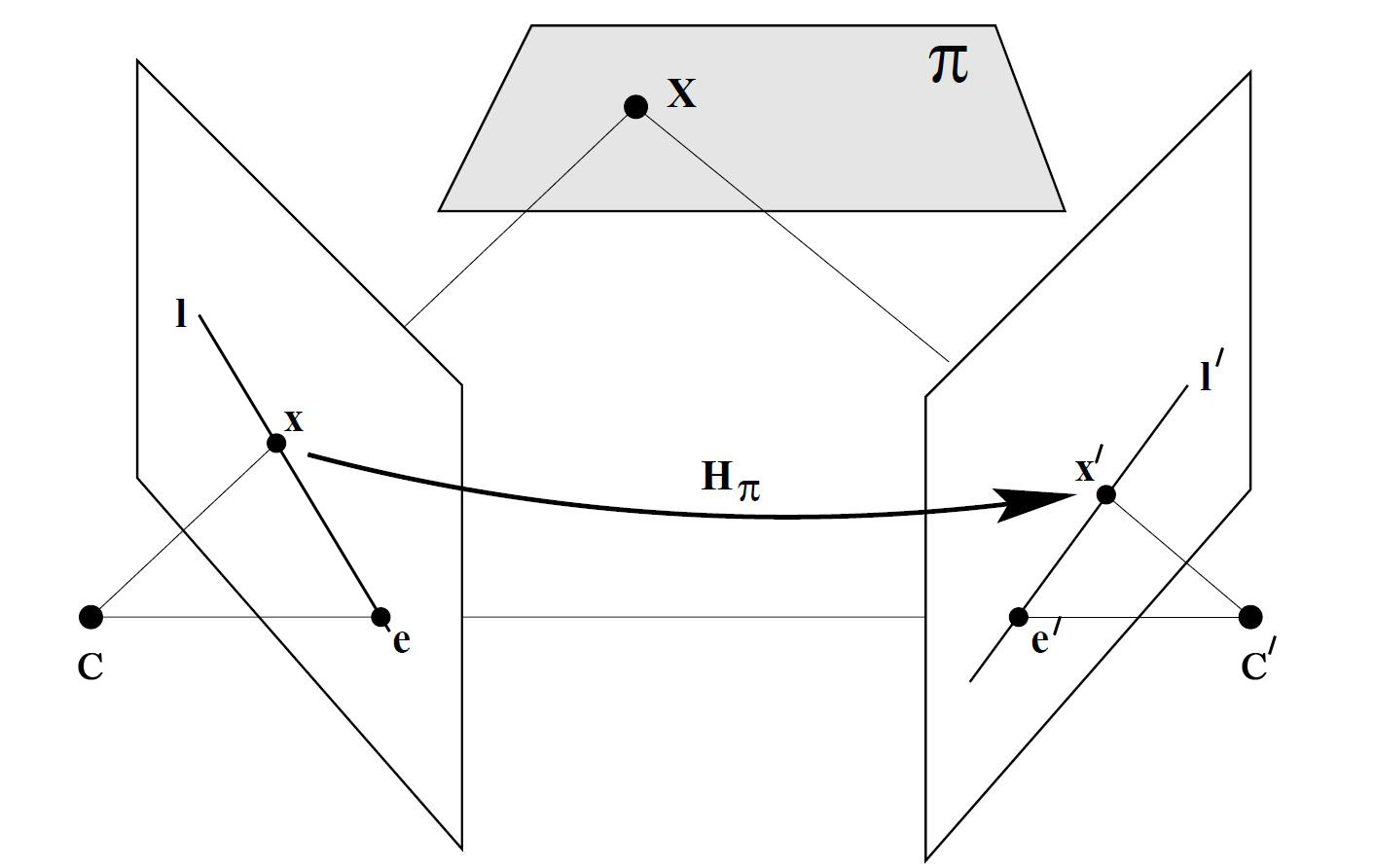
根据针孔摄像机模型,我们可以知道,沿着三维点X和相机中心点之间的连线,可以在图像上找到对应的点x。反过来,在三维空间中,与成像平面上的位置x对应的场景点可以位于这条线上的所有位置。这说明如果要根据图像中的一个点找到另一幅图像中对应的点,就需要在第二个成像平面上沿着这条线的投影搜索,这条线成为对极线,在这里是 l’ 。另外,所有的对极线都通过同一个点,这个点成为极点,这是图中的 e 和 e’。那么这时,出来了一个矩阵F,称为基础矩阵。

1.基础矩阵
一个场景中的一个空间点在不同视角下的像点存在一种约束关系,称为对极约束。基础矩阵就是这种约束关系的代数表示。它具体表示的是图像中的像点 p1 到另一幅图像对极线 l2 的映射,有如下公式
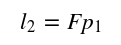
而和像点
p1 匹配的另一个像点
p2必定在对集线
l2上,所以有
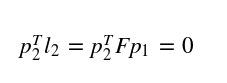
基础矩阵是一个 3×3 的矩阵,且使用的是齐次坐标系,所以可以用8个匹配的特征点来求解出基础矩阵F。这种方法称为
8点法(Eight-Point-Algorithm)。在数学上,所有对极线都穿过极点,对矩阵产生了一个约束条件。使用这个约束条件,可以只用7组匹配点进行计算。用术语来讲,就是基础矩阵有7个自由度。相应这种方法称为7点法。
代码实现如下
/********************************************************************
 * Created by 杨帮杰 on 10/7/18
 * Right to use this code in any way you want without
 * warranty, support or any guarantee of it working
 * E-mail: yangbangjie1998@qq.com
 * Association: SCAU 华南农业大学
 ********************************************************************/

#include <iostream>
#include <vector>
#include <opencv2/core.hpp>
#include <opencv2/imgproc.hpp>
#include <opencv2/highgui.hpp>
#include <opencv2/features2d.hpp>
#include <opencv2/calib3d.hpp>
#include <opencv2/objdetect.hpp>
#include <opencv2/xfeatures2d.hpp>

#define CHURCH01 "/home/jacob/图片/images/church01.jpg"
#define CHURCH02 "/home/jacob/图片/images/church02.jpg"
#define CHURCH03 "/home/jacob/图片/images/church03.jpg"

using namespace cv;
using namespace std;

int main()
{
    Mat image1= imread(CHURCH01,0);
    Mat image2= imread(CHURCH02,0);
    if (!image1.data || !image2.data)
        return 0;

    imshow("Right Image",image1);
    imshow("Left Image",image2);

    //检测并匹配SIFT描述子
    vector<KeyPoint> keypoints1;
    vector<KeyPoint> keypoints2;
    Mat descriptors1, descriptors2;

    Ptr<Feature2D> ptrFeature2D = xfeatures2d::SIFT::create(74);

    ptrFeature2D->detectAndCompute(image1, noArray(), keypoints1, descriptors1);
    ptrFeature2D->detectAndCompute(image2, noArray(), keypoints2, descriptors2);

    cout << "Number of SIFT points (1): " << keypoints1.size() << endl;
    cout << "Number of SIFT points (2): " << keypoints2.size() << endl;

    Mat imageKP;
    drawKeypoints(image1,keypoints1,imageKP,
                  Scalar(255,255,255),DrawMatchesFlags::DRAW_RICH_KEYPOINTS);
    imshow("Right SIFT Features",imageKP);

    drawKeypoints(image2,keypoints2,imageKP,
                  Scalar(255,255,255),DrawMatchesFlags::DRAW_RICH_KEYPOINTS);
    imshow("Left SIFT Features",imageKP);

    //使用交叉验证
    BFMatcher matcher(NORM_L2,true);

    vector<DMatch> matches;
    matcher.match(descriptors1,descriptors2, matches);

    cout << "Number of matched points: " << matches.size() << endl;

    // 手工选择配对成功的七组匹配,有点麻烦
    vector<DMatch> selMatches;

    selMatches.push_back(matches[8]);
    selMatches.push_back(matches[21]);
    selMatches.push_back(matches[15]);
    selMatches.push_back(matches[17]);
    selMatches.push_back(matches[22]);
    selMatches.push_back(matches[27]);
    selMatches.push_back(matches[29]);

    Mat imageMatches;
    drawMatches(image1,keypoints1,  // 1st image and its keypoints
                image2,keypoints2,  // 2nd image and its keypoints
                selMatches,         // the selected matches
                imageMatches,       // the image produced
                Scalar(255,255,255),
                Scalar(255,255,255),
                vector<char>(),
                2);

    imshow("Matches",imageMatches);

    //根据筛选出的匹配得到对应点的index
    vector<int> pointIndexes1;
    vector<int> pointIndexes2;
    for (vector<DMatch>::const_iterator it= selMatches.begin();
         it!= selMatches.end(); ++it)
    {
        pointIndexes1.push_back(it->queryIdx);
        pointIndexes2.push_back(it->trainIdx);
    }

    //将KeyPoint类型转换为Point2f类型
    //根据pointIndexes来筛选需要转换的点,相当于掩膜(Mask)
    vector<Point2f> selPoints1, selPoints2;
    KeyPoint::convert(keypoints1,selPoints1,pointIndexes1);
    KeyPoint::convert(keypoints2,selPoints2,pointIndexes2);

    //在筛选出的点的位置上画圈
    vector<Point2f>::const_iterator it= selPoints1.begin();
    while (it!=selPoints1.end())
    {
        circle(image1,*it,3,Scalar(255,255,255),2);
        ++it;
    }

    it= selPoints2.begin();
    while (it!=selPoints2.end())
    {
        circle(image2,*it,3,Scalar(255,255,255),2);
        ++it;
    }

    //根据7对匹配来计算基础矩阵
    Mat fundamental= findFundamentalMat(
        selPoints1, // points in first image
        selPoints2, // points in second image
        FM_7POINT);       // 7-point method

    cout << "F-Matrix size= " << fundamental.rows << "x" << fundamental.cols << endl;

    //根据基础矩阵的匹配点计算对极线
    vector<Vec3f> lines1;
    computeCorrespondEpilines(
        selPoints1, // image points
        1,                   // in image 1 (can also be 2)
        fundamental, // F matrix
        lines1);     // vector of epipolar lines


    //画出左右图像的对极线
    for (vector<Vec3f>::const_iterator it= lines1.begin();
         it!=lines1.end(); ++it)
    {
        line(image2,Point(0,-(*it)[2]/(*it)[1]),
            Point(image2.cols,-((*it)[2]+(*it)[0]*image2.cols)/(*it)[1]),
            Scalar(255,255,255));
    }

    vector<Vec3f> lines2;
    computeCorrespondEpilines(Mat(selPoints2),2,fundamental,lines2);
    for (vector<Vec3f>::const_iterator it= lines2.begin();
         it!=lines2.end(); ++it)
    {
        line(image1,Point(0,-(*it)[2]/(*it)[1]),
            Point(image1.cols,-((*it)[2]+(*it)[0]*image1.cols)/(*it)[1]),
            Scalar(255,255,255));
    }

    //拼接两幅图像
    Mat both(image1.rows,image1.cols+image2.cols, CV_8U);
    image1.copyTo(both.colRange(0, image1.cols));
    image2.copyTo(both.colRange(image1.cols, image1.cols+image2.cols));

    imshow("Epilines",both);

    waitKey();
    return 0;
}
结果如下
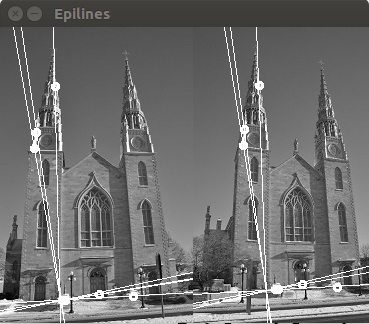
这里需要手工选出7组正确的匹配项,不然就会有严重偏差。这个是挺蛋疼的。
2.RANSAC(随机采样一致性)
使用极线约束,可以使特征点的匹配更加可靠。遵循的原则很简单:在匹配两幅图像的特征时,只接收位于对极线上的匹配项。若要判断是否满足这个条件,必须先知道基础矩阵,但计算基础矩阵又需要优质的匹配项。对于这种困境,可以使用RANSAC(Random Sample Consensus)算法来解决。
上面说到,基础矩阵的计算要求特征点的匹配是正确的,但在实际情况中是难以保证的。RANSAC的思想是:支撑集越大(这里是指符合极线约束的匹配项),那么矩阵正确的可能性越大,反之如果一个或多个随机选取的匹配项是错误的,那么基础矩阵的计算也是有问题的,支撑集会相对较少。RANSAC反复随机选取匹配项,并留下支撑集最大的矩阵作为最佳结果。
假设优质匹配项的比例是ϖ,那么选取n个优质匹配项的概率是ϖ的n次方。那么n个点至少有一个是外点的概率为
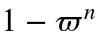
迭代k次均得不到正确模型的概率为
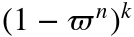
显然,迭代次数越多,这个概率就会越小。代码实现如下
/********************************************************************
 * Created by 杨帮杰 on 10/7/18
 * Right to use this code in any way you want without
 * warranty, support or any guarantee of it working
 * E-mail: yangbangjie1998@qq.com
 * Association: SCAU 华南农业大学
 ********************************************************************/

#include <iostream>
#include <vector>
#include <opencv2/core.hpp>
#include <opencv2/imgproc.hpp>
#include <opencv2/highgui.hpp>
#include <opencv2/features2d.hpp>
#include <opencv2/calib3d.hpp>


#define CHURCH01 "/home/jacob/图片/images/church01.jpg"
#define CHURCH02 "/home/jacob/图片/images/church02.jpg"
#define CHURCH03 "/home/jacob/图片/images/church03.jpg"

#define IS_REFINE_FUNDA 1
#define IS_REFINE_MATCHES 1

using namespace cv;
using namespace std;

int main()
{
    Mat image1= imread(CHURCH01,0);
    Mat image2= imread(CHURCH03,0);

    if (!image1.data || !image2.data)
        return 0;

    //检测并匹配SIFT描述子
    vector<KeyPoint> keypoints1;
    vector<KeyPoint> keypoints2;
    Mat descriptors1, descriptors2;

    Ptr<Feature2D> ptrFeature2D = xfeatures2d::SIFT::create(100);

    ptrFeature2D->detectAndCompute(image1, noArray(), keypoints1, descriptors1);
    ptrFeature2D->detectAndCompute(image2, noArray(), keypoints2, descriptors2);

    cout << "Number of SIFT points (1): " << keypoints1.size() << endl;
    cout << "Number of SIFT points (2): " << keypoints2.size() << endl;

    Mat imageKP;
    drawKeypoints(image1,keypoints1,imageKP,
                  Scalar(255,255,255),DrawMatchesFlags::DRAW_RICH_KEYPOINTS);
    imshow("Right SIFT Features",imageKP);

    drawKeypoints(image2,keypoints2,imageKP,
                  Scalar(255,255,255),DrawMatchesFlags::DRAW_RICH_KEYPOINTS);
    imshow("Left SIFT Features",imageKP);

    //使用交叉验证
    BFMatcher matcher(NORM_L2,true);

    vector<DMatch> matches;
    matcher.match(descriptors1,descriptors2, matches);

    vector<Point2f> points1, points2;

    for (vector<DMatch>::const_iterator it= matches.begin();
         it!= matches.end(); ++it)
    {
         points1.push_back(keypoints1[it->queryIdx].pt);
         points2.push_back(keypoints2[it->trainIdx].pt);
    }

    //使用RANSAC算法计算基础矩阵
    //inliers相当于一个掩膜
    vector<uchar> inliers(points1.size(),0);
    Mat fundamental= findFundamentalMat(
                points1,points2, // matching points
                inliers,         // match status (inlier or outlier)
                FM_RANSAC,
                1.0,      // distance to epipolar line
                0.99     // confidence probability
                );

    //提取合格的匹配项
    vector<uchar>::const_iterator itIn= inliers.begin();
    vector<DMatch>::const_iterator itM= matches.begin();
    vector<DMatch> outMatches;
    // for all matches
    for ( ;itIn!= inliers.end(); ++itIn, ++itM)
    {
        if (*itIn == true)
        {
            outMatches.push_back(*itM);
        }
    }

    if (IS_REFINE_FUNDA || IS_REFINE_MATCHES)
    {
        //使用RANSAC得出的高质量匹配点再次估算基础矩阵
        points1.clear();
        points2.clear();

        //得到高质量匹配点的坐标
        for (vector<DMatch>::const_iterator it= outMatches.begin();
             it!= outMatches.end(); ++it)
        {
             points1.push_back(keypoints1[it->queryIdx].pt);
             points2.push_back(keypoints2[it->trainIdx].pt);
        }

        //用八点法计算基础矩阵
        fundamental= findFundamentalMat(
            points1,points2, // matching points
            FM_8POINT); // 8-point method

        if (IS_REFINE_MATCHES)
        {
            //用基础矩阵来矫正匹配点的位置
            vector<Point2f> newPoints1, newPoints2;

            correctMatches(fundamental,             // F matrix
                           points1, points2,        // original position
                           newPoints1, newPoints2); // new position

            for (int i=0; i< points1.size(); i++)
            {

                cout << "(" << keypoints1[outMatches[i].queryIdx].pt.x
                     << "," << keypoints1[outMatches[i].queryIdx].pt.y
                     << ") -> ";

                cout << "(" << newPoints1[i].x
                     << "," << newPoints1[i].y << endl;

                cout << "(" << keypoints2[outMatches[i].trainIdx].pt.x
                     << "," << keypoints2[outMatches[i].trainIdx].pt.y
                     << ") -> ";

                cout << "(" << newPoints2[i].x
                     << "," << newPoints2[i].y << endl;

                keypoints1[outMatches[i].queryIdx].pt.x= newPoints1[i].x;
                keypoints1[outMatches[i].queryIdx].pt.y= newPoints1[i].y;

                keypoints2[outMatches[i].trainIdx].pt.x= newPoints2[i].x;
                keypoints2[outMatches[i].trainIdx].pt.y= newPoints2[i].y;
            }
        }
    }


    Mat imageMatches;
    drawMatches(image1,keypoints1,  // 1st image and its keypoints
                image2,keypoints2,  // 2nd image and its keypoints
                outMatches,         // the matches
                imageMatches,       // the image produced
                Scalar(255,255,255),  // color of the lines
                Scalar(255,255,255),  // color of the keypoints
                vector<char>(),
                2);

    imshow("Matches",imageMatches);

    for (vector<DMatch>::const_iterator it= matches.begin();
         it!= matches.end(); ++it)
    {
         //得到左图像特征点的位置并画圆
         float x= keypoints1[it->queryIdx].pt.x;
         float y= keypoints1[it->queryIdx].pt.y;
         points1.push_back(keypoints1[it->queryIdx].pt);
         circle(image1,Point(x,y),3,Scalar(255,255,255),3);

         //得到右图像特征点的位置并画圆
         x= keypoints2[it->trainIdx].pt.x;
         y= keypoints2[it->trainIdx].pt.y;
         points2.push_back(keypoints2[it->trainIdx].pt);
         circle(image2,Point(x,y),3,Scalar(255,255,255),3);

    }

    //画出两幅图像的对极线
    vector<Vec3f> lines1;
    computeCorrespondEpilines(points1,1,fundamental,lines1);

    for (vector<Vec3f>::const_iterator it= lines1.begin();
             it!=lines1.end(); ++it)
    {
        line(image2,Point(0,-(*it)[2]/(*it)[1]),
            Point(image2.cols,-((*it)[2]+(*it)[0]*image2.cols)/(*it)[1]),
            Scalar(255,255,255));
    }

    vector<Vec3f> lines2;
    computeCorrespondEpilines(points2,2,fundamental,lines2);

    for (vector<Vec3f>::const_iterator it= lines2.begin();
             it!=lines2.end(); ++it)
    {
        line(image1,Point(0,-(*it)[2]/(*it)[1]),
            Point(image1.cols,-((*it)[2]+(*it)[0]*image1.cols)/(*it)[1]),
            Scalar(255,255,255));
    }

    imshow("Right Image Epilines (RANSAC)",image1);
    imshow("Left Image Epilines (RANSAC)",image2);

    waitKey();
    return 0;
}
结果如下
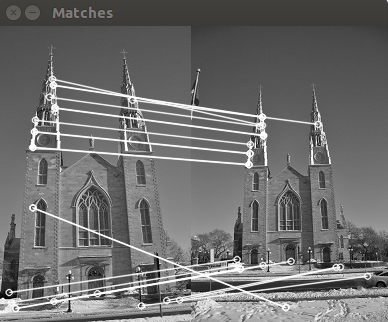
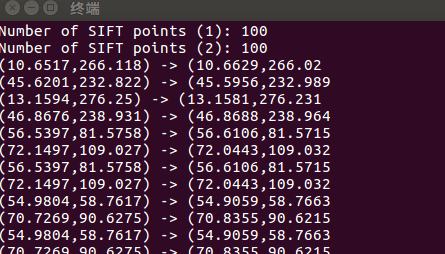
可以看到,仍然会有不正确的匹配项,这主要是因为匹配点刚好在对极线上。可以通过混合使用之前提到过的一些匹配策略,如比率检测法,匹配差值的阈值化等方法继续改善。
References:
SLAM入门之视觉里程计(4):基础矩阵的估计
SLAM入门之视觉里程计(3):两视图对极约束 基础矩阵
opencv计算机视觉编程攻略(第三版) —— Robert Laganiere
发布者:全栈程序员-站长,转载请注明出处:https://javaforall.net/107275.html原文链接:https://javaforall.net



