
大家好,又见面了,我是全栈君。
1:Nginx的相关概念知识:
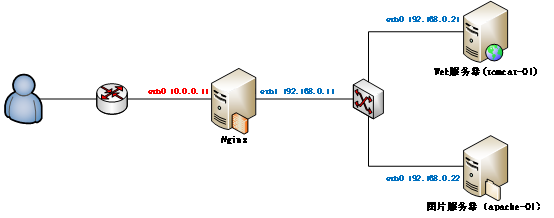
1.1:反向代理:
反向代理(Reverse Proxy)方式是指以代理服务器来接受internet上的连接请求,然后将请求转发给内部网络上的服务器,并将从服务器上得到的结果返回给internet上请求连接的客户端,此时代理服务器对外就表现为一个服务器。

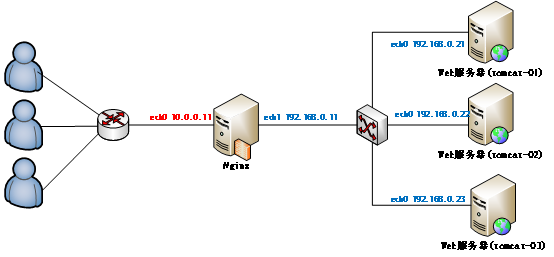
1.2:负载均衡:
负载均衡,英文名称为Load Balance,是指建立在现有网络结构之上,并提供了一种廉价有效透明的方法扩展网络设备和服务器的带宽、增加吞吐量、加强网络数据处理能力、提高网络的灵活性和可用性。其原理就是数据流量分摊到多个服务器上执行,减轻每台服务器的压力,多台服务器共同完成工作任务,从而提高了数据的吞吐量。
2:Nginx的安装操作:
Nginx的官网:http://nginx.org/
2.1:将下载好的Nginx上传到虚拟机上面,然后进行解压缩操作,上传过程省略,请自行脑补:
[root@master package]# tar -zxvf nginx-1.8.1.tar.gz -C /home/hadoop/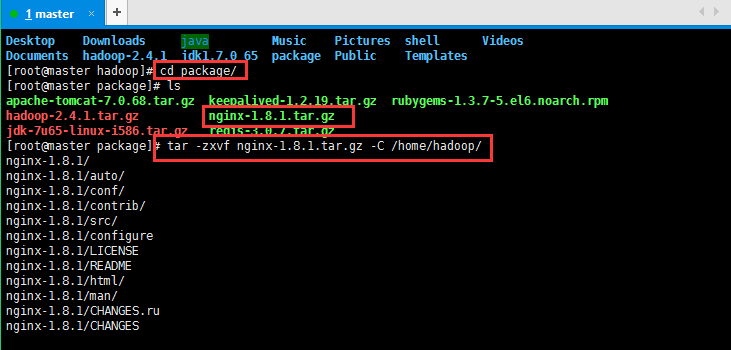
2.2:编译Ngnix源码目录:
进入Ngnix源码目录:[root@master hadoop]# cd /home/hadoop/nginx-1.8.1/
检查安装环境,并指定将来要安装的路径:
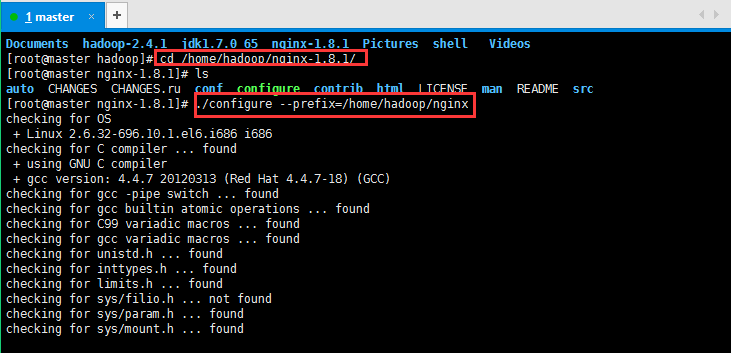
#缺包报错
checking for OS
+ Linux 2.6.32-696.10.1.el6.i686 i686
checking for C compiler … found
+ using GNU C compiler
+ gcc version: 4.4.7 20120313 (Red Hat 4.4.7-18) (GCC)
checking for gcc -pipe switch … found
checking for gcc builtin atomic operations … found
checking for C99 variadic macros … found
checking for gcc variadic macros … found
checking for unistd.h … found
checking for inttypes.h … found
checking for limits.h … found
checking for sys/filio.h … not found
checking for sys/param.h … found
checking for sys/mount.h … found
checking for sys/statvfs.h … found
checking for crypt.h … found
checking for Linux specific features
checking for epoll … found
checking for EPOLLRDHUP … found
checking for O_PATH … not found
checking for sendfile() … found
checking for sendfile64() … found
checking for sys/prctl.h … found
checking for prctl(PR_SET_DUMPABLE) … found
checking for sched_setaffinity() … found
checking for crypt_r() … found
checking for sys/vfs.h … found
checking for nobody group … found
checking for poll() … found
checking for /dev/poll … not found
checking for kqueue … not found
checking for crypt() … not found
checking for crypt() in libcrypt … found
checking for F_READAHEAD … not found
checking for posix_fadvise() … found
checking for O_DIRECT … found
checking for F_NOCACHE … not found
checking for directio() … not found
checking for statfs() … found
checking for statvfs() … found
checking for dlopen() … not found
checking for dlopen() in libdl … found
checking for sched_yield() … found
checking for SO_SETFIB … not found
checking for SO_ACCEPTFILTER … not found
checking for TCP_DEFER_ACCEPT … found
checking for TCP_KEEPIDLE … found
checking for TCP_FASTOPEN … not found
checking for TCP_INFO … found
checking for accept4() … found
checking for eventfd() … found
checking for int size … 4 bytes
checking for long size … 4 bytes
checking for long long size … 8 bytes
checking for void * size … 4 bytes
checking for uint64_t … found
checking for sig_atomic_t … found
checking for sig_atomic_t size … 4 bytes
checking for socklen_t … found
checking for in_addr_t … found
checking for in_port_t … found
checking for rlim_t … found
checking for uintptr_t … uintptr_t found
checking for system byte ordering … little endian
checking for size_t size … 4 bytes
checking for off_t size … 8 bytes
checking for time_t size … 4 bytes
checking for setproctitle() … not found
checking for pread() … found
checking for pwrite() … found
checking for sys_nerr … found
checking for localtime_r() … found
checking for posix_memalign() … found
checking for memalign() … found
checking for mmap(MAP_ANON|MAP_SHARED) … found
checking for mmap(“/dev/zero”, MAP_SHARED) … found
checking for System V shared memory … found
checking for POSIX semaphores … not found
checking for POSIX semaphores in libpthread … found
checking for struct msghdr.msg_control … found
checking for ioctl(FIONBIO) … found
checking for struct tm.tm_gmtoff … found
checking for struct dirent.d_namlen … not found
checking for struct dirent.d_type … found
checking for sysconf(_SC_NPROCESSORS_ONLN) … found
checking for openat(), fstatat() … found
checking for getaddrinfo() … found
checking for PCRE library … not found
checking for PCRE library in /usr/local/ … not found
checking for PCRE library in /usr/include/pcre/ … not found
checking for PCRE library in /usr/pkg/ … not found
checking for PCRE library in /opt/local/ … not found./configure: error: the HTTP rewrite module requires the PCRE library.
You can either disable the module by using –without-http_rewrite_module
option, or install the PCRE library into the system, or build the PCRE library
statically from the source with nginx by using –with-pcre=<path> option.
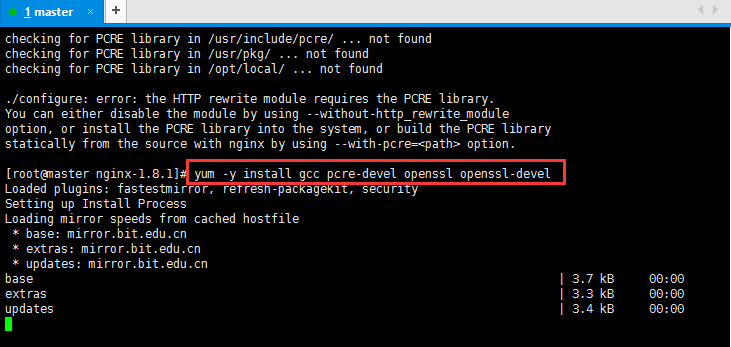
然后安装一下缺少的包:
[root@master nginx-1.8.1]# yum -y install gcc pcre-devel openssl openssl-devel
解决完错误以后再次执行,检查安装环境,并指定将来要安装的路径:
[root@master nginx-1.8.1]# ./configure –prefix=/home/hadoop/nginx
[root@master nginx-1.8.1]# ./configure –prefix=/home/hadoop/nginx
checking for OS
+ Linux 2.6.32-696.10.1.el6.i686 i686
checking for C compiler … found
+ using GNU C compiler
+ gcc version: 4.4.7 20120313 (Red Hat 4.4.7-18) (GCC)
checking for gcc -pipe switch … found
checking for gcc builtin atomic operations … found
checking for C99 variadic macros … found
checking for gcc variadic macros … found
checking for unistd.h … found
checking for inttypes.h … found
checking for limits.h … found
checking for sys/filio.h … not found
checking for sys/param.h … found
checking for sys/mount.h … found
checking for sys/statvfs.h … found
checking for crypt.h … found
checking for Linux specific features
checking for epoll … found
checking for EPOLLRDHUP … found
checking for O_PATH … not found
checking for sendfile() … found
checking for sendfile64() … found
checking for sys/prctl.h … found
checking for prctl(PR_SET_DUMPABLE) … found
checking for sched_setaffinity() … found
checking for crypt_r() … found
checking for sys/vfs.h … found
checking for nobody group … found
checking for poll() … found
checking for /dev/poll … not found
checking for kqueue … not found
checking for crypt() … not found
checking for crypt() in libcrypt … found
checking for F_READAHEAD … not found
checking for posix_fadvise() … found
checking for O_DIRECT … found
checking for F_NOCACHE … not found
checking for directio() … not found
checking for statfs() … found
checking for statvfs() … found
checking for dlopen() … not found
checking for dlopen() in libdl … found
checking for sched_yield() … found
checking for SO_SETFIB … not found
checking for SO_ACCEPTFILTER … not found
checking for TCP_DEFER_ACCEPT … found
checking for TCP_KEEPIDLE … found
checking for TCP_FASTOPEN … not found
checking for TCP_INFO … found
checking for accept4() … found
checking for eventfd() … found
checking for int size … 4 bytes
checking for long size … 4 bytes
checking for long long size … 8 bytes
checking for void * size … 4 bytes
checking for uint64_t … found
checking for sig_atomic_t … found
checking for sig_atomic_t size … 4 bytes
checking for socklen_t … found
checking for in_addr_t … found
checking for in_port_t … found
checking for rlim_t … found
checking for uintptr_t … uintptr_t found
checking for system byte ordering … little endian
checking for size_t size … 4 bytes
checking for off_t size … 8 bytes
checking for time_t size … 4 bytes
checking for setproctitle() … not found
checking for pread() … found
checking for pwrite() … found
checking for sys_nerr … found
checking for localtime_r() … found
checking for posix_memalign() … found
checking for memalign() … found
checking for mmap(MAP_ANON|MAP_SHARED) … found
checking for mmap(“/dev/zero”, MAP_SHARED) … found
checking for System V shared memory … found
checking for POSIX semaphores … not found
checking for POSIX semaphores in libpthread … found
checking for struct msghdr.msg_control … found
checking for ioctl(FIONBIO) … found
checking for struct tm.tm_gmtoff … found
checking for struct dirent.d_namlen … not found
checking for struct dirent.d_type … found
checking for sysconf(_SC_NPROCESSORS_ONLN) … found
checking for openat(), fstatat() … found
checking for getaddrinfo() … found
checking for PCRE library … found
checking for PCRE JIT support … not found
checking for md5 in system md library … not found
checking for md5 in system md5 library … not found
checking for md5 in system OpenSSL crypto library … found
checking for sha1 in system md library … not found
checking for sha1 in system OpenSSL crypto library … found
checking for zlib library … found
creating objs/MakefileConfiguration summary
+ using system PCRE library
+ OpenSSL library is not used
+ md5: using system crypto library
+ sha1: using system crypto library
+ using system zlib librarynginx path prefix: “/home/hadoop/nginx”
nginx binary file: “/home/hadoop/nginx/sbin/nginx”
nginx configuration prefix: “/home/hadoop/nginx/conf”
nginx configuration file: “/home/hadoop/nginx/conf/nginx.conf”
nginx pid file: “/home/hadoop/nginx/logs/nginx.pid”
nginx error log file: “/home/hadoop/nginx/logs/error.log”
nginx http access log file: “/home/hadoop/nginx/logs/access.log”
nginx http client request body temporary files: “client_body_temp”
nginx http proxy temporary files: “proxy_temp”
nginx http fastcgi temporary files: “fastcgi_temp”
nginx http uwsgi temporary files: “uwsgi_temp”
nginx http scgi temporary files: “scgi_temp”
2.3:编译安装(make是编译,make install是安装):
[root@master hadoop]# make && make install安装不是一帆风顺的,开始将make && make install写成了make && made install,肯定没有安装成功了,然后我再执行make && make install就出现下面的情况了,然后我重新./configure –prefix=/usr/local/nginx检查安装环境,并指定将来要安装的路径,最后再make && made install,貌似正常编译,安装了,虽然我也不是很清楚,这里贴一下吧先,安装好以后可以测试是否正常:
[root@master hadoop]# make && make install
make: *** No targets specified and no makefile found. Stop.
[root@master hadoop]# make install
make: *** No rule to make target `install’. Stop.
[root@master hadoop]# make && make install
make: *** No targets specified and no makefile found. Stop.
[root@master hadoop]# ./configure –prefix=/home/hadoop/nginx
bash: ./configure: No such file or directory
[root@master hadoop]# cd /home/hadoop/nginx-1.8.1/
[root@master nginx-1.8.1]# ls
auto CHANGES CHANGES.ru conf configure contrib html LICENSE Makefile man objs README src
[root@master nginx-1.8.1]# ./configure –prefix=/home/hadoop/nginx
2.4:安装好以后测试是否正常:
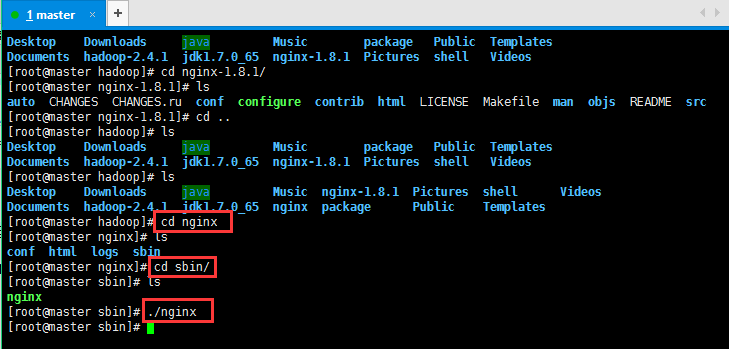
安装好以后指定的目录会生成一些文件,如我的/home/hadoop/nginx目录下面:
启动Nginx的命令:[root@master sbin]# ./nginx
查看端口是否有ngnix进程监听:[root@master sbin]# netstat -ntlp | grep 80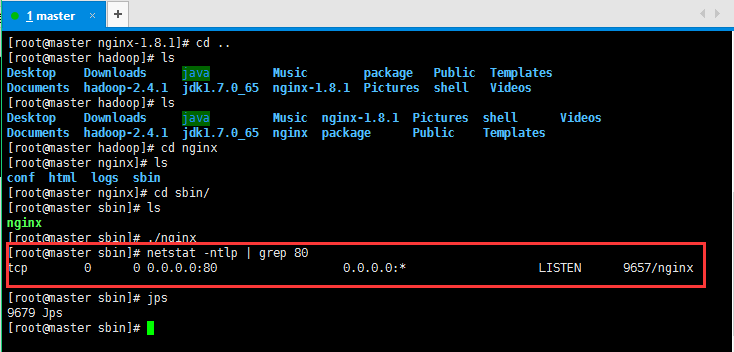
3:配置Nginx:
3.1:配置反向代理:
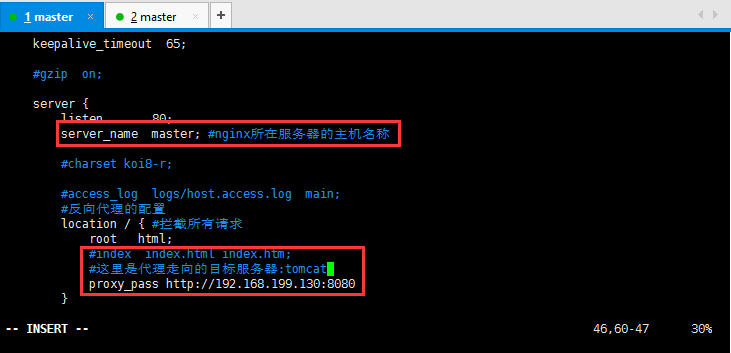
修改Nginx配置文件:
[root@master conf]# cd /home/hadoop/nginx/conf/
[root@master conf]# vim nginx.conf
  server {
        listen       80;
        server_name  master; #nginx所在服务器的主机名称

        #charset koi8-r;

        #access_log  logs/host.access.log  main;
        #反向代理的配置
        location / { #拦截所有请求
            root   html;
            #index  index.html index.htm;
            #这里是代理走向的目标服务器:tomcat
            proxy_pass http://192.168.199.130:8080;
        }
具体配置如下所示:
下面贴图这句话后面proxy_pass http://192.168.199.130:8080;
少了一个分号导致后面启动nginx的时候出现错误:
自己都操点心就可以了:
[root@master sbin]# ./nginx
nginx: [emerg] unexpected “}” in /home/hadoop/nginx/conf/nginx.conf:48
4:安装Tomcat,将下载好的tomcat安装包上传到虚拟机,过程省略,然后解压缩操作:
[root@slaver1 package]# tar -zxvf apache-tomcat-7.0.68.tar.gz -C /home/hadoop/
解压缩好以后启动Tomcat:
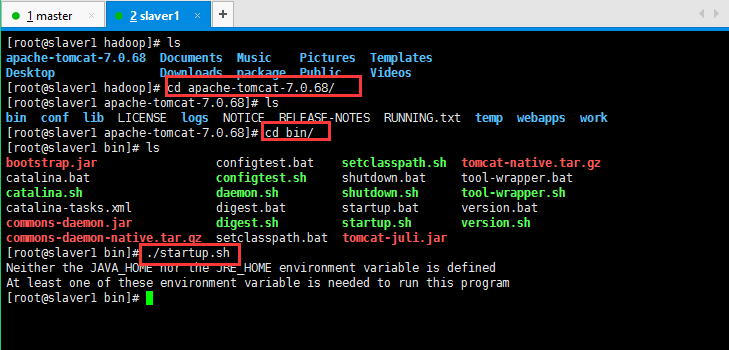
然后没启动起来,貌似说我的jdk没有配置啥的,现在配置一下,配置过程省略,大概如上传压缩包,解压缩,然后配置环境变量:
vim /etc/profile配置好以后使其立即生效:source /etc/profile,最后检查一下是否安装成功:java/javac/java -version
然后启动tomcat,如下所示:
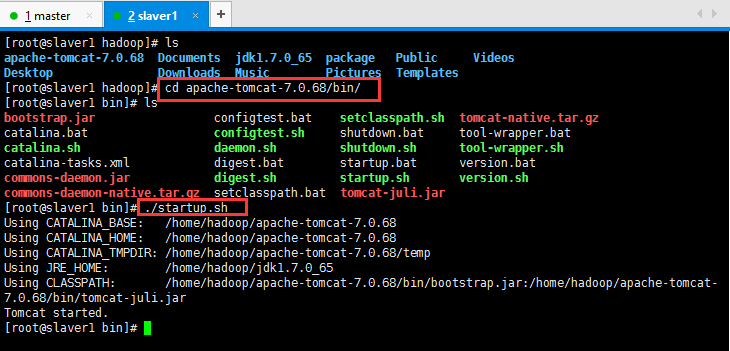
启动好,可以检查一下是否启动成功:
浏览器输入自己的http://192.168.199.131:8080/
如果无法访问,可能是防火墙的原因:service iptables stop关闭防火墙;service iptables status查看防火墙是否关闭成功;
5:现在体现Nginx的功能了,我在master节点安装的Nginx,然后在slaver1节点安装的tomcat:
然后访问master节点,会跳转到slaver1的tomcat页面:
http://192.168.199.130/自己的master节点的名称;
6:Nginx的动静分离:
动态资源 index.jsp
location ~ .*\.(jsp|do|action)$ {
proxy_pass http://ip地址:8080;
}
静态资源:
location ~ .*\.(html|js|css|gif|jpg|jpeg|png)$ {
expires 3d;
}
负载均衡:
在http这个节下面配置一个叫upstream的,后面的名字可以随意取,但是要和location下的proxy_pass http://后的保持一致。
http {
是在http里面的, 已有http, 不是在server里,在server外面
upstream tomcats {
server 192.168.199.130:8080 weight=1;#weight表示多少个
server 192.168.199.131:8080 weight=1;
server 192.168.199.132:8080 weight=1;
}
#卸载server里
#~代表是大小写敏感,.代表是任何非回车字符,*代表多个。
location ~ .*\.(jsp|do|action) {
proxy_pass http://tomcats; #tomcats是后面的tomcat服务器组的逻辑组号
}
}
待续……
发布者:全栈程序员-站长,转载请注明出处:https://javaforall.net/107992.html原文链接:https://javaforall.net


