
很多人可能用过如下的功能:

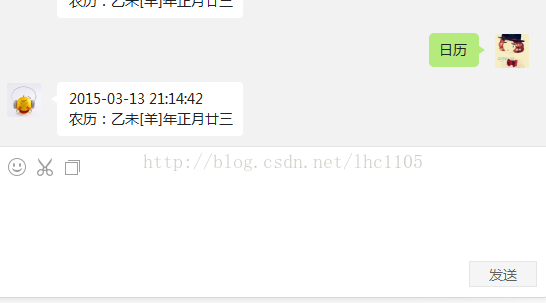
我向微信号发个字符,然后后台去解析字符,拆出其中的关键字,然后去数据库查询是否开启此项服务,如果服务开启,则返回给用户调用此服务的结果。
最近两天开始做的服务有,天气查询,日历,快递,火车,黄金。。。等六个服务做成接口,今天要分析的是这里面唯一没有调用外部API接口的服务。
首先,我们要写好一个计算农历的方法,:
#region 获取农历方法


        ///<summary>
        /// 实例化一个 ChineseLunisolarCalendar
        ///</summary>
        private static ChineseLunisolarCalendar ChineseCalendar = new ChineseLunisolarCalendar();

        ///<summary>
        /// 十天干
        ///</summary>
        private static string[] tg = { "甲", "乙", "丙", "丁", "戊", "己", "庚", "辛", "壬", "癸" };

        ///<summary>
        /// 十二地支
        ///</summary>
        private static string[] dz = { "子", "丑", "寅", "卯", "辰", "巳", "午", "未", "申", "酉", "戌", "亥" };

        ///<summary>
        /// 十二生肖
        ///</summary>
        private static string[] sx = { "鼠", "牛", "虎", "免", "龙", "蛇", "马", "羊", "猴", "鸡", "狗", "猪" };

        ///<summary>
        /// 返回农历天干地支年
        ///</summary>
        ///<param name="year">农历年</param>
        ///<return s></return s>
        public static string GetLunisolarYear(int year)
        {
            if (year > 3)
            {
                int tgIndex = (year - 4) % 10;
                int dzIndex = (year - 4) % 12;

                return string.Concat(tg[tgIndex], dz[dzIndex], "[", sx[dzIndex], "]");
            }

            throw new ArgumentOutOfRangeException("无效的年份!");
        }

        ///<summary>
        /// 农历月
        ///</summary>

        ///<return s></return s>
        private static string[] months = { "正", "二", "三", "四", "五", "六", "七", "八", "九", "十", "十一", "十二(腊)" };

        ///<summary>
        /// 农历日
        ///</summary>
        private static string[] days1 = { "初", "十", "廿", "三" };
        ///<summary>
        /// 农历日
        ///</summary>
        private static string[] days = { "一", "二", "三", "四", "五", "六", "七", "八", "九", "十" };


        ///<summary>
        /// 返回农历月
        ///</summary>
        ///<param name="month">月份</param>
        ///<return s></return s>
        public static string GetLunisolarMonth(int month)
        {
            if (month < 13 && month > 0)
            {
                return months[month - 1];
            }

            throw new ArgumentOutOfRangeException("无效的月份!");
        }

        ///<summary>
        /// 返回农历日
        ///</summary>
        ///<param name="day">天</param>
        ///<return s></return s>
        public static string GetLunisolarDay(int day)
        {
            if (day > 0 && day < 32)
            {
                if (day != 20 && day != 30)
                {
                    return string.Concat(days1[(day - 1) / 10], days[(day - 1) % 10]);
                }
                else
                {
                    return string.Concat(days[(day - 1) / 10], days1[1]);
                }
            }

            throw new ArgumentOutOfRangeException("无效的日!");
        }


        ///<summary>
        /// 根据公历获取农历日期
        ///</summary>
        ///<param name="datetime">公历日期</param>
        ///<return s></return s>
        public static string GetChineseDateTime(DateTime datetime)
        {
            int year = ChineseCalendar.GetYear(datetime);
            int month = ChineseCalendar.GetMonth(datetime);
            int day = ChineseCalendar.GetDayOfMonth(datetime);
            //获取闰月, 0 则表示没有闰月
            int leapMonth = ChineseCalendar.GetLeapMonth(year);

            bool isleap = false;

            if (leapMonth > 0)
            {
                if (leapMonth == month)
                {
                    //闰月
                    isleap = true;
                    month--;
                }
                else if (month > leapMonth)
                {
                    month--;
                }
            }

            return string.Concat(GetLunisolarYear(year), "年", isleap ? "闰" : string.Empty, GetLunisolarMonth(month), "月", GetLunisolarDay(day));
        }


        #endregion
接着,拼接好返回的字符:
Console.Write(DateTime.Now.ToString("yyyy-MM-dd hh:mm:ss") + "\r\n" + "农历为:"+GetChineseDateTime(DateTime.Now));
为了测试外部调用的情况,我们可以这样,一个ajax过来,然后提交到handler里面,handler调用这些接口来测试下。
需要注意的是,
1,拼接好的字符串里面的换行符最好是HTML标签中的<br/>,不使用\n;
2,调用百度等大型开发平台的API接口的时候,对于返回的JSON,处理JSON转对象的时候,要注意JSON里面数组都要变成LIST,然后再调用自己构造的泛型方法去转换。
下面分享一些私人手藏的接口:
http://www.djdkx.com/open/randxml
http://api.map.baidu.com/telematics/v3/weather?location=%E5%8C%97%E4%BA%AC&output=json&ak=这里填写自己的AK
http://www.twototwo.cn/train/QueryTrainScheduleByNumber.aspx
http://www.chepiao100.com/my/doc/checi.html
http://www.haoservice.com/apilist/
http://www.bejson.com/go.html?u=http://www.bejson.com/webInterface.html
网上也有很多付费的接口,另外,今天做黄金查询的时候,发现了个聚合数据也不错哟~
发布者:全栈程序员-站长,转载请注明出处:https://javaforall.net/109523.html原文链接:https://javaforall.net




