
大家好,又见面了,我是你们的朋友全栈君。如果您正在找激活码,请点击查看最新教程,关注关注公众号 “全栈程序员社区” 获取激活教程,可能之前旧版本教程已经失效.最新Idea2022.1教程亲测有效,一键激活。
Jetbrains全系列IDE使用 1年只要46元 售后保障 童叟无欺
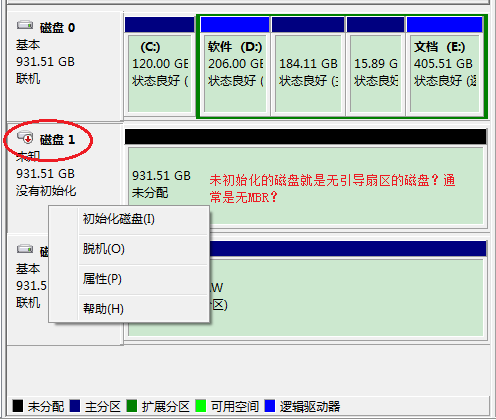
新买来的硬盘是未初始化的,以我的理解就是没有引导扇区的,通常是没有MBR,如下图磁盘1,右边有大小,但显示“未分配”,
左边显示“没有初始化”, 点鼠标右键就可以【初始化磁盘】。

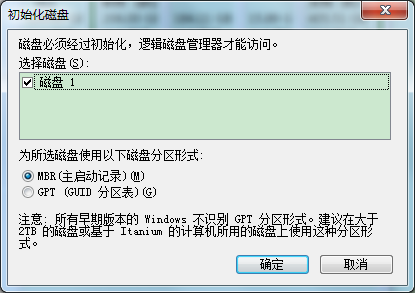
初始化时可以选择MBR和GPT, MBR方式顶多支持2T硬盘的。
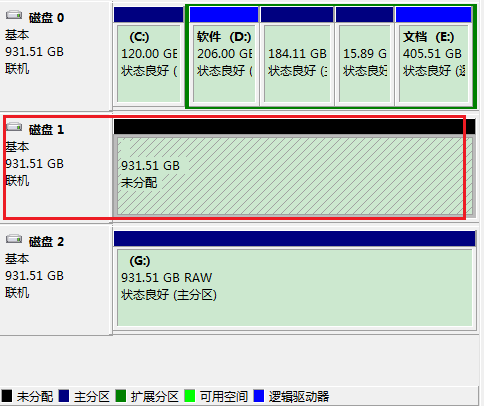
初始化后
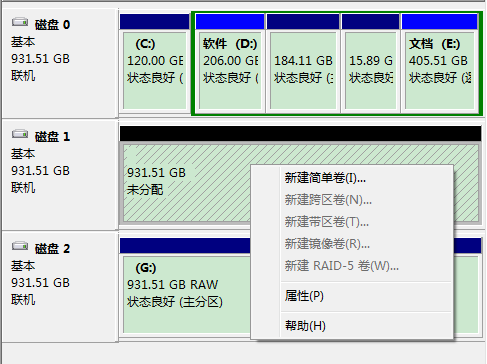
初始化后可以新建简单卷了,之前是不行的:
CreateDisk(1, 3) 就是把磁盘1分为3个分区
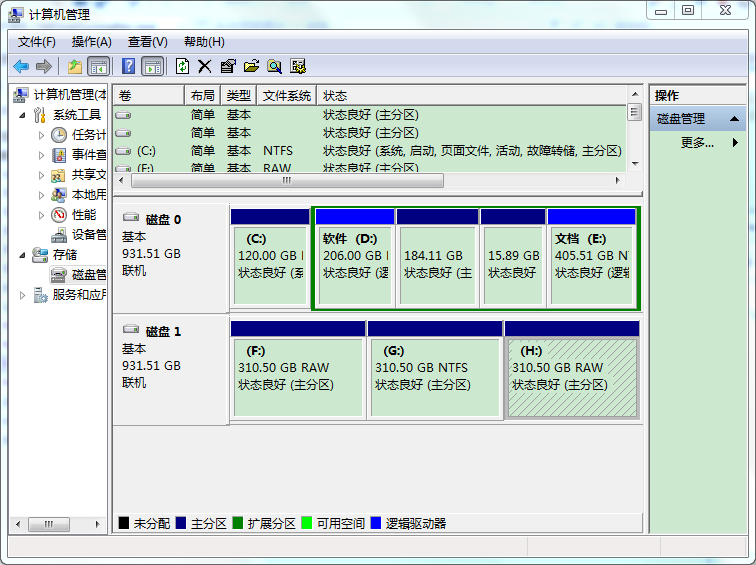
奇怪,如果只分1个区,就是自动以NTFS格式化掉, 而分3个区,还会提示是否格式化。
如果想回到刚买回来的空白状态怎么办呢? 用DestroyDisk()就可以了
代码:
CPP:CMDiskManager.cpp
#include "stdafx.h"
#include "CMDiskManager.h"

CMDiskManager::CMDiskManager(){}

//获取磁盘大小,单位是MB
int CMDiskManager::GetDiskSize(DWORD vDiskNo)
{
	HANDLE hDevice;               // handle to the drive to be examined
	BOOL bResult;                 // results flag
	DWORD junk;                   // discard results

	char diskPath[256];				//磁盘内部路径
	//生成磁盘内部路径
	sprintf_s(diskPath, "\\\\.\\PhysicalDrive%d", vDiskNo);

	hDevice = CreateFile(TEXT(diskPath),  // drive 或者 用"\\\\.\\PhysicalDrive0"  代表第一块磁盘
		GENERIC_READ,                // no access to the drive
		FILE_SHARE_READ | // share mode
		FILE_SHARE_WRITE,
		NULL,             // default security attributes
		OPEN_EXISTING,    // disposition
		0,                // file attributes
		NULL);            // do not copy file attributes

	if (hDevice == INVALID_HANDLE_VALUE) // cannot open the drive
	{
		return (FALSE);
	}

	GET_LENGTH_INFORMATION pdg;
	bResult = DeviceIoControl(hDevice,  // device to be queried
		IOCTL_DISK_GET_LENGTH_INFO,  // operation to perform
		NULL, 0, // no input buffer
		&pdg, sizeof(pdg),     // output buffer
		&junk,                 // # bytes returned
		(LPOVERLAPPED)NULL);  // synchronous I/O

	CloseHandle(hDevice);

/*	INT64 nUseSize = disk_len.Length.QuadPart;
	INT64 sizeGB = nUseSize / 1014 / 1024 / 1024;
	CString szSize;
	szSize.Format(L"C盘大小 %I64d GB", sizeGB);
	*/
	int MB = pdg.Length.QuadPart >> 20;
	//CString s;
	//s.Format("C盘大小 %f GB", MB/1024.0);
	//AfxMessageBox(s, 0, MB_OK);
	//float x = (float) MB ;
	return MB  ;
}


/*
获取磁盘分区个数
vDiskNo:磁盘序号
*/
int CMDiskManager::GetPartNum(DWORD vDiskNo)
{
	char diskPath[256];				//磁盘内部路径
	//生成磁盘内部路径
	sprintf_s(diskPath, "\\\\.\\PhysicalDrive%d", vDiskNo);
	HANDLE hDevice;               //硬盘句柄 handle to the drive to be examined
	BOOL result;                  //结果标志 results flag
	DWORD readed;                 // discard results

	hDevice = CreateFile(
		diskPath,
		GENERIC_READ | GENERIC_WRITE,
		FILE_SHARE_READ | FILE_SHARE_WRITE,
		NULL,           //default security attributes
		OPEN_EXISTING, // disposition
		0,              // file attributes
		NULL
		);
	if (hDevice == INVALID_HANDLE_VALUE) // cannot open the drive
	{
		fprintf(stderr, "CreateFile() Error: %ld\n", GetLastError());
		return int(-1);
	}

	DRIVE_LAYOUT_INFORMATION_EX* dl;
	DWORD tSize = 0x4000; // sizeof(DRIVE_LAYOUT_INFORMATION_EX) * 10;
	dl = (DRIVE_LAYOUT_INFORMATION_EX*)malloc(tSize);
	if (NULL == dl)
	{
		(void)CloseHandle(hDevice);
		return (int)-2;
	}

	result = DeviceIoControl(
		hDevice,
		IOCTL_DISK_GET_DRIVE_LAYOUT_EX,
		NULL,
		0,
		dl,
		tSize,
		&readed,
		NULL
		);

	if (!result)
	{
		fprintf(stderr, "IOCTL_DISK_GET_DRIVE_LAYOUT_EX Error: %ld\n", GetLastError());
		(void)CloseHandle(hDevice);
		return int(-3);
	}

	CString tPartitionStyle = "RAW";
	switch (dl->PartitionStyle){
	case 0:
		tPartitionStyle = "MBR";
		break;
	case 1:
		tPartitionStyle = "GPT";
		break;
	}

	//printf("dl->PartitionCount = %d", dl->PartitionCount);
	TRACE("dl->PartitionCount = %d, tPartitionStyle:%s \n", dl->PartitionCount, tPartitionStyle.GetBuffer());

	//printf("dl->PartitionCount = %d", dl->PartitionCount);
	int tRet = dl->PartitionCount/4;
	//TRACE("dl->PartitionCount tRet = %d", tRet);

	free(dl);
	(void)CloseHandle(hDevice);

	return tRet;
}

//读MBR信息
BOOL CMDiskManager::ReadMBR(int vDiskNo, LPVOID *pBuffer)
{
	HANDLE hDevice;
	DWORD dwSize;
	DWORD dwOverRead;
	BOOL bRet = TRUE;
	char diskPath[256];				//磁盘内部路径
	//生成磁盘内部路径
	sprintf_s(diskPath, "\\\\.\\PhysicalDrive%d", vDiskNo);

	hDevice = CreateFile(TEXT(diskPath),
		GENERIC_READ | GENERIC_WRITE,
		FILE_SHARE_READ | FILE_SHARE_WRITE,
		NULL,
		OPEN_EXISTING,
		0,
		NULL);
	if (hDevice == INVALID_HANDLE_VALUE) {
		TRACE("Open \\\\.\\PhysicalDrive failed. Error=%u\n", GetLastError());
		return FALSE;
	}

	if (!DeviceIoControl(hDevice, FSCTL_LOCK_VOLUME, NULL, 0, NULL, 0, &dwSize, NULL)) {
		CloseHandle(hDevice);
		TRACE("FSCTL_LOCK_VOLUME \\\\.\\PhysicalDrive0 failed. Error=%u\n", GetLastError());
		return FALSE;
	}

	DISK_GEOMETRY Geometry;
	if (!DeviceIoControl(hDevice, IOCTL_DISK_GET_DRIVE_GEOMETRY, NULL, 0, &Geometry, sizeof(DISK_GEOMETRY), &dwSize, NULL)) {
		bRet = FALSE;
		TRACE("IOCTL_DISK_GET_DRIVE_GEOMETRY \\\\.\\PhysicalDrive0 failed. Error=%u\n", GetLastError());
		goto _out;
	}

	*pBuffer = (LPVOID)GlobalAlloc(GPTR, Geometry.BytesPerSector);
	if (*pBuffer) {
		if (!ReadFile(hDevice, *pBuffer, Geometry.BytesPerSector, &dwOverRead, NULL)) {
			printf("ReadFile \\\\.\\PhysicalDrive %u bytes failed. Error=%u\n", Geometry.BytesPerSector, GetLastError());
			bRet = FALSE;
		}
	}

_out:
	DeviceIoControl(hDevice, FSCTL_UNLOCK_VOLUME, NULL, 0, NULL, 0, &dwSize, NULL);
	CloseHandle(hDevice);
	return bRet;

}


/*
获取磁盘分区信息
vDiskNo:磁盘序号
*/
DWORD CMDiskManager::GetLayoutInfo(DWORD vDiskNo)
{
	char diskPath[256];				//磁盘内部路径
	//生成磁盘内部路径
	sprintf_s(diskPath, "\\\\.\\PhysicalDrive%d", vDiskNo);
	HANDLE hDevice;               //硬盘句柄 handle to the drive to be examined
	BOOL result;                  //结果标志 results flag
	DWORD readed;                 // discard results

	hDevice = CreateFile(
		diskPath,
		GENERIC_READ | GENERIC_WRITE,
		FILE_SHARE_READ | FILE_SHARE_WRITE,
		NULL,           //default security attributes
		OPEN_EXISTING, // disposition
		0,              // file attributes
		NULL
		);
	if (hDevice == INVALID_HANDLE_VALUE) // cannot open the drive
	{
		fprintf(stderr, "CreateFile() Error: %ld\n", GetLastError());
		return DWORD(-1);
	}

	DRIVE_LAYOUT_INFORMATION_EX* dl;
	DWORD tSize = 0x4000; // sizeof(DRIVE_LAYOUT_INFORMATION_EX) * 10;
	dl = (DRIVE_LAYOUT_INFORMATION_EX*)malloc(tSize);
	if (NULL == dl)
	{
		(void)CloseHandle(hDevice);
		return (WORD)-1;
	}

	result = DeviceIoControl(
		hDevice,
		IOCTL_DISK_GET_DRIVE_LAYOUT_EX,
		NULL,
		0,
		dl,
		tSize,
		&readed,
		NULL
		);

	if (!result)
	{
		fprintf(stderr, "IOCTL_DISK_GET_DRIVE_LAYOUT_EX Error: %ld\n", GetLastError());
		(void)CloseHandle(hDevice);
		return DWORD(-1);
	}

	CString tPartitionStyle = "RAW";
	switch (dl->PartitionStyle){
	case 0:
		tPartitionStyle = "MBR";
		break;
	case 1:
		tPartitionStyle = "GPT";
		break;
	}

	//printf("dl->PartitionCount = %d", dl->PartitionCount);
	TRACE("dl->PartitionCount = %d, tPartitionStyle:%s", dl->PartitionCount, tPartitionStyle.GetBuffer());

	free(dl);
	(void)CloseHandle(hDevice);

	return 0;
}

/*
初始化磁盘,创建分区
vDiskNo:磁盘序号,千万要避开系统盘,系统盘一般是0
vPartNum:分区数,只要1个分区就可以了
*/
DWORD CMDiskManager::CreateDisk(DWORD vDiskNo, WORD vPartNum)
{
	printf("准备CreateDisk, vDiskNo=%d, vPartNum=%d \n", vDiskNo, vPartNum);

	//第0块磁盘是系统盘,不能格式化掉!!!但不排除某些情况下新插入的移动硬盘会是第0块磁盘
	if (0 == vDiskNo){
		printf("第0块磁盘是系统盘,不能格式化掉\n");
		return 0;
	}

	HANDLE hDevice;               //硬盘句柄 handle to the drive to be examined
	BOOL result;                  //结果标志 results flag
	DWORD readed;                 // discard results
	DWORD ret;
	WORD i;
	char diskPath[256];				//磁盘内部路径
	DISK_GEOMETRY pdg;
	DWORD sectorSize;			//扇区大小
	DWORD signature;			//签名
	LARGE_INTEGER diskSize;		//磁盘大小
	LARGE_INTEGER partSize;		//分区大小
	BYTE actualPartNum;			//实际上的分区数

	DWORD layoutStructSize;		//
	DRIVE_LAYOUT_INFORMATION_EX *dl;	//磁盘分区信息
	CREATE_DISK newDisk;		//创建磁盘(初始化?)

	//生成磁盘内部路径
	sprintf_s(diskPath, "\\\\.\\PhysicalDrive%d", vDiskNo);

	actualPartNum = 4;
	if (vPartNum > actualPartNum)
	{
		printf("vPartNum > 4\n");
		return (WORD)-1;
	}

	hDevice = CreateFile(
		diskPath,
		GENERIC_READ | GENERIC_WRITE,
		FILE_SHARE_READ | FILE_SHARE_WRITE,
		NULL,           //default security attributes
		OPEN_EXISTING, // disposition
		0,              // file attributes
		NULL
		);
	if (hDevice == INVALID_HANDLE_VALUE) // cannot open the drive
	{
		fprintf(stderr, "CreateFile() Error: %ld\n", GetLastError());
		return DWORD(-1);
	}

	// Create primary partition MBR
	//创建主分区的MBR
	printf("创建主分区的MBR\n");

	newDisk.PartitionStyle = PARTITION_STYLE_MBR;
	signature = (DWORD)time(0);     // 原为time(NULL),   get signature from current time
	newDisk.Mbr.Signature = signature;

	result = DeviceIoControl(
		hDevice,
		IOCTL_DISK_CREATE_DISK,
		&newDisk,
		sizeof(CREATE_DISK),
		NULL,
		0,
		&readed,
		NULL
		);
	if (!result)
	{
		fprintf(stderr, "IOCTL_DISK_CREATE_DISK Error: %ld\n", GetLastError());
		(void)CloseHandle(hDevice);
		return DWORD(-1);
	}

	//fresh the partition table
	//刷新分区表
	printf("刷新分区表\n");
	result = DeviceIoControl(
		hDevice,
		IOCTL_DISK_UPDATE_PROPERTIES,
		NULL,
		0,
		NULL,
		0,
		&readed,
		NULL
		);
	if (!result)
	{
		fprintf(stderr, "IOCTL_DISK_UPDATE_PROPERTIES Error: %ld\n", GetLastError());
		(void)CloseHandle(hDevice);
		return DWORD(-1);
	}

	//Now create the partitions
	//现在创建分区
	ret = GetDriveGeometry(vDiskNo, &pdg);
	if ((DWORD)-1 == ret)
	{
		return ret;
	}

	//扇区大小
	sectorSize = pdg.BytesPerSector;
	diskSize.QuadPart = pdg.Cylinders.QuadPart * pdg.TracksPerCylinder *
		pdg.SectorsPerTrack * pdg.BytesPerSector;       //calculate the disk size;
	partSize.QuadPart = diskSize.QuadPart / vPartNum;

	//分区结构大小
	layoutStructSize = sizeof(DRIVE_LAYOUT_INFORMATION_EX) + (actualPartNum - 1) * sizeof(PARTITION_INFORMATION_EX);
	dl = (DRIVE_LAYOUT_INFORMATION_EX*)malloc(layoutStructSize);
	if (NULL == dl)
	{
		(void)CloseHandle(hDevice);
		return (WORD)-1;
	}

	dl->PartitionStyle = (DWORD)PARTITION_STYLE_MBR;
	dl->PartitionCount = actualPartNum;
	dl->Mbr.Signature = signature;

	//clear the unused partitions
	//清除未用的分区
	printf("清除未用的分区\n");
	for (i = 0; i < actualPartNum; i++){
		dl->PartitionEntry[i].RewritePartition = 1;
		dl->PartitionEntry[i].Mbr.PartitionType = PARTITION_ENTRY_UNUSED;
	}

	//set the profile of the partitions
	for (i = 0; i < vPartNum; i++){
		dl->PartitionEntry[i].PartitionStyle = PARTITION_STYLE_MBR;
		dl->PartitionEntry[i].StartingOffset.QuadPart =
			(partSize.QuadPart * i) + ((LONGLONG)(pdg.SectorsPerTrack) * (LONGLONG)(pdg.BytesPerSector));   //32256
		dl->PartitionEntry[i].PartitionLength.QuadPart = partSize.QuadPart;
		dl->PartitionEntry[i].PartitionNumber = i + 1;
		dl->PartitionEntry[i].RewritePartition = TRUE;
		dl->PartitionEntry[i].Mbr.PartitionType = PARTITION_IFS;
		dl->PartitionEntry[i].Mbr.BootIndicator = FALSE;
		dl->PartitionEntry[i].Mbr.RecognizedPartition = TRUE;
		dl->PartitionEntry[i].Mbr.HiddenSectors =
			pdg.SectorsPerTrack + (DWORD)((partSize.QuadPart / sectorSize) * i);
	}
	//execute the layout
	result = DeviceIoControl(
		hDevice,
		IOCTL_DISK_SET_DRIVE_LAYOUT_EX,
		dl,
		layoutStructSize,
		NULL,
		0,
		&readed,
		NULL
		);
	if (!result)
	{
		fprintf(stderr, "IOCTL_DISK_SET_DRIVE_LAYOUT_EX Error: %ld\n", GetLastError());
		free(dl);
		(void)CloseHandle(hDevice);
		return DWORD(-1);
	}

	//fresh the partition table
	printf("刷新分区表\n");
	result = DeviceIoControl(
		hDevice,
		IOCTL_DISK_UPDATE_PROPERTIES,
		NULL,
		0,
		NULL,
		0,
		&readed,
		NULL
		);
	if (!result)
	{
		fprintf(stderr, "IOCTL_DISK_UPDATE_PROPERTIES Error: %ld\n", GetLastError());
		free(dl);
		(void)CloseHandle(hDevice);
		return DWORD(-1);
	}

	free(dl);
	(void)CloseHandle(hDevice);
	printf("CreateDisk完成\n");
	Sleep(3000);            //wait the operations take effect
	return 0;
}


//获取磁盘几何信息
BOOL CMDiskManager::GetDriveGeometry(DWORD vDiskNo, DISK_GEOMETRY *pdg)
{
	HANDLE hDevice; // handle to the drive to be examined
	BOOL bResult; // results flag
	DWORD junk; // discard results

	char diskPath[256];				//磁盘内部路径
	sprintf_s(diskPath, "\\\\.\\PhysicalDrive%d", vDiskNo);

	hDevice = CreateFile(TEXT(diskPath), // drive
		0, // no access to the drive
		FILE_SHARE_READ | // share mode
		FILE_SHARE_WRITE,
		NULL, // default security attributes
		OPEN_EXISTING, // disposition
		0, // file attributes
		NULL); // do not copy file attributes

	if (hDevice == INVALID_HANDLE_VALUE) // cannot open the drive
	{
		return (FALSE);
	}

	bResult = DeviceIoControl(hDevice, // device to be queried
		IOCTL_DISK_GET_DRIVE_GEOMETRY, // operation to perform
		NULL, 0, // no input buffer
		pdg, sizeof(*pdg), // output buffer
		&junk, // # bytes returned
		(LPOVERLAPPED)NULL); // synchronous I/O

	CloseHandle(hDevice);

	return (bResult);
}


/******************************************************************************
* Function: delete the partition layout of the disk
删除磁盘分区信息(恢复出厂设置)
* input: disk, disk name
* output: N/A
* return: Succeed, 0
*         Fail, -1
******************************************************************************/
DWORD CMDiskManager::DestroyDisk(DWORD vDiskNo)
{
	if (0 == vDiskNo){
		//系统盘是0号盘,为了安全,不能删除
		return 0;
	}

	HANDLE hDevice;               // handle to the drive to be examined
	BOOL result;                  // results flag
	DWORD readed;                 // discard results
	CHAR diskPath[256];

	sprintf(diskPath, "\\\\.\\PhysicalDrive%d", vDiskNo);

	hDevice = CreateFile(
		diskPath, // drive to open
		GENERIC_READ | GENERIC_WRITE,     // access to the drive
		FILE_SHARE_READ | FILE_SHARE_WRITE, //share mode
		NULL,             // default security attributes
		OPEN_EXISTING,    // disposition
		0,                // file attributes
		NULL            // do not copy file attribute
		);
	if (hDevice == INVALID_HANDLE_VALUE) // cannot open the drive
	{
		fprintf(stderr, "CreateFile() Error: %ld\n", GetLastError());
		return DWORD(-1);
	}

	result = DeviceIoControl(
		hDevice,               // handle to device
		IOCTL_DISK_DELETE_DRIVE_LAYOUT, // dwIoControlCode
		NULL,                           // lpInBuffer
		0,                              // nInBufferSize
		NULL,                           // lpOutBuffer
		0,                              // nOutBufferSize
		&readed,      // number of bytes returned
		NULL        // OVERLAPPED structure
		);
	if (!result)
	{
		//fprintf(stderr, "IOCTL_DISK_DELETE_DRIVE_LAYOUT Error: %ld\n", GetLastError());
		(void)CloseHandle(hDevice);
		return DWORD(-1);
	}

	//fresh the partition table
	result = DeviceIoControl(
		hDevice,
		IOCTL_DISK_UPDATE_PROPERTIES,
		NULL,
		0,
		NULL,
		0,
		&readed,
		NULL
		);
	if (!result)
	{
		fprintf(stderr, "IOCTL_DISK_UPDATE_PROPERTIES Error: %ld\n", GetLastError());
		(void)CloseHandle(hDevice);
		return DWORD(-1);
	}

	(void)CloseHandle(hDevice);
	return 0;
}

/******************************************************************************
* Function:快速格式化某个磁盘,文件系统NTFS,
如果在CreateDisk()创建磁盘后,磁盘的文件系统是RAW的话,才需要调用该函数
* input: disk, disk name
* output: N/A
* return: Succeed, 0
*         Fail, 1
******************************************************************************/
DWORD CMDiskManager::FormatVolume(CHAR letter)
{
	DWORD ret;
	CHAR cmd[64];
	sprintf(cmd, "format %c: /FS:NTFS /Q /Y", letter);
	ret = (DWORD)system(cmd);
	return ret;
}

//获取第dwNum个磁盘的信息
void CMDiskManager::GetDiskInfo(DWORD &dwNum, CString chDriveInfo[])
{
	DWORD DiskCount = 0;

	//利用GetLogicalDrives()函数可以获取系统中逻辑驱动器的数量,函数返回的是一个32位无符号整型数据。
	DWORD DiskInfo = GetLogicalDrives();

	//通过循环操作查看每一位数据是否为1,如果为1则磁盘为真,如果为0则磁盘不存在。
	while (DiskInfo)
	{
		//通过位运算的逻辑与操作,判断是否为1
		Sleep(10);
		if (DiskInfo & 1)
		{
			DiskCount++;
		}
		DiskInfo = DiskInfo >> 1;//通过位运算的右移操作保证每循环一次所检查的位置向右移动一位。*/
	}

	if (dwNum < DiskCount)
	{
		return;//实际的磁盘数目大于dwNum
	}
	dwNum = DiskCount;//将磁盘分区数量保存


	//-------------------------------------------------------------------//
	//通过GetLogicalDriveStrings()函数获取所有驱动器字符串信息长度
	int DSLength = GetLogicalDriveStrings(0, NULL);

	CHAR* DStr = new CHAR[DSLength];
	memset(DStr, 0, DSLength);

	//通过GetLogicalDriveStrings将字符串信息复制到堆区数组中,其中保存了所有驱动器的信息。
	GetLogicalDriveStrings(DSLength, DStr);

	int DType;
	int si = 0;
	BOOL fResult;
	unsigned _int64 i64FreeBytesToCaller;
	unsigned _int64 i64TotalBytes;
	unsigned _int64 i64FreeBytes;

	//读取各驱动器信息,由于DStr内部数据格式是A:\NULLB:\NULLC:\NULL,所以DSLength/4可以获得具体大循环范围
	for (int i = 0; i<DSLength / 4; ++i)
	{
		Sleep(10);
		CString strdriver = DStr + i * 4;
		CString strTmp, strTotalBytes, strFreeBytes;
		DType = GetDriveType(strdriver);//GetDriveType函数,可以获取驱动器类型,参数为驱动器的根目录
		switch (DType)
		{
		case DRIVE_FIXED:
		{
			strTmp.Format(_T("本地磁盘"));
		}
			break;
		case DRIVE_CDROM:
		{
			strTmp.Format(_T("DVD驱动器"));
		}
			break;
		case DRIVE_REMOVABLE:
		{
			strTmp.Format(_T("可移动磁盘"));
		}
			break;
		case DRIVE_REMOTE:
		{
			strTmp.Format(_T("网络磁盘"));
		}
			break;
		case DRIVE_RAMDISK:
		{
			strTmp.Format(_T("虚拟RAM磁盘"));
		}
			break;
		case DRIVE_UNKNOWN:
		{
			strTmp.Format(_T("虚拟RAM未知设备"));
		}
			break;
		default:
			strTmp.Format(_T("未知设备"));
			break;
		}

		//GetDiskFreeSpaceEx函数,可以获取驱动器磁盘的空间状态,函数返回的是个BOOL类型数据
		fResult = GetDiskFreeSpaceEx(strdriver,
			(PULARGE_INTEGER)&i64FreeBytesToCaller,
			(PULARGE_INTEGER)&i64TotalBytes,
			(PULARGE_INTEGER)&i64FreeBytes);

		if (fResult)
		{
			strTotalBytes.Format(_T("磁盘总容量%.2fMB"), (float)i64TotalBytes / 1024 / 1024);
			strFreeBytes.Format(_T("磁盘剩余空间%.2fMB"), (float)i64FreeBytesToCaller / 1024 / 1024);
		}
		else
		{
			strTotalBytes.Format(_T(""));
			strFreeBytes.Format(_T(""));
		}
		chDriveInfo[i] = strTmp + _T("(") + strdriver + _T("):") + strTotalBytes + ", " +strFreeBytes;
		si += 4;
	}
}


/******************************************************************************

* Function: get disk's physical number from its drive letter
		根据逻辑盘符找到物理硬盘号

*           e.g. C-->0 (C: is on disk0)

* input: letter, drive letter

* output: N/A

* return: Succeed, disk number

*         Fail, -1

******************************************************************************/

//根据逻辑盘符找到物理硬盘号
DWORD CMDiskManager::GetPhysicalDriveFromPartitionLetter(CHAR letter)
{
	HANDLE hDevice;               // handle to the drive to be examined

	BOOL result;                 // results flag

	DWORD readed;                   // discard results

	STORAGE_DEVICE_NUMBER number;   //use this to get disk numbers

	CHAR path[256];

	sprintf(path, "\\\\.\\%c:", letter);

	hDevice = CreateFile(path, // drive to open

		GENERIC_READ | GENERIC_WRITE,    // access to the drive

		FILE_SHARE_READ | FILE_SHARE_WRITE,    //share mode

		NULL,             // default security attributes

		OPEN_EXISTING,    // disposition

		0,                // file attributes

		NULL);            // do not copy file attribute

	if (hDevice == INVALID_HANDLE_VALUE) // cannot open the drive

	{

		fprintf(stderr, "CreateFile() Error: %ld\n", GetLastError());

		return DWORD(-1);
	}

	result = DeviceIoControl(

		hDevice,                // handle to device

		IOCTL_STORAGE_GET_DEVICE_NUMBER, // dwIoControlCode

		NULL,                            // lpInBuffer

		0,                               // nInBufferSize

		&number,           // output buffer

		sizeof(number),         // size of output buffer

		&readed,       // number of bytes returned

		NULL      // OVERLAPPED structure

		);

	if (!result) // fail
	{

		fprintf(stderr, "IOCTL_STORAGE_GET_DEVICE_NUMBER Error: %ld\n", GetLastError());

		(void)CloseHandle(hDevice);

		return (DWORD)-1;
	}

	//printf("%d %d %d\n\n", number.DeviceType, number.DeviceNumber, number.PartitionNumber);

	(void)CloseHandle(hDevice);

	return number.DeviceNumber;

}

/******************************************************************************

* Function: get disk's drive letters from physical number
获取一个物理硬盘上的所有盘符
*           e.g. 0-->{C, D, E} (disk0 has 3 drives, C:, D: and E:)

* input: vDiskNo, disk's physical number

* output: letters, letters array

* return: Succeed, the amount of letters

*         Fail, -1

******************************************************************************/

CString CMDiskManager::GetPartitionLetterFromPhysicalDrive(DWORD vDiskNo)
{
	DWORD mask;
	DWORD driveType;
	DWORD bmLetters;
	DWORD diskNumber;
	CHAR path[256];
	CHAR letter;
	DWORD letterNum;
	WORD i;
	CHAR *p;
	CString tRet = "";

	bmLetters = GetLogicalDrives();

	if (0 == bmLetters)
	{
		return "";
	}

	letterNum = 0;

	for (i = 0; i < sizeof(DWORD) * 8; i++)
	{
		mask = 0x1u << i;

		if ((mask & bmLetters) == 0)        //get one letter
		{
			continue;
		}

		letter = (CHAR)(0x41 + i);    //ASCII change

		sprintf(path, "%c:\\", letter);

		driveType = GetDriveType(path);

		if (driveType != DRIVE_FIXED)
		{
			bmLetters &= ~mask;     //clear this bit
			continue;
		}

		diskNumber = GetPhysicalDriveFromPartitionLetter(letter);

		if (diskNumber != vDiskNo)
		{
			bmLetters &= ~mask;     //clear this bit

			continue;
		}

		letterNum++;
	}

	//build the result

	/*letters = (CHAR *)malloc(letterNum);

	if (NULL == *letters)
	{
		return (DWORD)-1;
	}

	p = *letters;
	*/
	CString s;
	for (i = 0; i < sizeof(DWORD) * 8; i++)
	{
		mask = 0x1u << i;

		if ((mask & bmLetters) == 0)
		{
			continue;
		}

		letter = (CHAR)(0x41 + i);    //ASCII change
		s.Format("%c", letter);
		if (!tRet.IsEmpty()){
			tRet +=  ",";
		}
		tRet += s + ":";

	}

	return tRet;
}
头文件:CMDiskManager.h
#include <windows.h>
#include <winioctl.h>
#include <stdio.h>
#include "time.h"

#include <stdlib.h>
#include <tchar.h>

#pragma pack(1)

#define MAX_MBR_PARTITIONS          4
#define MBR_DISK_SIGNATURE_OFFSET   440
#define MBR_DISK_PPT_OFFSET         446
#define MBR_SIGNATURE_OFFSET        510

//
// MBR Partition Entry
//
typedef struct {
	UINT8  BootIndicator;
	UINT8  StartHead;
	UINT8  StartSector;
	UINT8  StartTrack;
	UINT8  OSType;
	UINT8  EndHead;
	UINT8  EndSector;
	UINT8  EndTrack;
	UINT32 StartingLBA;
	UINT32 SizeInLBA;
} MBR_PARTITION_RECORD;

//
// MBR Partition table
//
typedef struct {
	UINT8                 BootCode[440];
	UINT32                UniqueMbrSignature;
	UINT16                Unknown;
	MBR_PARTITION_RECORD  PartitionRecord[MAX_MBR_PARTITIONS];
	UINT16                Signature;
} MASTER_BOOT_RECORD;

#pragma pack()

#define MBR_SIGNATURE               0xAA55
#define EXTENDED_DOS_PARTITION      0x05
#define EXTENDED_WINDOWS_PARTITION  0x0F


class CMDiskManager {

public:

	CMDiskManager();

	//获取磁盘几何
	BOOL GetDriveGeometry(DWORD vDiskNo, DISK_GEOMETRY *pdg);

	//获取磁盘大小,单位是MB
	int GetDiskSize(DWORD vDiskNo);

	/*
	获取磁盘分区信息
	vDiskNo:磁盘序号
	*/
	DWORD GetLayoutInfo(DWORD vDiskNo);

	//读MBR信息
	BOOL ReadMBR(int vDiskNo, LPVOID *pBuffer);

	/*
	获取磁盘分区个数
	vDiskNo:磁盘序号
	*/
	int GetPartNum(DWORD vDiskNo);

	/*
	初始化磁盘,创建分区
	vDiskNo:磁盘序号,千万要避开系统盘,系统盘一般是0
	vPartNum:分区数,只要1个分区就可以了
	*/
	DWORD CreateDisk(DWORD vDiskNo, WORD vPartNum);

	/*
	回复磁盘到空白状态,删除MBR分区信息
	*/
	DWORD DestroyDisk(DWORD vDiskNo);

};
如果CreateDisk之后文件系统格式还是RAW的,那么可以用这个:
/******************************************************************************
* Function:快速格式化某个磁盘,文件系统NTFS
* input: disk, disk name
* output: N/A
* return: Succeed, 0
*         Fail, 1
******************************************************************************/
DWORD CMDiskManager::FormatVolume(CHAR letter)
{
	DWORD ret;
	CHAR cmd[64];
	sprintf(cmd, "format %c: /FS:NTFS /Q /Y", letter);
	ret = (DWORD)system(cmd);
	return ret;
}
版权声明:本文内容由互联网用户自发贡献,该文观点仅代表作者本人。本站仅提供信息存储空间服务,不拥有所有权,不承担相关法律责任。如发现本站有涉嫌侵权/违法违规的内容, 请联系我们举报,一经查实,本站将立刻删除。
发布者:全栈程序员-站长,转载请注明出处:https://javaforall.net/191153.html原文链接:https://javaforall.net



