
背景
某位大牛说过,采用命名模式的好处是,你可以将命令按照不同的方式执行,如:排队、异步、远程和拦截等等。今天我介绍一下如何拦截命令的执行,这有些AOP的味道。
思路
就是一个管道过滤器而已
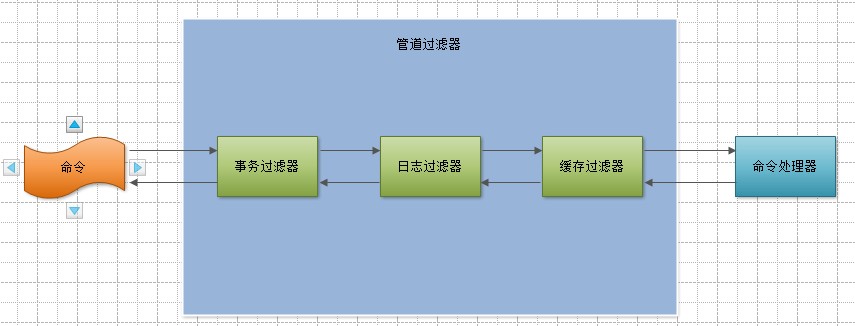

实现
先不考虑处理器的实例化和过滤器列表的实例化,如果给你一个命令、一些过滤器和一个处理器,让你组装为一个管道应该不是啥大问题。
这部分概念虽然简单,可是也不见得好理解,因此我基本把全部代码都贴上了,建议不太明白的同学,自己重写一遍,加深对管道过滤器的理解。
核心代码
命令接口
 1 using System;
 2 using System.Collections.Generic;
 3 using System.Linq;
 4 using System.Text;
 5 using System.Threading.Tasks;
 6
 7 namespace Happy.Command
 8 {
 9     /// <summary>
10     /// 命令接口。
11     /// </summary>
12     public interface ICommand
13     {
14     }
15 }
命令处理器接口,一个命令只能有一个命令处理器。
 1 using System;
 2 using System.Collections.Generic;
 3 using System.Linq;
 4 using System.Text;
 5 using System.Threading.Tasks;
 6
 7 namespace Happy.Command
 8 {
 9     /// <summary>
10     /// 命令处理器接口,一个命令只能有一个命令处理器。
11     /// </summary>
12     public interface ICommandHandler<TCommand>
13         where TCommand : ICommand
14     {
15         /// <summary>
16         /// 处理命令。
17         /// </summary>
18         void Handle(TCommand command);
19     }
20 }
命令拦截器,拦截正在被执行的命令。
 1 using System;
 2 using System.Collections.Generic;
 3 using System.Linq;
 4 using System.Text;
 5 using System.Threading.Tasks;
 6
 7 namespace Happy.Command
 8 {
 9     /// <summary>
10     /// 命令拦截器,拦截正在被执行的命令。
11     /// </summary>
12     [AttributeUsage(AttributeTargets.Class, AllowMultiple = false)]
13     public abstract class CommandInterceptorAttribute : Attribute
14     {
15         /// <summary>
16         /// 构造方法。
17         /// </summary>
18         /// <param name="order">指示拦截器在管道中的位置</param>
19         protected CommandInterceptorAttribute(int order)
20         {
21             this.Order = order;
22         }
23
24         /// <summary>
25         /// 拦截正在被执行的命令。
26         /// </summary>
27         /// <param name="context">命令执行上下文</param>
28         public abstract void Intercept(ICommandExecuteContext context);
29
30         /// <summary>
31         /// 拦截器在管道中的位置。
32         /// </summary>
33         public int Order { get; protected set; }
34     }
35 }
命令执行上下文接口,代表了一次命令的执行过程。
 1 using System;
 2 using System.Collections.Generic;
 3 using System.Linq;
 4 using System.Text;
 5 using System.Threading.Tasks;
 6
 7 namespace Happy.Command
 8 {
 9     /// <summary>
10     /// 命令执行上下文接口,代表了一次命令的执行过程。
11     /// </summary>
12     public interface ICommandExecuteContext
13     {
14         /// <summary>
15         /// 命令执行服务。
16         /// </summary>
17         ICommandService CommandService { get; }
18
19         /// <summary>
20         /// 正在执行的命令。
21         /// </summary>
22         ICommand Command { get; }
23
24         /// <summary>
25         /// 执行下一个<see cref="CommandInterceptorAttribute"/>,如果已经是最后一个,就会执行<see cref="ICommandHandler{TCommand}"/>。
26         /// </summary>
27         void ExecuteNext();
28     }
29 }
 1 using System;
 2 using System.Collections.Generic;
 3 using System.Linq;
 4 using System.Text;
 5 using System.Threading.Tasks;
 6
 7 using Happy.ExtensionMethod.Reflection;
 8
 9 namespace Happy.Command.Internal
10 {
11     internal sealed class CommandExecuteContext : ICommandExecuteContext
12     {
13         private CommandInterceptorChain _commandInterceptorChain;
14
15         internal CommandExecuteContext(ICommandService commandService, ICommand command, Action commandExecutor)
16         {
17             this.CommandService = commandService;
18             this.Command = command;
19             _commandInterceptorChain = new CommandInterceptorChain(
20                 this,
21                 command.GetType().GetAttributes<CommandInterceptorAttribute>(),
22                 commandExecutor);
23         }
24
25
26         public ICommandService CommandService
27         {
28             get;
29             private set;
30         }
31
32         public ICommand Command { get; private set; }
33
34         public void ExecuteNext()
35         {
36             _commandInterceptorChain.ExecuteNext();
37         }
38     }
39 }
管道过滤器的内部实现
 1 using System;
 2 using System.Collections.Generic;
 3 using System.Linq;
 4 using System.Text;
 5 using System.Threading.Tasks;
 6
 7 namespace Happy.Command.Internal
 8 {
 9     internal sealed class CommandInterceptorChain
10     {
11         private ICommandExecuteContext _commandExecuteContext;
12         private CommandInterceptorAttribute[] _commandInterceptors;
13         private Action _commandExecutor;
14         private int _currentCommandInterceptorIndex = -1;
15
16         internal CommandInterceptorChain(
17             ICommandExecuteContext commandExecuteContext,
18             CommandInterceptorAttribute[] commandInterceptors,
19             Action commandExecutor)
20         {
21             _commandExecuteContext = commandExecuteContext;
22             _commandInterceptors = commandInterceptors.OrderBy(x => x.Order).ToArray();
23             _commandExecutor = commandExecutor;
24         }
25
26         private CommandInterceptorAttribute CurrentCommandInterceptor
27         {
28             get
29             {
30                 return _commandInterceptors[_currentCommandInterceptorIndex];
31             }
32         }
33
34         internal void ExecuteNext()
35         {
36             _currentCommandInterceptorIndex++;
37
38             if (_currentCommandInterceptorIndex < _commandInterceptors.Length)
39             {
40                 this.CurrentCommandInterceptor.Intercept(_commandExecuteContext );
41             }
42             else
43             {
44                 _commandExecutor();
45             }
46         }
47     }
48 }
命令服务,负责执行命令
 1 using System;
 2 using System.Collections.Generic;
 3 using System.Linq;
 4 using System.Text;
 5 using System.Threading.Tasks;
 6 using System.Threading;
 7
 8 using Common.Logging;
 9 using Microsoft.Practices.ServiceLocation;
10
11 using Happy.DesignByContract;
12
13 namespace Happy.Command.Internal
14 {
15     internal sealed class DefaultCommandService : ICommandService
16     {
17         private readonly Dictionary<Type, object> _services = new Dictionary<Type, object>();
18
19         public void Execute<TCommand>(TCommand command)
20             where TCommand : ICommand
21         {
22             command.MustNotNull("command");
23
24             var context = this.CreateCommandExecuteContext(command);
25
26             context.ExecuteNext();
27         }
28
29         public ICommandService AddService<T>(T service)
30         {
31             _services[typeof(T)] = service;
32
33             return this;
34         }
35
36         public T GetService<T>()
37         {
38             return (T)_services[typeof(T)];
39         }
40
41         private CommandExecuteContext CreateCommandExecuteContext<TCommand>(TCommand command)
42             where TCommand : ICommand
43         {
44
45             return new CommandExecuteContext(this, command, () =>
46             {
47                 this.ExecuteCommandHandler(command);
48             });
49         }
50
51         private void ExecuteCommandHandler<TCommand>(TCommand command)
52             where TCommand : ICommand
53         {
54             ServiceLocator.Current.MustNotNull("ServiceLocator.Current");
55
56             var commandHandler = ServiceLocator
57                 .Current
58                 .GetInstance<ICommandHandler<TCommand>>();
59
60             commandHandler.Handle(command);
61         }
62     }
63 }
事务拦截器
 1 using System;
 2 using System.Collections.Generic;
 3 using System.Linq;
 4 using System.Text;
 5 using System.Threading.Tasks;
 6 using System.Transactions;
 7
 8 namespace Happy.Command
 9 {
10     /// <summary>
11     /// 事务拦截器。
12     /// </summary>
13     public sealed class TransactionAttribute : CommandInterceptorAttribute
14     {
15         /// <inheritdoc />
16         public TransactionAttribute(int order) : base(order) { }
17
18         /// <inheritdoc />
19         public override void Intercept(ICommandExecuteContext context)
20         {
21             using (var ts = new TransactionScope())
22             {
23                 context.ExecuteNext();
24
25                 ts.Complete();
26             }
27         }
28     }
29 }
应用事务拦截器
 1 using System;
 2 using System.Collections.Generic;
 3 using System.Linq;
 4 using System.Text;
 5 using System.Threading.Tasks;
 6
 7 using Happy.Domain;
 8 using Happy.Command;
 9 using Happy.DesignByContract;
10
11 namespace Happy.Application
12 {
13     /// <summary>
14     /// 简单的创建命令。
15     /// </summary>
16     [Transaction(1)]
17     public abstract class SimpleCreateCommand<TAggregateRoot> : SimpleCommand<TAggregateRoot>
18         where TAggregateRoot : AggregateRoot
19     {
20     }
21 }
执行命令
 1         /// <summary>
 2         /// 创建。
 3         /// </summary>
 4         public ActionResult Create(TAggregateRoot item)
 5         {
 6             this.CurrentCommandService.Execute(new TCreateCommand
 7             {
 8                 Aggregate = item
 9             });
10
11             return this.NewtonsoftJson(new
12             {
13                 success = true,
14                 items = this.GetById(item.Id)
15             });
16         }
备注
这里的命令模式本质上是一种消息模式,因为命令里没有任何行为,将行为独立了出来。像WCF、ASP.NET和ASP.NET MVC本质上也是消息模式,他们也内置了管道过滤器模式。
版权声明:本文内容由互联网用户自发贡献,该文观点仅代表作者本人。本站仅提供信息存储空间服务,不拥有所有权,不承担相关法律责任。如发现本站有涉嫌侵权/违法违规的内容, 请联系我们举报,一经查实,本站将立刻删除。
发布者:全栈程序员-站长,转载请注明出处:https://javaforall.net/110108.html原文链接:https://javaforall.net



