
使用Lucene检索文档关键字时,具体步骤如下:
1.对文档处理
2.为要处理的文件内容建立索引
3.构建查询对象
4.在索引中查找
使用Lucene检索文档中的关键字实例
文件预处理工具类FilePreHandleUtil
package org.dennisit.study.lucene.prehandle;

import java.io.BufferedReader;
import java.io.BufferedWriter;
import java.io.File;
import java.io.FileReader;
import java.io.FileWriter;
import java.io.IOException;
import java.util.HashMap;

/**
 *
 *
 *  @version : 1.0
 *
 *  @author  : 苏若年     <a href="mailto:DennisIT@163.com">发送邮件</a>
 *
 *  @since     : 1.0        创建时间:    2013-1-15    上午11:02:04
 *
 *  @function: TODO         工具类实现将全角标点转换成半角标点[实现文件中的符合统一]和文件切分工具整合
 *
 */
public class FilePreHandleUtil {


    /**
     * 读取每一行串值,将每一行中含有的全角标点替换为半角标点
     * @param line
     * @return
     */
    public static String replacePunctuation(String line){

        //创建HashMap存放全角标点及其对应的半角标点的映射<key(全角标点),value(半角标点)>
        HashMap<String, String> map = new HashMap<String, String>();

        map.put("。", ".");
        map.put(",", ",");
        map.put("《", "<");
        map.put("》", ">");
        map.put("【", "[");
        map.put("】", "]");
        map.put("?", "?");
        map.put("“", "\"");
        map.put("”", "\"");
        map.put(":", ":");
        map.put("(", "(");
        map.put(")", ")");
        map.put("~", "~");
        map.put("-", "-");
        map.put("‘", "'");
        map.put("!", "!");
        map.put("、", "\\");
        //更多的根据需要添加

        //获取行字符串的长度
        int length = line.length();

        for(int i=0; i<length; i++){
            //逐个从行字符串中取出每个字符进行判断是否包含map中含有的全角标点
            String charat = line.substring(i,i+1);

            //如果含有全角标点,则进行替换
            if(map.get(charat)!=null){
                line = line.replace(charat, map.get(charat));
            }

        }

        return line;
    }


    /**
     * 文件标点过滤替换
     * @param file        源文件
     * @param destFile    目标文件名
     * @return            替换后的目标文件
     * @throws Exception
     */
    public static File filePunctuationFilter(File file,String destFile)throws IOException{

        //创建一个输出流,用于写新文件
        BufferedWriter writer = new BufferedWriter(new FileWriter(destFile));

        //创建一个输入流,用于读取文件
        BufferedReader reader = new BufferedReader(new FileReader(file));

        //逐行读取的串值引用对象
        String line ;

        //如果读取的行不为空,则进行判断处理
        while((line = reader.readLine()) != null){
            //进行符号替换
            String newLine = replacePunctuation(line);

            //将替换后的String写入新文件
            writer.write(newLine);
            //写入行分割符
            writer.newLine();

        }

        //关闭文件读取流
        reader.close();
        //关闭文件输出流
        writer.close();
        //返回替换后的文件
        return new File(destFile);
    }

    /**
     * 大文件切分成小文件的方法
     * @param file            原始文件
     * @param outputPath    输出文件路径
     * @throws Exception
     */
    public static void splitToSamllFiles(File file,String outputPath)throws Exception{

        //定义文件计数器,用于产生文件名
        int filePointer = 0;

        //定义单个文件的最大个数
        int MAX_SIZE = 10240;

        //创建文件输出流
        BufferedWriter writer = null;

        //创建文件输入流
        BufferedReader reader = new BufferedReader(new FileReader(file));

        //建立字符缓冲区,存储大文件中读取的数据
        StringBuffer buffer = new StringBuffer();

        //行字符串引用
        String line = null;

        while( (line=reader.readLine()) != null){

            //如果读取的字符串不为空,则将字符串加入缓冲区,因为是行读取,所以每行读取完后,缓冲区中的数据也加入换行标签
            buffer.append(line).append("\r\n");

            //如果缓冲区长度大到定义的每个文件的最大值,则将缓冲区的数据写入文件
            if(buffer.toString().getBytes().length >= MAX_SIZE){

                //实例化输出流
                writer = new BufferedWriter(new FileWriter(outputPath+"output"+filePointer+".txt"));
                //缓冲区的数据写入文件
                writer.write(buffer.toString());

                writer.close();

                //文件计数器加1
                filePointer++;

                //清空缓冲区
                buffer = new StringBuffer();
            }
        }

        //如果大文件已经读取完毕,直接将缓冲区中的数据写入文件

        //实例化输出流
        writer = new BufferedWriter(new FileWriter(outputPath+"output"+filePointer+".txt"));

        //缓冲区的数据写入文件
        writer.write(buffer.toString());

        //关闭输出流
        writer.close();
    }

    /**
     * 文档处理前的预处理
     * 1.全角符号转换成半角符号
     * 2.大文件切分成小文件
     *
     */
    public static void preprocess(File file, String outputPath){
        try {
            splitToSamllFiles(filePunctuationFilter(file, outputPath +"output-all.txt"), outputPath);
        } catch (Exception e) {
            e.printStackTrace();
        }
    }


    public static void main(String[] args) {

        //设置需要被预处理的源文件位置
        String inputFile = "测试文本.txt";

        //设置处理后的文件存放位置
        String outputPath = "splitfile/";

        //如果输出路径不存在,则创建路径
        if(!new File(outputPath).exists()){
            new File(outputPath).mkdir();
        }
        preprocess(new File(inputFile), outputPath);

    }
}
文件创建索引类IndexProcess
package org.dennisit.study.lucene.process;

import java.io.BufferedReader;
import java.io.File;
import java.io.FileReader;

import jeasy.analysis.MMAnalyzer;

import org.apache.lucene.document.Document;
import org.apache.lucene.document.Field;
import org.apache.lucene.index.IndexWriter;


/**
 *
 *
 *  @version : 1.0
 *
 *  @author  : 苏若年     <a href="mailto:DennisIT@163.com">发送邮件</a>
 *
 *  @since     : 1.0        创建时间:    2013-1-15    下午12:46:31
 *
 *  @function: TODO        为文档创建索引
 *
 *  使用Lucene的步骤如下
 *  1.为要处理的内容建立索引
 *  2.构建查询对象
 *  3.在索引中查找
 *
 *
 */
public class IndexProcess {

    //成员变量,存储创建的索引文件存放的位置
    private String INDEX_STORE_PATH = "index/";

    /**
     *
     * 创建文件索引
     *
     * @param inputPath
     *             等待被建立索引的文件的存放路径,获取该路径下的所有txt文件,为每个文件创建一个Lucene的Document
     *             文档,并向每个Document文档内加入一些文件信息,包括文件名以及文件内容.将文件名和内容等信息加入到
     *             Lucene的索引.
     * 方法中使用MMAnalyzer来做分词器.
     */
    public void createIndex(String inputPath){
        try {
            //MMAnalyzer作为分词工具创建一个IndexWriter
            IndexWriter writer = new IndexWriter(INDEX_STORE_PATH,new MMAnalyzer(),true);

            File filePath = new File(inputPath);

            //取得所有需要建立索引的文件数组
            File[] files = filePath.listFiles();

            //遍历数组
            for(int i=0; i<files.length; i++){

                //获取文件名
                String fileName = files[i].getName();

                //判断是否为txt文件
                if(fileName.substring(fileName.lastIndexOf(".")).equals(".txt")){

                    //创建一个新的Document
                    Document doc = new Document();

                    //为文件名创建一个新的Document
                    Field field = new Field("filename",files[i].getName(),Field.Store.YES,Field.Index.TOKENIZED);

                    doc.add(field);

                    //为文件内容创建一个Field
                    field = new Field("content",loadFileToString(files[i]),Field.Store.NO,Field.Index.TOKENIZED);

                    doc.add(field);

                    //把Document加入IndexWriter
                    writer.addDocument(doc);
                }
            }
            //关闭IndexWriter
            writer.close();
        } catch (Exception e) {
            e.printStackTrace();
        }
    }

    /**
     * 将文件的内容转换成字符串返回.
     * @param file
     * @return
     */
    public String loadFileToString(File file){
        try {
            BufferedReader reader = new BufferedReader(new FileReader(file));
            StringBuffer buffer = new StringBuffer();
            String line = null;
            while((line=reader.readLine()) != null){
                buffer.append(line);
            }
            reader.close();
            return buffer.toString();
        } catch (Exception e) {
            e.printStackTrace();
        }
        return null;
    }


    public static void main(String[] args) {
        IndexProcess process = new IndexProcess();
        process.createIndex("splitfile/");
    }
}
关键字搜索实现类LuceneSearch
package org.dennisit.study.lucene.process; import java.io.BufferedReader; import java.io.File; import java.io.FileReader; import java.util.Date; import java.util.Iterator; import java.util.LinkedHashMap; import java.util.Map; import org.apache.lucene.index.Term; import org.apache.lucene.index.TermDocs; import org.apache.lucene.search.IndexSearcher; import org.apache.lucene.search.Query; import org.apache.lucene.search.TermQuery; /** * * * @version : 1.0 * * @author : 苏若年 <a href="mailto:DennisIT@163.com">发送邮件</a> * * @since : 1.0 创建时间: 2013-1-15 下午01:18:46 * * @function: TODO 关键字查找 * */
public class LuceneSearch { //成员变量,存储创建的索引文件存放的位置
    private String INDEX_STORE_PATH = "index/"; /** * 使用Lucene的搜索引 * * @param searchType * 要搜索的Filed 表示要搜索的是文件名还是文件内容 * @param searchKey * 关键字 */
    public void indexSearch(String searchType, String searchKey){ try { System.out.println("----------------------使用索引方式搜索---------------------"); //根据索引位置建立IndexSearch
            IndexSearcher searcher = new IndexSearcher(INDEX_STORE_PATH); //建立搜索单元,searchType代表要搜索的Filed,searchType代表关键字
            Term term = new Term(searchType,searchKey); //由Term生成一个Query
            Query query = new TermQuery(term); //搜素开始时间
            Date beginTime = new Date(); //获取一个<document, frequency>的枚举对象TermDocs,其中document表示包含当前所查找关键字的文档,而frequency表示在该文档中关键字出现的次数
            TermDocs termDocs = searcher.getIndexReader().termDocs(term); while(termDocs.next()){ //输出在文档中出现关键词的次数
                System.out.print("find " + termDocs.freq()+" matches in "); //输出搜索到关键词的文档
                System.out.println(searcher.getIndexReader().document(termDocs.doc()).getField("filename").stringValue()); } //搜索完成时间
            Date endTime = new Date(); //搜索耗费时间
            long timeOfSearch = endTime.getTime()-beginTime.getTime(); System.out.println("使用索引方式搜索总耗时:" + timeOfSearch + "ms"); } catch (Exception e) { // TODO: handle exception
 e.printStackTrace(); } } public void StringSearch(String keyword,String searchPath){ System.out.println("----------------------使用字符串匹配方式搜索---------------------"); File filePath = new File(searchPath); //返回目录文件夹下所有文件数组
        File[] files = filePath.listFiles(); //HashMap保存文件名和匹配次数对
        Map<String,Object> map = new LinkedHashMap<String,Object>(); //搜索开始时间
        Date beginTime = new Date(); //遍历所有文件
        for(int i=0; i<files.length; i++){ //初始化匹配次数
            int hits = 0; try { //读取文件内容
                BufferedReader reader = new BufferedReader(new FileReader(files[i])); StringBuffer buffer = new StringBuffer(); String line = null; while((line=reader.readLine())!=null){ buffer.append(line); } reader.close(); //将StringBuffer转换成String,以便于搜索
                String fileToSearchString = buffer.toString(); //初始化fromIndex
                int fromIndex = -keyword.length(); //逐个匹配关键词
                while((fromIndex=fileToSearchString.indexOf(keyword,fromIndex+keyword.length()))!=-1){ hits++; } //将文件名和匹配次数加入HashMap.
                map.put(files[i].getName(), new Integer(hits)); } catch (Exception e) { // TODO: handle exception
 e.printStackTrace(); } }//end for
 Iterator<String> iter = map.keySet().iterator(); while(iter.hasNext()){ String fileName = iter.next(); Integer hits = (Integer)map.get(fileName); System.out.println("find " + hits.intValue() + " matches in " + fileName); } //结束时间
        Date endTime = new Date(); //得到搜索耗费时间
        long timeOfSearch = endTime.getTime() - beginTime.getTime(); System.out.println("使用字符串匹配方式总耗时" + timeOfSearch + "ms"); } public static void main(String[] args) { LuceneSearch search = new LuceneSearch(); //通过索引搜索关键词
        search.indexSearch("content", "日志"); System.out.println(); //通过String的API搜索关键词
        search.StringSearch("日志", "splitfile/"); } }
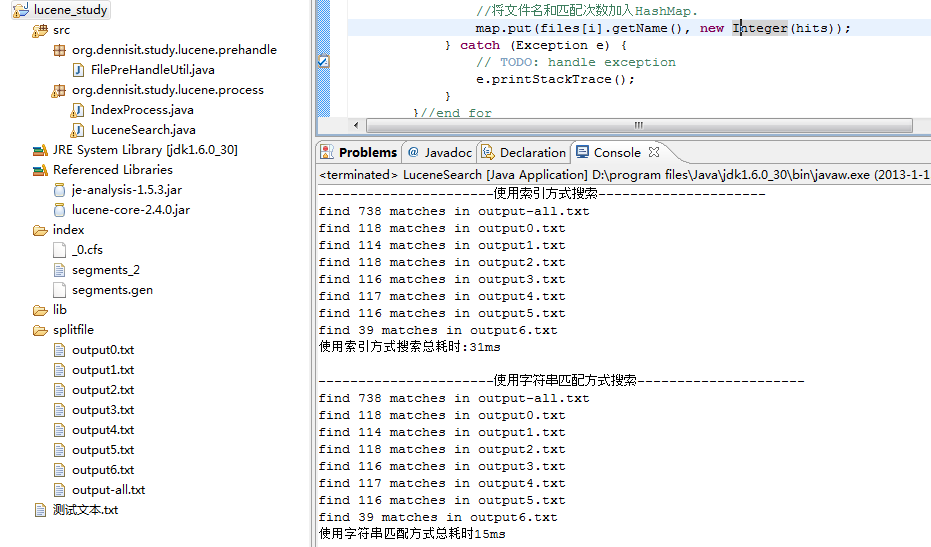
运行结果:

转载请注明出处:[http://www.cnblogs.com/dennisit/archive/2013/01/29/2881413.html]
版权声明:本文内容由互联网用户自发贡献,该文观点仅代表作者本人。本站仅提供信息存储空间服务,不拥有所有权,不承担相关法律责任。如发现本站有涉嫌侵权/违法违规的内容, 请联系我们举报,一经查实,本站将立刻删除。
发布者:全栈程序员-站长,转载请注明出处:https://javaforall.net/110220.html原文链接:https://javaforall.net


![sql模糊查询 like[通俗易懂]](https://javaforall.net/wp-content/uploads/2020/11/2020110817443450-480x300.jpg)
