
大家好,又见面了,我是全栈君。
一.提供试用期
使用试用期,使订户可以在常规计费周期开始之前以免费或打折的价格试用您的产品。试用期结束后,订阅的常规计费期开始。每个计划最多可以有两个试用期。
以下样本请求显示了如何提供试用期。创建计划时,请使用这些示例来调整代码。
示例:音乐服务
本示例设置具有以下特征的试用期:
- 第一个月$ 0。
- 试用期后每月15美元。
curl -v –X POST https://api-m.sandbox.paypal.com/v1/billing/plans \
-H "Accept: application/json" \
-H "Authorization: Bearer <Access-Token>" \
-H "Content-Type: application/json" \
-H "PayPal-Request-Id: PLAN-18062020-002" \
-d '{
     "name": "Premium Music Plus",
    "description": "A premium plan with music download feature",
    "product_id": "PROD-5RN21878H3527870P",
    "billing_cycles": [
        {
            "frequency": {
                "interval_unit": "MONTH",
                "interval_count": 1
            },
            "tenure_type": "TRIAL",
            "sequence": 1,
            "total_cycles": 1,
            "pricing_scheme": {
                "fixed_price": {
                    "value": "0",
                    "currency_code": "USD"
                }
            }
        },
        {
            "frequency": {
                "interval_unit": "MONTH",
                "interval_count": 1
            },
            "tenure_type": "REGULAR",
            "sequence": 2,
            "total_cycles": 0,
            "pricing_scheme": {
                "fixed_price": {
                    "value": "15",
                    "currency_code": "USD"
                }
            }
        }
    ],
    "payment_preferences": {
        "auto_bill_outstanding": true,
        "payment_failure_threshold": 1
    }
 }'
示例:在线教程服务
本示例设置具有以下特征的试用期:
- 首周$ 0免费试用。
- 接下来的3周,每周5美元的优惠试用期。
- 试用期后每周10美元。
curl -v –X POST https://api-m.sandbox.paypal.com/v1/billing/plans \
-H "Accept: application/json" \
-H "Authorization: Bearer <Access-Token>" \
-H "Content-Type: application/json" \
-H "PayPal-Request-Id: PLAN-18062020-003" \
-d '{
     "name": "Music Tutorial Premium Plus",
    "description": "Offering a premium music tutorial with download feature",
    "product_id": "PROD-5RN21878H3527870P",
    "billing_cycles": [
        {
            "frequency": {
                "interval_unit": "WEEK",
                "interval_count": 1
            },
            "tenure_type": "TRIAL",
            "sequence": 1,
            "total_cycles": 1,
            "pricing_scheme": {
                "fixed_price": {
                    "value": "0",
                    "currency_code": "USD"
                }
            }
        },
        {
            "frequency": {
                "interval_unit": "WEEK",
                "interval_count": 1
            },
            "tenure_type": "TRIAL",
            "sequence": 2,
            "total_cycles": 3,
            "pricing_scheme": {
                "fixed_price": {
                    "value": "5",
                    "currency_code": "USD"
                }
            }
        },
        {
            "frequency": {
                "interval_unit": "WEEK",
                "interval_count": 1
            },
            "tenure_type": "REGULAR",
            "sequence": 3,
            "total_cycles": 0,
            "pricing_scheme": {
                "fixed_price": {
                    "value": "10",
                    "currency_code": "USD"
                }
            }
        }
    ],
    "payment_preferences": {
        "auto_bill_outstanding": true,
        "payment_failure_threshold": 1
    }
 }`
二 .订阅和试用按钮
<!DOCTYPE html>
<html lang="en">
<head>
    <meta charset="UTF-8">
    <title>Title</title>
</head>
<body>
<form action="https://www.paypal.com/cgi-bin/webscr" method="post">

    <!-- Identify your business so that you can collect the payments. -->
    <input type="hidden" name="business" value="alice@mystore.com">

    <!-- Specify a Subscribe button. -->
    <input type="hidden" name="cmd" value="_xclick-subscriptions">
    <!-- Identify the subscription. -->
    <input type="hidden" name="item_name" value="Alice's Weekly Digest">
    <input type="hidden" name="item_number" value="DIG Weekly">

    <!-- Set the terms of the regular subscription. -->
    <input type="hidden" name="currency_code" value="USD">
    <input type="hidden" name="a3" value="5.00">
    <input type="hidden" name="p3" value="1">
    <input type="hidden" name="t3" value="M">

    <!-- Set recurring payments until canceled. -->
    <input type="hidden" name="src" value="1">

    <!-- Display the payment button. -->
    <input type="image" name="submit"
           src="https://www.paypalobjects.com/en_US/i/btn/btn_subscribe_LG.gif"
           alt="Subscribe">
    <img alt="" width="1" height="1"
         src="https://www.paypalobjects.com/en_US/i/scr/pixel.gif" >
</form>

<form action="https://www.paypal.com/cgi-bin/webscr" method="post">

    <!-- Identify your business so that you can collect the payments. -->
    <input type="hidden" name="business" value="alice@mystore.com">

    <!-- Specify a Subscribe button. -->
    <input type="hidden" name="cmd" value="_xclick-subscriptions">

    <!-- Identify the subscription. -->
    <input type="hidden" name="item_name" value="Alice's Weekly Digest">
    <input type="hidden" name="item_number" value="DIG Weekly">

    <!-- Set the terms of the 1st trial period. -->
    <input type="hidden" name="currency_code" value="USD">
    <input type="hidden" name="a1" value="0">
    <input type="hidden" name="p1" value="7">
    <input type="hidden" name="t1" value="D">

    <!-- Set the terms of the 2nd trial period. -->
    <input type="hidden" name="a2" value="5.00">
    <input type="hidden" name="p2" value="3">
    <input type="hidden" name="t2" value="W">

    <!-- Set the terms of the regular subscription. -->
    <input type="hidden" name="a3" value="49.99">
    <input type="hidden" name="p3" value="1">
    <input type="hidden" name="t3" value="Y">

    <!-- Set recurring payments until canceled. -->
    <input type="hidden" name="src" value="1">

    <!-- Display the payment button. -->
    <input type="image" name="submit"
           src="https://www.paypalobjects.com/en_US/i/btn/btn_subscribe_LG.gif"
           alt="Subscribe">
    <img alt="" width="1" height="1"
         src="https://www.paypalobjects.com/en_US/i/scr/pixel.gif" >
</form>
</body>
</html>
页面图示


点击后效果图:
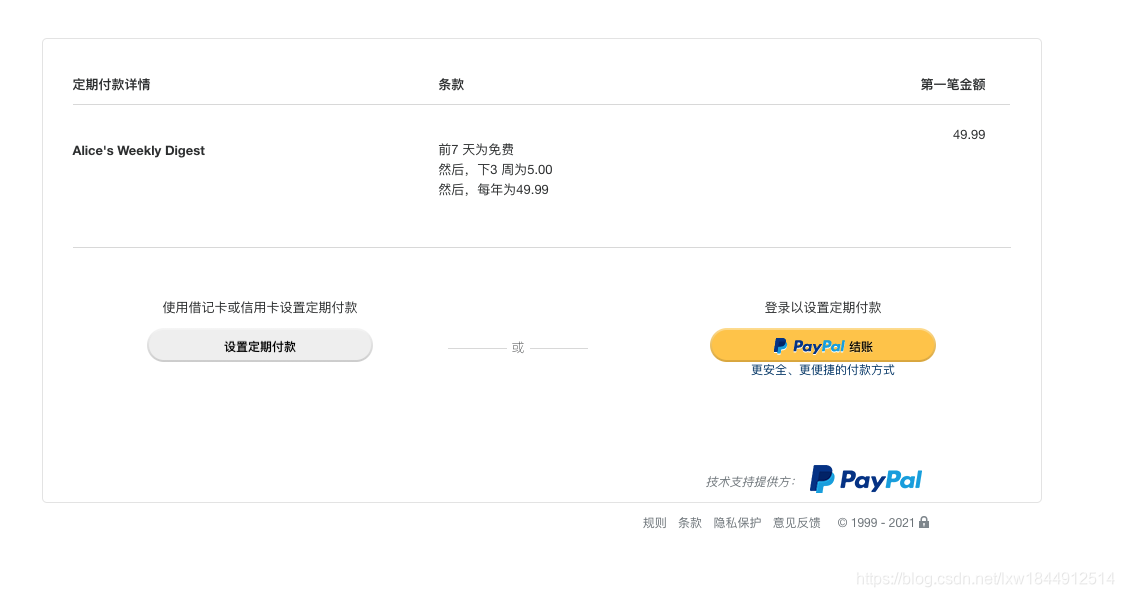
代码示例1;
 /**
  * Create billing plan at paypal
  *
  * @param $name
  * @param $description
  * @param $amount
  * @param string $returnUrl
  * @param string $returnCancel
  * @param int $setupFee
  * @param bool $isTrial
  * @param string $currency
  * @param string $planType
  * @param string $definitionName
  * @param string $definitionType
  * @param string $definitionFrequency
  * @param string $definitionFrequencyInterval
  * @param string $definitionCycles
  * @param string $trialDefinitionName
  * @param string $trialDefinitionType
  * @param string $trialDefinitionFrequency
  * @param string $trialDefinitionFrequencyInterval
  * @param string $trialDefinitionCycles
  * @param string $trialDefinitionAmount
  * @return string
  */
function create($name, $description, $amount, $returnUrl = '', $returnCancel = '', $setupFee = 0, $isTrial = false, $currency = 'USD', $planType = 'fixed',
                $definitionName = 'Regular Payments', $definitionType = 'REGULAR', $definitionFrequency = 'Month', $definitionFrequencyInterval = '1', $definitionCycles = '12',
                $trialDefinitionName = 'Trial Period', $trialDefinitionType = 'TRIAL', $trialDefinitionFrequency = '0', $trialDefinitionFrequencyInterval = '0', $trialDefinitionCycles = '0',
                $trialDefinitionAmount = '0')
{
    $plan = new Plan();
    $plan->setName($name)->setDescription($description)->setType($planType);
    $paymentDefinition = new PaymentDefinition();
    $paymentDefinition->setName($definitionName)
        ->setType($definitionType)
        ->setFrequency($definitionFrequency)
        ->setFrequencyInterval($definitionFrequencyInterval)
        ->setCycles($definitionCycles)
        ->setAmount(new Currency(array('value' => $amount, 'currency' => $currency)));
    $plan->setPaymentDefinitions(array($paymentDefinition));

    if ($isTrial) {
        $paymentDefinitionTrial = new PaymentDefinition();
        $paymentDefinitionTrial->setName($trialDefinitionName)
            ->setType($trialDefinitionType)
            ->setFrequency($trialDefinitionFrequency)
            ->setFrequencyInterval($trialDefinitionFrequencyInterval)
            ->setCycles($trialDefinitionCycles)
            ->setAmount(new Currency(array('value' => $trialDefinitionAmount, 'currency' => $currency)));
        $plan->addPaymentDefinition($paymentDefinitionTrial);
    }

    $merchantPreferences = new MerchantPreferences();
    $merchantPreferences->setReturnUrl($returnUrl)
        ->setCancelUrl($returnCancel)
        ->setAutoBillAmount("yes")
        ->setInitialFailAmountAction("CONTINUE")
        ->setMaxFailAttempts("0")
        ->setSetupFee(new Currency(array('value' => $setupFee, 'currency' => $currency)));

    $plan->setPaymentDefinitions(array($paymentDefinition));
    $plan->setMerchantPreferences($merchantPreferences);
    $result = $plan->create($this->getAdapter()->getApiContext());
    if ($result) {
        return ['plan' => $result, 'id' => $result->getId(), 'state' => $result->getState(), 'created' => $result->getCreateTime()];
    }
    return $result;
}
在使用使用期时;一定要记得把第一次扣费的设为0:否则每次都正常订阅的扣费
$this->paypal->set_merchant_preferences($returnurl, $cancelurl, 'YES', 'CONTINUE', '0', 0); // $price 设置第一次订阅扣款金额***, 默认0表示不扣款public function set_merchant_preferences($return_url, $cancel_url, $auto_bill_amount = "NO", $initial_fail_amount_action = "CANCEL",
$max_fail_attempts = 0, $agreement_fees = 0)
{
$this->merchantPreferences = new MerchantPreferences();
$this->merchantPreferences->setReturnUrl($return_url)
->setCancelUrl($cancel_url)
->setAutoBillAmount($auto_bill_amount)
->setInitialFailAmountAction($initial_fail_amount_action)
->setMaxFailAttempts($max_fail_attempts)
->setSetupFee(new Currency(array('value' => $agreement_fees, 'currency' => config_item("currency"))));
$this->plan->setMerchantPreferences($this->merchantPreferences);
return;
}
版权声明:本文内容由互联网用户自发贡献,该文观点仅代表作者本人。本站仅提供信息存储空间服务,不拥有所有权,不承担相关法律责任。如发现本站有涉嫌侵权/违法违规的内容, 请联系我们举报,一经查实,本站将立刻删除。
发布者:全栈程序员-站长,转载请注明出处:https://javaforall.net/111560.html原文链接:https://javaforall.net



