
大家好,又见面了,我是你们的朋友全栈君。
最近有个需求,读取一个网站的信息,需要读取验证码。
一、环境依赖
1、如果在Linux下运行,需要安装如下 tesseract-ocr,
在 centos 上
yum install tesseract
在ubuntu上
apt install tesseract
其他版本的 Linux 可以从下面的地址找安装方式
https://tesseract-ocr.github.io/tessdoc/Home.html
2、如果在windows下运行
打开tess4j3.1.0.jar,把里面的win32-x86-64目录中的两个dll文件复制到C:\Windows\System32和C:\Windows\SysWOW64
需要安装vc开发环境
https://www.microsoft.com/zh-cn/download/confirmation.aspx?id=40784
二、在pom.xml中引入maven
net.sourceforge.tess4jgroupId>
tess4jartifactId>
3.1.0version>
org.slf4jgroupId>
log4j-over-slf4jartifactId>
exclusion>
ch.qos.logbackgroupId>
logback-classicartifactId>
exclusion>
exclusions>
dependency>
三、代码如下
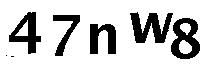
由于验证码图片中,大部分都有干扰信息,需要处理掉干扰信息,所以代码的大篇幅都在预处理图片。
import java.awt.image.BufferedImage;
import java.io.ByteArrayOutputStream;
import java.io.File;
import java.io.IOException;
import javax.imageio.ImageIO;
import org.apache.log4j.Logger;
import net.sourceforge.tess4j.Tesseract;
import net.sourceforge.tess4j.util.LoadLibs;
import java.security.MessageDigest;
import java.math.BigInteger;
public class ImageUtil {
private static Logger log = Logger.getLogger(ImageUtil.class);
/**
* 读取验证码
* 1、去除验证码图片中的干扰信息
* 2、把背景改为纯白色
* 3、把文字改为纯黑色
* 4、读取验证码
* @param imagePath 原图片本地保存路径
* @return 验证码
* @throws Exception
*/
public static String readVerifyImage(String imagePath) throws Exception {
log.debug(“验证码原文件:” + imagePath);
// 处理图片
String outImage = dealImage(imagePath);
// windows和linxu的API路径不同,需要单独处理
File tessDataFolder = LoadLibs.extractTessResources(“tessdata”);
String tessdata = tessDataFolder.getAbsolutePath();
if(System.getProperty(“os.name”).toLowerCase().contains(“linux”)) {
tessdata.replace(“tessdata”, “”);
}
// 读取验证码
Tesseract instance = new Tesseract();
instance.setDatapath(tessdata);
instance.setTessVariable(“user_defined_dpi”, “300”);
String verification = instance.doOCR(new File(outImage));
verification = verification.replaceAll(“[^0-9a-zA-Z]”,””);
return verification;
}
/**
* 处理图片
* 其实可以不对图片做处理,直接使用Tess4j直接读取图片文字。
* 不过不经过图片处理的图片识别率较低,大概只有10%的成功率。
* 经过处理的图片,识别率提高到了50%左右。
* @param imagePath 图片的绝对或相对路径
* @return 处理后的图片保存路径
* @throws IOException
*/
public static String dealImage(String imagePath) throws IOException {
String formatName = imagePath.substring(imagePath.indexOf(“.”) + 1);
File file = new File(imagePath);
BufferedImage image = ImageIO.read(file);
int width = image.getWidth();
int height = image.getHeight();
BufferedImage outImage = new BufferedImage(width, height, image.getType());
int backgroudColor = image.getRGB(0, 0);
int backgroudR = (backgroudColor >> 16) & 0xff;
int backgroudG = (backgroudColor >> 8) & 0xff;
int backgroudB = backgroudColor & 0xff;
for (int i = 0; i < width; i++) {
for (int j = 0; j < height; j++) {
int color = image.getRGB(i, j);
int r = (color >> 16) & 0xff;
int g = (color >> 8) & 0xff;
int b = color & 0xff;
int newColor = color;
// 去除干扰信息,干扰信息为黑色相近46/256之内全部清理
if(r < 64 && g < 64 && b < 64) {
if(j-1 >= 0)
newColor = image.getRGB(i, j-1);
else if(i-1 >= 0)
newColor = image.getRGB(i-1, j);
else if(j+1 < height)
newColor = image.getRGB(i, j+1);
else if(i+1 < width)
newColor = image.getRGB(i+1, j);
r = (newColor >> 16) & 0xff;
g = (newColor >> 8) & 0xff;
b = newColor & 0xff;
}
// 去除背景颜色,相近的±30之内的全部设置为白色,灰色的干扰信息改为白色,文字改为黑色
if(Math.abs((r – backgroudR)) <= 30 && Math.abs((g – backgroudG)) <= 30 && Math.abs((b – backgroudB)) <= 30) {
newColor = 0xffffff;
} else if(r > 150 && g > 150 && b > 150){
newColor = 0xffffff;
} else {
newColor = 0x000000;
}
outImage.setRGB(i, j, newColor);
}
}
ByteArrayOutputStream out = new ByteArrayOutputStream();
ImageIO.write(outImage, formatName, out);
String outPath = new File(imagePath).getParent() + File.separator + getFileMd5(out.toByteArray()) + “.” + formatName;
File newFile = new File(outPath);
ImageIO.write(outImage, formatName, newFile);
log.debug(“处理后的验证码文件:” + outPath);
return outPath;
}
/**
* 根据文件字节流获取文件MD5
* @param fileBytes
* @return
*/
public static String getFileMd5(byte[] fileBytes) {
try {
MessageDigest md = MessageDigest.getInstance(“MD5”);
byte[] mdBytes = md.digest(fileBytes);
BigInteger bigInt = new BigInteger(1, mdBytes);
return bigInt.toString(16);
} catch (Exception e) {
log.error(“删除文件失败”,e);
return null;
}
}
}
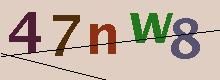
处理前的图片

经过处理后的图片如下:
四、图片处理
本案例中使用的图片处理方式为Java自带的awt包,简单的图片可以这样处理,如果需要处理复杂的图片,可以研究一下开源的图片处理工具ImageMagick
http://www.imagemagick.org/
五、Tess4j
1、如果Tess4j的版本与Tesseract版本不匹配,可能会出现如下错误:
Error opening data file /tessdata/eng.traineddata
Please make sure the TESSDATA_PREFIX environment variable is set to the parent directory of your “tessdata” directory.
Failed loading language ‘eng’
Tesseract couldn’t load any languages!
#
# A fatal error has been detected by the Java Runtime Environment:
#
# SIGSEGV (0xb) at pc=0x00007fcd3f91bac7, pid=29532, tid=0x00007fcd762cd700
#
# JRE version: Java(TM) SE Runtime Environment (8.0_181-b13) (build 1.8.0_181-b13)
# Java VM: Java HotSpot(TM) 64-Bit Server VM (25.181-b13 mixed mode linux-amd64 compressed oops)
# Problematic frame:
# C [libtesseract.so+0x9dac7] tesseract::Tesseract::recog_all_words(PAGE_RES*, ETEXT_DESC*, TBOX const*, char const*, int)+0x5e7
#
# Core dump written. Default location: /root/crgecent/core or core.29532
#
# An error report file with more information is saved as:
# /root/crgecent/hs_err_pid29532.log
#
# If you would like to submit a bug report, please visit:
# http://bugreport.java.com/bugreport/crash.jsp
# The crash happened outside the Java Virtual Machine in native code.
# See problematic frame for where to report the bug.
#
Aborted (core dumped)
截至2020年4月,tess4j的最新版本为4.5.1,如果你是windows的服务器,可以直接使用最新的版本。如果你需要部署到Linux,而又不会在Linux编译C语言源码,那么这里建议你使用tess4j-3.1.0版本。
因为最新4.5.1版本需要Tesseract4.1.0支持,但是Tesseract4.1.0没有安装版,只能通过下载源码自己编译。
https://github.com/tesseract-ocr/tesseract
2、可以通过添加语言包,来处理不同语言
1)添加语言包
比如想要读取简体中文,则可以添加tesseract-ocr-chi-sim的语言包
centos系统可以通过下面命令安装
yum install tesseract-ocr-chi-sim
ubuntu系统可以通过下面命令安装
apt install tesseract-ocr-chi-sim
windows系统,可以下载语言包chi_sim.traineddata,放到C:\Users\XXXX\AppData\Local\Temp\tess4j\tessdata
下载地址:
1、训练过的语言包:https://github.com/tesseract-ocr/tessdata
2、快速语言包:https://github.com/tesseract-ocr/tessdata_fast
3、最优语言包:https://github.com/tesseract-ocr/tessdata_best
2)代码中配置语言
instance.setLanguage(“chi_sim”);
发布者:全栈程序员-站长,转载请注明出处:https://javaforall.net/137783.html原文链接:https://javaforall.net



