
大家好,又见面了,我是你们的朋友全栈君。
效果图
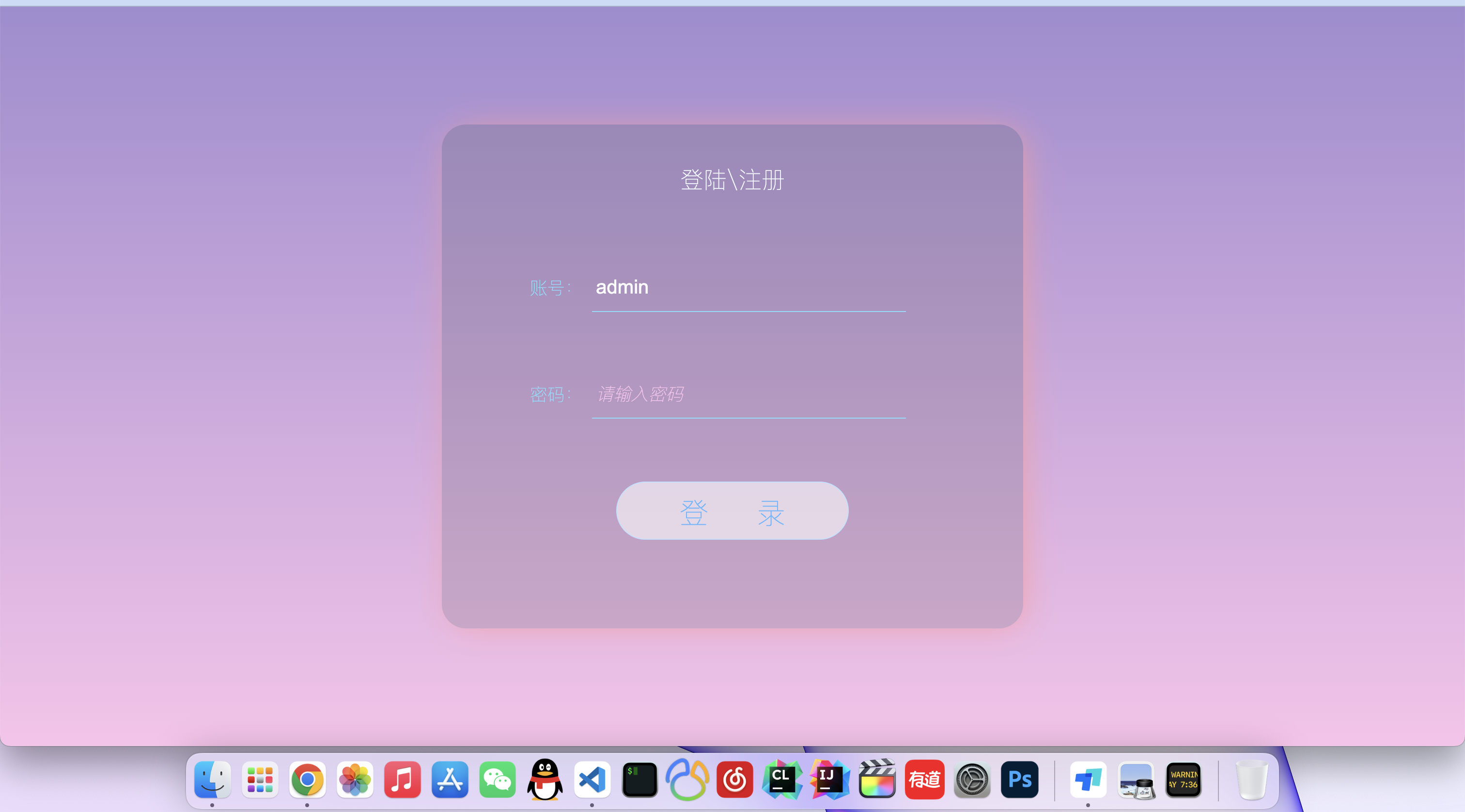

所有代码
<!DOCTYPE html>
<html lang="en">
<head>
<meta charset="UTF-8">
<meta http-equiv="X-UA-Compatible" content="IE=edge">
<meta name="viewport" content="width=device-width, initial-scale=1.0">
<title>登陆页面</title>
<!-- author xjt -->
</head>
<body>
<div class="login">
<h2>登陆\注册</h2>
<div class="login_form">
<span>账号:</span>
<input type="text" placeholder="请输入账号">
<br>
<span>密码:</span>
<input type="password" placeholder="请输入密码">
</div>
<div class="btn">
<button class="login_btn" onclick="login()">登 录</button>
</div>
</div>
</body>
<script> function login(){
console.log('登录按钮点击了'); } </script>
<style> body{
padding: 0; margin: 0; height: 100vh; display: flex; justify-content: center; background-image: linear-gradient(#a18cd1 0%, #fbc2eb 100%); background-size: cover; flex: 1; align-items: center; } .login{
text-align: center; margin: 0 auto; width: 600px; height: 520px; background-color: rgba(87, 86, 86, 0.2); border-radius: 25px; box-shadow: 5px 2px 35px -7px #ff9a9e; } .login h2{
margin-top: 40px; color: aliceblue; font-weight: 100; } .login_form{
padding: 20px; } .login_form span{
color: rgb(131, 220, 255); font-size: 18px; font-weight: 100; } .login_form input{
background-color: transparent; width: 320px; padding: 2px; text-indent: 2px; color: white; font-size: 20px; height: 45px; margin: 30px 30px 30px 5px; outline: none; border: 0; border-bottom: 1px solid rgb(131, 220, 255); } input::placeholder{
color: #fbc2eb; font-weight: 100; font-size: 18px; font-style: italic; } .login_btn{
background-color: rgba(255, 255, 255, 0.582); border: 1px solid rgb(190, 225, 255); padding: 10px; width: 240px; height: 60px; border-radius: 30px; font-size: 30px; color: rgb(100, 183, 255); font-weight: 100; margin-top: 15px; } .login_btn:hover{
box-shadow: 2px 2px 15px 2px rgb(190, 225, 255); background-color: transparent; color: white; /* 选择动画 */ animation: login_mation 0.5s; } /* 定义动画 */ @keyframes login_mation {
from {
background-color: rgba(255, 255, 255, 0.582); box-shadow: 0px 0px 15px 2px rgb(190, 225, 255); } to {
background-color: transparent; color: white; box-shadow: 2px 2px 15px 2px rgb(190, 225, 255); } } </style>
</html>
版权声明:本文内容由互联网用户自发贡献,该文观点仅代表作者本人。本站仅提供信息存储空间服务,不拥有所有权,不承担相关法律责任。如发现本站有涉嫌侵权/违法违规的内容, 请发送邮件至 举报,一经查实,本站将立刻删除。
发布者:全栈程序员-站长,转载请注明出处:https://javaforall.net/142728.html原文链接:https://javaforall.net



