
大家好,又见面了,我是你们的朋友全栈君。
今天写完了一个关于使用模板发送邮件的代码,作为例子保存着,希望以后用得着,也希望能够帮助到需要帮助的人
以163网易邮箱为例,使用java发送邮件,发送以邮件时使用模板(.ftl文件转换为html)发送邮件内容,并附带上附件,可抄送给多个人。项目的结构目录如下

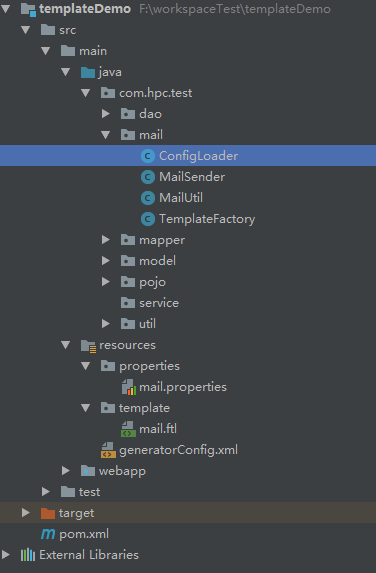
邮箱配置文件mail.properties参数如下
#mail sender settings
# for example: smtp.163.com
mail.server=smtp.163.com
#the sender mail
mail.sender=xxx@163.com
#the sender nickname
mail.nickname=
#sender mail username
mail.username=xxx@163.com
#sender mail password
mail.password=hpc2013210831xxx
模板mail.ftl如下
<div>
    <span>${username},你好!</span>
    <p>${content}</p>
</div>
邮件发送信息配置类ConfigLoader.java如下
package com.hpc.test.mail;

import org.slf4j.Logger;
import org.slf4j.LoggerFactory;

import java.io.IOException;
import java.io.InputStream;
import java.util.Properties;

public class ConfigLoader {

    // 日志记录对象
    private static Logger log = LoggerFactory.getLogger(ConfigLoader.class);
    // 配置文件路径
    private static String mailPath = "properties/mail.properties";
    // 邮件发送SMTP主机
    private static String server;
    // 发件人邮箱地址
    private static String sender;
    // 发件人邮箱用户名
    private static String username;
    // 发件人邮箱密码
    private static String password;
    // 发件人显示昵称
    private static String nickname;

    static {
        // 类初始化后加载文件
        InputStream in = ConfigLoader.class.getClassLoader().getResourceAsStream(mailPath);
        Properties props = new Properties();
        try {
            props.load(in);
        } catch (IOException e) {
            log.error("load mail setting error, please check the file path:" + mailPath);
            log.error(e.toString(), e);
        }

        server = props.getProperty("mail.server");
        sender = props.getProperty("mail.sender");
        username = props.getProperty("mail.username");
        password = props.getProperty("mail.password");
        nickname = props.getProperty("mail.nickname");
        log.debug("load mail setting success, file path: " + mailPath);
    }

    public static String getServer() {
        return server;
    }

    public static String getSender() {
        return sender;
    }

    public static String getUsername() {
        return username;
    }

    public static String getPassword() {
        return password;
    }

    public static String getNickname() {
        return nickname;
    }

    public static void setMailPath(String mailPath) {
        ConfigLoader.mailPath = mailPath;
    }
}
邮件发送实现类MailSender.java如下
package com.hpc.test.mail;

import org.slf4j.Logger;
import org.slf4j.LoggerFactory;

import javax.activation.DataHandler;
import javax.activation.FileDataSource;
import javax.mail.*;
import javax.mail.internet.*;
import java.io.UnsupportedEncodingException;
import java.util.ArrayList;
import java.util.List;
import java.util.Map;
import java.util.Properties;

public class MailSender {

    // 日志记录对象
    private static Logger log = LoggerFactory.getLogger(MailSender.class);

    // MIME邮件对象
    private MimeMessage mimeMsg;
    // 邮件会话对象
    private Session session;
    // 系统属性
    private Properties properties;
    // Multilpart对象,邮件内容,标题,附件等内容均添加到其中后再生成
    private Multipart mp;
    // 发件人用户名
    private String username;
    // 发件人密码
    private String password;
    // 发件人昵称
    private String nickname;

    /** * 构造函数 * @param smtp 发送主机名 */
    public MailSender(String smtp) {
        setSmptHost(smtp);
        createMimeMessage();
    }

    /** * 设置权限坚定配置 * @param need 是否需要权限 * @desc */
    public void setNeedAuth(boolean need) {
        if (null == properties) {
            properties = System.getProperties();
        }
        if (need) {
            properties.put("mail.smtp.auth", "true");
        }
        else {
            properties.put("mail.smtp.auth", "false");
        }
        log.debug("set smtp auth success; mail.smtp.auth = " + need);
    }

    /** * 创建邮件对象 * @description */
    public void createMimeMessage() {
        // 获取邮件会话对象
        session = Session.getDefaultInstance(properties, null);
        // 创建邮件MIME对象
        mimeMsg = new MimeMessage(session);
        mp = new MimeMultipart();
        log.debug("create session and mimeMessage success");
    }

    /** * 设置邮件发送的SMTP主机 * @param smtp 发送主机名 * @description */
    public void setSmptHost(String smtp) {
        if(null == properties) {
            properties = System.getProperties();
        }
        properties.put("mail.smtp.host", smtp);
        log.debug("set system properties success : mail.smtp.host = " + smtp);
    }

    /** * 设置发送邮件的主题 * @param subject 邮件的主题 * @throws UnsupportedEncodingException * @throws MessagingException * @desc */
    public void setSubject(String subject) throws UnsupportedEncodingException, MessagingException {
        mimeMsg.setSubject(MimeUtility.encodeText(subject, "utf-8", "B"));
        log.debug("set mail subject success, subject = " +subject);
    }

    public void setBody(String mailBody) throws MessagingException {
        BodyPart bp = new MimeBodyPart();
        bp.setContent("" + mailBody, "text/html;charset=utf-8");
        mp.addBodyPart(bp);
        log.debug("set mail body content success, mailBody = " + mailBody);
    }

    /** * 添加邮件附件,附件可为多个 * @param fileMap 文件绝对路径map集合 * @throws MessagingException */
    public void setFileAffix(Map<String, String> fileMap) throws MessagingException, UnsupportedEncodingException {
        // 获取附件
        for (String file: fileMap.keySet()) {
            // 创建一个存放附件的BodyPart对象
            BodyPart bp = new MimeBodyPart();
            // 获取文件路径
            String filePath = fileMap.get(file);
            String[] fileNames = filePath.split("/");
            // 获取文件名
            String fileName = fileNames[fileNames.length-1];
            // 设置附件名称,附件名称为中文时先用utf-8编码
            bp.setFileName(MimeUtility.encodeWord(fileName, "utf-8", null));
            FileDataSource fields = new FileDataSource(filePath);
            bp.setDataHandler(new DataHandler(fields));
            // multipart中添加bodypart
            mp.addBodyPart(bp);
            log.debug("mail add file success, filepath = " + filePath);
        }
        log.debug("setFileAffix end with success");
    }

    /** * 设置发件人邮箱地址 * @param sender 发件人邮箱地址 * @throws UnsupportedEncodingException * @throws MessagingException * @desc */
    public void setSender(String sender) throws UnsupportedEncodingException, MessagingException {
        nickname = MimeUtility.encodeText(nickname, "utf-8", "B");
        mimeMsg.setFrom(new InternetAddress(nickname + "<" + sender + ">"));
        log.debug("set mail sender and nickname success, sender = " + sender);
    }

    /** * 设置收件人邮箱地址 可以设置多个收件人 * @param receivers 收件人邮箱地址List集合 * @throws MessagingException * @desc */
    public void setReceiver(String[] receivers) throws MessagingException {
        // 将收件人数组设置为InternetAddress数组类型
        List<InternetAddress> receiverList = new ArrayList<InternetAddress>();
        for (String receiver : receivers) {
            receiverList.add(new InternetAddress(receiver));
        }
        InternetAddress[] addresses = receiverList.toArray(new InternetAddress[receivers.length]);
        mimeMsg.setRecipients(Message.RecipientType.TO, addresses);
        log.debug("set mail receiver success, the number of receivers is = " + addresses.length);
    }

    /** * 设置抄送人邮箱地址 * @param copyTos 抄送人邮箱地址 * @throws MessagingException * @desc */
    public void setCopyTo(String[] copyTos) throws MessagingException {
        // 将抄送人数组设置为InternetAddress数组类型
        List<InternetAddress> copyToList = new ArrayList<InternetAddress>();
        for (String copyto : copyTos) {
            copyToList.add(new InternetAddress(copyto));
        }
        InternetAddress[] addresses = copyToList.toArray(new InternetAddress[copyTos.length]);
        mimeMsg.setRecipients(Message.RecipientType.CC, addresses);
        log.debug("set mail copyto receiver success, the number of copyTos is " + copyTos.length);
    }

    /** * 设置发件人用户名密码进行发送邮件操作 * @throws MessagingException * @desc */
    public void sendout() throws MessagingException {
        mimeMsg.setContent(mp);
        mimeMsg.saveChanges();
        Session mailSession = Session.getDefaultInstance(properties, null);
        Transport transport = mailSession.getTransport("smtp");
        transport.connect((String) properties.get("mail.smtp.host"), username, password);
        transport.sendMessage(mimeMsg, mimeMsg.getRecipients(Message.RecipientType.TO));
        transport.close();
        log.debug("send mail success");
    }

    /** * 设置发件人用户名、密码、昵称 * @param username 发件人用户名 * @param password 发件人密码 * @param nickname 发件人昵称 * @desc */
    public void setNamePass(String username, String password, String nickname) {
        this.username = username;
        this.password = password;
        this.nickname = nickname;
    }
}
邮件发送工具类MailUtil.java
package com.hpc.test.mail;

import org.slf4j.Logger;
import org.slf4j.LoggerFactory;

import javax.mail.MessagingException;
import java.io.UnsupportedEncodingException;
import java.util.ArrayList;
import java.util.List;
import java.util.Map;

public class MailUtil {

    private static Logger log = LoggerFactory.getLogger(MailUtil.class);

    /** * 根据模版名称查找模版,加载目标内容后发送邮件,抄送给copyTos * @param receivers 收件人邮箱地址数组 * @param copyTos 抄送人邮箱地址数组 * @param subject 邮件主题 * @param fileMap 附件路径map集合 * @param map 邮件内容与模板内容转换对象 * @param templateName 模板文件名称 * @throws UnsupportedEncodingException * @throws MessagingException * */
    public static void sendMailFileByTemplateWithCopyto(String[] receivers, String[] copyTos, String subject, Map<String, String> fileMap, Map<String, String> map, String templateName) throws UnsupportedEncodingException, MessagingException {
        String mailBody = "";
        String server = ConfigLoader.getServer();
        String sender = ConfigLoader.getSender();
        String username = ConfigLoader.getUsername();
        String password = ConfigLoader.getPassword();
        String nickname = ConfigLoader.getNickname();
        MailSender mail = new MailSender(server);
        mail.setNeedAuth(true);
        mail.setNamePass(username, password, nickname);
        mailBody = TemplateFactory.genrateHtmlFromFtl(templateName, map);
        mail.setSubject(subject);
        mail.setFileAffix(fileMap);
        mail.setBody(mailBody);
        mail.setReceiver(receivers);
        mail.setSender(sender);
        mail.sendout();
    }
}
版权声明:本文内容由互联网用户自发贡献,该文观点仅代表作者本人。本站仅提供信息存储空间服务,不拥有所有权,不承担相关法律责任。如发现本站有涉嫌侵权/违法违规的内容, 请联系我们举报,一经查实,本站将立刻删除。
发布者:全栈程序员-站长,转载请注明出处:https://javaforall.net/146480.html原文链接:https://javaforall.net



