
大家好,又见面了,我是你们的朋友全栈君。
事实上网上有非常多关于Excel的样例,可是不是非常好,他们的代码没有非常全,读的起来还非常晦涩。经过这几天的摸索,最终能够完毕我想要导出报表Excel的效果了。以下是我的效果图。
一.前台的页面图
GridView的第一页的内容
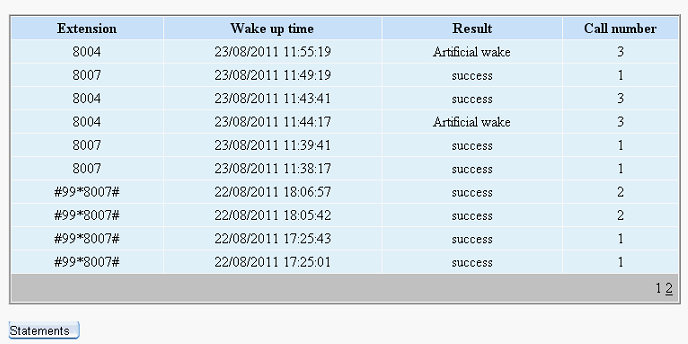

GridView第二页的内容:

大家可能遇到这样的情况,就是这个时候导出Excel的时候,打开Excel的时候发现GridView的第二页的内容却没有导出到Excel表里面。事实上解决这样的情况,非常easy,仅仅要在导出之前,把Gridview的设置分页设置为Flase即可了。
以下是我导出Gridview里面的所有内容,打开Excel表例如以下:
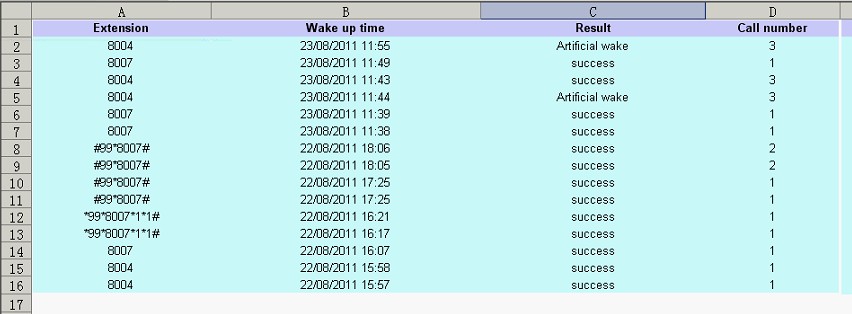
这就能够导出所有的GridView里面的内容了,包含了GridView的第一页和第二页的内容。
二、实现的代码
1.前台的代码:
<div style=” margin:20px;”>
<asp:GridView ID=”gvRecord” runat=”server” AllowPaging=”True” CellPadding=”3″
AutoGenerateColumns=”False” BorderColor=”White”
BorderStyle=”Ridge” BorderWidth=”2px” BackColor=”White” CellSpacing=”1″
GridLines=”None” onprerender=”gvRecord_PreRender”
onpageindexchanged=”gvRecord_PageIndexChanged”
onpageindexchanging=”gvRecord_PageIndexChanging” >
<PagerSettings FirstPageText=”Home Page” LastPageText=”Last Page”
NextPageText=”Next” PreviousPageText=”Previous” />
<RowStyle ForeColor=”Black” BackColor=”#E5F1FF” HorizontalAlign=”Center” />
<Columns>
<asp:TemplateField HeaderText=”Extension”>
<ItemTemplate>
<asp:Label ID=”Label1″ runat=”server” Text='<%# Bind(“Extn”) %>’></asp:Label>
</ItemTemplate>
<ItemStyle Width=”200px” />
</asp:TemplateField>
<asp:TemplateField HeaderText=”Wake up time”>
<ItemTemplate>
<asp:Label ID=”Label2″ runat=”server” Text='<%# Bind(“CallTime”) %>’></asp:Label>
</ItemTemplate>
<ItemStyle Width=”300px” />
</asp:TemplateField>
<asp:TemplateField HeaderText=”Status”>
<ItemTemplate>
<asp:Label ID=”Label3″ runat=”server” Text='<%# getResult(Eval(“Status”).ToString()) %>’></asp:Label>
</ItemTemplate>
<ItemStyle Width=”250px” />
</asp:TemplateField>
<asp:TemplateField HeaderText=”Call number”>
<ItemTemplate>
<asp:Label ID=”Label4″ runat=”server” Text='<%# Bind(“callcount”) %>’></asp:Label>
</ItemTemplate>
<ItemStyle Width=”150px” />
</asp:TemplateField>
</Columns>
<FooterStyle BackColor=”#C6C3C6″ ForeColor=”Black” />
<PagerStyle BackColor=”#C6C3C6″ ForeColor=”Black” HorizontalAlign=”Right” />
<SelectedRowStyle BackColor=”#9471DE” Font-Bold=”True” ForeColor=”White” />
<HeaderStyle BackColor=”#C9E2FF” Font-Bold=”True” ForeColor=”#000000″ />
</asp:GridView>
<p>
<asp:Button ID=”btnExcel” CssClass=”button” runat=”server” Text=”Statements
”
onclick=”btnExcel_Click” /></p>
</div>
2.后台代码例如以下:
using System;
using System.Collections;
using System.Configuration;
using System.Data;
using System.Linq;
using System.Web;
using System.Web.Security;
using System.Web.UI;
using System.Web.UI.HtmlControls;
using System.Web.UI.WebControls;
using System.Web.UI.WebControls.WebParts;
using System.Xml.Linq;
using Model;
using DAL;
using System.Collections.Generic;
using System.IO;
public partial class _3C_CallManager_CallRecord : System.Web.UI.Page
{
int selectFlag = 0;
protected void Page_Load(object sender, EventArgs e)
{
if (!IsPostBack)
{
bind();
}
}
public string getResult(string str)
{
if (str == “0”)
return “Haven’t called”;
if (str == “1”)
return “check-out”;
if (str == “2”)
return “success”;
if (str == “3”)
return “fail”;
if (str == “4”)
return “dealing”;
if (str == “5”)
return “Artificial wake”;
else
return “unkown”;
}
public void bind() {
selectFlag = 0;
gvRecord.DataSource = VgCallService.GetInfo();
gvRecord.DataBind();
}
protected void btnExcel_Click(object sender, EventArgs e)
{
DateTime dt = System.DateTime.Now;
string str = dt.ToString(“yyyyMMddhhmmss”);
str = str + “.xls”;
gvRecord.AllowPaging = false;
if (selectFlag == 0)
bind();
if (selectFlag == 1)
selectBind();
GridViewToExcel(gvRecord, “application/ms-excel”, str);
// Export(gvRecord, “application/ms-excel”, str);
}
/// <summary>
/// 将网格数据导出到Excel
/// </summary>
/// <param name=”ctrl”>网格名称(如GridView1)</param>
/// <param name=”FileType”>要导出的文件类型(Excel:application/ms-excel)</param>
/// <param name=”FileName”>要保存的文件名称</param>
public static void GridViewToExcel(Control ctrl, string FileType, string FileName)
{
HttpContext.Current.Response.Charset = “GB2312”;
HttpContext.Current.Response.ContentEncoding = System.Text.Encoding.UTF8;//注意编码
HttpContext.Current.Response.AppendHeader(“Content-Disposition”,
“attachment;filename=” + HttpUtility.UrlEncode(FileName, System.Text.Encoding.UTF8).ToString());
HttpContext.Current.Response.ContentType = FileType;//image/JPEG;text/HTML;image/GIF;vnd.ms-excel/msword
ctrl.Page.EnableViewState = false;
StringWriter tw = new StringWriter();
HtmlTextWriter hw = new HtmlTextWriter(tw);
ctrl.RenderControl(hw);
HttpContext.Current.Response.Write(tw.ToString());
HttpContext.Current.Response.End();
}
/// <summary>
/// ReLoad this VerifyRenderingInServerForm is neccessary
/// </summary>
/// <param name=”control”></param>
public override void VerifyRenderingInServerForm(Control control)
{
}
protected void gvRecord_PreRender(object sender, EventArgs e)
{
if(selectFlag==0)
bind();
}
protected void gvRecord_PageIndexChanged(object sender, EventArgs e)
{
}
protected void gvRecord_PageIndexChanging(object sender, GridViewPageEventArgs e)
{
this.gvRecord.PageIndex = e.NewPageIndex;
bind();
}
}
注意问题说明:
1)前台页面<%@ Page Language=”C#” EnableEventValidation=”false” AutoEventWireup=”true” CodeFile=”CallRecord.aspx.cs” Inherits=”_3C_CallManager_CallRecord” %>注意加入EnableEventValidation=”false”,要不然会报错的。
2)GridView的绑定数据库的代码
gvRecord.DataSource = VgCallService.GetInfo();//VgCallService.GetInfo()是获取数据库的集合,我是封装好的,依据你们的获取的集合做不同的调整。
gvRecord.DataBind();
3)点击GridView下一页的关键代码,在PageIndexChanging事件里面
this.gvRecord.PageIndex = e.NewPageIndex; //注意这个不能少。
bind();
4)在导出Excel的button事件里面记得先gvRecord.AllowPaging = false;把GridView的分页取消之后,再调用GridViewToExcel方法。
5)以下的不可少。
public override void VerifyRenderingInServerForm(Control control)
{
}
发布者:全栈程序员-站长,转载请注明出处:https://javaforall.net/154869.html原文链接:https://javaforall.net




