
大家好,又见面了,我是你们的朋友全栈君。
vs2017
rapidxml-1.13
1 RapidXml使用
1.1 创建xml
#include <iostream>
#include "rapidxml/rapidxml.hpp"
#include "rapidxml/rapidxml_utils.hpp"
#include "rapidxml/rapidxml_print.hpp"

using namespace rapidxml;

void crateXml()
{

	xml_document<> doc;
	xml_node<>* rot = doc.allocate_node(rapidxml::node_pi, doc.allocate_string("xml version='1.0' encoding='utf-8'"));
	doc.append_node(rot);
	xml_node<>* node = doc.allocate_node(node_element, "config", "information");
	xml_node<>* color = doc.allocate_node(node_element, "color", NULL);
	doc.append_node(node);
	node->append_node(color);
	color->append_node(doc.allocate_node(node_element, "red", "0.1"));
	color->append_node(doc.allocate_node(node_element, "green", "0.1"));
	color->append_node(doc.allocate_node(node_element, "blue", "0.1"));
	color->append_node(doc.allocate_node(node_element, "alpha", "1.0"));

	xml_node<>* size = doc.allocate_node(node_element, "size", NULL);
	size->append_node(doc.allocate_node(node_element, "x", "640"));
	size->append_node(doc.allocate_node(node_element, "y", "480"));
	node->append_node(size);

	xml_node<>* mode = doc.allocate_node(rapidxml::node_element, "mode", "screen mode");
	mode->append_attribute(doc.allocate_attribute("fullscreen", "false"));
	node->append_node(mode);


	std::string text;
	rapidxml::print(std::back_inserter(text), doc, 0);

	std::cout << text << std::endl;

	std::ofstream out("config.xml");
	out << doc;
}

int main()
{

	crateXml();

	system("PAUSE");
	return EXIT_SUCCESS;
}
输出文件config.xml:
<?xml version='1.0' encoding='utf-8' ?>
<config>
	<color>
		<red>0.1</red>
		<green>0.1</green>
		<blue>0.1</blue>
		<alpha>1.0</alpha>
	</color>
	<size>
		<x>640</x>
		<y>480</y>
	</size>
	<mode fullscreen="false">screen mode</mode>
</config>
1.2 创建xml2
void createXml2()
{

	xml_document<> doc; //是解析器
	char a[] = "<top>"//假设单独传, 就不能加上xml的头部信息,
			   //否则会报错
		"<name>tangqiang</name>"
		"<age>22</age>"
		"</top>";
	char* p = a;
	doc.parse<0>(p);

	xml_node<>* node = doc.first_node();//去顶级结点
	std::cout << (node->name()) << std::endl;
	node = node->first_node();
	while (node) {

		std::cout << node->name() << ":" << node->value() << std::endl;//name() value()返回的字符串不会去掉首尾的空白字符
		node = node->next_sibling();
	}

	std::ofstream out("test.xml");//ofstream 默认时,假设文件存在则会覆盖原来的内容,不存在则会新建
	out << doc;//doc 这样输出时在目标文件里不会有xml 头信息---<?xml version='1.0' encoding='utf-8' >
	out.close();

}
输出文件test.xml:
<top>
	<name>tangqiang</name>
	<age>22</age>
</top>
1.3 读取xml
void readXml()
{

	file<> fdoc("config.xml");
	std::cout << fdoc.data() << std::endl;
	xml_document<> doc;
	doc.parse<0>(fdoc.data());

	std::cout << doc.name() << std::endl;

	//! 获取根节点
	xml_node<>* root = doc.first_node();
	std::cout << root->name() << std::endl;

	//! 获取根节点第一个节点
	xml_node<>* node1 = root->first_node();
	std::cout << node1->name() << std::endl;

	xml_node<>* node11 = node1->first_node();
	std::cout << node11->name() << std::endl;
	std::cout << node11->value() << std::endl;

	//! 加入之后再次保存
	//须要说明的是rapidxml明显有一个bug
	//那就是append_node(doc.allocate_node(node_element,"h","0"));的时候并不考虑该对象是否存在!
	xml_node<>* size = root->first_node("size");
	size->append_node(doc.allocate_node(node_element, "w", "0"));
	size->append_node(doc.allocate_node(node_element, "h", "0"));

	std::string text;
	rapidxml::print(std::back_inserter(text), doc, 0);

	std::cout << text << std::endl;

	std::ofstream out("config.xml");
	out << doc;

}
输出文件config.xml:
<config>
	<color>
		<red>0.1</red>
		<green>0.1</green>
		<blue>0.1</blue>
		<alpha>1.0</alpha>
	</color>
	<size>
		<x>640</x>
		<y>480</y>
		<w>0</w>
		<h>0</h>
	</size>
	<mode fullscreen="false">screen mode</mode>
</config>
1.4 删除节点
void removeNode()
{

	file<> fdoc("config.xml");
	xml_document<> doc;
	doc.parse<0>(fdoc.data());

	std::string text;
	rapidxml::print(std::back_inserter(text), doc, 0);
	std::cout << text << std::endl;

	xml_node<>* root = doc.first_node();

	xml_node<>* sec = root->first_node();

	root->remove_node(sec); //移除根节点下的sec结点(包含该结点下全部结点)
	text = "删除一个节点\r\n";
	rapidxml::print(std::back_inserter(text), doc, 0);
	std::cout << text << std::endl;

	root->remove_all_nodes(); //移除根节点下全部结点
	text = "删除全部节点\r\n";
	rapidxml::print(std::back_inserter(text), doc, 0);
	std::cout << text << std::endl;

	std::ofstream out("test.xml");
	out << doc;

}
输出文件test.xml:
<config>
    <color>
        <red>0.1</red>
        <green>0.1</green>
        <blue>0.1</blue>
        <alpha>1.0</alpha>
    </color>
    <size>
        <x>640</x>
        <y>480</y>
        <w>0</w>
        <h>0</h>
    </size>
    <mode fullscreen="false">screen mode</mode>
</config>


删除一个节点

<config>
    <size>
        <x>640</x>
        <y>480</y>
        <w>0</w>
        <h>0</h>
    </size>
    <mode fullscreen="false">screen mode</mode>
</config>


删除全部节点

<config/>
2 问题记录
2.1 错误 C3861 “print_children”: 找不到标识符
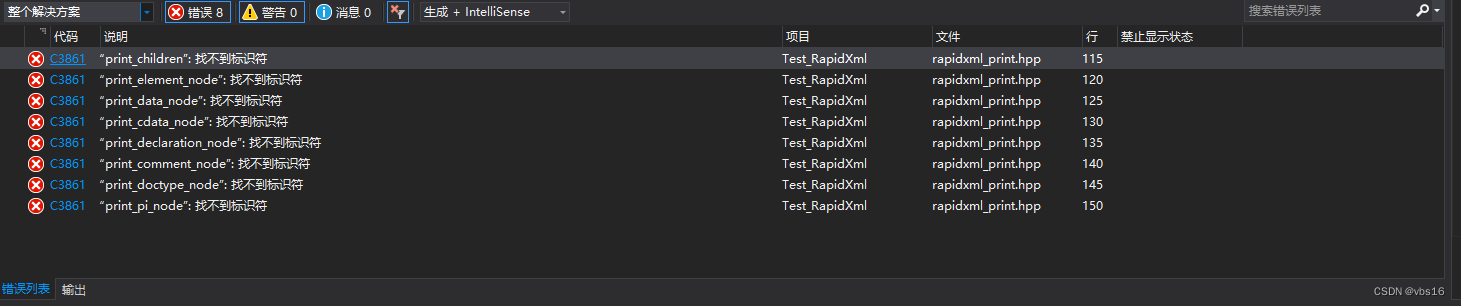

解决方法:
在print_node函数处,rapidxml_print.hpp 104行,前置声明调用到的函数
template<class OutIt, class Ch>
inline OutIt print_children(OutIt out, const xml_node<Ch>* node, int flags, int indent);

template<class OutIt, class Ch>
inline OutIt print_element_node(OutIt out, const xml_node<Ch>* node, int flags, int indent);

template<class OutIt, class Ch>
inline OutIt print_data_node(OutIt out, const xml_node<Ch>* node, int flags, int indent);

template<class OutIt, class Ch>
inline OutIt print_cdata_node(OutIt out, const xml_node<Ch>* node, int flags, int indent);

template<class OutIt, class Ch>
inline OutIt print_declaration_node(OutIt out, const xml_node<Ch>* node, int flags, int indent);

template<class OutIt, class Ch>
inline OutIt print_comment_node(OutIt out, const xml_node<Ch>* node, int flags, int indent);

template<class OutIt, class Ch>
inline OutIt print_doctype_node(OutIt out, const xml_node<Ch>* node, int flags, int indent);

template<class OutIt, class Ch>
inline OutIt print_pi_node(OutIt out, const xml_node<Ch>* node, int flags, int indent);
原文连接: https://www.cnblogs.com/rainbow70626/p/10386131.html
版权声明:本文内容由互联网用户自发贡献,该文观点仅代表作者本人。本站仅提供信息存储空间服务,不拥有所有权,不承担相关法律责任。如发现本站有涉嫌侵权/违法违规的内容, 请联系我们举报,一经查实,本站将立刻删除。
发布者:全栈程序员-站长,转载请注明出处:https://javaforall.net/160878.html原文链接:https://javaforall.net



