
大家好,又见面了,我是你们的朋友全栈君。
把如下图几个文件放到工程目录(hpp文件)
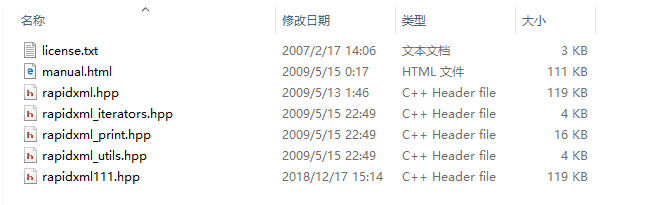

新建工程进行读写测试,代码如下:
// ConsoleApplication1.cpp : 定义控制台应用程序的入口点。
//
#include “stdafx.h”
#include “rapidxml.hpp”
#include “rapidxml_utils.hpp” //rapidxml::file
#include “rapidxml_print.hpp” //rapidxml::print
#include <windows.h>
#include <iostream>
void writeFile(const char * file_name)
{
char buf[1024] = { 0 };
rapidxml::xml_document<> doc;
// XML头的声明
rapidxml::xml_node<>* declaration = doc.allocate_node(rapidxml::node_declaration);
declaration->append_attribute(doc.allocate_attribute(“version”, “1.0”));
declaration->append_attribute(doc.allocate_attribute(“encoding”, “utf-8”));
doc.append_node(declaration);
rapidxml::xml_node<>* root = doc.allocate_node(rapidxml::node_element, “root”);
doc.append_node(root);
rapidxml::xml_node<>* comment1 = doc.allocate_node(rapidxml::node_comment, 0, “all students info”);
root->append_node(comment1);
rapidxml::xml_node<>* students = doc.allocate_node(rapidxml::node_element, “students”);
for (int i = 0; i < 10; ++i)
{
rapidxml::xml_node<>* n1 = doc.allocate_node(rapidxml::node_element, “student”);
// doc.allocate_string 的作用是将源字符串深拷贝一份
n1->append_attribute(doc.allocate_attribute(“name”, doc.allocate_string(buf)));
n1->append_attribute(doc.allocate_attribute(“score”, doc.allocate_string(std::to_string(100 – i).c_str())));
students->append_node(n1);
}
root->append_node(students);
std::ofstream outfile(file_name, std::ios::out);
if (outfile)
{
std::string text;
rapidxml::print(std::back_inserter(text), doc, 0);
outfile << text;
outfile.close();
}
}
void readFile(const char * fileName)
{
std::ifstream inf(fileName, std::ios::in);
if (!inf)
{
return;
}
inf.seekg(0, std::ios::end);
int nLen = inf.tellg();
inf.seekg(0, std::ios::beg);
char * strc = new char[nLen+1];
ZeroMemory(strc, nLen + 1);
inf.read(strc, nLen);
rapidxml::xml_document<> doc;
doc.parse<0>(strc);
rapidxml::xml_node<> *root = doc.first_node(“root”);
int nSize = 0;
rapidxml::xml_node<>* child = root->first_node(“students”)->first_node();
while (child)
{
//判断属性是否存在
rapidxml::xml_attribute<>* nameAttr = child->first_attribute(“name”);
rapidxml::xml_attribute<>* scoreAttr = child->first_attribute(“score”);
char *nameC;
char *scoreC;
if (nameAttr)
{
nameC = nameAttr->value();
}
if (scoreAttr)
{
scoreC = scoreAttr->value();
}
child = child->next_sibling();
}
/*for (rapidxml::xml_node<>* child = root->first_node(“students”)->first_node(); child; child = child->next_sibling())
{
char *nameC = child->first_attribute(“name”)->value();
char * homea = child->first_attribute(“score”)->value();
}*/
delete strc;
strc = NULL;
}
int _tmain(int argc, _TCHAR* argv[])
{
writeFile(“11.xml”);
readFile(“11.xml”);
return 0;
}
发布者:全栈程序员-站长,转载请注明出处:https://javaforall.net/160903.html原文链接:https://javaforall.net



