
大家好,又见面了,我是你们的朋友全栈君。
帮朋友写的一个远程关机的小程序,参考一些网上大神的代码,加上自己的代码。

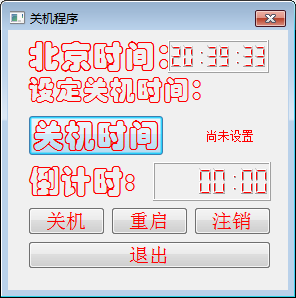
控制端:main.c
#include "shutdown.h"
#include <QApplication>
#include <QSound>
#include <QPalette>
int main(int argc, char *argv[])
{
QApplication a(argc, argv);
QSound::play("music.wav");
shutdown w;
w.setFixedSize(280,260);
w.setWindowTitle(QObject::tr("关机程序"));
w.setWindowFlags(Qt::WindowCloseButtonHint);
w.setWindowOpacity(1);
w.setAutoFillBackground(true);
QPalette palette;
palette.setBrush(QPalette::WindowText, Qt::red);
palette.setBrush(QPalette::ButtonText, Qt::red);
palette.setBrush(QPalette::Button, Qt::red);
w.setPalette(palette);
w.show();
return a.exec();
}
shutdown.cpp
#include "shutdown.h"
#include "ui_shutdown.h"
#include <QDebug>
#include <QTimer>
#include <QTime>
#include <QDateTime>
#include <QLCDNumber>
#include <QMessageBox>
#include <QPalette>
#include <windows.h>
#include <QInputDialog>
#include <QByteArray>
#include <QDebug>
int shutdownTime = 0;
int second = -1;
shutdown::shutdown(QWidget *parent) :
QDialog(parent),
ui(new Ui::shutdown)
{
ui->setupUi(this);
setAutoFillBackground(true);
QPalette p = QPalette();
p.setColor(QPalette::WindowText , Qt::red); //设置某一个控件颜色的方法
ui->lcdNumber->setPalette(p);
QTimer *timer = new QTimer(this); //新建一个定时器
connect(timer,SIGNAL(timeout()),this,SLOT(showTime())); //信号与槽,时间到便触发
connect(timer,SIGNAL(timeout()),this,SLOT(showCountDownTime())); //倒计时的信号与槽
connect(ui->setShutDownbt,SIGNAL(clicked(bool)),this,SLOT(showCountDownTime())); //倒计时信号与槽
connect(timer,SIGNAL(timeout()),this,SIGNAL(showCountDownTime));
timer->start(1000); //一秒刷新一次
showTime(); //显示时间
showCountDownTime();
showColon=true; //显示分号
ui->shutDownTime->setText(tr(" 尚未设置")) ; //初始化关机时间lebel
sender = new QUdpSocket(this);
receiver = new QUdpSocket(this);
receiver->bind(QHostAddress::LocalHost, 6665);
connect(receiver, SIGNAL(readyRead()),this, SLOT(readPendingDatagrams()));
}
shutdown::~shutdown()
{
delete ui;
}
void shutdown::readPendingDatagrams()
{
qDebug()<<"111122";
while (receiver->hasPendingDatagrams())
{
QByteArray datagram;
datagram.resize(receiver->pendingDatagramSize());
receiver->readDatagram(datagram.data(), datagram.size());
qDebug()<<datagram.data();
//数据接收在datagram里
/* readDatagram 函数原型
qint64 readDatagram(char *data,qint64 maxSize,QHostAddress *address=0,quint16 *port=0)
*/
}
}
void shutdown::showTime()//显示系统时间
{
QTime time = QTime::currentTime();
QString text = time.toString("hh:mm:ss");
if(showColon)
{
text[2]=':';
text[5]=':';
showColon=false;
}
else
{
text[2]=' ';
text[5]=' ';
showColon=true;
}
ui->lcdNumber->display(text);
}
void shutdown::showCountDownTime()
{
if(second == -1)
{
ui->QlcdTime->display("00:00");
}
else
{
if(second == 0)
{
on_shutdownButton_clicked();
}
QString str;
str.sprintf("%02d:%02d",second/60,second%60);
ui->QlcdTime->display( str );
second--;
}
}
void shutdown::on_shutdownButton_clicked()
{
HANDLE hToken;
TOKEN_PRIVILEGES tkp;
if (!OpenProcessToken(GetCurrentProcess(), TOKEN_ADJUST_PRIVILEGES | TOKEN_QUERY, &hToken))
{
return ;
}
//获取关机特权的LUID
LookupPrivilegeValue(NULL, SE_SHUTDOWN_NAME, &tkp.Privileges[0].Luid);
tkp.PrivilegeCount = 1;
tkp.Privileges[0].Attributes = SE_PRIVILEGE_ENABLED;
//获取这个进程的关机特权
AdjustTokenPrivileges(hToken, false, &tkp, 0, (PTOKEN_PRIVILEGES)NULL, 0);
if (GetLastError() != ERROR_SUCCESS)
{
return ;
}
QByteArray datagram = "1";
//UDP广播
sender->writeDatagram(datagram.data(),datagram.size(),QHostAddress::Broadcast,6665);
//向特定IP发送
QHostAddress serverAddress = QHostAddress(QHostAddress::LocalHost);
sender->writeDatagram(datagram.data(), datagram.size(),serverAddress, 6665);
ui->shutDownTime->setText(tr(" 尚未设置")) ; //初始化关机时间lebel
// 强制关闭计算机
// if ( !ExitWindowsEx(EWX_SHUTDOWN , 0)) //关机
// {
// return ;
// }
}
void shutdown::on_setShutDownbt_clicked()
{
bool ok;
shutdownTime = QInputDialog::getInt(this,
tr("输入关机时间"),
tr("请输入关机时间"),
ui->shutDownTime->text().toInt(&ok),
0,
60,
1,
&ok);
if(ok)
{
ui->shutDownTime->setText(QString(tr(" %1 分钟后关机")).arg(shutdownTime));
second = shutdownTime * 60;
}
else
{
return ;
}
}
void shutdown::on_reboot_clicked()
{
HANDLE hToken;
TOKEN_PRIVILEGES tkp;
//获取进程标志
if (!OpenProcessToken(GetCurrentProcess(), TOKEN_ADJUST_PRIVILEGES | TOKEN_QUERY, &hToken))
{
return ;
}
//获取关机特权的LUID
LookupPrivilegeValue(NULL, SE_SHUTDOWN_NAME, &tkp.Privileges[0].Luid);
tkp.PrivilegeCount = 1;
tkp.Privileges[0].Attributes = SE_PRIVILEGE_ENABLED;
//获取这个进程的关机特权
AdjustTokenPrivileges(hToken, false, &tkp, 0, (PTOKEN_PRIVILEGES)NULL, 0);
if (GetLastError() != ERROR_SUCCESS)
{
return ;
}
QByteArray datagram = "2";
//UDP广播
sender->writeDatagram(datagram.data(),datagram.size(),QHostAddress::Broadcast,6665);
//向特定IP发送
QHostAddress serverAddress = QHostAddress(QHostAddress::LocalHost);
sender->writeDatagram(datagram.data(), datagram.size(),serverAddress, 6665);
#if 0
// 强制关闭计算机
if ( !ExitWindowsEx(EWX_REBOOT , 0)) //重启
{
return ;
}
#endif
}
void shutdown::on_logoutButton_clicked()
{
HANDLE hToken;
TOKEN_PRIVILEGES tkp;
//获取进程标志
if (!OpenProcessToken(GetCurrentProcess(), TOKEN_ADJUST_PRIVILEGES | TOKEN_QUERY, &hToken))
{
return ;
}
//获取关机特权的LUID
LookupPrivilegeValue(NULL, SE_SHUTDOWN_NAME, &tkp.Privileges[0].Luid);
tkp.PrivilegeCount = 1;
tkp.Privileges[0].Attributes = SE_PRIVILEGE_ENABLED;
//获取这个进程的关机特权
AdjustTokenPrivileges(hToken, false, &tkp, 0, (PTOKEN_PRIVILEGES)NULL, 0);
if (GetLastError() != ERROR_SUCCESS)
{
return ;
}
QByteArray datagram = "3";
//UDP广播
sender->writeDatagram(datagram.data(),datagram.size(),QHostAddress::Broadcast,6665);
//向特定IP发送
QHostAddress serverAddress = QHostAddress(QHostAddress::LocalHost);
sender->writeDatagram(datagram.data(), datagram.size(),serverAddress, 6665);
#if 0
if ( !ExitWindowsEx(EWX_LOGOFF , 0)) //注销
{
return ;
}
#endif
}
void shutdown::on_exitButtion_clicked()
{
QMessageBox msgBox;
msgBox.setWindowModality(Qt::ApplicationModal); //设置此消息框为模式对话框
msgBox.setIcon(QMessageBox::Warning); //设置对话框的显示图标
msgBox.setText("真的要退出程序吗?");
msgBox.setInformativeText("怎么会狠心伤害我?");
msgBox.setStandardButtons(QMessageBox::Yes | QMessageBox::No);
msgBox.setDefaultButton(QMessageBox::Yes);
int ret = msgBox.exec();
switch (ret)
{
case QMessageBox::Yes :
close(); //退出程序
break;
case QMessageBox::No :
return; //返回主程序
break;
}
}
void shutdown::on_pushButtonSend_clicked()
{
#if 0
//UDP广播
sender->writeDatagram(datagram.data(),datagram.size(),QHostAddress::Broadcast,6665);
//向特定IP发送
QHostAddress serverAddress = QHostAddress(QHostAddress::LocalHost);
sender->writeDatagram(datagram.data(), datagram.size(),serverAddress, 6665);
/* writeDatagram函数原型,发送成功返回字节数,否则-1
qint64 writeDatagram(const char *data,qint64 size,const QHostAddress &address,quint16 port)
qint64 writeDatagram(const QByteArray &datagram,const QHostAddress &host,quint16 port)
*/
#endif
}
shutdown.h
#ifndef SHUTDOWN_H
#define SHUTDOWN_H
#include <QDialog>
#include <QtNetwork>
namespace Ui {
class shutdown;
}
class shutdown : public QDialog
{
Q_OBJECT
public:
explicit shutdown(QWidget *parent = 0);
~shutdown();
private slots:
void showTime();
void showCountDownTime();
void on_shutdownButton_clicked();
void on_setShutDownbt_clicked();
void on_reboot_clicked();
void on_logoutButton_clicked();
void on_exitButtion_clicked();
void on_pushButtonSend_clicked();
void readPendingDatagrams();
private:
bool showColon;
QUdpSocket *sender;
QUdpSocket *receiver;
private:
Ui::shutdown *ui;
};
#endif // SHUTDOWN_H
受控端:
main.cpp
#include "mainwindow.h"
#include <QApplication>
int main(int argc, char *argv[])
{
QApplication a(argc, argv);
MainWindow w;
w.show();
w.hide();
return a.exec();
}
mainwindow.cpp
#include "mainwindow.h"
#include "ui_mainwindow.h"
#include <QTimer>
#include <QTime>
#include <QDateTime>
#include <QLCDNumber>
#include <QMessageBox>
#include <QPalette>
#include <windows.h>
#include <QInputDialog>
#include <QByteArray>
#include <QDebug>
MainWindow::MainWindow(QWidget *parent) :
QMainWindow(parent),
ui(new Ui::MainWindow)
{
ui->setupUi(this);
receiver = new QUdpSocket(this);
receiver->bind(QHostAddress::LocalHost, 6665);
connect(receiver, SIGNAL(readyRead()),this, SLOT(readPendingDatagrams()));
}
MainWindow::~MainWindow()
{
delete ui;
}
void on_shutdown()
{
HANDLE hToken;
TOKEN_PRIVILEGES tkp;
if (!OpenProcessToken(GetCurrentProcess(), TOKEN_ADJUST_PRIVILEGES | TOKEN_QUERY, &hToken))
{
return ;
}
//获取关机特权的LUID
LookupPrivilegeValue(NULL, SE_SHUTDOWN_NAME, &tkp.Privileges[0].Luid);
tkp.PrivilegeCount = 1;
tkp.Privileges[0].Attributes = SE_PRIVILEGE_ENABLED;
//获取这个进程的关机特权
AdjustTokenPrivileges(hToken, false, &tkp, 0, (PTOKEN_PRIVILEGES)NULL, 0);
if (GetLastError() != ERROR_SUCCESS)
{
return ;
}
#ifndef DEBUG
// 强制关闭计算机
if ( !ExitWindowsEx(EWX_SHUTDOWN , 0)) //关机
{
return ;
}
#endif
}
void reboot()
{
HANDLE hToken;
TOKEN_PRIVILEGES tkp;
//获取进程标志
if (!OpenProcessToken(GetCurrentProcess(), TOKEN_ADJUST_PRIVILEGES | TOKEN_QUERY, &hToken))
{
return ;
}
//获取关机特权的LUID
LookupPrivilegeValue(NULL, SE_SHUTDOWN_NAME, &tkp.Privileges[0].Luid);
tkp.PrivilegeCount = 1;
tkp.Privileges[0].Attributes = SE_PRIVILEGE_ENABLED;
//获取这个进程的关机特权
AdjustTokenPrivileges(hToken, false, &tkp, 0, (PTOKEN_PRIVILEGES)NULL, 0);
if (GetLastError() != ERROR_SUCCESS)
{
return ;
}
#ifndef DEBUG
// 强制关闭计算机
if ( !ExitWindowsEx(EWX_REBOOT , 0)) //重启
{
return ;
}
#endif
}
void logout()
{
HANDLE hToken;
TOKEN_PRIVILEGES tkp;
//获取进程标志
if (!OpenProcessToken(GetCurrentProcess(), TOKEN_ADJUST_PRIVILEGES | TOKEN_QUERY, &hToken))
{
return ;
}
//获取关机特权的LUID
LookupPrivilegeValue(NULL, SE_SHUTDOWN_NAME, &tkp.Privileges[0].Luid);
tkp.PrivilegeCount = 1;
tkp.Privileges[0].Attributes = SE_PRIVILEGE_ENABLED;
//获取这个进程的关机特权
AdjustTokenPrivileges(hToken, false, &tkp, 0, (PTOKEN_PRIVILEGES)NULL, 0);
if (GetLastError() != ERROR_SUCCESS)
{
return ;
}
#ifndef DEBUG
if ( !ExitWindowsEx(EWX_LOGOFF , 0)) //注销
{
return ;
}
#endif
}
void MainWindow::readPendingDatagrams()
{
while (receiver->hasPendingDatagrams())
{
QByteArray datagram;
datagram.resize(receiver->pendingDatagramSize());
receiver->readDatagram(datagram.data(), datagram.size());
//qDebug()<<"222";
qDebug()<<datagram.toInt();
switch(datagram.toInt())
{
case 1:on_shutdown();break; //关机
case 2:reboot();break;
case 3:logout();break;
default:break;
}
}
}
mainwindow.h
#ifndef MAINWINDOW_H
#define MAINWINDOW_H
#include <QMainWindow>
#include <QtNetwork>
#include <QDebug>
namespace Ui {
class MainWindow;
}
class MainWindow : public QMainWindow
{
Q_OBJECT
public:
explicit MainWindow(QWidget *parent = 0);
~MainWindow();
private:
QUdpSocket *receiver;
//信号槽
private slots:
void readPendingDatagrams();
private:
Ui::MainWindow *ui;
};
#endif // MAINWINDOW_H
版权声明:本文内容由互联网用户自发贡献,该文观点仅代表作者本人。本站仅提供信息存储空间服务,不拥有所有权,不承担相关法律责任。如发现本站有涉嫌侵权/违法违规的内容, 请联系我们举报,一经查实,本站将立刻删除。
发布者:全栈程序员-站长,转载请注明出处:https://javaforall.net/162989.html原文链接:https://javaforall.net



