
大家好,又见面了,我是你们的朋友全栈君。如果您正在找激活码,请点击查看最新教程,关注关注公众号 “全栈程序员社区” 获取激活教程,可能之前旧版本教程已经失效.最新Idea2022.1教程亲测有效,一键激活。
Jetbrains全系列IDE使用 1年只要46元 售后保障 童叟无欺
Angular实现下拉菜单多选
写这篇文章时,引用文章地址如下:
http://ngmodules.org/modules/angularjs-dropdown-multiselect
http://dotansimha.github.io/angularjs-dropdown-multiselect/#/
AngularJS Dropdown Multiselect
This directive gives you a Bootstrap Dropdown with the power of AngularJS directives.
Features
Based on Bootstrap’s dropdown.
jQuery is not necessary.
Seperated your data and the selection data. no modification to the data made.
Built-in search.
Complete control on the selected items model to fit it to your requirements.
Two view options: normal list and checkboxes.
Pre-selected values.
Limit selection count.
Grouping items by property.
Callback events.
Demo
http://dotansimha.github.io/angularjs-dropdown-multiselect/
Dependencies
required: AngularJS >= 1.2, Lodash >= 2, Bootstrap >= 3.0
Make sure to add the dependencies before the directive’s js file.
Note: Bootstrap JS file is not needed for the directive, it just uses the CSS file.
Install
Download the files
Using bower:
Just run bower install angularjs-dropdown-multiselect
Manually: You can download the .js file directly or clone this repository.
Include the file in your app
<script type=”text/javascript” src=”angularjs-dropdown-multiselect.js”></script>.
You can also use the minfined version (angularjs-dropdown-multiselect.min.js).
Include the module in angular (i.e. in app.js) – angularjs-dropdown-multiselect
Usage and Documentation
See the documentation and examples in the GitHub pages: http://dotansimha.github.io/angularjs-dropdown-multiselect/
由以上英文文档可以得知,若使用angularjs-dropdown-multiselect,首先需要在index.html中引入AngularJS >= 1.2, Lodash >= 2, Bootstrap >= 3.0,如下所示:
<script src=“js/angularjs-dropdown-multiselect.js”></script>
<script src=“js/lodash.min.js”></script>
并在app.js模块中添加依赖angularjs-dropdown-multiselect。如下所示:
var routerApp = angular.module(‘routerApp’, [‘ui.router’, ‘ngCookies’, ‘ngTable’, ‘angularjs-dropdown-multiselect’, ‘MedListModule’]);
yh_set_dtl.html核心代码如下:
<div style=”float:left“>优 惠 类 型:</div>
<!– Demo –>
<div ng-dropdown-multiselect=“”
options=“yhctlModelOptions”
selected-model=“yhctlModel”
checkboxes=“true”>
</div>
controllers.js代码如下:
$scope.yhctlModel = [];
$scope.yhctlModelOptions = [
{id: 1, label: ‘限定用户’},
{id: 2, label: “限定商家”},
{id: 3, label: “限定使用次数”},
{id: 4, label: “限定药品”},
{id: 5, label: “与其它优惠共享”}];
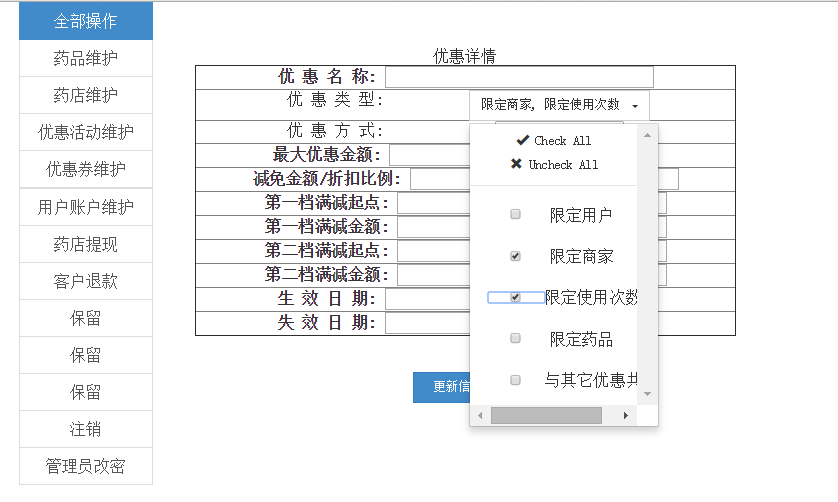
效果图如下:

发布者:全栈程序员-站长,转载请注明出处:https://javaforall.net/164218.html原文链接:https://javaforall.net




