
大家好,又见面了,我是你们的朋友全栈君。如果您正在找激活码,请点击查看最新教程,关注关注公众号 “全栈程序员社区” 获取激活教程,可能之前旧版本教程已经失效.最新Idea2022.1教程亲测有效,一键激活。
Jetbrains全系列IDE使用 1年只要46元 售后保障 童叟无欺
在我们做系统级框架的时候,我们要一定程度上考虑系统的使用版权,不能随便一个人拿去在任何环境都能用,所以我们需要给我们系统做一个授权认证机制,只有上传了我们下发的lic文件并验证通过,才能正常使用,下面就开始一步一步实现这个功能
1.生成机器码
我们首先要做的就是对软件部署的环境的唯一性进行限制,这里使用的是macadderss,当然你也可以换成cpu序列编号,并无太大影响,先上代码
private static String getMac() {
        try {
            Enumeration<NetworkInterface> el = NetworkInterface
                    .getNetworkInterfaces();
            while (el.hasMoreElements()) {
                byte[] mac = el.nextElement().getHardwareAddress();
                if (mac == null)
                    continue;
                String hexstr = bytesToHexString(mac);
                return getSplitString(hexstr, "-", 2).toUpperCase();
            }
        } catch (Exception exception) {
            exception.printStackTrace();
        }
        return null;
    }

public static String getMachineCode() throws Exception{
        Set<String> result = new HashSet<>();
        String mac = getMac();
        result.add(mac);
        Properties props = System.getProperties();
        String javaVersion = props.getProperty("java.version");
        result.add(javaVersion);
        String javaVMVersion = props.getProperty("java.vm.version");
        result.add(javaVMVersion);
        String osVersion = props.getProperty("os.version");
        result.add(osVersion);
        String code = Encrpt.GetMD5Code(result.toString());
        return getSplitString(code, "-", 4);

    }
这里进行的操作是取出机器码,与java版本,jvm,操作系统参数进行混合,并进行MD5操作
2.进行lic文件的生成

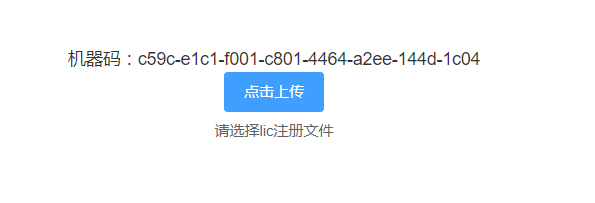
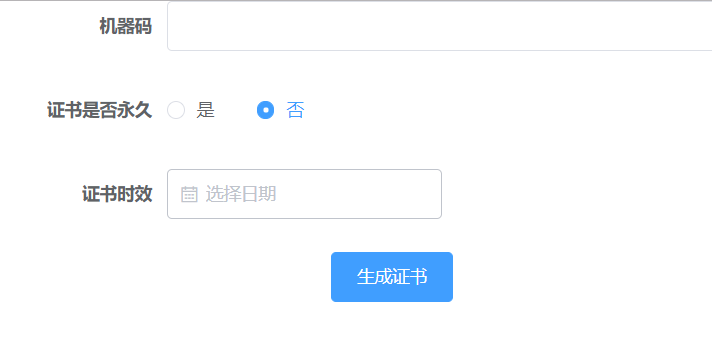
这是我生成证书与进行授权证书的界面,可以看到授权证书主要包含三个要素,机器码,是否永久有效标识,证书时效,我们会将这些数据写入文本中并进行加密处理,看下生成证书的代码
public static void getLicense(String isNoTimeLimit, String licenseLimit, String machineCode, String licensePath, String priavateKeyPath) throws Exception{
        String[] liccontent = {
                "LICENSEID=yanpeng19940119@gmail.com",
                "LICENSENAME=YBLOG使用证书",
                MessageFormat.format("LICENSETYPE={0}",isNoTimeLimit),
                MessageFormat.format("EXPIREDAY={0}",licenseLimit), //日期采用yyyy-MM-dd日期格式
                MessageFormat.format("MACHINECODE={0}",machineCode),
                ""
        };

        //将lic内容进行混合签名并写入内容
        StringBuilder sign = new StringBuilder();
        for(String item:liccontent){
            sign.append(item+"yblog");
        }
        liccontent[5] = MessageFormat.format("LICENSESIGN={0}",Encrpt.GetMD5Code(sign.toString()));
        FileUtil.createFileAndWriteLines(licensePath,liccontent);
        //将写入的内容整体加密替换
        String filecontent =FileUtil.readFileToString(licensePath);
        String encrptfilecontent = Encrpt.EncriptWRSA_Pri(filecontent,priavateKeyPath);
        File file = new File(licensePath);
        file.delete();
        FileUtil.createFile(licensePath,encrptfilecontent);
}这里我们是将一些信息与特定标识进行拼接然后加密,使用的是RSA加密,我们使用私钥加密公钥解密,保证验证的开放性与生成证书的私密性,密钥可以使用java自带的keytool工具进行生成,教程地址:http://note.youdao.com/noteshare?id=09e2bfc902b21a335a4505f7946a45c9,在lic文件最后我们加上一个LICENSESIGN参数,对其他信息进行一次加密,防止信息被篡改,生成文件后再对文本进行整体加密
这里生成密钥的长度为2048而非1024,所以解密块长度为256,这里需要注意下,公钥加密方法为,为了方便大家,这里提供下具体加密代码
private static final int MAX_ENCRYPT_BLOCK = 117;
private static final int MAX_DECRYPT_BLOCK=256;
public static String EncriptWRSA_Pri(String data,String path) throws Exception{
        String encryptData ="";

        FileInputStream in = new FileInputStream(path);
        KeyStore ks = KeyStore.getInstance("JKS");// JKS: Java KeyStoreJKS,可以有多种类型
        ks.load(in, "123".toCharArray());
        in.close();

        String alias = "yblogkey"; // 记录的别名
        String pswd = "123"; // 记录的访问密码
        java.security.cert.Certificate cert = ks.getCertificate(alias);
        //获取私钥
        PrivateKey privateKey = (PrivateKey) ks.getKey(alias, pswd.toCharArray());
        //私钥加密
        Cipher cipher = Cipher.getInstance("rsa");
        SecureRandom random = new SecureRandom();
        cipher.init(Cipher.ENCRYPT_MODE, privateKey, random);

        try {
            //  Cipher cipher = Cipher.getInstance("RSA");
            //   cipher.init(Cipher.ENCRYPT_MODE, publicKey);
            int length = data.getBytes().length;
            int offset = 0;
            byte[] cache;
            ByteArrayOutputStream outStream = new ByteArrayOutputStream();
            int i = 0;
            while(length - offset > 0){
                if(length - offset > MAX_ENCRYPT_BLOCK){
                    cache = cipher.doFinal(data.getBytes(), offset, MAX_ENCRYPT_BLOCK);
                }else{
                    cache = cipher.doFinal(data.getBytes(), offset, length - offset);
                }
                outStream.write(cache, 0, cache.length);
                i++;
                offset = i * MAX_ENCRYPT_BLOCK;
            }
            return encode.encode(outStream.toByteArray());
        } catch (IllegalBlockSizeException e) {
            e.printStackTrace();
        } catch (BadPaddingException e) {
            e.printStackTrace();
        }
        return encryptData;
    }

 public static String DecriptWithRSA_Pub(String data,String path) throws Exception{
        X509Certificate x509Certificate = (X509Certificate) getCertificate(path);
        // 获得公钥
        PublicKey publicKey = x509Certificate.getPublicKey();

        Cipher cipher = Cipher.getInstance("rsa");
        SecureRandom random = new SecureRandom();

        byte[] bEncrypt = decoder.decodeBuffer(data);
        //公钥解密
        cipher.init(Cipher.DECRYPT_MODE, publicKey, random);
        String decryptData = "";
        // byte[] plainData = cipher.doFinal(bEncrypt);
        //  System.out.println("11111:"+new String(plainData));
        int inputLen = bEncrypt.length;
        ByteArrayOutputStream out = new ByteArrayOutputStream();
        int offSet = 0;
        byte[] cache;
        int i = 0;
        // 对数据分段解密
        while (inputLen - offSet > 0) {
            if (inputLen - offSet > MAX_DECRYPT_BLOCK) {
                cache = cipher.doFinal(bEncrypt, offSet, MAX_DECRYPT_BLOCK);
            } else {
                cache = cipher.doFinal(bEncrypt, offSet, inputLen - offSet);
            }
            out.write(cache, 0, cache.length);
            i++;
            offSet = i * MAX_DECRYPT_BLOCK;
        }
        byte[] decryptedData = out.toByteArray();
        out.close();
        return  new String(decryptedData);
    }
3.验证lic
我们会在系统中注册一个拦截器,未通过系统授权认证会自动跳转到lic文件上传界面,springboot接收文件与常规java有一些不同,使用的MultipartFile对象,会获取到上传文件的数组,进行操作,看下保存上传lic文件代码
@RequestMapping(value="/login/licenseauth",method= RequestMethod.POST)
    @ResponseBody
    public Map<Object,Object> licenseauth(MultipartHttpServletRequest multiReq){
        Map<Object,Object>  map = new HashMap<Object,Object>();
        try {
            String savePath = ResourceUtils.getURL("src/main/resources/static/lic").getPath();
            MultipartFile file = multiReq.getFile("file");
            String filename = file.getOriginalFilename();
            File uploadfile = new File(savePath + "\\" + filename);
            if (!uploadfile.exists()){
                //获取item中的上传文件的输入流
                InputStream in = file.getInputStream();
                //创建一个文件输出流
                FileOutputStream out = new FileOutputStream(savePath + "\\" + filename);
                //创建一个缓冲区
                byte buffer[] = new byte[1024];
                //判断输入流中的数据是否已经读完的标识
                int len = 0;
                //循环将输入流读入到缓冲区当中,(len=in.read(buffer))>0就表示in里面还有数据
                while((len=in.read(buffer))>0){
                    //使用FileOutputStream输出流将缓冲区的数据写入到指定的目录(savePath + "\\" + filename)当中
                    out.write(buffer, 0, len);
                }
                //关闭输入流
                in.close();
                //关闭输出流
                out.close();
            }
            map.put("executestatus","1");

        }catch (Exception e){
            e.printStackTrace();
            map.put("executestatus","0");
        }

        return map;
    }
有了上传文件,我们就可以通过系统内置的公钥对lic文件的机器码,授权时间进行验证,确定是否能正常访问系统
public static boolean authLicense() throws Exception{
        boolean isauth = false;
        String pubkpath = ResourceUtils.getURL("src/main/resources/static/lic/").getPath()+"yblog.crt";
        String licpath = ResourceUtils.getURL("src/main/resources/static/lic/").getPath();
        File lic = new File(licpath);
        String[] filelist = lic.list();
        if (filelist.length>0){
            for (int i = 0; i < filelist.length; i++) {
                if (filelist[i].contains(".lic")){
                    File readfile = new File(licpath + filelist[i]);
                    if (readfile.isFile()) {
                        String liccontent = FileUtil.readFileToString(readfile);
                        String decriptliccontent = Encrpt.DecriptWithRSA_Pub(liccontent,pubkpath);
                        HashMap<String, String> props = genDataFromArrayByte(decriptliccontent.getBytes());
                        String licenseid = props.get("LICENSEID");
                        String licensename= props.get("LICENSENAME");
                        String licensetype = props.get("LICENSETYPE");
                        String liclimit = props.get("EXPIREDAY");
                        String machinecode = props.get("MACHINECODE");
                        String lincensesign = props.get("LICENSESIGN");
                        //验证签名
                        String allinfogroup = "LICENSEID="+licenseid+"yblog"+"LICENSENAME="+licensename+"yblog"+
                                "LICENSETYPE="+licensetype+"yblog"+"EXPIREDAY="+liclimit+"yblog"+"MACHINECODE="+machinecode+"yblogyblog";
                        if (lincensesign.equals(Encrpt.GetMD5Code(allinfogroup))){
                            //验证机器码
                            if (getMachineCode().equals(machinecode)){
                                SimpleDateFormat sdf=new SimpleDateFormat("yyyy-MM-dd");
                                Date bt=new Date();
                                Date et=sdf.parse(liclimit);
                                //验证时间
                                if(bt.compareTo(et)<=0){
                                    isauth = true;
                                    System.out.println("注册文件:"+filelist[i]+",已通过验证");
                                    break;
                                }else{
                                    System.out.println("证书过期");
                                }
                            }else{
                                System.out.println("机器码不一致");
                            }
                        }else{
                            System.out.println("签名不一致");
                        }
                    }
                }
            }
        }else{
            System.out.println("未上传证书");
        }
        return isauth;
    }
发布者:全栈程序员-站长,转载请注明出处:https://javaforall.net/164390.html原文链接:https://javaforall.net




