
大家好,又见面了,我是你们的朋友全栈君。如果您正在找激活码,请点击查看最新教程,关注关注公众号 “全栈程序员社区” 获取激活教程,可能之前旧版本教程已经失效.最新Idea2022.1教程亲测有效,一键激活。
Jetbrains全系列IDE稳定放心使用
Author: 杨正 date:2014.11.5 Email:y2012ww@gmail.com QQ: 1209758756
1、uip简介
Uip网络是一个简单好用的嵌入式协议栈,易于移植且消耗的内存空间较少,应用于很多嵌入式产品。uIP 协议栈去掉了完整的TCP/IP系统中不常用的功能,简化了通讯流程,只保留了网络通信必须使用的协议,设计重点放在了IP/TCP/ICMP/UDP/ARP这些网络层和传输层的协议上,因此保证了其代码的通用性和结构的稳定性。由于uIP协议栈专门为嵌入式系统而设计,因此还具有以下优越功能:
(1)代码非常少,其协议栈代码不到6K,方便阅读与移植。
(2)占用的内存数极少,RAM占用仅几百字节。
(3)它的硬件处理层、协议栈层和应用层共用一个全局缓存区,不存在数据拷贝,而且发送和接收都是依靠这个缓存区,极大的节省了空间和时间。
(4)支持多个主动连接和被动连接并发。
(5)它的源代码中提供一套实例程序:web 客户端,web 服务器,Telnet 服务器,电子邮件发送程序(SMTP 客户端),DNS 主机名解析程序等。
(6)在数据的处理上采用轮循机制,不需要操作系统的支持。由于 uIP 对资源的需求少而且移植容易,大部分的8位微控制器都使用过uIP协议栈, 而且很多著名的嵌入式产品和项目(如卫星,Cisco 路由器,无线传感器网络)中均在使用uIP 协议栈。
下面就开始进入移植过程。
2、uip移植
2.1 uip架构
在移植uip之前先简单看一下uip的大致框架,uIP相当于一个代码库,通过一系列的函数实现与底层硬件和高层应用程序之间的通讯,对于整个系统来说它内部的协议组是透明的,从而增加了协议的通用性。uIP协议栈与系统底层和高层应用之间的关系如下:
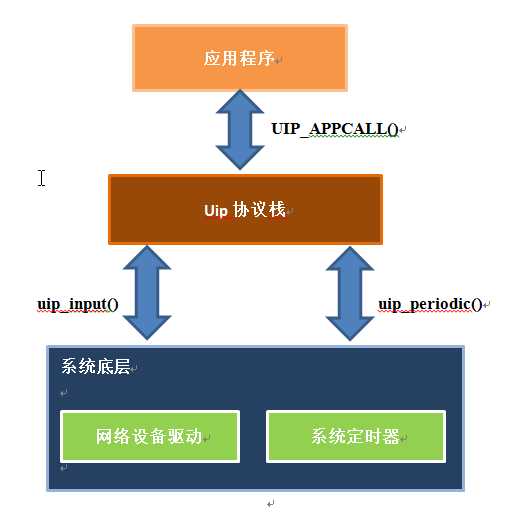

uIP 协议栈主要提供了三个函数供系统底层调用。即uip_init(), uip_input()和uip_periodic()。其与应用程序的主要接口是UIP_APPCALL( )。
uip_init()是系统初始化时调用的,主要用于初始化协议栈的侦听端口和默认所有连接是关闭的。当网卡驱动收到一个输入包时,将其放入全局缓冲区 uip_buf 中,包的大小由全局变量uip_len 约束。同时将调用uip_input()函数,这个函数将会根据包首部的协议处理这个包并在需要时调用应用程序。当uip_input()返回时,一个输出包同样放在全局缓冲区uip_buf 里,并把大小赋给uip_len。若uip_len 是0,则说明没有包要发送;否则调用底层系统的发包函数就会将包发送到网络上。uIP周期计时用于驱动所有的uIP内部时钟事件:当周期计时激发,每一个TCP连接都会调用uIP函数uip_periodic()。类似于uip_input()函数,uip_periodic()函数返回时,输出的IP 包要放到uip_buf 中,供底层系统查询uip_len 的大小并发送。由于TCP/IP 的应用场景很多,所以应用程序作为单独的模块由用户实现。uIP 协议栈提供一系列接口函数供用户程序调用,其中大部分函数是作为C的宏命令实现的,主要是为了速度、代码大小、堆栈和效率的使用。用户需要将应用层入口程序作为接口提供给uIP协议栈,并将这个函数定义为UIP_APPCALL()。这样以来,uIP在接受到底层传来的数据包后,在需要送到上层应用程序处理的地方,调用UIP_APPCALL(),在不用修改协议栈的情况下可以适配不同的应用程序。
2.2 UIP移植过程
2.2.1 拷贝UIP-0.9到u-boot-2010.06/net目录
以u-boot_sources_for_tp-link_AR9331_by_pepe2k为蓝本进行移植,将该蓝本里面的uip-0.9这个目录复制到我的u-boot 的u-boot-2010.06/net目录下,这个uip-0.9里面有这个一些文件:
ap121.h ctype.h fsdata.c tapdev.c uip_arch.h uip_arp.h uip.h
ar7240.h flash.h fsdata.h httpd.c main.c tapdev.h cmd_confdefs.h fs.c fs.h httpd.h Makefile uip_arch.c uip_arp.c uip.c uipopt.h
当然不是所有的文件都用到。拷贝过来以后要修改makefile不然编译会通不过的,我的makefile修改如下:
CC=g++
CFLAGS=-Wall -O2-fpack-struct -DDUMP=0
CFLAGS += -I../../include
all: uip
uip: uip.o uip_arch.otapdev.o httpd.o main.o fs.o uip_arp.o
#uip: uip.o uip_arch.otapdev.o main.o fs.o uip_arp.o
$(CC) $(CFLAGS) $(LDFLAGS) $^ -o $@
%.o: %.c
$(CC) $(CFLAGS) -c $^ -o $@
clean:
rm-f *.o *~ *core uip
接下来就进入u-boot-2010.06/net目录下的net.c文件,其实整个移植过程都是在这个文件里面打转。
2.2.2 在u-boot-2010.06/net/net.c里面添加函数
在net.c里面添加NetReceiveHttpd()函数:
void NetReceiveHttpd(volatileuchar * inpkt, int len) {
memcpy(uip_buf, (const void *) inpkt, len);
uip_len = len;
#ifdef ET_DEBUG //debug by yangzheng
DBG(“NetReceiveHttpd buf->type =%04X\n”, ntohs(BUF->type));
#endif
if (BUF->type == htons(UIP_ETHTYPE_IP)){
#ifdef ET_DEBUG //debug by yangzheng
DBG(“buf type isUIP_ETHTYPE_IP\n”);
#endif
uip_arp_ipin(); //处理传入的ip包
DBG(“file=%s, func=%s,line=%d\n”, __FILE__, __FUNCTION__, __LINE__ );
DBG(“uip_len2=%d\n”,uip_len);
uip_input(); //从上往下封装包的函数,这个函数会调用UIP_APPCALL()
DBG(“file=%s, func=%s,line=%d\n”, __FILE__, __FUNCTION__, __LINE__ );
DBG(“uip_len2=%d\n”,uip_len);
if (uip_len > 0) {
DBG(“ipin->uip bufferinside data\n”);
DBG(“file=%s, func=%s,line=%d\n”, __FILE__, __FUNCTION__, __LINE__ );
uip_arp_out(); //arp请求发送函数
NetSendHttpd(); //调用网卡驱动的发送函数
}
} else if (BUF->type ==htons(UIP_ETHTYPE_ARP)) {
#ifdef ET_DEBUG //debug by yangzheng
DBG(“buf type isUIP_ETHTYPE_ARP\n”);
#endif
uip_arp_arpin(); //处理arp应答
DBG(“uip_len3=%d\n”,uip_len);
if (uip_len > 0) {
DBG(“arpin->uip bufferinside data\n”);
DBG(“file=%s, func=%s,line=%d\n”, __FILE__, __FUNCTION__, __LINE__ );
NetSendHttpd();
}
}
}
在net.c的NetReceive()函数里面还要添加如下代码,调用NetReceiveHttpd()函数:
if(webfailsafe_is_running)
{
NetReceiveHttpd(inpkt,len); //这个函数上面已经说明
return;
}
这里有一个函数需要说明一下,因为我在这里徘徊了很久。ARP请求发送函数:
void uip_arp_out(void)(在uip-0.9目录的uip_arp.c里面定义)。
*==================================================================
* 为传出的IP包添加以太网头并看是否需要发送ARP请求.
* 此函数应该在发送IP包时调用,它会检查IP包的目的IP地址,看看以太网应该使用什么目的MAC地址.
* 如果目的IP地址是在局域网中(由IP地址与子网掩码的与逻辑决定),函数就会从ARP缓存表中查找有
* 无对应项.若有,就取对应的MAC地址,加上以太网头,并返回,否则uip_buf[]中的数据包会被替换成一个
* 目的IP在址的ARP请求.原来的IP包会被简单的仍掉,此函数假设高层协议(如TCP)会最终重传扔掉的包.
* 如果目标IP地址并非一个局域网IP,则会使用默认路由的IP地址.
* uip_len.函数返回时,uip_buf[]中已经有了一个包,其长度由uip_len指定.
*===================================================================
void uip_arp_out(void)
{
struct arp_entry *tabptr=0;
ipaddr[0] =IPBUF->destipaddr[0];
ipaddr[1] = IPBUF->destipaddr[1];
DBG(“****************ipaddr[0]=%x******************ipaddr[1]=%x\n”,ipaddr[0], ipaddr[1]);
DBG(“file=%s, func=%s,line=%d\n”, __FILE__, __FUNCTION__, __LINE__ );
for(i = 0; i < UIP_ARPTAB_SIZE; ++i) {
tabptr = &arp_table[i];
if(ipaddr[0] == tabptr->ipaddr[0]&&
ipaddr[1] == tabptr->ipaddr[1])
break;
}
if(i == UIP_ARPTAB_SIZE)
{
/* 如果遍历到头没找到,将原IP包替换为ARP请求并返回 */
memset(BUF->ethhdr.dest.addr, 0xff, 6);
memset(BUF->dhwaddr.addr, 0x00, 6);
memcpy(BUF->ethhdr.src.addr,uip_ethaddr.addr, 6);
memcpy(BUF->shwaddr.addr,uip_ethaddr.addr, 6);
BUF->dipaddr[0] = ipaddr[0];
BUF->dipaddr[1] = ipaddr[1];
BUF->sipaddr[0] = uip_hostaddr[0];
BUF->sipaddr[1] = uip_hostaddr[1];
BUF->opcode = HTONS(ARP_REQUEST); /* ARPrequest. */
BUF->hwtype = HTONS(ARP_HWTYPE_ETH);
BUF->protocol = HTONS(UIP_ETHTYPE_IP);
BUF->hwlen = 6;
BUF->protolen = 4;
BUF->ethhdr.type = HTONS(UIP_ETHTYPE_ARP);
DBG(“file=%s, func=%s,line=%d\n”, __FILE__, __FUNCTION__, __LINE__ );
uip_appdata = &uip_buf[40 +UIP_LLH_LEN];
uip_len = sizeof(struct arp_hdr);
return;
}
/* Build an ethernet header. */
memcpy(IPBUF->ethhdr.dest.addr,tabptr->ethaddr.addr, 6);
memcpy(IPBUF->ethhdr.src.addr,uip_ethaddr.addr, 6);
IPBUF->ethhdr.type =HTONS(UIP_ETHTYPE_IP);
uip_len += sizeof(struct uip_eth_hdr);
}
接下来看arp应答函数:uip_arp_arpin()在uip-0.9目录的uip_arp.c里面定义。
uip_arp_arpin()函数主要是处理ARP应答。这个函数是在设备接收到ARP包时,由驱动程序调用的.如果收到是ARP包是一个对本地主机上次发送的ARP请求的应答,那么就从包中取得自己想要的主机的MAC地址,加入自己的ARP缓存表中.如果收到是一个ARP请求,那就把自己的MAC地址打包成一个ARP应答,发送给请求的主机。
/*———————————————————————————–*/
/**
* ARP processing for incoming ARP packets.
*
* This function should be called by the devicedriver when an ARP
* packet has been received. The function willact differently
* depending on the ARP packet type: if it is areply for a request
* that we previously sent out, the ARP cachewill be filled in with
* the values from the ARP reply. If theincoming ARP packet is an ARP
* request for our IP address, an ARP replypacket is created and put
* into the uip_buf[] buffer.
*
* When the function returns, the value of theglobal variable uip_len
* indicates whether the device driver shouldsend out a packet or
* not. If uip_len is zero, no packet should besent. If uip_len is
* non-zero, it contains the length of theoutbound packet that is
* present in the uip_buf[] buffer.
*
* This function expects an ARP packet with aprepended Ethernet
* header in the uip_buf[] buffer, and thelength of the packet in the
* global variable uip_len.
*/
/*———————————————————————————–*/
void
uip_arp_arpin(void)
{
if(uip_len < sizeof(struct arp_hdr)) {
uip_len = 0;
return;
}
uip_len = 0;
int ar = HTONS(ARP_REQUEST);
case HTONS(ARP_REQUEST): //arp请求:1,arp应答:2
/* ARP request. If it asked for ouraddress, we send out a
reply. */
if(BUF->dipaddr[0] == uip_hostaddr[0]&&
BUF->dipaddr[1] == uip_hostaddr[1]) {
/* The reply opcode is 2. */
BUF->opcode = HTONS(2); //回应的操作码是2
//将收到的arp包的发送端以太网地址变为目的以太网地址
memcpy(BUF->dhwaddr.addr,BUF->shwaddr.addr, 6);
//将自己的以太网地址赋值给arp包的发送端以太网地址
memcpy(BUF->shwaddr.addr,uip_ethaddr.addr, 6);
memcpy(BUF->ethhdr.src.addr,uip_ethaddr.addr, 6);
memcpy(BUF->ethhdr.dest.addr,BUF->dhwaddr.addr, 6);
BUF->dipaddr[0] = BUF->sipaddr[0];
BUF->dipaddr[1] = BUF->sipaddr[1];
BUF->sipaddr[0] = uip_hostaddr[0];
BUF->sipaddr[1] = uip_hostaddr[1];
BUF->ethhdr.type =HTONS(UIP_ETHTYPE_ARP);
uip_len = sizeof(struct arp_hdr);
}
break;
case HTONS(ARP_REPLY):
/* ARP reply. We insert or update the ARPtable if it was meant
for us. */
if(BUF->dipaddr[0] == uip_hostaddr[0]&&
BUF->dipaddr[1] == uip_hostaddr[1]) {
uip_arp_update(BUF->sipaddr,&BUF->shwaddr);
}
break;
}
return;
}
在net.c里面还要添加如下函数:
#define BUF ((struct uip_eth_hdr*)&uip_buf[0])
voidNetSendHttpd(void) {
volatile uchar *tmpbuf = NetTxPacket;
int i;
for (i = 0; i < 40 + UIP_LLH_LEN; i++) {
tmpbuf[i] = uip_buf[i];
//printf(“uip_buf[%d]=%d\n”,i, uip_buf[i]);
}
for (; i < uip_len; i++) {
tmpbuf[i] = uip_appdata[i – 40 -UIP_LLH_LEN];
}
eth_send(NetTxPacket, uip_len); //这里就是调用uboot里面网卡 驱动的发送函数
//NetSendPacket(NetTxPacket, uip_len);
}
voidHttpdHandler(void) { //
int i;
for (i = 0; i < UIP_CONNS; i++) {
uip_periodic(i);
if (uip_len > 0) {
uip_arp_out();
NetSendHttpd();
}
}
// TODO: check this
if (++arptimer == 20) {
uip_arp_timer();
arptimer = 0;
}
}
// start http daemon
void HttpdStart(void){
DBG(“file=%s, func=%s,line=%d\n”, __FILE__, __FUNCTION__, __LINE__);
uip_init(); //下面讲到
httpd_init();
}
uip协议结合网卡芯片组成嵌入式网卡,硬件提供能力,uip提供策略。由上往下逐步封装数据,如:
应用层———-传输层————网络层—————数据链路层———物理层
应用数据——>tcp封装头——>IP封装头———–MAC封装+尾部——->发送
任何事物都需要一个初始化的过程,uip协议栈也不例外,uip协议通过uip_init()来初始化。uip_init()函数里主要的工作是:
1. 将uip_state结构体全部清零。
2. 初始化用于TCP连接的uip_conn结构体,将连接状态置为close。
3. 设置用于TCP连接的端口号lastport=1024。
4. 如果定义了UDP,同样也要初始化。
/*———————————————————————————–*/
void
uip_init(void)
{
for(c = 0; c < UIP_LISTENPORTS; ++c) {
uip_listenports[c] = 0;
}
for(c = 0; c < UIP_CONNS; ++c) {
uip_conns[c].tcpstateflags = CLOSED;
}
#if UIP_ACTIVE_OPEN
lastport = 1024;
#endif /*UIP_ACTIVE_OPEN */
#if UIP_UDP
for(c = 0; c < UIP_UDP_CONNS; ++c) {
uip_udp_conns[c].lport = 0;
}
#endif /* UIP_UDP */
/* IPv4 initialization. */
#if UIP_FIXEDADDR == 0
uip_hostaddr[0] = uip_hostaddr[1] = 0;
#endif /*UIP_FIXEDADDR */
}
/*———————————————————————————–*/
在net.c里面还要添加NetLoopHttpd(void)函数,这个函数前半部分可以模仿net.c里面的NetLoop()函数。红色部分是字节序的转换,在移植过程当中,字节序转换也是花了很长时间。
int NetLoopHttpd(void){
bd_t *bd = gd->bd;
unsigned short int ip[2];
unsigned char ethinit_attempt = 0;
struct uip_eth_addr eaddr;
#ifdef CONFIG_NET_MULTI
NetRestarted = 0;
NetDevExists = 0;
#endif
/* XXX problem with bss workaround */
NetArpWaitPacketMAC = NULL;
NetArpWaitTxPacket = NULL;
NetArpWaitPacketIP = 0;
NetArpWaitReplyIP = 0;
NetArpWaitTxPacket = NULL;
NetTxPacket = NULL;
if (!NetTxPacket) {
int i;
// Setup packet buffers, alignedcorrectly.
NetTxPacket = &PktBuf[0] +(PKTALIGN – 1);
NetTxPacket -= (ulong) NetTxPacket% PKTALIGN;
for (i = 0; i < PKTBUFSRX; i++){
NetRxPackets[i] =NetTxPacket + (i + 1) * PKTSIZE_ALIGN;
}
}
if (!NetArpWaitTxPacket) {
NetArpWaitTxPacket =&NetArpWaitPacketBuf[0] + (PKTALIGN – 1);
NetArpWaitTxPacket -= (ulong)NetArpWaitTxPacket % PKTALIGN;
NetArpWaitTxPacketSize = 0;
}
// restart label
restart:
eth_halt();
#ifdef CONFIG_NET_MULTI
eth_set_current();
#endif
int ret = eth_init(bd);
DBG(“eth_init = %d\n”, ret);
while(ethinit_attempt < 10){
if(!eth_init(bd)){ //eth_init->!eth_init add by yangzheng
DBG(“file=%s, func=%s,line=%d\n”, __FILE__, __FUNCTION__, __LINE__);
ethinit_attempt = 0;
break;
} else {
ethinit_attempt++;
eth_halt();
milisecdelay(1000);
}
}
if (ethinit_attempt > 0) {
eth_halt();
printf(“## Error: couldn’tinitialize eth (cable disconnected?)!\n\n”);
return (-1);
}
// get MAC address
#ifdefCONFIG_NET_MULTI
memcpy(NetOurEther,eth_get_dev()->enetaddr, 6);
#else
eth_getenv_enetaddr(“ethaddr”,NetOurEther);
#endif
//获取物理地址
eaddr.addr[0] = NetOurEther[0];
eaddr.addr[1] = NetOurEther[1];
eaddr.addr[2] = NetOurEther[2];
eaddr.addr[3] = NetOurEther[3];
eaddr.addr[4] = NetOurEther[4];
eaddr.addr[5] = NetOurEther[5];
DBG(“file=%s, func=%s,line=%d\n”, __FILE__, __FUNCTION__, __LINE__);
DBG(“%x:%x:%x:%x:%x:%x\n”,eaddr.addr[0], eaddr.addr[1], eaddr.addr[2], eaddr.addr[3], eaddr.addr[4],eaddr.addr[5]);
// set MAC address
uip_setethaddr(eaddr);
// set ip and other addresses
// TODO: do we need this with uIP stack?
NetCopyIP(&NetOurIP,&bd->bi_ip_addr);
NetOurGatewayIP = getenv_IPaddr(“gatewayip”);
NetOurSubnetMask =getenv_IPaddr(“netmask”);
NetOurVLAN =getenv_VLAN(“vlan”);
NetOurNativeVLAN =getenv_VLAN(“nvlan”);
// start server…
// printf(“HTTP server is starting at IP:%ld.%ld.%ld.%ld\n”, (bd->bi_ip_addr & 0xff000000) >> 24,(bd->bi_ip_addr & 0x00ff0000) >> 16, (bd->bi_ip_addr &0x0000ff00) >> 8, (bd->bi_ip_addr & 0x000000ff));
// printf(“HTTP server is starting at IP:%ld.%ld.%ld.%ld\n”, (bd->bi_ip_addr & 0x000000ff),(bd->bi_ip_addr & 0x0000ff00) >> 8, (bd->bi_ip_addr & 0x00ff0000)>> 16, (bd->bi_ip_addr & 0xff000000) >> 24);
IPaddr_t x =ntohl(bd->bi_ip_addr); //add yangzheng
char tmp[22];
ip_to_string(bd->bi_ip_addr,tmp);
printf(“HTTP server is starting at IP: %s\n”,tmp);
DBG(“file=%s, func=%s, line=%d\n”,__FILE__, __FUNCTION__, __LINE__);
HttpdStart(); //这里就会初始化uip和http
DBG(“file=%s, func=%s,line=%d\n”, __FILE__, __FUNCTION__, __LINE__);
// set local host ip address
//ip[1] = ((bd->bi_ip_addr &0xFFFF0000) >> 16);
//ip[0] = (bd->bi_ip_addr &0x0000FFFF);
ip[0] = htons(((x& 0xFFFF0000) >> 16)); //dbgyangzheng
ip[1] = htons((x & 0x0000FFFF));
uip_sethostaddr(ip);
// set network mask (255.255.255.0 ->local network)
ip[0] = ((0xFFFFFF00 & 0xFFFF0000)>> 16);
ip[1] = (0xFFFFFF00 & 0x0000FFFF);
//ip[0] = htons(0xFFFF); //dbg yangzheng
//ip[1] = htons(0xFF00);
uip_setnetmask(ip);
ip[0] = 0xFFFF; //dbg yangzheng
ip[1] = 0xFFFF;
uip_setdraddr(ip);
// should we also set default router ipaddress?
//uip_setdraddr();
// show current progress of the process
do_http_progress(WEBFAILSAFE_PROGRESS_START);
webfailsafe_is_running = 1;
// infinite loop
for (;;) {
// TODO: ??
WATCHDOG_RESET();
/*
* Checkthe ethernet for a new packet.
* Theethernet receive routine will process it.
*/
if (eth_rx() > 0) {
HttpdHandler();
}
// if CTRL+C was pressed ->return!
if (ctrlc()) {
eth_halt();
printf(“\nWeb failsafemode aborted!\n\n”);
return (-1);
}
// until upload is not completed,get back to the start of the loop
if(!webfailsafe_ready_for_upgrade) continue;
// stop eth interface
eth_halt();
// show progress
do_http_progress(WEBFAILSAFE_PROGRESS_UPLOAD_READY);
// try to make upgrade!
// try to makeupgrade!
if ( !do_upgrade()); //这个函数后面会重点说明
{
DBG(“file=%s, func=%s,line=%d\n”, __FILE__, __FUNCTION__, __LINE__);
do_http_progress(WEBFAILSAFE_PROGRESS_UPGRADE_READY);
do_reset(NULL, 0, 0, NULL); //这个函数是在uboot里面的
return 0;
}
#if 0
if(do_http_upgrade(NetBootFileXferSize, webfailsafe_upgrade_type) >= 0) {
do_http_progress(WEBFAILSAFE_PROGRESS_UPGRADE_READY);
udelay(1000 * 10);
do_reset(0, 0, 0, 0);
return 0;
}
#endif
break;
}
webfailsafe_is_running = 0;
webfailsafe_ready_for_upgrade = 0;
webfailsafe_upgrade_type =WEBFAILSAFE_UPGRADE_TYPE_FIRMWARE;
NetBootFileXferSize = 0;
DBG(“file=%s, func=%s,line=%d\n”, __FILE__, __FUNCTION__, __LINE__);
do_http_progress(WEBFAILSAFE_PROGRESS_UPGRADE_FAILED);
// go to restart
goto restart;
return -1;
}
下面就说一下do_upgrade()函数。我移植uip协议栈的目的就是通过这个协议来升级uboot,内核,文件系统。这个函数就是将通过网页上传到buffer的数据即bin文件写到Flash里去,那么具体写的函数可以参考u-boot-2010.06/common/cmd_sf.c里面的函数。(这里解释一下,上传的文件时存放在一个buffer里面,而不是直接写到Flash里面,所以需要用下面这个函数来写到Flash)我也是参考uboot里面cmd_sf.c文件,添加了如下代码:
int do_upgrade (void)
{
DBG(“file=%s, func=%s, line=%d\n”, __FILE__, __FUNCTION__,__LINE__);
printf(“+++++++++++++++++++++++++++++++++++++++++++++++++++++++++++++\n”);
printf(“+zmodo_upgrade – upgrade kenel ,rootfilesystem,andAPP\n”);
printf(“+++++++++++++++++++++++++++++++++++++++++++++++++++++++++++++\n”);
int argc =3;
char*argv[10];
argv[0] =”sf”;
argv[1]=”probe”;
argv[2]=”0″;
do_spi_flash_probe(argc – 1, argv + 1);
argc = 4;
argv[0] =”sf”;
argv[1] =”erase”;
argv[2] =”0″;
//argv[3]= “80000”;
argv[3] =”1000000″; //所烧录文件的大小,我的是烧录的是整个烧片文件16M
do_spi_flash_erase(argc – 1, argv + 1);
argc = 5;
argv[0] =”sf”;
argv[1] =”write”;
argv[2] =”82000000″;
argv[3] =”0″;
//argv[4]= “80000”;
argv[4] =”1000000″;
do_spi_flash_read_write(argc – 1, argv + 1);
return 0;
}
下面三个函数我完全是从u-boot-2010.06/common/cmd_sf.c文件里面拷贝过来的,仅供参考:
static int do_spi_flash_probe(int argc, char*argv[])
{
unsignedint bus = 0;
unsignedint cs;
unsignedint speed = CONFIG_SF_DEFAULT_SPEED;
unsignedint mode = CONFIG_SF_DEFAULT_MODE;
char*endp;
structspi_flash *new;
if (argc< 2)
gotousage;
cs =simple_strtoul(argv[1], &endp, 0);
if(*argv[1] == 0 || (*endp != 0 && *endp != ‘:’))
gotousage;
if(*endp == ‘:’) {
if(endp[1] == 0)
gotousage;
bus= cs;
cs= simple_strtoul(endp + 1, &endp, 0);
if(*endp != 0)
gotousage;
}
if (argc>= 3) {
speed= simple_strtoul(argv[2], &endp, 0);
if(*argv[2] == 0 || *endp != 0)
gotousage;
}
if (argc>= 4) {
mode= simple_strtoul(argv[3], &endp, 16);
if(*argv[3] == 0 || *endp != 0)
gotousage;
}
new =spi_flash_probe(bus, cs, speed, mode);
if(!new) {
printf(“Failedto initialize SPI flash at %u:%u\n”, bus, cs);
return1;
}
if(flash)
spi_flash_free(flash);
flash =new;
printf(“%uKiB %s at %u:%u is now current device\n”,
flash->size>> 10, flash->name, bus, cs);
return0;
usage:
puts(“Usage:sf probe [bus:]cs [hz] [mode]\n”);
return1;
}
static int do_spi_flash_read_write(int argc, char*argv[])
{
unsignedlong addr;
unsignedlong offset;
unsignedlong len;
void*buf;
char*endp;
int ret;
structmtd_info_ex *spiflash_info = get_spiflash_info();
if (argc< 4)
gotousage;
addr =simple_strtoul(argv[1], &endp, 16);
if(*argv[1] == 0 || *endp != 0)
gotousage;
offset =simple_strtoul(argv[2], &endp, 16);
if(*argv[2] == 0 || *endp != 0)
gotousage;
len =simple_strtoul(argv[3], &endp, 16);
if(*argv[3] == 0 || *endp != 0)
gotousage;
if(offset + len >
spiflash_info->chipsize* spiflash_info->numchips) {
printf(
“ERROR:read/write area is out of range!\n\n”);
return-1;
}
buf =map_physmem(addr, len, MAP_WRBACK);
if(!buf) {
puts(“Failedto map physical memory\n”);
return1;
}
if(strcmp(argv[0], “read”) == 0)
ret= spi_flash_read(flash, offset, len, buf);
else {
unsignedlong write_start, write_len, write_step;
intpercent_complete = -1;
char*pbuf = buf;
write_start= offset;
write_len = len;
write_step = spiflash_info->erasesize;
while(len > 0) {
if(len < write_step)
write_step= len;
ret= spi_flash_write(flash, offset, write_step, pbuf);
if(ret)
break;
offset+= write_step;
pbuf += write_step;
len -= write_step;
do{
unsignedlong long n = (unsigned long long)
(offset- write_start) * 100;
intpercent;
do_div(n,write_len);
percent= (int)n;
/*output progress message only at whole percent
* steps to reduce the number of messages
* printed on (slow) serial consoles
*/
if(percent != percent_complete) {
percent_complete= percent;
printf(“\rWritingat 0x%lx — %3d%% “
“complete.”,offset, percent);
}
}while (0);
}
}
puts(“\n”);
unmap_physmem(buf,len);
if (ret){
printf(“SPIflash %s failed\n”, argv[0]);
return1;
}
return0;
usage:
printf(“Usage:sf %s addr offset len\n”, argv[0]);
return1;
}
static int do_spi_flash_erase(int argc, char*argv[])
{
unsignedlong offset;
unsignedlong len;
char*endp;
int ret;
structmtd_info_ex *spiflash_info = get_spiflash_info();
unsignedlong erase_start, erase_len, erase_step;
intpercent_complete = -1;
if (argc< 3)
gotousage;
offset =simple_strtoul(argv[1], &endp, 16);
if(*argv[1] == 0 || *endp != 0)
gotousage;
len =simple_strtoul(argv[2], &endp, 16);
if(*argv[2] == 0 || *endp != 0)
gotousage;
if(offset + len > spiflash_info->chipsize * spiflash_info->numchips) {
printf(“ERROR:erase area is out of range!\n\n”);
return1;
}
if(offset & (spiflash_info->erasesize-1)) {
printf(“ERROR:erase start address is not block aligned!\n\n”);
return1;
}
if (len& (spiflash_info->erasesize-1)) {
printf(“ERROR:erase length is not block aligned!\n\n”);
return1;
}
erase_start= offset;
erase_len = len;
erase_step = spiflash_info->erasesize;
while(len > 0) {
if(len < erase_step)
erase_step= len;
ret= spi_flash_erase(flash, offset, erase_step);
if(ret) {
printf(“SPIflash %s failed\n”, argv[0]);
return1;
}
len-= erase_step;
offset+= erase_step;
do{
unsignedlong long n = (unsigned long long)
(offset- erase_start) * 100;
intpercent;
do_div(n,erase_len);
percent= (int)n;
/*output progress message only at whole percent
* steps to reduce the number of messagesprinted
* on (slow) serial consoles
*/
if(percent != percent_complete) {
percent_complete= percent;
printf(“\rErasingat 0x%lx — %3d%% complete.”,
offset,percent);
}
}while (0);
}
puts(“\n”);
return0;
usage:
puts(“Usage:sf erase offset len\n”);
return1;
}
当数据写到Flash以后,需要重启单板,所以在net.c里面调用uboot的重启函数,do_reset(),这个函数在grub模式下执行reset的时候就会被调用,现在把它添加到net.c里面,当上传的文件写到Flash之后就会自动重启单板:
if ( !do_upgrade() );
{
DBG(“file=%s, func=%s,line=%d\n”, __FILE__, __FUNCTION__, __LINE__); do_http_progress(WEBFAILSAFE_PROGRESS_UPGRADE_READY);
do_reset (NULL, 0, 0, NULL);
return 0;
}
上面do_http_progress()这个函数只是打印文件加载成功或失败的信息:
int do_http_progress(const int state) {
/*toggle LED’s here */
switch(state) {
caseWEBFAILSAFE_PROGRESS_START:
printf(“HTTPserver is ready!\n\n”);
break;
caseWEBFAILSAFE_PROGRESS_TIMEOUT:
//printf(“Waitingfor request…\n”);
break;
caseWEBFAILSAFE_PROGRESS_UPLOAD_READY:
printf(“HTTPupload is done! Upgrading…\n”);
break;
caseWEBFAILSAFE_PROGRESS_UPGRADE_READY:
printf(“HTTPugrade is done! Rebooting…\n\n”);
break;
caseWEBFAILSAFE_PROGRESS_UPGRADE_FAILED:
printf(“##Error: HTTP ugrade failed!\n\n”);
//wait 1 sec
milisecdelay(1000);
break;
}
return0;
}
到这里在net.c里面要添加的函数基本上就完成了,当然还有个别的宏定义,全局变量等一些定义的话,在编译的时候参考出错信息来修改添加就可以了。例如我在文件开头添加了如下信息:
/*————————–add byyangzheng———————*/
#include <common.h>
#include <spi_flash.h>
#include <asm/io.h>
#include <linux/mtd/mtd.h>
#ifndef CONFIG_SF_DEFAULT_SPEED
# define CONFIG_SF_DEFAULT_SPEED 1000000
#endif
#ifndef CONFIG_SF_DEFAULT_MODE
# define CONFIG_SF_DEFAULT_MODE SPI_MODE_3
#endif
#define WEBFAILSAFE_UPGRADE_TYPE_FIRMWARE 0
#define WEBFAILSAFE_PROGRESS_START 0
#define WEBFAILSAFE_PROGRESS_TIMEOUT 1
#define WEBFAILSAFE_PROGRESS_UPLOAD_READY 2
#define WEBFAILSAFE_PROGRESS_UPGRADE_FAILED 4
#define WEBFAILSAFE_PROGRESS_UPGRADE_READY 3
#define ET_DEBUG
#define milisecdelay(_x) udelay((_x) * 1000)
#if 0
#define DBG(x…) printf(x)
#else
#define DBG(x…) do { } while (0)
#endif
static int arptimer = 0;
int webfailsafe_is_running = 0;
int webfailsafe_ready_for_upgrade = 0;
int webfailsafe_upgrade_type = WEBFAILSAFE_UPGRADE_TYPE_FIRMWARE;
unsigned char *webfailsafe_data_pointer = NULL;
extern int do_reset (cmd_tbl_t *cmdtp, int flag, intargc, char *argv[]);
static struct spi_flash *flash;
/*—————————————————————*/
小结:uip 的移植大部分时间就是用在net.c里面,net.c里面需要修改的东西很多,尤其是字节序的问题也是让我花了很长时间去转换,总之net.c需要修改的大致就这么多,可能还有个别地方没讲到,但是那都是小问题,这篇文档已经说明了移植uip协议的整体思路,那么没有提及的个别小问题就靠自己分析了,这样做移植才能有更多收获。下面还有一点需要完善,我需要系统启动时,在找不到内核的情况下,自动调用httpd服务程序,然后通过web来升级我的系统,方法如下。
2.2.3 在uboot里面添加httpd命令
首先要知道,uboot里面的那些命令是在哪儿定义的,比如,printenv, tftp, help等。这些命令是在u-boot-2010.06/common的.c文件里面定义的。可以模仿其中的一个命令来添加我们的httpd命令,我的代码添加如下:
[kernel@localhost common]$vim cmd_httpd.c
/*********************************************************************************
* Copyright: (C) 2014 YangZheng<yz2012ww@gmail.com>
* All rights reserved.
*
* Filename: cmd_httpd.c
* Description: This file
*
* Version: 1.0.0(10/09/2014~)
* Author: Yang Zheng<yz2012ww@gmail.com>
* ChangeLog: 1, Release initialversion on “10/09/2014 03:48:07 PM”
*
********************************************************************************/
#include<common.h>
#include<command.h>
#include <net.h>
extern intNetLoopHttpd(void);
int do_httpd(cmd_tbl_t *cmdtp, int flag, int argc, char *argv[])
{
printf(“file=%s, func=%s,line=%d\n”, __FILE__, __FUNCTION__, __LINE__);
return NetLoopHttpd(); //这里就会调用net.c里面的NetLoopHttpd()函数
}
U_BOOT_CMD(httpd, 1,1, do_httpd, “start www server for firmware recovery\n”, NULL);
然后再添加一个功能,那就是上面提到的,系统启动找不到内核是就调用httpd服务程序。在u-boot-2010.06/common/cmd_bootm.c的bootm_start()函数里面添加NetLoopHttpd():
extern int NetLoopHttpd(void);
static int bootm_start(cmd_tbl_t *cmdtp, int flag,int argc, char *argv[])
{
void *os_hdr;
int ret;
memset((void *)&images, 0, sizeof (images));
images.verify = getenv_yesno (“verify”);
bootm_start_lmb();
/* getkernel image header, start address and length */
os_hdr =boot_get_kernel (cmdtp, flag, argc, argv,
&images, &images.os.image_start, &images.os.image_len);
if (images.os.image_len == 0) {
puts(“ERROR: can’t get kernel image!\n”); //找不到内核时会打印这一句信息
puts (“#############start httpdserver!###############\n”);
NetLoopHttpd();
return1;
…………
2.2.4 展示结果
终于到了看结果的时候了,有点激动。。。。。
首先在单板上运行httpd服务,在windows的DOS下,使用命令ping命令:
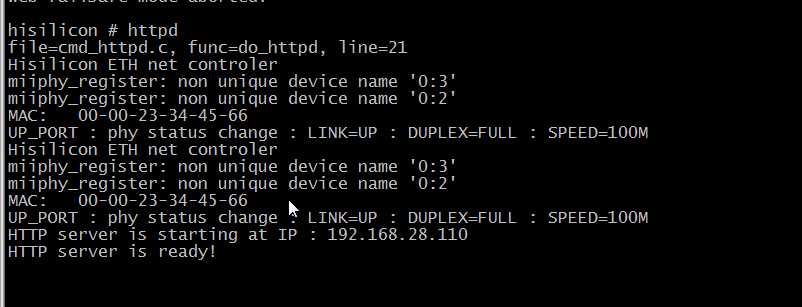
图1 运行httpd
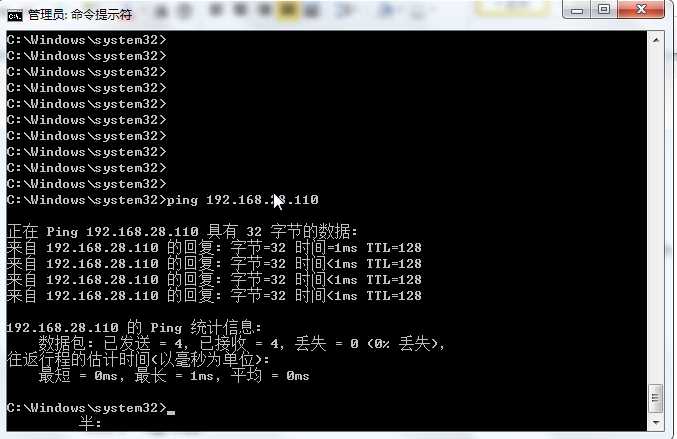
图2 ping单板
使用web升级系统,在浏览器地址栏输入单板ip,就会看到如下图所示:
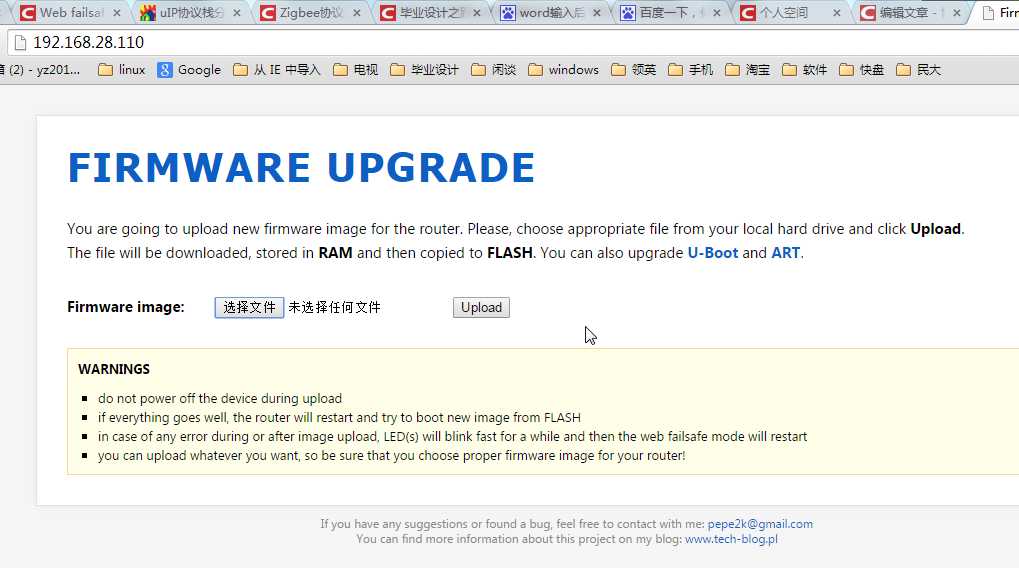
图3 web升级界面
点击选择文件->升级就开始上传文件,上传完以后就会自动写到Flash了,这里就不再演示,不然我又得再次升级。。。
3、总结
3.1 uip协议关键库函数的功能及使用方法
应用程序必须作为C函数去实现,uIP在任何一个事件发生时调用UIP_APPCALL()。表 1 列出了可能的事件和每个事件的对应测试函数,测试函数用于区别不同的事件。函数是作为C宏命令实现的,将会是零或非零值。注意,某些函数可以在互相连接时发生(即新数据可以在数据确应的同时到达)。
表 1 uIP应用事件和对应的测试参数
|
一个数据包到达,确定先前发送到数据 |
uip_acked() |
|
应用程序的新数据包已到达 |
uip_newdata() |
|
一个远程主机连接到监听端口 |
uip_connected() |
|
一个到达远程主机的连接建立成功 |
uip_connected() |
|
计时时间满重发 |
uip_rexmit() |
|
计时时间满周期性轮询 |
uip_poll() |
|
远程主机关闭连接 |
uip_closed() |
|
远程主机中断连接 |
uip_aborted() |
|
由于太多重传,连接中断 |
uip_timedout() |
当应用程序调用时,uIP设置全局变量uip_conn去指向当前连接的uip_conn结构,这可以用于区别不同的服务。一个典型的应用是检查uip_conn->lport (当地TCP端口号)去决定哪个服务连接应该提供。例如,如果值uip_conn->lport等于80,应用程序可以决定启动一个HTTP服务;若值是23,则是启动TELNET服务。
3.1.1 接收数据
如果uIP测试函数uip_newdata()的值为1,则远程连接的主机有发送新数据,uip_appdata指针指向实际数据,数据的大小通过uIP函数uip_datalen()获得。在数据不是被缓冲后,应用程序必须立刻启动。
3.1.2 发送数据
应用程序通过使用uIP函数uip_send()发送数据。uip_send()函数采用两个参数:一个指针指向发送数据和数据的长度。如果应用程序为了产生要发送的实际数据需要RAM空间,包缓存(通过uip_appdata指针指向)可以用于这方面。在一个时间里应用程序只能在连接中发送一块数据,所以不可以在每个应用程序启用中调用uip_send()超过一次,只有上一次调用的数据将会发出后才可以。注意,调用uip_send()后会改变某些全局变量,在应用函数返回前它不能被调用。
3.1.3 重发数据
若数据在网络中丢失,则应用程序必须重新发数据。无论是数据收到还是没有收到,uIP都保并通知应用程序什么时候察觉出数据丢失了。若测试函数uip_rexmit()为真,则应用程序要重持跟踪,发上一次发出的数据。重发就好像原来那样发送,也就是通过uip_send()发送。
3.1.4 关闭连接
应用程序通过调用uip_close()关闭当前连接,这会导致连接干净地关闭。为了指出致命的错误,应用程序可以通过中止连接和调用uip_abort()函数完成这项工作。若连接已经被远端关闭,则测试函数uip_closed()为真,应用程序接着可以做一些必要的清理工作。
3.1.5 报告出错
有两个致命的错误可以发生在连接中:连接由远程主机中止和连接多次重发上一数据而被中止。uIP通过调用函数报告这些问题,应用程序使用两个测试函数uip_aborted()和uip_timedout() 去测试这些错误情况。
3.1.6 轮询
当连接空闲时,uIP周期性地轮询应用程序,应用程序使用测试函数uip_poll()去检查它是否被轮询过。
3.1.7 监听端口
uIP维持一个监听TCP端口列表,通过uip_listen()函数,一个新的监听端口被打开。当一个连接请求在一个监听端口到达,uIP产生一个新的连接。若一个新连接产生,则应用程序被调用,测试函数uip_connected()为真。
3.1.8 打开连接
作为uIP的0.6版,在uIP里面通过使用uip_connect()函数打开一个新连接。这个函数打开一个新连接到指定的IP地址和端口,返回一个新连接的指针到uip_conn结构。若是没有空余的连接槽,则函数返回空值。为了方便,函数uip_ipaddr()可以用于将IP地址打包进两个单元16位数组里,通过uIP去代表IP地址。
接下来用两个例子说明。第一个例子展示了怎样打开一个连接去远端TCP端口8080。若没有足够的TCP连接插槽去允许一个新连接打开,则uip_connect()函数返回NULL并通过uip_abort()中止当前连接。第二个例子展示怎样打开一个新连接去指定的IP地址。
例1:打开一个连接去远端TCP端口8080。
void connect_example1_app(void)
{
if(uip_connect(uip_conn->ripaddr,8080) == NULL)
{
uip_abort();
}
}
例2:打开一个连接去当前连接的远端的端口8080。
void connect_example2(void)
{
u16_t ipaddr[2];
uip_ipaddr(ipaddr,192,168,0,1);
uip_connect(ipaddr,8080);
}
3.1.8 数据流控制
uIP通过函数uip_stop()和函数uip_restart()提供对存取TCP数据流的控制途径。假如一个应用程序下载数据到一个慢速设备,例如磁盘驱动器。当磁盘驱动器的作业队列满时,应用程序不会准备从服务器接收更多的数据,直到队列排出空位。函数uip_stop()可以用于维护流控制和停止远程主机发送数据。当应用程序准备好接收更多数据时,可用函数uip_restart()告知远程终端再次发送数据。函数uip_stopped()可以用于检查当前连接是否停止。
3.1.9 UIP函数总结
表2 包含了所有uIP提供的函数
表2 uIP 函数总结
|
系统接口 |
|
|
uip_init() uip_input() uip_periodic() |
初始化uIP 处理输入包 处理周期计时事件 |
|
应用程序接口 |
|
|
uip_listen() uip_connect() uip_send() uip_datalen() uip_close() uip_abort() uip_stop() uip_stopped() uip_restart() |
开始监听端口 连接到远程主机 在当前连接发送数据 输入数据的大小 关闭当前连接 中止当前连接 停止当前连接 查找连接是否停止 重新启动当前连接 |
|
测试函数 |
|
|
uip_newdata() uip_acked() uip_connected() uip_closed() uip_aborted() uip_timeout() uip_rexmit uip_poll() |
远程主机已经发出数据 确定发出的数据 当前连接刚连上 当前连接刚关闭 当前连接刚中止 当前连接刚超时 数据重发 应用程序循环运行 |
|
其它 |
|
|
uip_mss() uip_ipaddr() htons(),ntohs() |
获得当前连接的最大段的大小 将IP地址结构打包 在主机和网络之间转换字节次序 |
上面的这些都是引用网上别人博客里面的内容,总结的也很全面。
发布者:全栈程序员-站长,转载请注明出处:https://javaforall.net/180050.html原文链接:https://javaforall.net




