
大家好,又见面了,我是你们的朋友全栈君。如果您正在找激活码,请点击查看最新教程,关注关注公众号 “全栈程序员社区” 获取激活教程,可能之前旧版本教程已经失效.最新Idea2022.1教程亲测有效,一键激活。
Jetbrains全系列IDE稳定放心使用
Stream流 collect() 方法的使用介绍
//1.
<R> R collect(Supplier<R> supplier,
                  BiConsumer<R, ? super T> accumulator,
                  BiConsumer<R, R> combiner);
//2.
<R, A> R collect(Collector<? super T, A, R> collector);
Stream 流的注意事项:Stream不调用终止方法,中间的操作不会执行。
但是,当我们对 Stream 流中的数据操作完成之后,如果需要将流的结果进行保存,方便我们接下来对结果的继续操作,该怎么办呢?
Stream 流提供了一个 collect() 方法,可以收集流中的数据到【集合】或者【数组】中去。
1.收集 Stream 流中的数据到集合中
//1.收集数据到list集合中
stream.collect(Collectors.toList())
//2.收集数据到set集合中
stream.collect(Collectors.toSet())
//3.收集数据到指定的集合中
Collectors.toCollection(Supplier<C> collectionFactory)
stream.collect(Collectors.joining())
示例如下:
/**
 * 收集Stream流中的数据到集合中
 * 备注:切记Stream流只能被消费一次,流就失效了
 * 如下只是示例代码
 */
public class CollectDataToCollection{

    public static void main(String[] args) {
        //Stream 流
        Stream<String> stream = Stream.of("aaa", "bbb", "ccc", "bbb");
        //收集流中的数据到集合中
        //1.收集流中的数据到 list
        List<String> list = stream.collect(Collectors.toList());
        System.out.println(list);

        //2.收集流中的数据到 set
        Set<String> collect = stream.collect(Collectors.toSet());
        System.out.println(collect);

        //3.收集流中的数据(ArrayList)(不收集到list,set等集合中,而是)收集到指定的集合中
        ArrayList<String> arrayList = stream.collect(Collectors.toCollection(ArrayList::new));
        System.out.println(arrayList);

        //4.收集流中的数据到 HashSet
        HashSet<String> hashSet = stream.collect(Collectors.toCollection(HashSet::new));
        System.out.println(hashSet);
    }
}
测试结果:
[aaa, bbb, ccc, bbb]
[aaa, ccc, bbb]
[aaa, bbb, ccc, bbb]
[aaa, ccc, bbb]
2.收集 Stream 流中的数据到数组中
//1.使用无参,收集到数组,返回值为 Object[](Object类型将不好操作)
Object[] toArray();
//2.使用有参,可以指定将数据收集到指定类型数组,方便后续对数组的操作
<A> A[] toArray(IntFunction<A[]> generator);
示例如下:
/**
 * 收集Stream流中的数据到数组中
 * 备注:切记Stream流只能被消费一次,流就失效了
 * 如下只是示例代码
 */
public class CollectDataToArray{

    public static void main(String[] args) {
        //Stream 流
        Stream<String> stream = Stream.of("aaa", "bbb", "ccc", "bbb");

        //2.1 使用 toArray()无参
        Object[] objects = stream.toArray();
        for (Object o: objects) {//此处无法使用.length() 等方法
            System.out.println("data:"+o);
        }

        //2.2 使用有参返回指定类型数组
        //无参不好的一点就是返回的是 Object[] 类型,操作比较麻烦.想要拿到长度,Object是拿不到长度的
        String[] strings = stream.toArray(String[]::new);
        for(String str : strings){
            System.out.println("data:"+str + ",length:"+str.length());
        }
    }
}
测试结果:
data:aaa
data:bbb
data:ccc
data:bbb
-----------------
data:aaa,length:3
data:bbb,length:3
data:ccc,length:3
data:bbb,length:3
3.Stream流中数据聚合/分组/分区/拼接操作
除了 collect() 方法将数据收集到集合/数组中。对 Stream流 的收集还有其他的方法。比如说:聚合计算,分组,多级分组,分区,拼接等。
附:Student实体类(接下来介绍,将根据Student类来进行聚合、分组、分区、拼接介绍)
/**
 * TODO Student实体类
 *
 * @author liuzebiao
 * @Date 2020-1-10 13:38
 */
public class Student {

    private String name;

    private int age;

    private int score;

    public Student(String name, int age, int score) {
        this.name = name;
        this.age = age;
        this.score = score;
    }

    public String getName() {
        return name;
    }

    public void setName(String name) {
        this.name = name;
    }

    public int getAge() {
        return age;
    }

    public void setAge(int age) {
        this.age = age;
    }

    public int getScore() {
        return score;
    }

    public void setScore(int score) {
        this.score = score;
    }


    @Override
    public String toString() {
        return "Student{" +
                "name='" + name + '\'' +
                ", age=" + age +
                ", score=" + score +
                '}';
    }
}
1.聚合操作
当我们使用 Stream 流处理数据后,可以像数据库的聚合函数一样对某个字段进行操作。比如获取最大值,获取最小值,求总和,求平均值,统计数量等操作。
//最大值
Collectors.maxBy();
//最小值
Collectors.minBy();
//总和
Collectors.summingInt();/Collectors.summingDouble();/Collectors.summingLong();
//平均值
Collectors.averagingInt();/Collectors.averagingDouble();/Collectors.averagingLong();
//总个数
Collectors.counting();
示例如下:
/**
 * Stream流数据--聚合操作
 * 备注:切记Stream流只能被消费一次,流就失效了
 * 如下只是示例代码
 * @author liuzebiao
 * @Date 2020-1-10 13:37
 */
public class CollectDataToArray{

    public static void main(String[] args) {
        Stream<Student> studentStream = Stream.of(
                new Student("赵丽颖", 58, 95),
                new Student("杨颖", 56, 88),
                new Student("迪丽热巴", 56, 99),
                new Student("柳岩", 52, 77)
        );

        //聚合操作
        //获取最大值(Stream流 max()方法亦可)
        //max()方法实现
        //Optional<Student> max = studentStream.max((s1, s2) -> s1.getScore() - s2.getScore());
        //(聚合)实现
        Optional<Student> max = studentStream.collect(Collectors.maxBy((s1, s2) -> s1.getScore() - s2.getScore()));
        System.out.println("最大值:"+max.get());

        //获取最小值(Stream流 min()方法亦可)
        //min()方法实现
        //Optional<Student> min = studentStream.max((s1, s2) -> s2.getScore() - s1.getScore());
        //(聚合)实现
        Optional<Student> min = studentStream.collect(Collectors.minBy((s1, s2) -> s1.getScore() - s2.getScore()));
        System.out.println("最小值:"+min.get());

        //求总和(使用Stream流的map()和reduce()方法亦可求和)
        //map()和reduce()方法实现
        //Integer reduce = studentStream.map(s -> s.getAge()).reduce(0, Integer::sum);
        //(聚合)简化前
        //Integer ageSum = studentStream.collect(Collectors.summingInt(s->s.getAge()));
        //(聚合)使用方法引用简化
        Integer ageSum = studentStream.collect(Collectors.summingInt(Student::getAge));
        System.out.println("年龄总和:"+ageSum);

        //求平均值
        //(聚合)简化前
        //Double avgScore = studentStream.collect(Collectors.averagingInt(s->s.getScore()));
        //(聚合)使用方法引用简化
        Double avgScore = studentStream.collect(Collectors.averagingInt(Student::getScore));
        System.out.println("分数平均值:"+avgScore);

        //统计数量(Stream流 count()方法亦可)
        //count()方法实现
        //long count = studentStream.count();
        //(聚合)统计数量
        Long count = studentStream.collect(Collectors.counting());
        System.out.println("数量为:"+count);
    }
}
测试结果:
最大值:Student{name='迪丽热巴', age=56, score=99}
最小值:Student{name='柳岩', age=52, score=77}
年龄总和:222
分数平均值:89.75
数量为:4
2.分组操作
当我们使用 Stream 流处理数据后,可以根据某个属性来将数据进行分组。
//接收一个 Function 参数
groupingBy(Function<? super T, ? extends K> classifier)
示例如下:
/**
 * Stream流数据--分组操作
 * 备注:切记Stream流只能被消费一次,流就失效了
 * 如下只是示例代码
 * @author liuzebiao
 * @Date 2020-1-10 13:37
 */
public class CollectDataToArray{

    public static void main(String[] args) {
        Stream<Student> studentStream = Stream.of(
                new Student("赵丽颖", 52, 56),
                new Student("杨颖", 56, 88),
                new Student("迪丽热巴", 56, 99),
                new Student("柳岩", 52, 53)
        );

        //1.按照具体年龄分组
        Map<Integer, List<Student>> map = studentStream.collect(Collectors.groupingBy((s -> s.getAge())));
        map.forEach((key,value)->{
            System.out.println(key + "---->"+value);
        });

        //2.按照分数>=60 分为"及格"一组  <60 分为"不及格"一组
        Map<String, List<Student>> map = studentStream.collect(Collectors.groupingBy(s -> {
            if (s.getScore() >= 60) {
                return "及格";
            } else {
                return "不及格";
            }
        }));
        map.forEach((key,value)->{
            System.out.println(key + "---->"+value.get());
        });

        //3.按照年龄分组,规约求每组的最大值最小值(规约:reducing)
        Map<Integer, Optional<Student>> reducingMap = studentStream.collect(
                Collectors.groupingBy(Student::getAge,
                        Collectors.reducing(
                                BinaryOperator.maxBy(
                                        Comparator.comparingInt(Student::getScore)
                                )
                        )
                )
        );
        reducingMap .forEach((key,value)->{
            System.out.println(key + "---->"+value);
        });
    }
}
测试结果:
52---->[Student{name='赵丽颖', age=52, score=56}, Student{name='柳岩', age=52, score=53}]
56---->[Student{name='杨颖', age=56, score=88}, Student{name='迪丽热巴', age=56, score=99}]
-----------------------------------------------------------------------------------------------
不及格---->[Student{name='赵丽颖', age=52, score=56}, Student{name='柳岩', age=52, score=53}]
及格---->[Student{name='杨颖', age=56, score=88}, Student{name='迪丽热巴', age=56, score=99}]
-----------------------------------------------------------------------------------------------
52---->Student{name='赵丽颖', age=52, score=95}
56---->Student{name='杨颖', age=56, score=88}
3.多级分组操作
当我们使用 Stream 流处理数据后,可以根据某个属性来将数据进行分组。
//接收两个参数: 1.Function 参数  2.Collector多级分组
groupingBy(Function<? super T, ? extends K> classifier,Collector<? super T, A, D> downstream)
示例如下:
/**
 * Stream流数据--多级分组操作
 * 备注:切记Stream流只能被消费一次,流就失效了
 * 如下只是示例代码
 * @author liuzebiao
 * @Date 2020-1-10 13:37
 */
public class CollectDataToArray{

    public static void main(String[] args) {
        Stream<Student> studentStream = Stream.of(
                new Student("赵丽颖", 52, 95),
                new Student("杨颖", 56, 88),
                new Student("迪丽热巴", 56, 55),
                new Student("柳岩", 52, 33)
        );

        //多级分组
        //1.先根据年龄分组,然后再根据成绩分组
        //分析:第一个Collectors.groupingBy() 使用的是(年龄+成绩)两个维度分组,所以使用两个参数 groupingBy()方法
        //    第二个Collectors.groupingBy() 就是用成绩分组,使用一个参数 groupingBy() 方法
        Map<Integer, Map<Integer, Map<String, List<Student>>>> map = studentStream.collect(Collectors.groupingBy(str -> str.getAge(), Collectors.groupingBy(str -> str.getScore(), Collectors.groupingBy((student) -> {
            if (student.getScore() >= 60) {
                return "及格";
            } else {
                return "不及格";
            }
        }))));

        map.forEach((key,value)->{
            System.out.println("年龄:" + key);
            value.forEach((k2,v2)->{
                System.out.println("\t" + v2);
            });
        });
    }
}
测试结果:
年龄:52
	{不及格=[Student{name='柳岩', age=52, score=33}]}
	{及格=[Student{name='赵丽颖', age=52, score=95}]}
年龄:56
	{不及格=[Student{name='迪丽热巴', age=56, score=55}]}
	{及格=[Student{name='杨颖', age=56, score=88}]}
4.分区操作
我们在前面学习了 Stream流中数据的分组操作,我们可以根据属性完成对数据的分组。接下来我们介绍分区操作,我们通过使用 Collectors.partitioningBy() ,根据返回值是否为 true,把集合分为两个列表,一个 true 列表,一个 false 列表。
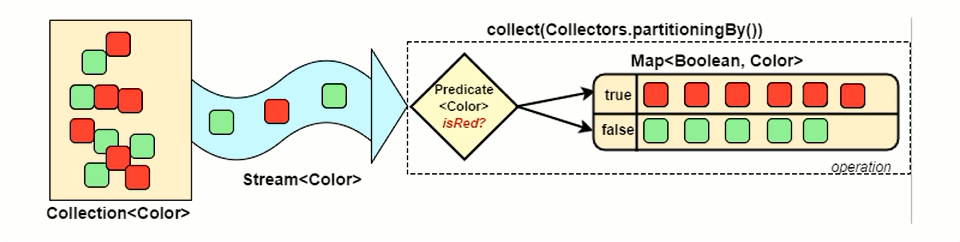

分组和分区的区别就在:分组可以有多个组。分区只会有两个区( true 和 false)
//1.一个参数
partitioningBy(Predicate<? super T> predicate)

//2.两个参数(多级分区)
partitioningBy(Predicate<? super T> predicate, Collector<? super T, A, D> downstream)
示例如下:
/**
 * Stream流数据--多级分组操作
 * 备注:切记Stream流只能被消费一次,流就失效了
 * 如下只是示例代码
 * @author liuzebiao
 * @Date 2020-1-10 13:37
 */
public class CollectDataToArray{

    public static void main(String[] args) {
        Stream<Student> studentStream = Stream.of(
                new Student("赵丽颖", 52, 95),
                new Student("杨颖", 56, 88),
                new Student("迪丽热巴", 56, 55),
                new Student("柳岩", 52, 33)
        );

        //分区操作
        Map<Boolean, List<Student>> partitionMap = studentStream.collect(Collectors.partitioningBy(s -> s.getScore() > 60));
        partitionMap.forEach((key,value)->{
            System.out.println(key + "---->" + value);
        });
    }
}
测试结果:
false---->[Student{name='迪丽热巴', age=56, score=55}, Student{name='柳岩', age=52, score=33}]
true---->[Student{name='赵丽颖', age=52, score=95}, Student{name='杨颖', age=56, score=88}]
5.拼接操作
Collectors.joining() 会根据指定的连接符,将所有元素连接成一个字符串。
//无参数--等价于 joining("");
joining()
//一个参数
joining(CharSequence delimiter)
//三个参数(前缀+后缀)
joining(CharSequence delimiter, CharSequence prefix,CharSequence suffix)
示例如下:
/**
 * Stream流数据--多级分组操作
 * 备注:切记Stream流只能被消费一次,流就失效了
 * 如下只是示例代码
 * @author liuzebiao
 * @Date 2020-1-10 13:37
 */
public class CollectDataToArray{

    public static void main(String[] args) {
        Stream<Student> studentStream = Stream.of(
                new Student("赵丽颖", 52, 95),
                new Student("杨颖", 56, 88),
                new Student("迪丽热巴", 56, 55),
                new Student("柳岩", 52, 33)
        );

        //拼接操作
        //无参:join()
        String joinStr1 = studentStream.map(s -> s.getName()).collect(Collectors.joining());
        System.out.println(joinStr1);
        //一个参数:joining(CharSequence delimiter)
        String joinStr2 = studentStream.map(s -> s.getName()).collect(Collectors.joining(","));
        System.out.println(joinStr2);
        //三个参数:joining(CharSequence delimiter, CharSequence prefix,CharSequence suffix)
        String joinStr3 = studentStream.map(s -> s.getName()).collect(Collectors.joining("—","^_^",">_<"));
        System.out.println(joinStr3);
    }
}
测试结果:
赵丽颖杨颖迪丽热巴柳岩
赵丽颖,杨颖,迪丽热巴,柳岩
^_^赵丽颖—杨颖—迪丽热巴—柳岩>_<
附:JDK8新特性(目录)
本目录为 JDK8新特性 学习目录,包含JDK8 新增全部特性的介绍。
如需了解,请跳转链接查看:我是跳转链接
博主写作不易,来个关注呗
求关注、求点赞,加个关注不迷路 ヾ(◍°∇°◍)ノ゙
博主不能保证写的所有知识点都正确,但是能保证纯手敲,错误也请指出,望轻喷 Thanks♪(・ω・)ノ
发布者:全栈程序员-站长,转载请注明出处:https://javaforall.net/188786.html原文链接:https://javaforall.net


![reaver使用相关[通俗易懂]](https://javaforall.net/wp-content/uploads/2020/11/2020110817443450-480x300.jpg)
