
大家好,又见面了,我是你们的朋友全栈君。如果您正在找激活码,请点击查看最新教程,关注关注公众号 “全栈程序员社区” 获取激活教程,可能之前旧版本教程已经失效.最新Idea2022.1教程亲测有效,一键激活。
Jetbrains全系列IDE使用 1年只要46元 售后保障 童叟无欺
C++优先级队列解析
优先级队列:是零个或多个元素的集合,优先级队列中每一个元素都有一个优先级,元素的先后的出队顺序是由优先级的高低决定的。优先级高的先出队,优先级低的后出队。
优先级队列的主要特点:从一个集合中能够快速的查找到和删除最大值和最小值的元素。
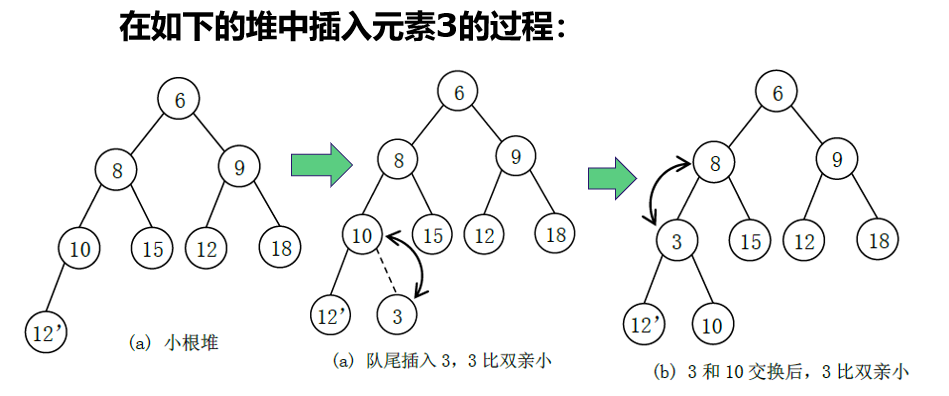
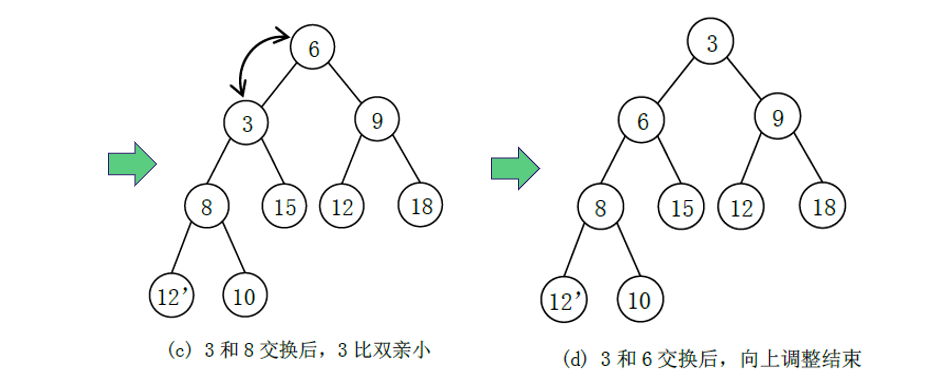
1.入队解释图:

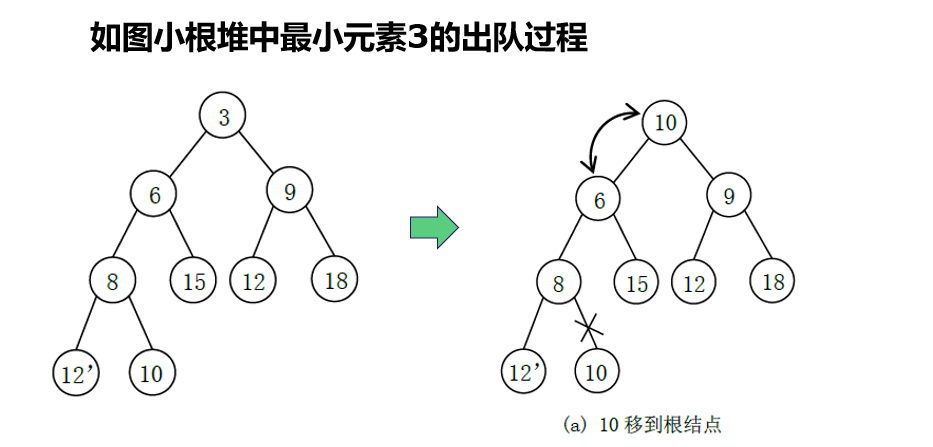
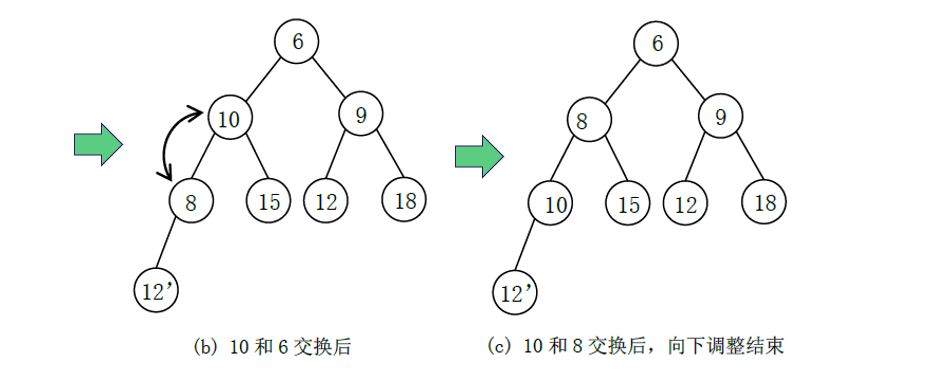
2.出队解释图:
3.代码:
PriorityQueue.h
#pragma once
#ifndef MYPRIORITYQUEUE_H
#define MYPRIORITYQUEUE_H
#include<iostream>
using namespace std;
template<class T>
class MyPriorityQueue
{

public:
	MyPriorityQueue();
	void inQueue(const T & value);
	void outQueue();
	T topQueue();
	~MyPriorityQueue();


	void siftDown(int pos);
	void siftUp(int pos);
	void resize();
	T * data;
	int size;
	int Max_size;
};

#endif // !MYPRIORITYQUEUE_H
PriorityQueue.cpp递减
#include"PriorityQueue.h"
template<class T>
MyPriorityQueue<T>::MyPriorityQueue()
{

	this->size = 0;
	this->Max_size = 1024;
	data = new T[Max_size];
}
template<class T>
void MyPriorityQueue<T>::inQueue(const T &value)
{

	if (size==Max_size-1)
	{

		resize();
	}
	data[++size] = value;
	siftUp(size);
}
template<class T>
void MyPriorityQueue<T>::outQueue()
{

	if (size==0)
	{

		return;
	}
	T temp;
	temp = data[1];
	data[1] = data[size--];
	siftDown(1);
}
template<class T>
T MyPriorityQueue<T>::topQueue()
{

	if (size==0)
	{

		return NULL;
	}
	return data[1];
}
template<class T>
MyPriorityQueue<T>::~MyPriorityQueue()
{

	delete data;
}
template<class T>
void MyPriorityQueue<T>::siftDown(int pos)
{

	T temp = data[pos];
	int child;
	for (;pos*2<=size;pos=child)
	{

		child = pos * 2;
		if (child !=size&&data[child +1]<data[child])
		{

			child = child + 1;
		}
		if (temp>data[child])
		{

			data[pos] = data[child];
		}
		else
		{

			break;
		}
	}
	data[pos] = temp;
}
template<class T>
void MyPriorityQueue<T>::siftUp(int pos)
{

	T temp = data[pos];
	for (;pos>1&&temp<data[pos/2];pos/=2)
	{

		data[pos] = data[pos / 2];
	}
	data[pos] = temp;
}
template<class T>
void MyPriorityQueue<T>::resize()
{

	Max_size = Max_size * 2;
}
PriorityQueue.cpp递增
#include"PriorityQueue.h"
template<class T>
MyPriorityQueue<T>::MyPriorityQueue()
{

	this->size = 0;
	this->Max_size = 1024;
	data = new T[Max_size];
}
template<class T>
void MyPriorityQueue<T>::inQueue(const T &value)
{

	if (size==Max_size-1)
	{

		resize();
	}
	data[++size] = value;
	siftUp(size);
}
template<class T>
void MyPriorityQueue<T>::outQueue()
{

	if (size==0)
	{

		return;
	}
	T temp;
	temp = data[1];
	data[1] = data[size--];
	siftDown(1);
}
template<class T>
T MyPriorityQueue<T>::topQueue()
{

	if (size==0)
	{

		return NULL;
	}
	return data[1];
}
template<class T>
MyPriorityQueue<T>::~MyPriorityQueue()
{

	delete data;
}
template<class T>
void MyPriorityQueue<T>::siftDown(int pos)
{

	T temp = data[pos];
	int child;
	for (;pos*2<=size;pos=child)
	{

		child = pos * 2;
		if (child !=size&&data[child +1]>data[child])
		{

			child = child + 1;
		}
		if (temp<data[child])
		{

			data[pos] = data[child];
		}
		else
		{

			break;
		}
	}
	data[pos] = temp;
}
template<class T>
void MyPriorityQueue<T>::siftUp(int pos)
{

	T temp = data[pos];
	for (;pos>1&&temp>data[pos/2];pos/=2)
	{

		data[pos] = data[pos / 2];
	}
	data[pos] = temp;
}
template<class T>
void MyPriorityQueue<T>::resize()
{

	Max_size = Max_size * 2;
}
main.cpp
注意此处使用的是.cpp头文件,不能使用.h头文件了,不要回连接处错误。因为此处用的还是模板类
#include"PriorityQueue.cpp"
int main()
{

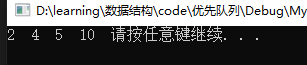
	MyPriorityQueue<int> pq;
	pq.inQueue(2);
	pq.inQueue(5);
	pq.inQueue(10);
	pq.inQueue(4);
	while (pq.size!=0)
	{

		std::cout << pq.topQueue() << " ";
		pq.outQueue();
	}
	system("pause");
	return 0;
}
4.结果:
5.本地优先级队列API
其实在C++的queue库中有优先级队列的接口API
使用时要包含头文件#include <queue>
基本操作:
top 访问队头元素
empty 队列是否为空
size 返回队列内元素个数
push 插入元素到队尾 (并排序)
emplace 原地构造一个元素并插入队列
pop 弹出队头元素
swap 交换内容
//升序队列
priority_queue <int,vector<int>,greater<int> > q;
//降序队列
priority_queue <int,vector<int>,less<int> >q;
代码:
#include<iostream>
#include<queue>
using namespace std;
int main()
{

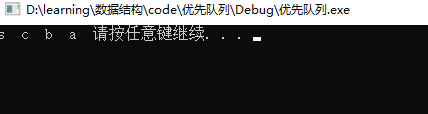
	priority_queue<char,vector<char>,less<char>> a;
	a.push('b');
	a.push('c');
	a.push('a');
	a.push('s');
	while (!a.empty())
	{

		cout << a.top() << " ";
		a.pop();
	}
	system("pause");
	return 0;
}
版权声明:本文内容由互联网用户自发贡献,该文观点仅代表作者本人。本站仅提供信息存储空间服务,不拥有所有权,不承担相关法律责任。如发现本站有涉嫌侵权/违法违规的内容, 请联系我们举报,一经查实,本站将立刻删除。
发布者:全栈程序员-站长,转载请注明出处:https://javaforall.net/190469.html原文链接:https://javaforall.net



