
大家好,又见面了,我是你们的朋友全栈君。如果您正在找激活码,请点击查看最新教程,关注关注公众号 “全栈程序员社区” 获取激活教程,可能之前旧版本教程已经失效.最新Idea2022.1教程亲测有效,一键激活。
Jetbrains全系列IDE使用 1年只要46元 售后保障 童叟无欺
1- You may write your conversion function (Fastest):
func String(n int32) string {
    buf := [11]byte{}
    pos := len(buf)
    i := int64(n)
    signed := i < 0
    if signed {
        i = -i
    }
    for {
        pos--
        buf[pos], i = '0'+byte(i%10), i/10
        if i == 0 {
            if signed {
                pos--
                buf[pos] = '-'
            }
            return string(buf[pos:])
        }
    }
}
2- You may use fmt.Sprint(i) (Slow)
See inside:
// Sprint formats using the default formats for its operands and returns the resulting string.
// Spaces are added between operands when neither is a string.
func Sprint(a ...interface{}) string {
    p := newPrinter()
    p.doPrint(a)
    s := string(p.buf)
    p.free()
    return s
}
3- You may use strconv.Itoa(int(i)) (Fast)
See inside:
// Itoa is shorthand for FormatInt(int64(i), 10).
func Itoa(i int) string {
    return FormatInt(int64(i), 10)
}
4- You may use strconv.FormatInt(int64(i), 10) (Faster)
See inside:
// FormatInt returns the string representation of i in the given base,
// for 2 <= base <= 36. The result uses the lower-case letters 'a' to 'z'
// for digit values >= 10.
func FormatInt(i int64, base int) string {
    _, s := formatBits(nil, uint64(i), base, i < 0, false)
    return s
}
以上内容出自: https://stackoverflow.com/questions/39442167/convert-int32-to-string-in-golang.
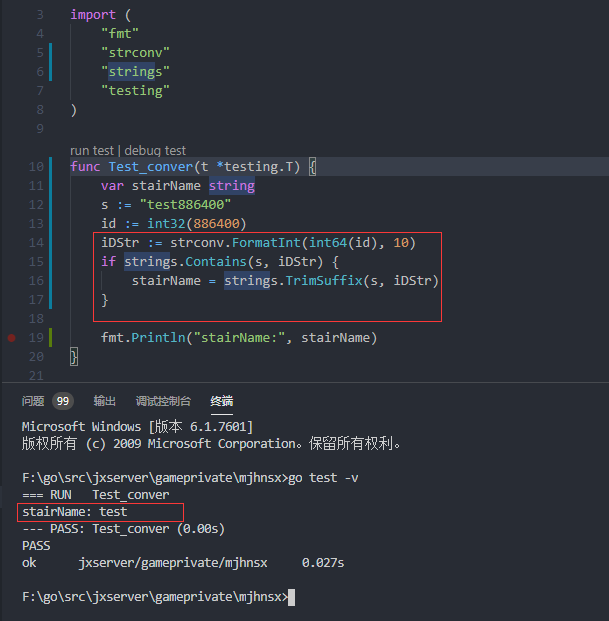
本人自用代码:
func Test_conver(t *testing.T) {
	var stairName string
	s := "test886400"
	id := int32(886400)
	iDStr := strconv.FormatInt(int64(id), 10)
	if strings.Contains(s, iDStr) {
		stairName = strings.TrimSuffix(s, iDStr)
	}

	fmt.Println("stairName:", stairName)
}
效果如下:

版权声明:本文内容由互联网用户自发贡献,该文观点仅代表作者本人。本站仅提供信息存储空间服务,不拥有所有权,不承担相关法律责任。如发现本站有涉嫌侵权/违法违规的内容, 请联系我们举报,一经查实,本站将立刻删除。
发布者:全栈程序员-站长,转载请注明出处:https://javaforall.net/193161.html原文链接:https://javaforall.net



