
Jetbrains全系列IDE使用 1年只要46元 售后保障 童叟无欺
工作中用到一段比较复杂的SQL查询脚本,使用了listagg()函数实现了具有多个值的字段的填充(即,列表聚合,list aggregation(我猜的))。
说简单点,listagg()函数可以实现多列记录聚合为一条记录,从而实现数据的压缩、致密化(data densification)。
以下内容转载自http://dacoolbaby.iteye.com/blog/1698957,SQL脚本做了部分优化,增加了输出结果。
————————————————————————-
这是一个Oracle的列转行函数:LISTAGG()
先看示例代码:
with temp as(
select 'China' nation ,'Guangzhou' city from dual union all
select 'China' nation ,'Shanghai' city from dual union all
select 'China' nation ,'Beijing' city from dual union all
select 'USA' nation ,'New York' city from dual union all
select 'USA' nation ,'Bostom' city from dual union all
select 'Japan' nation ,'Tokyo' city from dual
)
select nation,listagg(city,',') within GROUP (order by city)  as Cities
from temp
group by nation
运行结果:

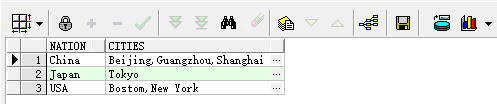
这是最基础的用法:
LISTAGG(XXX,XXX) WITHIN GROUP( ORDER BY XXX),
用法就像聚合函数一样,通过Group by语句,把每个Group的一个字段,拼接起来,非常方便。
同样是聚合函数,还有一个高级用法:
就是over(partition by XXX)
也就是说,在你不使用Group by语句时候,也可以使用LISTAGG函数:
with temp as(
select 500 population, 'China' nation ,'Guangzhou' city from dual union all
select 1500 population, 'China' nation ,'Shanghai' city from dual union all
select 500 population, 'China' nation ,'Beijing' city from dual union all
select 1000 population, 'USA' nation ,'New York' city from dual union all
select 500 population, 'USA' nation ,'Bostom' city from dual union all
select 500 population, 'Japan' nation ,'Tokyo' city from dual
)
select population,
nation,
city,
listagg(city,',') within GROUP (order by city) over (partition by nation) rank
from temp
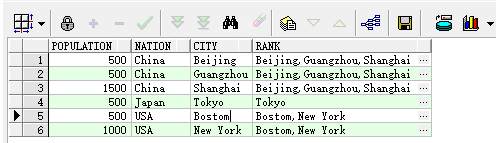
总结:LISTAGG()把它当作SUM()函数来使用就可以了。
Oracle Database SQL Language Reference上有关listagg()函数的描述如下:
—————————————————————————————————————————–
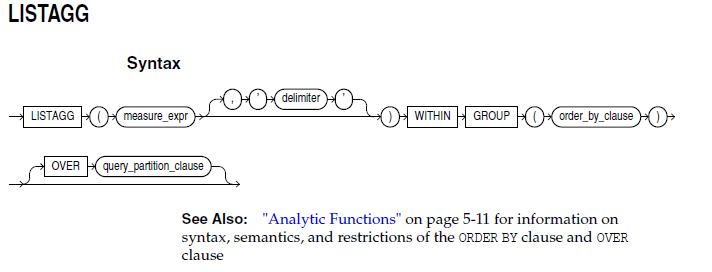
Purpose
For a specified measure, LISTAGG orders data within each group specified in the ORDER BY clause and then concatenates the values of the measure column.
■ As a single-set aggregate function, LISTAGG operates on all rows and returns a single output row.
■ As a group-set aggregate, the function operates on and returns an output row for each group defined by the GROUP BY clause.
■ As an analytic function, LISTAGG partitions the query result set into groups based on one or more expression in the query_partition_clause.
The arguments to the function are subject to the following rules:
■ The measure_expr can be any expression. Null values in the measure column are ignored.
■ The delimiter_expr designates the string that is to separate the measure values.
This clause is optional and defaults to NULL.
■ The order_by_clause determines the order in which the concatenated values are returned. The function is deterministic only if the ORDER BY column list achieved
unique ordering.
The return data type is RAW if the measure column is RAW; otherwise the return value is VARCHAR2.
Aggregate Examples
The following single-set aggregate example lists all of the employees in Department 30 in the hr.employees table, ordered by hire date and last name:
SELECT LISTAGG(last_name, ‘; ‘)
WITHIN GROUP (ORDER BY hire_date, last_name) “Emp_list”,
MIN(hire_date) “Earliest”
FROM employees
WHERE department_id = 30;
Emp_list Earliest
———————————————————— ———
Raphaely; Khoo; Tobias; Baida; Himuro; Colmenares 07-DEC-02
The following group-set aggregate example lists, for each department ID in the hr.employees table, the employees in that department in order of their hire date:
SELECT department_id “Dept.”,
LISTAGG(last_name, ‘; ‘) WITHIN GROUP (ORDER BY hire_date) “Employees”
FROM employees
GROUP BY department_id
ORDER BY department_id;
Dept. Employees
—— ————————————————————
10 Whalen
20 Hartstein; Fay
30 Raphaely; Khoo; Tobias; Baida; Himuro; Colmenares
40 Mavris
50 Kaufling; Ladwig; Rajs; Sarchand; Bell; Mallin; Weiss; Davie
s; Marlow; Bull; Everett; Fripp; Chung; Nayer; Dilly; Bissot
; Vollman; Stiles; Atkinson; Taylor; Seo; Fleaur; Matos; Pat
el; Walsh; Feeney; Dellinger; McCain; Vargas; Gates; Rogers;
Mikkilineni; Landry; Cabrio; Jones; Olson; OConnell; Sulliv
an; Mourgos; Gee; Perkins; Grant; Geoni; Philtanker; Markle
60 Austin; Hunold; Pataballa; Lorentz; Ernst
70 Baer
. . .
Analytic Example
The following analytic example shows, for each employee hired earlier than September 1, 2003, the employee’s department, hire date, and all other employees in
that department also hired before September 1, 2003:
SELECT department_id “Dept”, hire_date “Date”, last_name “Name”,
LISTAGG(last_name, ‘; ‘) WITHIN GROUP (ORDER BY hire_date, last_name)
OVER (PARTITION BY department_id) as “Emp_list”
FROM employees
WHERE hire_date < ’01-SEP-2003′
ORDER BY “Dept”, “Date”, “Name”;
Dept Date Name Emp_list
—– ——— ————— ———————————————
30 07-DEC-02 Raphaely Raphaely; Khoo
30 18-MAY-03 Khoo Raphaely; Khoo
40 07-JUN-02 Mavris Mavris
50 01-MAY-03 Kaufling Kaufling; Ladwig
50 14-JUL-03 Ladwig Kaufling; Ladwig
70 07-JUN-02 Baer Baer
90 13-JAN-01 De Haan De Haan; King
90 17-JUN-03 King De Haan; King
100 16-AUG-02 Faviet Faviet; Greenberg
100 17-AUG-02 Greenberg Faviet; Greenberg
110 07-JUN-02 Gietz Gietz; Higgins
110 07-JUN-02 Higgins Gietz; Higgins
发布者:全栈程序员-站长,转载请注明出处:https://javaforall.net/197718.html原文链接:https://javaforall.net


