
一、简介
Aspose 是 .NET 和 Java 开发组件以及为 Microsoft SQL Server Reporting Services 和 JasperReports 等平台提供渲染扩展的领先供应商。它的核心重点是提供最完整和最强大的文件管理产品。Aspose 产品支持一些商业上最流行的文件格式,包括:Word 文档、Excel 电子表格、PowerPoint 演示文稿、PDF 文档、Flash 演示文稿和项目文件。
二、下载
下载 Aspose 的依赖 Jar 包可以通过一下仓库下载:Aspose 依赖下载
https://repository.aspose.com/repo/com/aspose/ - 1、aspose-words,word 转 pdf 使用
- 2、aspose-cells,excel 转 pdf 使用
- 3、aspose-slides,ppt 转 pdf 使用
三、整合 Aspose
- 1、将下载下来的 Jar 包依赖放在 resources/lib/ 目录下


- 2、pom.xml 文件引入
<!-- 转化pdf start --> <dependency> <groupId>aspose-words</groupId> <artifactId>aspose-words</artifactId> <version>15.8.0</version> <scope>system</scope> <systemPath>${
   project.basedir}/src/main/resources/lib/aspose-words-15.8.0-jdk16.jar</systemPath> </dependency> <dependency> <groupId>aspose-cells</groupId> <artifactId>aspose-cells</artifactId> <version>8.8.0</version> <scope>system</scope> <systemPath>${
   project.basedir}/src/main/resources/lib/aspose-cells-8.8.0.jar</systemPath> </dependency> <dependency> <groupId>aspose-slides</groupId> <artifactId>aspose-slides</artifactId> <version>20.4</version> <scope>system</scope> <systemPath>${
   project.basedir}/src/main/resources/lib/aspose-slides-20.4-jdk16.jar</systemPath> </dependency> <!-- 转化pdf end -->
四、自定义工具类
我们将转化的方法放在一个工具类中,PdfUtils.java,内容如下:
package com.asurplus.common.office; import com.aspose.cells.Workbook; import com.aspose.slides.Presentation; import com.aspose.words.Document; import java.io.*; import java.net.HttpURLConnection; import java.net.URL; import java.util.UUID; / * 文件转PDF *  * Aspose下载地址:https://repository.aspose.com/repo/com/aspose/ */ public class PdfUtils {
    / * word 转为 pdf 输出 * * @param inPath word文件 * @param outPath pdf 输出文件目录 */ public static String word2pdf(String inPath, String outPath) {
    // 验证License if (!isWordLicense()) {
    return null; } FileOutputStream os = null; try {
    String path = outPath.substring(0, outPath.lastIndexOf(File.separator)); File file = new File(path); // 创建文件夹 if (!file.exists()) {
    file.mkdirs(); } // 新建一个空白pdf文档 file = new File(outPath); os = new FileOutputStream(file); // Address是将要被转化的word文档 Document doc = new Document(inPath); // 全面支持DOC, DOCX, OOXML, RTF HTML, OpenDocument, PDF, doc.save(os, com.aspose.words.SaveFormat.PDF); os.close(); } catch (Exception e) {
    if (os != null) {
    try {
    os.close(); } catch (IOException e1) {
    e1.printStackTrace(); } } e.printStackTrace(); } return outPath; } / * excel 转为 pdf 输出 * * @param inPath excel 文件 * @param outPath pdf 输出文件目录 */ public static String excel2pdf(String inPath, String outPath) {
    // 验证License if (!isWordLicense()) {
    return null; } FileOutputStream os = null; try {
    String path = outPath.substring(0, outPath.lastIndexOf(File.separator)); File file = new File(path); // 创建文件夹 if (!file.exists()) {
    file.mkdirs(); } // 新建一个空白pdf文档 file = new File(outPath); os = new FileOutputStream(file); // Address是将要被转化的excel表格 Workbook workbook = new Workbook(new FileInputStream(getFile(inPath))); workbook.save(os, com.aspose.cells.SaveFormat.PDF); os.close(); } catch (Exception e) {
    if (os != null) {
    try {
    os.close(); } catch (IOException e1) {
    e1.printStackTrace(); } } e.printStackTrace(); } return outPath; } / * ppt 转为 pdf 输出 * * @param inPath ppt 文件 * @param outPath pdf 输出文件目录 */ public static String ppt2pdf(String inPath, String outPath) {
    // 验证License if (!isWordLicense()) {
    return null; } FileOutputStream os = null; try {
    String path = outPath.substring(0, outPath.lastIndexOf(File.separator)); File file = new File(path); // 创建文件夹 if (!file.exists()) {
    file.mkdirs(); } // 新建一个空白pdf文档 file = new File(outPath); os = new FileOutputStream(file); // Address是将要被转化的PPT幻灯片 Presentation pres = new Presentation(new FileInputStream(getFile(inPath))); pres.save(os, com.aspose.slides.SaveFormat.Pdf); os.close(); } catch (Exception e) {
    if (os != null) {
    try {
    os.close(); } catch (IOException e1) {
    e1.printStackTrace(); } } e.printStackTrace(); } return outPath; } / * 验证 Aspose.word 组件是否授权 * 无授权的文件有水印和试用标记 */ public static boolean isWordLicense() {
    boolean result = false; try {
    // 避免文件遗漏 String licensexml = "

     \n"
    + "  \n"  + "

     \n"
    + "

     Aspose.Total for Java
   \n" + "

     Aspose.Words for Java
   \n" + "\n" + "

     Enterprise
   \n" + "

   \n" + "

   \n" + "

     8bfe198c-7f0c-4ef8-8ff0-acc3237bf0d7
   \n" + "\n" + "

     sNLLKGMUdF0r8O1kKilWAGdgfs2BvJb/2Xp8p5iuDVfZXmhppo+d0Ran1P9TKdjV4ABwAgKXxJ3jcQTqE/2IRfqwnPf8itN8aFZlV3TJPYeD3yWE7IT55Gz6EijUpC7aKeoohTb4w2fpox58wWoF3SNp6sK6jDfiAUGEHYJ9pjU=
   \n" + ""; InputStream inputStream = new ByteArrayInputStream(licensexml.getBytes()); com.aspose.words.License license = new com.aspose.words.License(); license.setLicense(inputStream); result = true; } catch (Exception e) {
    e.printStackTrace(); } return result; } / * OutputStream 转 InputStream */ public static ByteArrayInputStream parse(OutputStream out) {
    ByteArrayOutputStream baos = (ByteArrayOutputStream) out; ByteArrayInputStream swapStream = new ByteArrayInputStream(baos.toByteArray()); return swapStream; } / * InputStream 转 File */ public static File inputStreamToFile(InputStream ins, String name) throws Exception {
    File file = new File(System.getProperty("java.io.tmpdir") + File.separator + name); if (file.exists()) {
    return file; } OutputStream os = new FileOutputStream(file); int bytesRead; int len = 8192; byte[] buffer = new byte[len]; while ((bytesRead = ins.read(buffer, 0, len)) != -1) {
    os.write(buffer, 0, bytesRead); } os.close(); ins.close(); return file; } / * 根据网络地址获取 File 对象 */ public static File getFile(String url) throws Exception {
String suffix = url.substring(url.lastIndexOf(".")); HttpURLConnection httpUrl = (HttpURLConnection) new URL(url).openConnection(); httpUrl.connect(); return PdfUtils.inputStreamToFile(httpUrl.getInputStream(), UUID.randomUUID().toString() + suffix); } } - 1、我们需要通过 isWordLicense() 方法验证 Aspose.word 组件是否授权,如果未授权,转化出来的文件会带有水印和使用标记,影响阅读,因为 Aspose.word 是一个商用版本,目前 word 转 pdf 正常,excel 转 pdf 会带有水印但不影响阅读,ppt 转 pdf 会有严重水印,影响阅读
- 2、根据自定义的 pdf 输出目录,新建一个空白的 pdf 文件,然后将空白的 pdf 文件转化为 文件输出流 FileOutputStream
- 3、Document doc = new Document(inPath);,doc 就是将要被转化的 word 文档
- 4、doc.save(os, com.aspose.words.SaveFormat.PDF);,将转化的 word 文档写入空白的 pdf 文件中,就得到了我们的 pdf 文件
- 5、os.close();,别忘记关闭输出流噢
- 6、excel,ppt 的转化原理也是一致
五、测试
我们通过 API 的形式来,测试能不能将文件抓为 PDF 文件实现在线预览
- 1、开放 API
package com.asurplus.api.controller; import com.asurplus.common.office.PdfUtils; import io.swagger.annotations.Api; import org.apache.commons.lang3.StringUtils; import org.springframework.stereotype.Controller; import org.springframework.web.bind.annotation.GetMapping; import org.springframework.web.bind.annotation.RequestMapping; import javax.servlet.ServletOutputStream; import javax.servlet.http.HttpServletResponse; import java.io.File; import java.io.FileInputStream; import java.io.IOException; import java.io.InputStream; import java.net.HttpURLConnection; import java.net.URL; import java.util.UUID; / * 在线office预览 * * @Author admin / @Api(tags = "在线office预览") @Controller @RequestMapping("api/office") public class OfficeApiController {
    @GetMapping("previewPdf") public void pdf(String url, HttpServletResponse response) throws Exception {
    if (StringUtils.isBlank(url)) {
    return; } File file = null; // 文件后缀 String suffix = url.substring(url.lastIndexOf(".") + 1); // 如果是PDF if ("pdf".equals(suffix)) {
    HttpURLConnection httpUrl = (HttpURLConnection) new URL(url).openConnection(); httpUrl.connect(); file = PdfUtils.inputStreamToFile(httpUrl.getInputStream(), UUID.randomUUID().toString() + ".pdf"); response.setContentType("application/pdf"); } // 如果是文本 else if ("txt".equals(suffix)) {
    HttpURLConnection httpUrl = (HttpURLConnection) new URL(url).openConnection(); httpUrl.connect(); file = PdfUtils.inputStreamToFile(httpUrl.getInputStream(), UUID.randomUUID().toString() + ".txt"); response.setContentType("text/html"); } // 如果是doc else if ("doc".equals(suffix) || "docx".equals(suffix)) {
    file = new File(PdfUtils.word2pdf(url, System.getProperty("user.dir") + UUID.randomUUID().toString() + ".pdf")); response.setContentType("application/pdf"); } // 如果是excel else if ("xls".equals(suffix) || "xlsx".equals(suffix)) {
    file = new File(PdfUtils.excel2pdf(url, System.getProperty("user.dir") + UUID.randomUUID().toString() + ".pdf")); response.setContentType("application/pdf"); } // 如果是ppt else if ("ppt".equals(suffix) || "pptx".equals(suffix)) {
    file = new File(PdfUtils.ppt2pdf(url, System.getProperty("user.dir") + UUID.randomUUID().toString() + ".pdf")); response.setContentType("application/pdf"); } // 如果文件为空 if (null == file) {
    return; } try {
    response.setCharacterEncoding("UTF-8"); InputStream stream = new FileInputStream(file); ServletOutputStream out = response.getOutputStream(); byte buff[] = new byte[1024]; int length = 0; while ((length = stream.read(buff)) > 0) {
    out.write(buff, 0, length); } stream.close(); out.close(); out.flush(); } catch (IOException e) {
    e.printStackTrace(); } } }
我们需要传入需要转化的文件的在线地址,通过 Aspose 将文件转化为 PDF 文件输出到页面,实现在线预览
- 2、测试
准备一个 word 文件,内容如下:

在线转化后:
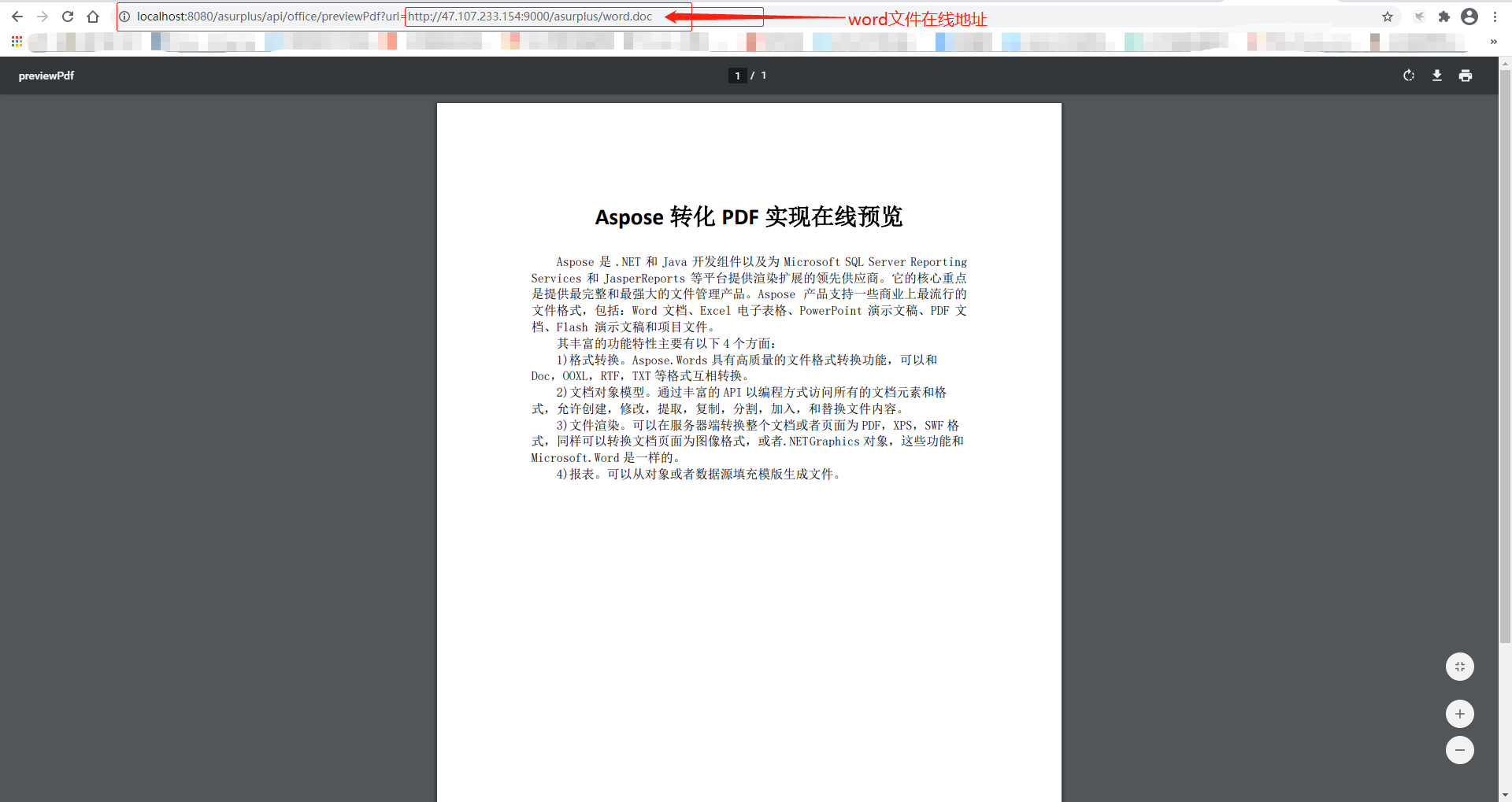
通过访问 API,成功将 word 文件转化为 pdf 文件,实现了在线预览
如您在阅读中发现不足,欢迎留言!!!
版权声明:本文内容由互联网用户自发贡献,该文观点仅代表作者本人。本站仅提供信息存储空间服务,不拥有所有权,不承担相关法律责任。如发现本站有涉嫌侵权/违法违规的内容, 请联系我们举报,一经查实,本站将立刻删除。
发布者:全栈程序员-站长,转载请注明出处:https://javaforall.net/198404.html原文链接:https://javaforall.net




