
效果图:

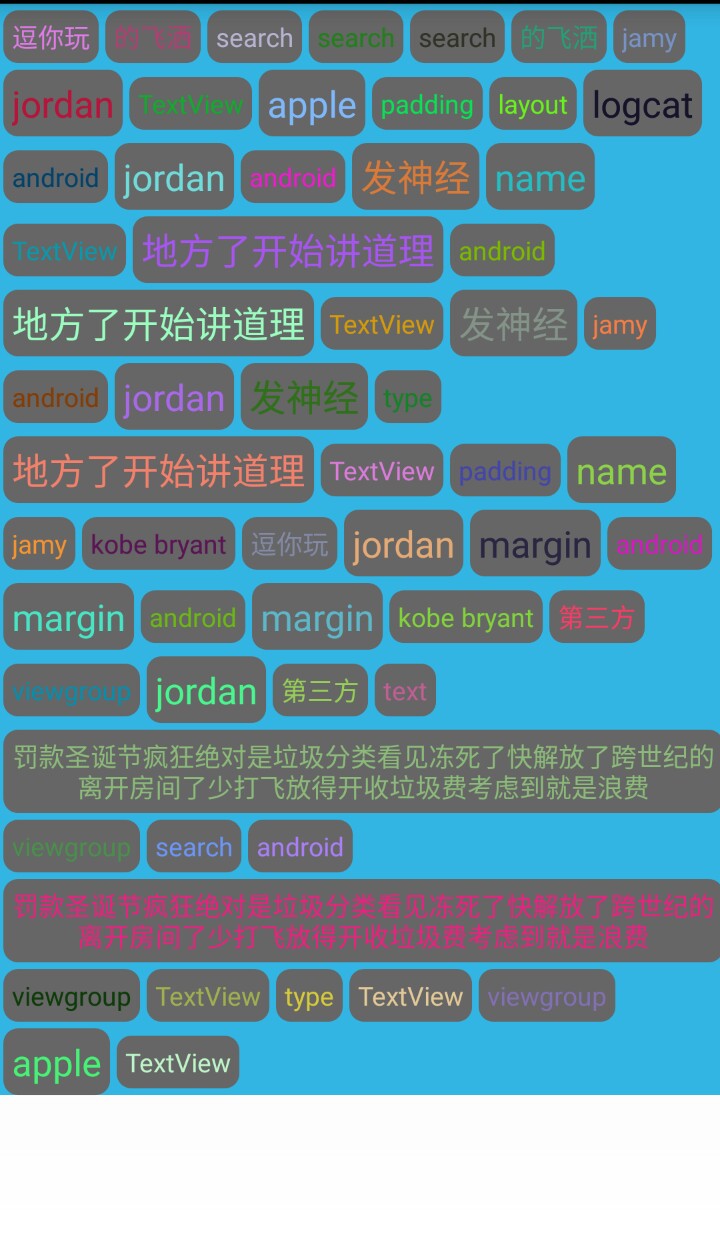
先梳理下整个流程:
- 继承ViewGroup ,重写onMeasure,onLayout 方法;
- 在onMeasure方法里通过加入其中的子view个数来计算父级的宽高;
- 在onLayout 方法里对子view进行排版(横向排列),即超过父级宽度就另换一行
注意:当父级宽高发生变化时会重新执行onMeasure,onLayout 方法,即会被调用2遍。
详细代码如下:
FlowLayout:
import java.util.ArrayList; import java.util.List; import android.annotation.SuppressLint; import android.content.Context; import android.util.AttributeSet; import android.view.View; import android.view.ViewGroup; / * 自定义流式布局 */ public class FlowLayout extends ViewGroup{
    / view距离父布局的边界信息*/ private MarginLayoutParams marginLayoutParams; / child宽度*/ private int childwidth; / child高度*/ int childheight; / 父级实际的宽度*/ int factwidth; / 父级实际的高度*/ int factheight; / 每行宽度*/ int linewidth; / 每行高度*/ int lineheight; / 用于记录上一次的行高*/ int lastchildheight=0; public FlowLayout(Context context, AttributeSet attrs, int defStyle) { super(context, attrs, defStyle); } public FlowLayout(Context context, AttributeSet attrs) { super(context, attrs,0); } public FlowLayout(Context context) { super(context,null); } / * 根据子view来确定宽高 * */ @Override protected void onMeasure(int widthMeasureSpec, int heightMeasureSpec) { //添加了子视图后,父级视图布局会发生改变,onMeasure方法会被执行两遍 factheight=0; factwidth=0; int widthsize=MeasureSpec.getSize(widthMeasureSpec); int widthmode=MeasureSpec.getMode(widthMeasureSpec); int heightsize=MeasureSpec.getSize(heightMeasureSpec); int heightmode=MeasureSpec.getMode(heightMeasureSpec);
        int childcount=getChildCount(); for(int i=0;i

    //如果child的宽度和加起来大于了父级宽度,则计算最大值,并作为父级实际宽度
   if(linewidth+childwidth>widthsize){
   //计算父级宽度 factwidth=Math.max(widthsize,linewidth);
   //计算父级高度 factheight+=lastchildheight;
   //重置行宽 linewidth=
   0;
   //重置行高 lastchildheight=
   0; lineheight=
   0; } linewidth+=childwidth;
   //取最大行高(用于应对特殊字体大小) lineheight=Math.max(lastchildheight,childheight); lastchildheight=lineheight;
   //特殊情况,处理最后一个child(有可能该行只有一个view,也可能最后一个view刚好处于最后一行最后位置)
   if(i==childcount-
   1){ factwidth=Math.max(widthsize,linewidth); factheight+=lastchildheight; lastchildheight=
   0; lineheight=
   0; linewidth=
   0; } }
   //把测量结果设置为父级宽高 setMeasuredDimension(widthmode==MeasureSpec.EXACTLY?widthsize:factwidth, heightmode==MeasureSpec.EXACTLY?heightsize:factheight); }
   / 每行view的集合*/
   private List

     > AllChildView=
    new ArrayList

      >();
     / 每行高度的集合*/
     private List

       LineHeight=
      new ArrayList

        ();
       / * 排版 (横向排列) * */
       @SuppressLint(
       "DrawAllocation")
       @Override
       protected
       void
       onLayout(
       boolean changed,
       int l,
       int t,
       int r,
       int b) { factwidth=getMeasuredWidth(); AllChildView.clear(); LineHeight.clear(); List

         linelist=
        new ArrayList

          ();
         //计算每行可以放view的个数,并放进集合
         int childcount=getChildCount();
         for(
         int i=
         0;i

           int childwidth=view.getMeasuredWidth()+marginLayoutParams.leftMargin+marginLayoutParams.rightMargin;
          int childheight=view.getMeasuredHeight()+marginLayoutParams.topMargin+marginLayoutParams.bottomMargin;
          //每行子view加起来的宽度大于父级宽度 就把该行子view集合放进所有行的集合里
          if(linewidth+childwidth>=factwidth){ LineHeight.add(lastchildheight);
          //行高集合 AllChildView.add(linelist);
          //行数集合
          //重置 linewidth=
          0; lastchildheight=
          0;
          //重新创建一个集合 linelist=
          new ArrayList

            (); }
           //取每行的最大高度 lineheight=Math.max(childheight,lastchildheight); lastchildheight=lineheight; linewidth+=childwidth;
           //每行的view集合 linelist.add(view);
           //如果最后一行没有大于父级宽度,需要特殊处理
           if(i==childcount-
           1){ LineHeight.add(lastchildheight);
           //行高集合 AllChildView.add(linelist);
           //行数集合 lastchildheight=
           0; linewidth=
           0; } }
           int left=
           0;
           int top=
           0;
           //设置子view的位置
           for(
           int w=
           0;w

            //总共多少行 linelist=AllChildView.get(w); lineheight=LineHeight.get(w);
            for(
            int m=
            0;m

             //每行排版 View childview=linelist.get(m);
             //隐藏状态的子view不参与排版
             if(childview.getVisibility()==View.GONE){
             continue; } marginLayoutParams=(MarginLayoutParams) childview.getLayoutParams();
             int cleft=left+marginLayoutParams.leftMargin;
             int ctop=top+marginLayoutParams.topMargin+(lineheight/
             2-childview.getHeight()/
             2);
             int cright=cleft+childview.getMeasuredWidth();
             int cbottom=ctop+childview.getMeasuredHeight(); childview.layout(cleft, ctop, cright, cbottom); left+=childview.getMeasuredWidth()+marginLayoutParams.leftMargin+marginLayoutParams.rightMargin; }
             //每行排完之后重新设置属性 left=
             0; top+=lineheight; } }
             // @Override
             // public LayoutParams generateLayoutParams(AttributeSet attrs) {

             // return new MarginLayoutParams(getContext(), attrs);
             // } }
FlowLayoutActivity:
import java.util.Random; import android.app.Activity; import android.graphics.Color; import android.os.Bundle; import android.view.Gravity; import android.view.ViewGroup.LayoutParams; import android.view.ViewGroup.MarginLayoutParams; import android.widget.TextView; public class FlowLayoutActivity extends Activity { private String mNames[] = { "welcome","android","TextView", "apple","jamy","kobe bryant", "jordan","layout","viewgroup", "margin","padding","text","地方了开始讲道理","第三方","的飞洒", "name","type","search","logcat","逗你玩", "罚款圣诞节疯狂绝对是垃圾分类看见冻死了快解放了跨世纪的离开房间了少打飞放得开收垃圾费考虑到就是浪费", "发神经" }; private Random random; @Override protected void onCreate(Bundle savedInstanceState) { super.onCreate(savedInstanceState); setContentView(R.layout.activity_flow_layout); random=new Random(); init(); } private void init() { FlowLayout flowLayout=(FlowLayout) findViewById(R.id.flowlayout); MarginLayoutParams lp = new MarginLayoutParams( LayoutParams.WRAP_CONTENT,LayoutParams.WRAP_CONTENT); lp.leftMargin = 5; lp.rightMargin = 5; lp.topMargin = 5; lp.bottomMargin = 5; int a=0,i=0; while(a<40){ ++a; i=random.nextInt(mNames.length); TextView view = new TextView(this); view.setText(mNames[i]); view.setTextColor(Color.WHITE); view.setGravity(Gravity.CENTER); view.setBackground(getResources().getDrawable(R.drawable.textview_bg)); if(i%3==0){ view.setTextSize(20); } view.setTextColor(Color.rgb(random.nextInt(255), random.nextInt(255), random.nextInt(255))); flowLayout.addView(view,lp); } } }R.layout.activity_flow_layout:
    "http://schemas.android.com/apk/res/android" xmlns:tools=
   "http://schemas.android.com/tools" android:layout_width=
   "match_parent" android:layout_height=
   "match_parent" android:orientation=
   "vertical"
   tools:context=
   "com.example.mytoolutils.FlowLayoutActivity" > <
   com
   .example
   .mytoolutils
   .FlowLayout android:id=
   "@+id/flowlayout" android:layout_width=
   "match_parent" android:layout_height=
   "wrap_content" android:background=
   "@android:color/holo_blue_light" >
   com
   .example
   .mytoolutils
   .FlowLayout>
版权声明:本文内容由互联网用户自发贡献,该文观点仅代表作者本人。本站仅提供信息存储空间服务,不拥有所有权,不承担相关法律责任。如发现本站有涉嫌侵权/违法违规的内容, 请联系我们举报,一经查实,本站将立刻删除。
发布者:全栈程序员-站长,转载请注明出处:https://javaforall.net/199669.html原文链接:https://javaforall.net



