
OMNeT学习之TicToc2-7详解
前言
本文原创,创作不易,转载请注明!!!
模型
学习之前,先要补充一下有关模型的概念与知识
学习资料来自 omnet++ 快速入门 | 计算机网络仿真 | omnet++ 入门教程
概念
在omnet中, 网络中的所有东西(如一个节点, 服务器等)都以module形式定义
- 最低层的模块称为
简单模块(simple Module) - 模块可以添加到
复合模块(compound module) - 模块之间可以相互嵌套, 嵌套的层级没有限制
- 模块之间可以定义继承关系
一个节点, 很多个节点, 一块网络, 都可以是一个模块,network本质上就是一个复合模块
定义
一个模块的定义分为3个步骤
- 在ned文件中定义
- 使用C++继承omnet的cModule类或cSimpleModule类, 定义一个Module类
- 将ned文件中定义的Module与C++中定义的Module联系起来
1. ned文件中定义
定义一个复合模块的一般语法如下, 所有的sections都为可选的
module Host { types: //定义模块类型(在submodules中使用),信道类型(在connections中使用)等 ... parameters: //定义该模块的参数, 如传输速率,节点个数等 ... gates: // 定义该模块的输入和输出口及个数 ... submodules: // 定义子模块实例 ... connections: // 定义子模块间的链接方式 ... } 对于简单模型如下
simple Host { ... parameters: //定义该模块的参数, 如传输速率等 ... gates: // 定义该模块的输入和输出口及个数 ... } 2. C++文件定义
对于简单模块我们继承cSimpleModule类
对于复合模块我们继承cModule类, 来定义一个C++ Module类,这个在之前的新建项目有讲解
#include

    class ExampleModule: public omnetpp::cSimpleModule { public: ExampleModule(); virtual ~ExampleModule(); }; Define_Module(ExampleModule);
3. 将C++文件与ned文件联系起来
连接起来就是 Define_Module(模块名),这句代码,将类注册到工程中。
tictoc2
本实验主要是对于调试输出 EV的使用,同时对于msg的getName()属性的使用,其实这种自定义输出很常见,像Java的输出为 System.out.println("Hello,World!"),但在Android开发中,常用的调试输出为 log.
实验结果如下:
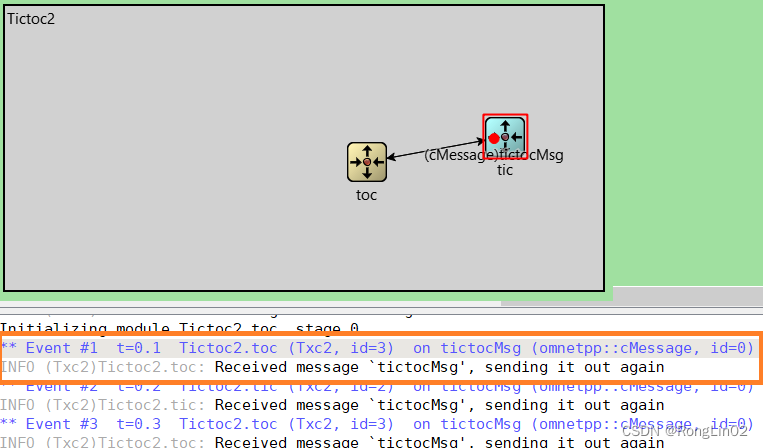

txc2.cc
先贴上代码和解释
 #include

    #include

     using namespace omnetpp; //使用命令空间omnetpp / *创建一个Txc2类,此类继承cSimpleModule *在网络中,我们新建的tic和toc模块都是Txc2对象 由omnet++在模拟开始时创建 *同时我们要重写函数initialize()和handleMessage(cMessage *msg)方法 *来实现我们的自定义功能 */ class Txc2 : public cSimpleModule { protected: virtual void initialize() override; virtual void handleMessage(cMessage *msg) override; }; //要将Txc2类注册到工程中 Define_Module(Txc2); void Txc2::initialize() { if (strcmp("tic", getName()) == 0) { // 这里的"EV"相当于C++中的"cout",都是输出信息 EV << "Sending initial message\n"; cMessage *msg = new cMessage("tictocMsg"); //定义一个名为"tictocMsg"的信息 send(msg, "out"); } } void Txc2::handleMessage(cMessage *msg) { // 输出的是msg类的属性,用getName()获取名称,这里的值为"tictocMsg". EV << "Received message `" << msg->getName() << "', sending it out again\n"; send(msg, "out"); }
txc2.ned
首先补充一下
//这是一个简单模型的定义 //有一个输入门和输出门 simple Txc2 { parameters: @display("i=block/routing"); // add a default icon gates: input in; output out; } //这里用了不同的颜色来让两个节点看起来不一样 //tic为蓝绿色,toc为黄色 //最后在connections定义了连接,同时延时为100ms network Tictoc2 { @display("bgb=598,284"); submodules: tic: Txc2 { parameters: @display("i=,cyan"); // do not change the icon (first arg of i=) just colorize it } toc: Txc2 { parameters: @display("i=,gold;p=362,156"); // here too } connections: tic.out --> { delay = 100ms; } --> toc.in; tic.in <-- { delay = 100ms; } <-- toc.out; } tictoc3
本实验主要是 在类内定义私有变量 counter 和WATCH() 的用法,逻辑为:每次收到消息, counter减1,减到0时删除消息。
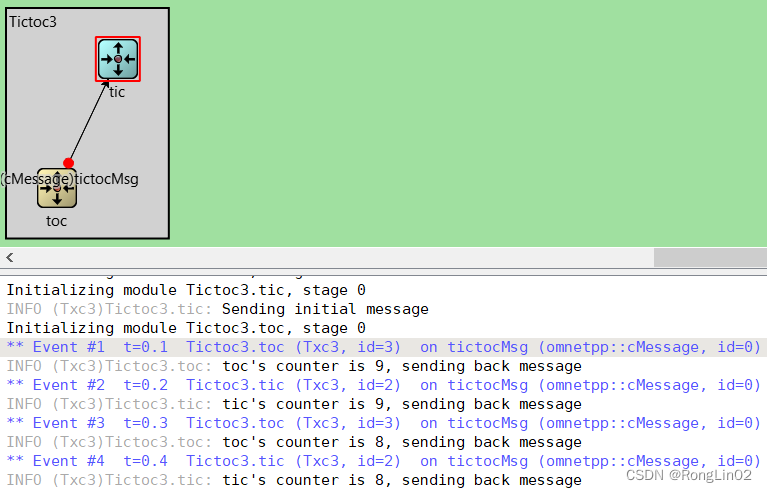
txc3.cc
 #include

    #include

     #include

      using namespace omnetpp; / *这次类中添加了一个私有变量 counter *继承cSimpleModule,重写函数initialize()和handleMessage(cMessage *msg)方法 */ class Txc3 : public cSimpleModule { private: int counter; // 是一个类中的私有成员 protected: virtual void initialize() override; virtual void handleMessage(cMessage *msg) override; }; Define_Module(Txc3); void Txc3::initialize() { //每一个 Txc3 类的 counter 都初始化为10,同时每次递减直到0删除信息 counter = 10; //这里的 WATCH() 主要是用来调试查看变量的值的 //然后我们在运行过程中点击某个模块,就可以在模拟界面的左下角看到 counter 的值了 WATCH(counter); if (strcmp("tic", getName()) == 0) { EV << "Sending initial message\n"; cMessage *msg = new cMessage("tictocMsg"); send(msg, "out"); } } void Txc3::handleMessage(cMessage *msg) { //每次收到消息 counter 就减一,同时判断其值是否到0 counter--; if (counter == 0) { //如果 counter 减到了0,就删除这个消息(msg) //删除消息之后,仿真器会弹出来一个 "no more events" 的提醒。 EV << getName() << "'s counter reached zero, deleting message\n"; delete msg; } else { EV << getName() << "'s counter is " << counter << ", sending back message\n"; send(msg, "out"); } }
txc3.ned
simple Txc3 { parameters: @display("i=block/routing"); gates: input in; output out; } network Tictoc3 { submodules: tic: Txc3 { parameters: @display("i=,cyan"); } toc: Txc3 { parameters: @display("i=,gold"); } connections: tic.out --> { delay = 100ms; } --> toc.in; tic.in <-- { delay = 100ms; } <-- toc.out; } tictop3的ned文件没啥好说的,和tictop2的一样。
tictoc4
本实验主要是 NED 文件和 cc 文件中参数的使用,实验效果同tictop3,counter 为2次。
txc4.cc
 #include

    #include

     #include

      using namespace omnetpp; / * 主要学习向仿真器中添加参数 * 我们将会把神奇数字10变成一个参数 */ class Txc4 : public cSimpleModule { private: int counter; protected: virtual void initialize() override; virtual void handleMessage(cMessage *msg) override; }; Define_Module(Txc4); void Txc4::initialize() { // counter 的值由 NED 文件中的 limit 参数控制,limit 设置为多少,counter 就被初始化为多少。 counter = par("limit"); // 这里我们不像之前用getName()方法与 "tic" 比较来得到发送信息的节点 // 而是用一个名为 "sendMsgOnInit" 的参数来标记本节点是否是第一个发送信息的节点 if (par("sendMsgOnInit").boolValue() == true) { EV << "Sending initial message\n"; cMessage *msg = new cMessage("tictocMsg"); send(msg, "out"); } } void Txc4::handleMessage(cMessage *msg) { //下面的逻辑和之前实验一致,收到消息 counter 减一,减到0删除信息。 counter--; if (counter == 0) { EV << getName() << "'s counter reached zero, deleting message\n"; delete msg; } else { EV << getName() << "'s counter is " << counter << ", sending back message\n"; send(msg, "out"); } }
txc4.ned
simple Txc4 { parameters: // 这里就是给每一个 Txc4 模型 设置每一个参数的初始值 // 可以在这里设置默认值,也可以在ini文件设置默认值 // 将 sendMsgOnInit 属性默认为关闭,对应 C 文件中的 par("sendMsgOnInit").boolValue() // 将 limit 参数默认设置为2,在 C 文件中,limit 的值赋给了 counter bool sendMsgOnInit = default(false); int limit = default(2); // another parameter with a default value @display("i=block/routing"); gates: input in; output out; } // 接下来就是对每一个实例化的Txc4模型,设置不同的初始化状态 // 将 tic 的 sendMsgOnInit 参数值设置为 true ,表示作为第一个主动发消息的节点 network Tictoc4 { submodules: tic: Txc4 { parameters: sendMsgOnInit = true; @display("i=,cyan"); } toc: Txc4 { parameters: sendMsgOnInit = false; @display("i=,gold"); } connections: tic.out --> { delay = 100ms; } --> toc.in; tic.in <-- { delay = 100ms; } <-- toc.out; } omnetpp.ini
把 ini 单独列出来,主要是设置参数的默认值
[General] network = Tictoc4 Tictoc4.toc.limit = 5 tictoc5
本实验学习如何向模拟添加输入参数,类型和 tictoc4 一致,区别在于 ned 文件中 Tic5的定义单独定义,同时注意 omnetpp.ini中对于默认值的设定。
txc5.cc
#include

    #include

     #include

      using namespace omnetpp; / * 本实验学习向仿真器中输入参数 */ class Txc5 : public cSimpleModule { private: int counter; protected: virtual void initialize() override; virtual void handleMessage(cMessage *msg) override; }; Define_Module(Txc5); void Txc5::initialize() { // 此部分同 Txc4,counter 的值由 ned 文件中的 limit 参数控制 counter = par("limit"); // 此部分同 Txc4,由 sendMsgOnInit 参数控制是否是第一个主动发消息的节点 if (par("sendMsgOnInit").boolValue() == true) { EV << "Sending initial message\n"; cMessage *msg = new cMessage("tictocMsg"); send(msg, "out"); } } void Txc5::handleMessage(cMessage *msg) { counter--; if (counter == 0) { EV << getName() << "'s counter reached zero, deleting message\n"; delete msg; } else { EV << getName() << "'s counter is " << counter << ", sending back message\n"; send(msg, "out"); } }
txc5.ned
//此部分同txc4,定义参数,设置默认值 simple Txc5 { parameters: bool sendMsgOnInit = default(false); int limit = default(2); @display("i=block/routing"); gates: input in; output out; } simple Tic5 extends Txc5 { parameters: @display("i=,cyan"); sendMsgOnInit = true; // 同 Txc4 将 tic 作为第一个主动发消息的节点 } simple Toc5 extends Txc5 { parameters: @display("i=,gold"); sendMsgOnInit = false; } network Tictoc5 { submodules: tic: Tic5; toc: Toc5 ; connections: tic.out --> { delay = 100ms; } --> toc.in; tic.in <-- { delay = 100ms; } <-- toc.out; } omnetpp.ini
[General] network = Tictoc5 Tictoc5.toc.limit = 5 Tictoc5.tic.limit = 6 tictoc6
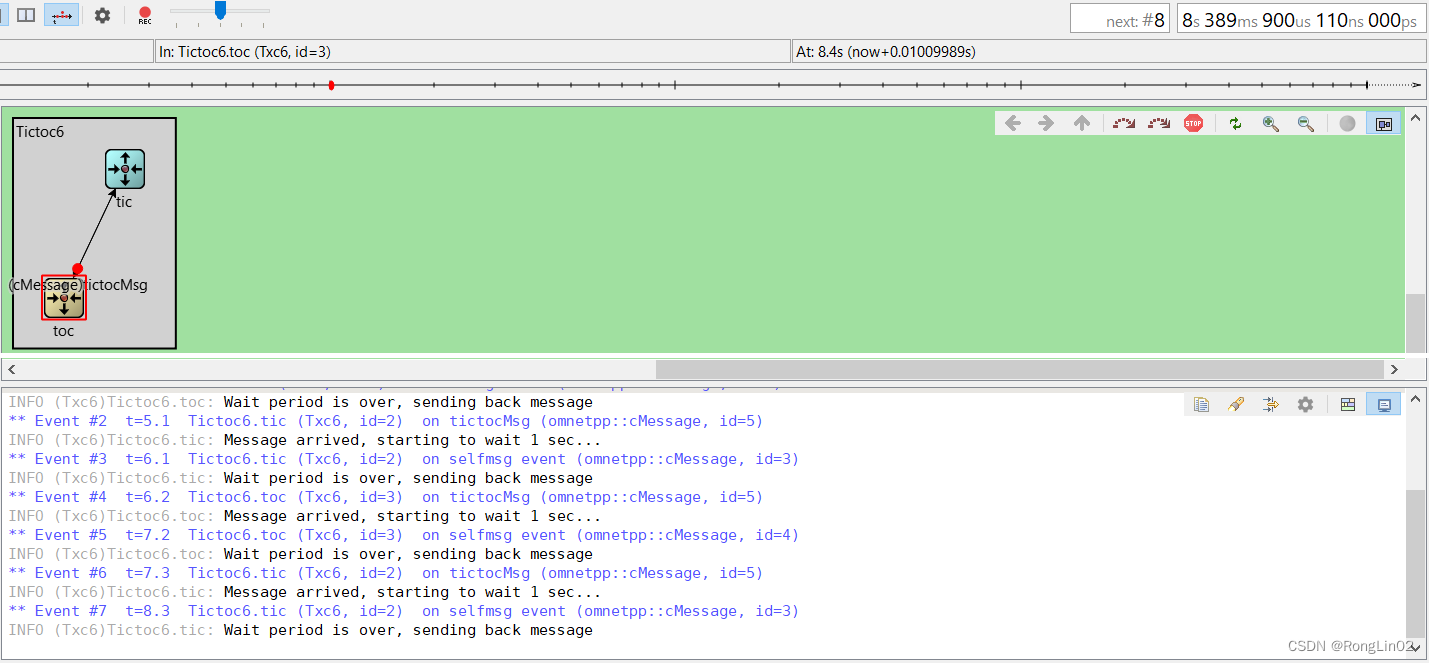
txc6.cc
#include

    #include

     #include

      using namespace omnetpp; / * 在之前的模型中,'tic' 和 'toc' 会立即发送回接收到的消息。 * 在这里,我们将添加一些计时:tic和toc将在发送回消息之前保持消息模拟一秒。 * 在omnet++中,这种计时是通过模块向自身发送消息来实现的。 * 这些消息被称为自消息(但这仅仅因为它们的使用方式,它们本身就是普通消息)或事件。 * 可以使用scheduleAt()函数“发送”自我消息,您可以指定它们应该何时返回模块。 * 为了使源代码短小,我们省略了计数器。 */ class Txc6 : public cSimpleModule { private: cMessage *event; // 这是一个消息指针,这是自消息的指针 cMessage *tictocMsg; // 这是两个消息的交互指针 public: Txc6(); virtual ~Txc6(); protected: virtual void initialize() override; virtual void handleMessage(cMessage *msg) override; }; Define_Module(Txc6); Txc6::Txc6() { //这里构造函数将 event 和 tictocMsg 都设置成了空指针 //这样即使initialize()在启动过程中由于运行时错误或用户取消而没有被调用,析构函数也不会崩溃。 event = tictocMsg = nullptr; } Txc6::~Txc6() { // C++释放动态分配的对象 cancelAndDelete(event); delete tictocMsg; } void Txc6::initialize() { // 这里 new 了一个 cMessage 类型的变量,用于计时的事件对象 //这里的 event 就是一个普通的任意的信息 event = new cMessage("event"); // 先不定义传输的信息 tictocMsg = nullptr; if (strcmp("toc", getName()) == 0) { // 我们不会立即开始,而是向自己发送消息(“self-message”) // 主要是用 scheduleAt() 方法实现自消息 // 我们将在它返回给我们时(模拟时间t=5.0)进行第一次发送。 EV << "Scheduling first send to t=5.0s\n"; tictocMsg = new cMessage("tictocMsg"); scheduleAt(5.0, event); } } void Txc6::handleMessage(cMessage *msg) { //有几种区分消息的方法 //例如通过消息类型(cMessage的int属性)或使用dynamic_cast通过类(提供cMessage的子类)。 //在这段代码中,我们只检查是否识别了指针,这(如果可行)是最简单和最快的方法。 if (msg == event) { // self-message到达了,我们就可以发送tictocMsg和nullptr //同时输出它的指针,这样以后就不会把我们弄糊涂了。 EV << "Wait period is over, sending back message\n"; send(tictocMsg, "out"); tictocMsg = nullptr; } else { //如果我们收到的消息不是我们自己的消息,那么它一定是来自其他节点的消息。 //我们在tictocMsg变量中记住它的指针,然后安排我们的自我消息在1个模拟时间内返回给我们。 // simTime() 会返回当前的模拟时间. EV << "Message arrived, starting to wait 1 sec...\n"; tictocMsg = msg; scheduleAt(simTime()+1.0, event); } }
txc6.ned
和实验2一致
simple Txc6 { parameters: @display("i=block/routing"); gates: input in; output out; } network Tictoc6 { submodules: tic: Txc6 { parameters: @display("i=,cyan"); } toc: Txc6 { parameters: @display("i=,gold"); } connections: tic.out --> { delay = 100ms; } --> toc.in; tic.in <-- { delay = 100ms; } <-- toc.out; } 最后贴一下文档中对于 virtual void scheduleAt(simtime_t t, cMessage *msg); 的说明
Schedules a self-message. It will be delivered back to the module via receive() or handleMessage() at simulation time t. This method is the way you can implement timers or timeouts. Timers can also be cancelled via cancelEvent() (See below.) When the message is delivered at the module, you can call msg->isSelfMessage() to tell it apart from messages arriving from other modules. msg->getKind() can be used to further classify it, or of you need to manage an unbounded number of timers, you can set msg->getContextPointer() before scheduling to point to the data structure the message belongs to – this way you can avoid having to search through lists or other data structures to find out where a just-arrived self-message belongs.
cancelEvent() can be used to cancel the self-message before it arrives. This is useful for implementing timeouts: if the event occurs “in time” (before timeout), the scheduled self-message can be cancelled.
Given a cMessage pointer, you can check whether it is currently scheduled by calling msg->isScheduled(). If it is scheduled, you cannot schedule it again without calling cancelEvent() first. However, after the message was delivered to the module or cancelled, you can schedule it again – so you can reuse the same message object for timeouts over and over during the whole simulation.
tictoc7
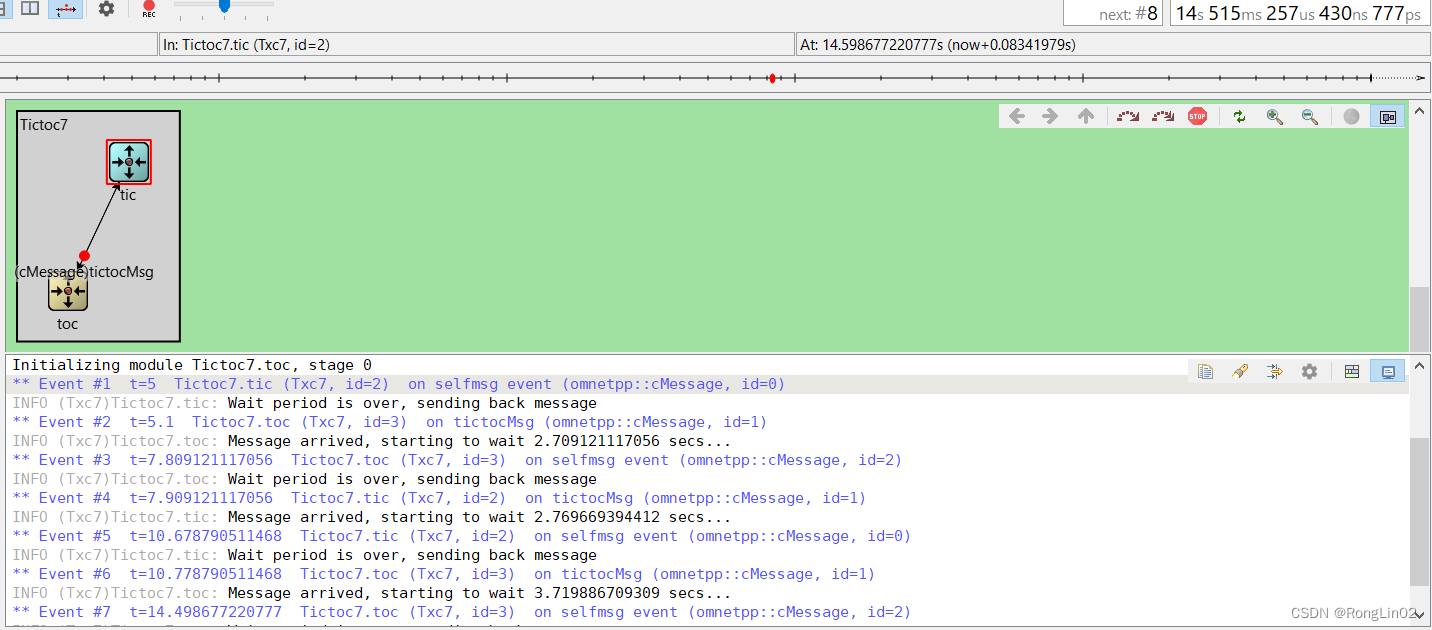
txc7.cc
#include

    #include

     #include

      using namespace omnetpp; / * 在这一步中,我们将引入随机数。 * 我们将延迟从1改为一个随机值,可以从NED文件或omnetpp.ini中设置。 * 此外,我们会以很小的概率“丢失”(删除)数据包。 */ class Txc7 : public cSimpleModule { private: cMessage *event; cMessage *tictocMsg; public: Txc7(); virtual ~Txc7(); protected: virtual void initialize() override; virtual void handleMessage(cMessage *msg) override; }; Define_Module(Txc7); Txc7::Txc7() { event = tictocMsg = nullptr; } Txc7::~Txc7() { cancelAndDelete(event); delete tictocMsg; } void Txc7::initialize() { event = new cMessage("event"); tictocMsg = nullptr; if (strcmp("tic", getName()) == 0) { EV << "Scheduling first send to t=5.0s\n"; scheduleAt(5.0, event); tictocMsg = new cMessage("tictocMsg"); } } void Txc7::handleMessage(cMessage *msg) { if (msg == event) { EV << "Wait period is over, sending back message\n"; send(tictocMsg, "out"); tictocMsg = nullptr; } else { // uniform() 方法会返回一个在[a,b)范围内均匀分布的随机变量 // 以0.1的概率“丢失”消息: if (uniform(0, 1) < 0.1) { EV << "\"Losing\" message\n"; delete msg; } else { // "delayTime" 参数可以在 ned 文件和 ini 文件中设置为 "exponential(5)" // 表示 平均值为5s的一个随机数 // 而这里我们就时每次得到不同的一个随机值 simtime_t delay = par("delayTime"); EV << "Message arrived, starting to wait " << delay << " secs...\n"; tictocMsg = msg; scheduleAt(simTime()+delay, event); } } }
txc7.ned
simple Txc7 { parameters: volatile double delayTime @unit(s); // 延迟发送回消息,对应 C 文件中的 simtime_t delay 变量 @display("i=block/routing"); gates: input in; output out; } network Tictoc7 { submodules: tic: Txc7 { parameters: @display("i=,cyan"); } toc: Txc7 { parameters: @display("i=,gold"); } connections: tic.out --> { delay = 100ms; } --> toc.in; tic.in <-- { delay = 100ms; } <-- toc.out; } omnetpp.ini
[General] network = Tictoc7 # exponential()的参数是平均值 # Truncnormal()返回被截断为非负值的正态分布的值 Tictoc7.tic.delayTime = exponential(3s) Tictoc7.toc.delayTime = truncnormal(3s,1s) 总结
这里学习了TicToc 2-7,学到了很多用法,继续学习OMNeT,=w=
发布者:全栈程序员-站长,转载请注明出处:https://javaforall.net/200369.html原文链接:https://javaforall.net




