
[root@s100 local]# tar -zxvf apache-hive-2.1.1-bin.tar.gz -C /usr/local/ 将文件重命名为hive文件:
[root@s100 local]# mv apache-hive-2.1.1-bin hive 

修改环境变量/etc/profile:
[root@s100 local]# vim /etc/profile 1 #hive 2 export HIVE_HOME=/usr/local/hive 3 export PATH=$PATH:$HIVE_HOME/bin [root@s100 local]# hive --version [root@s100 conf]# cd /usr/local/hive/conf/ [root@s100 conf]# cp hive-default.xml.template hive-site.xml [root@s100 conf]# vim hive-site.xml
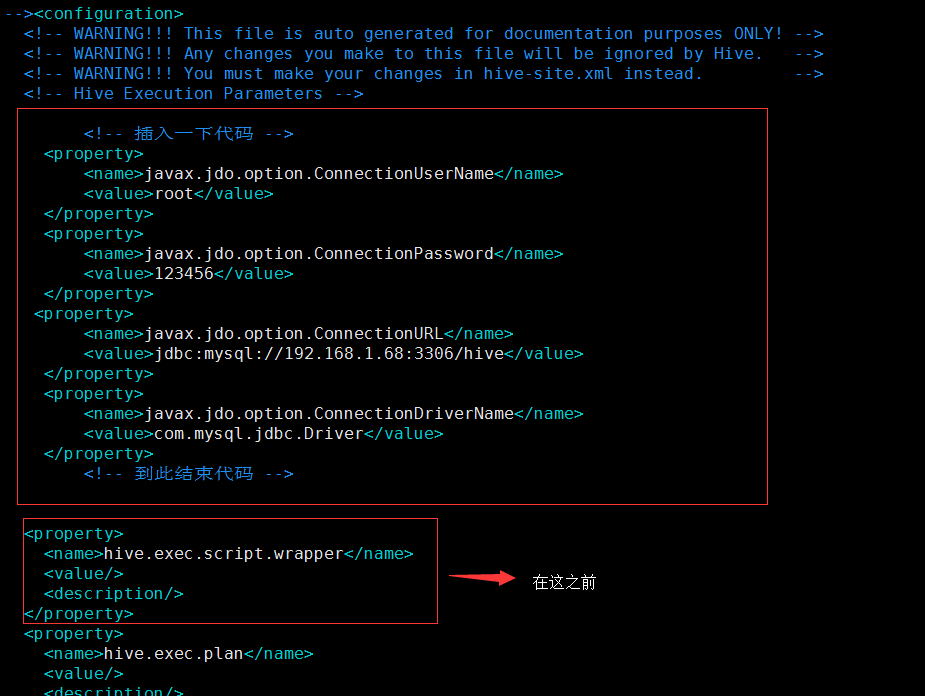
      javax.jdo.option.ConnectionUserName
    用户名(这4是新添加的,记住删除配置文件原有的哦!)

      root


      javax.jdo.option.ConnectionPassword
    密码


      javax.jdo.option.ConnectionURL
    mysql

      jdbc:mysql://192.168.1.68:3306/hive


      javax.jdo.option.ConnectionDriverName
    mysql驱动程序

      com.mysql.jdbc.Driver


      hive.exec.script.wrapper
2.复制mysql的驱动程序到hive/lib下面(这里已经拷贝好了)
[root@s100 lib]# ll mysql-connector-java-5.1.18-bin.jar -rw-r--r-- 1 root root 1月 4 01:43 mysql-connector-java-5.1.18-bin.jar 3.在mysql中hive的schema(在此之前需要创建mysql下的hive数据库)
1 [root@s100 bin]# pwd 2 /usr/local/hive/bin 3 [root@s100 bin]# schematool -dbType mysql -initSchema 4.执行hive命令
[root@localhost hive]# hive 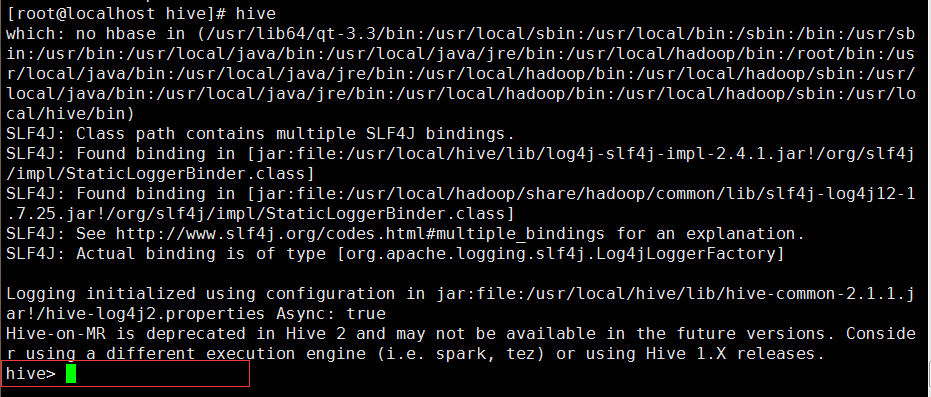
成功进入hive界面,hive配置完成
5.查询mysql(hive这个库是在 schematool -dbType mysql -initSchema 之前创建的!)
1 [root@localhost ~]# mysql -uroot -p 2 Welcome to the MySQL monitor. Commands end with ; or \g. 3 Your MySQL connection id is 10 4 Server version: 5.1.73 Source distribution 5 6 Copyright (c) 2000, 2013, Oracle and/or its affiliates. All rights reserved. 7 8 Oracle is a registered trademark of Oracle Corporation and/or its 9 affiliates. Other names may be trademarks of their respective 10 owners. 11 12 Type 'help;' or '\h' for help. Type '\c' to clear the current input statement. 13 14 mysql> use hive 15 Reading table information for completion of table and column names 16 You can turn off this feature to get a quicker startup with -A 17 18 Database changed 19 mysql> show tables; 20 +---------------------------+ 21 | Tables_in_hive | 22 +---------------------------+ 23 | AUX_TABLE | 24 | BUCKETING_COLS | 25 | CDS | 26 | COLUMNS_V2 | 27 | COMPACTION_QUEUE | 28 | COMPLETED_COMPACTIONS |
       javax.jdo.option.ConnectionURL


       jdbc:mysql://localhost:3306/hahive
     (mysql地址localhost)


       javax.jdo.option.ConnectionDriverName
     (mysql的驱动)

       com.mysql.jdbc.Driver


       javax.jdo.option.ConnectionUserName
     (用户名)

       root


       javax.jdo.option.ConnectionPassword
     (密码)


       hive.metastore.schema.verification


       false
[root@localhost conf]# hadoop fs -lsr / 2.进入hive并创建一个测试库和测试表
[root@localhost conf]# hive 创建库:
1 hive> create database hive_1; 2 OK 3 Time taken: 1.432 seconds 显示库: 1 hive> show databases; 2 OK 3 default 4 hive_1 5 Time taken: 1.25 seconds, Fetched: 2 row(s) 1 mysql> use hahive; 版权声明:本文内容由互联网用户自发贡献,该文观点仅代表作者本人。本站仅提供信息存储空间服务,不拥有所有权,不承担相关法律责任。如发现本站有涉嫌侵权/违法违规的内容, 请联系我们举报,一经查实,本站将立刻删除。
发布者:全栈程序员-站长,转载请注明出处:https://javaforall.net/201027.html原文链接:https://javaforall.net



