
Ubuntu 安装 Eclipse IDE
Ubuntu 安装 Eclipse IDE
编辑 -> 编译 -> 链接 -> 运行
1. Other -> IDE and Tools
2. Eclipse IDE for C/C++ Developers
Home -> IDE -> Desktop IDEs -> Eclipse IDE for C/C++ Developers
Ubuntu 源带 Eclipse,但版本通常是比官网的版本旧,额外的插件一律没有,默认只能开发 Java 程序,推荐直接从官网上下载 Eclipse 安装,有各类捆绑插件用于不同开发用途的 Eclipse 压缩包。
sudo apt-get install eclipse 2.1 Package Description
An IDE for C/C++ developers with Mylyn integration.
2.2 This package includes:
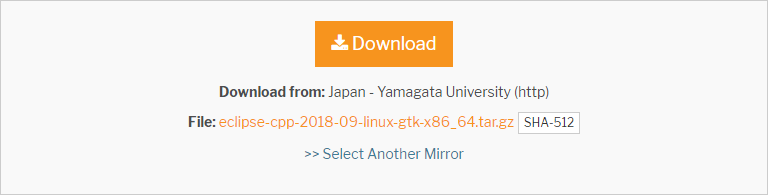

3. Installation
cd
  <你下载文件所在文件夹>
    chmod +x
   <已下载的安装文件>
为了使你的安装对所有用户都有效,用 sudo 运行安装命令并且根据提示操作。
sudo ./
  <已下载的安装文件>
为单个用户安装,只需运行安装文件并且根据提示操作。当安装程序询问你时,选择一个安装目录,并且确认这个用户对这个目录有写的权限。
./
  <已下载的安装文件>
要运行Eclipse,使用
/bin/eclipse命令。
3.1 Java SDK
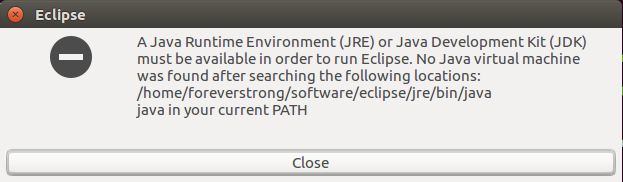
3.2 eclipse-cpp-2018-09-linux-gtk-x86_64.tar.gz
Eclipse 在 ubuntu 16.04 LTS 下是绿色版的。
foreverstrong@strong:~/software$ ll
total 506972
drwxrwxr-x  3 foreverstrong foreverstrong      4096 11月  5 14:14 ./
drwxr-xr-x 23 foreverstrong foreverstrong      4096 11月  2 13:04 ../
-rw-rw-rw-  1 foreverstrong foreverstrong 236908195 11月  5 14:14 eclipse-cpp-2018-09-linux-gtk-x86_64.tar.gz
drwxrwxr-x 10 foreverstrong foreverstrong      4096 11月  2 12:55 pycharm-2016.3.3/
-rwxrwxrwx  1 foreverstrong foreverstrong 282217430 11月  2 11:31 pycharm-professional-2016.3.3.tar.gz*
foreverstrong@strong:~/software$ chmod a+x eclipse-cpp-2018-09-linux-gtk-x86_64.tar.gz
foreverstrong@strong:~/software$
foreverstrong@strong:~/software$ ll
total 506972
drwxrwxr-x  3 foreverstrong foreverstrong      4096 11月  5 14:14 ./
drwxr-xr-x 23 foreverstrong foreverstrong      4096 11月  2 13:04 ../
-rwxrwxrwx  1 foreverstrong foreverstrong 236908195 11月  5 14:14 eclipse-cpp-2018-09-linux-gtk-x86_64.tar.gz*
drwxrwxr-x 10 foreverstrong foreverstrong      4096 11月  2 12:55 pycharm-2016.3.3/
-rwxrwxrwx  1 foreverstrong foreverstrong 282217430 11月  2 11:31 pycharm-professional-2016.3.3.tar.gz*
foreverstrong@strong:~/software$
foreverstrong@strong:~/software$ tar -zxvf eclipse-cpp-2018-09-linux-gtk-x86_64.tar.gz
......
foreverstrong@strong:~/software$
foreverstrong@strong:~/software$ ll
total 506976
drwxrwxr-x  4 foreverstrong foreverstrong      4096 11月  5 14:15 ./
drwxr-xr-x 23 foreverstrong foreverstrong      4096 11月  2 13:04 ../
drwxrwxr-x  8 foreverstrong foreverstrong      4096 9月  18 03:49 eclipse/
-rwxrwxrwx  1 foreverstrong foreverstrong 236908195 11月  5 14:14 eclipse-cpp-2018-09-linux-gtk-x86_64.tar.gz*
drwxrwxr-x 10 foreverstrong foreverstrong      4096 11月  2 12:55 pycharm-2016.3.3/
-rwxrwxrwx  1 foreverstrong foreverstrong 282217430 11月  2 11:31 pycharm-professional-2016.3.3.tar.gz*
foreverstrong@strong:~/software$ cd eclipse/
foreverstrong@strong:~/software/eclipse$ ls
artifacts.xml  configuration  dropins  eclipse  eclipse.ini  features  icon.xpm  notice.html  p2  plugins  readme
foreverstrong@strong:~/software/eclipse$ sudo ./eclipse
[sudo] password for foreverstrong:
Gtk-Message: GtkDialog mapped without a transient parent. This is discouraged.
foreverstrong@strong:~/software/eclipse$
foreverstrong@strong:~/software/eclipse$ sudo ./eclipse
[sudo] password for foreverstrong:
log4j:WARN No appenders could be found for logger (org.apache.http.client.protocol.RequestAddCookies).
log4j:WARN Please initialize the log4j system properly.
Memory pressure relief: Empty the PageCache: =dirty (at 21532672 bytes)
Memory pressure relief: Prune MemoryCache live resources: =dirty (at 21532672 bytes)
Memory pressure relief: Drain CSSValuePool: =dirty (at 21532672 bytes)
Memory pressure relief: Discard StyleResolvers: =dirty (at 21532672 bytes)
Memory pressure relief: Discard all JIT-compiled code: =dirty (at 21532672 bytes)
Memory pressure relief: Dropping buffered data from paused media elements: =dirty (at 21532672 bytes)
Memory pressure relief: Purge inactive FontData: =dirty (at 21532672 bytes)
Memory pressure relief: Clear WidthCaches: =dirty (at 21532672 bytes)
Memory pressure relief: Discard Selector Query Cache: =dirty (at 21532672 bytes)
Memory pressure relief: Prune MemoryCache dead resources: =dirty (at 21532672 bytes)
Memory pressure relief: Prune presentation attribute cache: =dirty (at 21532672 bytes)
Memory pressure relief: Run malloc_trim: -dirty 1036288 bytes (from 21532672 to 20496384)
Memory pressure relief: Release free FastMalloc memory: -dirty 110592 bytes (from 20496384 to 20385792)
Memory pressure relief: Empty the PageCache: =dirty (at 44429312 bytes)
Memory pressure relief: Prune MemoryCache live resources: =dirty (at 44429312 bytes)
Memory pressure relief: Drain CSSValuePool: =dirty (at 44429312 bytes)
Memory pressure relief: Discard StyleResolvers: +dirty 16384 bytes (from 44429312 to 44445696)
Memory pressure relief: Discard all JIT-compiled code: =dirty (at 44445696 bytes)
Memory pressure relief: Dropping buffered data from paused media elements: =dirty (at 44445696 bytes)
Memory pressure relief: Purge inactive FontData: =dirty (at 44445696 bytes)
Memory pressure relief: Clear WidthCaches: =dirty (at 44445696 bytes)
Memory pressure relief: Discard Selector Query Cache: =dirty (at 44445696 bytes)
Memory pressure relief: Prune MemoryCache dead resources: =dirty (at 44445696 bytes)
Memory pressure relief: Prune presentation attribute cache: =dirty (at 44445696 bytes)
Memory pressure relief: Run malloc_trim: -dirty 4718592 bytes (from 44445696 to 39727104)
Memory pressure relief: Release free FastMalloc memory: -dirty 2895872 bytes (from 39727104 to 36831232)
foreverstrong@strong:~/software/eclipse$

Eclipse 运行,会弹出一个窗口,要求用户选择一个工作空间 (Workspace)。在 Eclipse 运行之后,所有的项目和文件缺省情况下都会存储在这个工作空间中,并且我们对 Eclipse 进行的任何设置也都是和 Workspace 相关联的。

4. Create a launcher shortcut
Open terminal from Unity Dash, Application Launcher, or via Ctrl + Alt + T shortcut key. When it opens, paste below command and run:
gedit .local/share/applications/eclipse.desktop gedit /usr/share/applications/eclipse.desktop sudo gedit /usr/share/applications/eclipse.desktop The command creates and opens a launcher file, for current user, with gedit text editor. When it opens, paste below content:
[Desktop Entry] Name=Eclipse Type=Application Exec=/home/USERNAME/java-mars/eclipse/eclipse Terminal=false Icon=/home/USERNAME/java-mars/eclipse/icon.xpm Comment=Integrated Development Environment NoDisplay=false Categories=Development;IDE; Name[en]=Eclipse Depends on your installation folder, check out in file browser, change the value in red.
终端的警告不用理会,在弹出的文本编辑器输入:
[Desktop Entry] Name=Eclipse Type=Application Exec=/home/foreverstrong/software/eclipse/eclipse Terminal=false Icon=/home/foreverstrong/software/eclipse/icon.xpm Comment=Integrated Development Environment NoDisplay=false Categories=Development;IDE; Name[en]=Eclipse 
/usr/share/applications/ 目录下找到 Eclipse 图标,右击 -> Copy To… -> Desktop.
5. An error has occurred. See the log file null.
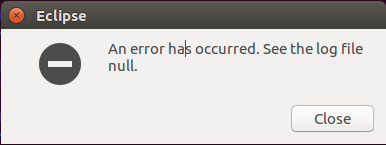
foreverstrong@strong:~/Desktop$ pwd /home/foreverstrong/Desktop foreverstrong@strong:~/Desktop$ foreverstrong@strong:~/Desktop$ ll total 12 drwxr-xr-x 2 foreverstrong foreverstrong 4096 11月 6 09:18 ./ drwxr-xr-x 25 foreverstrong foreverstrong 4096 11月 5 20:55 ../ -rwxr-xr-x 1 foreverstrong foreverstrong 262 11月 6 09:18 eclipse.desktop* foreverstrong@strong:~/Desktop$ foreverstrong@strong:~/Desktop$ chmod a+x eclipse.desktop foreverstrong@strong:~/Desktop$ foreverstrong@strong:~/Desktop$ ll total 12 drwxr-xr-x 2 foreverstrong foreverstrong 4096 11月 6 09:18 ./ drwxr-xr-x 25 foreverstrong foreverstrong 4096 11月 5 20:55 ../ -rwxr-xr-x 1 foreverstrong foreverstrong 262 11月 6 09:18 eclipse.desktop* foreverstrong@strong:~/Desktop$ foreverstrong@strong:~$ sudo gedit /usr/share/applications/eclipse.desktop 5.1 log file 目录
/home/foreverstrong/software/eclipse/configuration/.log
!SESSION 2018-11-06 09:14:57.747 ----------------------------------------------- eclipse.buildId=4.9.0.I-0745 java.version=1.8.0_181 java.vendor=Oracle Corporation BootLoader constants: OS=linux, ARCH=x86_64, WS=gtk, NL=en_US !ENTRY org.eclipse.osgi 4 0 2018-11-06 09:14:58.353 !MESSAGE Error reading configuration: /home/foreverstrong/software/eclipse/configuration/org.eclipse.osgi/.manager/.fileTableLock (Permission denied) !STACK 0 java.io.FileNotFoundException: /home/foreverstrong/software/eclipse/configuration/org.eclipse.osgi/.manager/.fileTableLock (Permission denied) at java.io.RandomAccessFile.open0(Native Method) at java.io.RandomAccessFile.open(RandomAccessFile.java:316) at java.io.RandomAccessFile.

    (RandomAccessFile.java:243) at org.eclipse.osgi.internal.location.Locker_JavaNio.lock(Locker_JavaNio.java:39) at org.eclipse.osgi.storagemanager.StorageManager.lock(StorageManager.java:391) at org.eclipse.osgi.storagemanager.StorageManager.open(StorageManager.java:704) at org.eclipse.osgi.storage.Storage.getChildStorageManager(Storage.java:2068) at org.eclipse.osgi.storage.Storage.getInfoInputStream(Storage.java:2085) at org.eclipse.osgi.storage.Storage.

     (Storage.java:240) at org.eclipse.osgi.storage.Storage.createStorage(Storage.java:175) at org.eclipse.osgi.internal.framework.EquinoxContainer.

      (EquinoxContainer.java:72) at org.eclipse.osgi.launch.Equinox.

       (Equinox.java:34) at org.eclipse.core.runtime.adaptor.EclipseStarter.startup(EclipseStarter.java:306) at org.eclipse.core.runtime.adaptor.EclipseStarter.run(EclipseStarter.java:242) at sun.reflect.NativeMethodAccessorImpl.invoke0(Native Method) at sun.reflect.NativeMethodAccessorImpl.invoke(NativeMethodAccessorImpl.java:62) at sun.reflect.DelegatingMethodAccessorImpl.invoke(DelegatingMethodAccessorImpl.java:43) at java.lang.reflect.Method.invoke(Method.java:498) at org.eclipse.equinox.launcher.Main.invokeFramework(Main.java:659) at org.eclipse.equinox.launcher.Main.basicRun(Main.java:595) at org.eclipse.equinox.launcher.Main.run(Main.java:1501) at org.eclipse.equinox.launcher.Main.main(Main.java:1474)
权限问题,sudo chmod -R 777 eclipse.
foreverstrong@strong:~/software$ ll eclipse
total 488
drwxrwxr-x  8 foreverstrong foreverstrong   4096 11月  6 09:30 ./
drwxrwxr-x  4 foreverstrong foreverstrong   4096 11月  5 14:15 ../
-rw-rw-r--  1 foreverstrong foreverstrong 167752 9月  18 03:49 artifacts.xml
drwxrwxr-x 11 foreverstrong foreverstrong   4096 11月  6 09:30 configuration/
drwxrwxr-x  2 foreverstrong foreverstrong   4096 9月  18 03:49 dropins/
-rwxr-xr-x  1 foreverstrong foreverstrong  73064 9月   6 21:10 eclipse*
-rw-rw-r--  1 foreverstrong foreverstrong    628 9月  18 03:49 eclipse.ini
-rw-rw-r--  1 foreverstrong foreverstrong     60 9月   6 19:47 .eclipseproduct
drwxrwxr-x 95 foreverstrong foreverstrong  12288 9月  18 03:49 features/
-rwxr-xr-x  1 foreverstrong foreverstrong 140566 9月   6 21:10 icon.xpm*
-rw-rw-r--  1 foreverstrong foreverstrong   6297 9月  12 19:46 notice.html
drwxrwxr-x  4 foreverstrong foreverstrong   4096 11月  5 20:55 p2/
drwxrwxr-x 10 foreverstrong foreverstrong  57344 9月  18 03:49 plugins/
drwxrwxr-x  2 foreverstrong foreverstrong   4096 9月  18 03:49 readme/
foreverstrong@strong:~/software$ chmod -R 777 eclipse

foreverstrong@strong:~/software$
foreverstrong@strong:~/software$ sudo chmod -R 777 eclipse
[sudo] password for foreverstrong:
foreverstrong@strong:~/software$

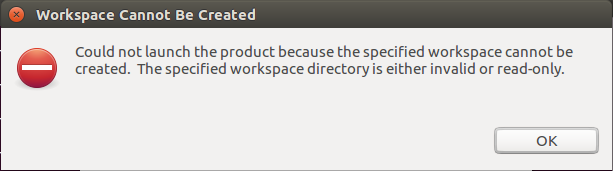
权限问题,新建目录。

foreverstrong@strong:~$ ll drwxrwxr-x 3 foreverstrong foreverstrong 4096 11月 6 09:36 eclipse-work/ drwxr-xr-x 3 root root 4096 11月 5 20:55 eclipse-workspace/ foreverstrong@strong:~$ 6. Eclipse documentation
https://help.eclipse.org/2018-09/index.jsp
References
WORDBOOK
发布者:全栈程序员-站长,转载请注明出处:https://javaforall.net/201170.html原文链接:https://javaforall.net



