


需要用到weapp-qrcode.js,下载https://blog-static.cnblogs.com/files/-tiantian/weapp-qrcode.js,点开链接按 ctrl + s 保存到相应的位置
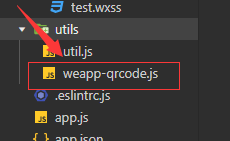
index.wxml中的代码:
index.wxss中的代码:
.ewm{ background-color: #e8e8e8; display: flex; justify-content: center; align-items: center; width: 680rpx; height: 680rpx; margin: 50rpx auto; } .inpt{ border: 1rpx solid #e8e8e8; width: 620rpx; margin: 30rpx auto; padding: 30rpx; } .btn{ width: 680rpx; }index.js中的代码:
const app = getApp() let drawQrcode = require("../../utils/weapp-qrcode.js") Page({ data: { //根据这个内容生成二维码的!!! text:"西宫硝子", }, onLoad() { this.ewmChange() }, ewmChange(){ let size = {} size.w = wx.getSystemInfoSync().windowWidth / 750 * 600 size.h = size.w var that = this drawQrcode({ width: size.w, height: size.h, canvasId: 'myQrcode', // ctx: wx.createCanvasContext('myQrcode'), text: that.data.text, // v1.0.0+版本支持在二维码上绘制图片 }) }, ewmText(e){ this.setData({ text: e.detail.value }) }, searchFn(){ this.ewmChange() } })版权声明:本文内容由互联网用户自发贡献,该文观点仅代表作者本人。本站仅提供信息存储空间服务,不拥有所有权,不承担相关法律责任。如发现本站有涉嫌侵权/违法违规的内容, 请联系我们举报,一经查实,本站将立刻删除。
发布者:全栈程序员-站长,转载请注明出处:https://javaforall.net/201219.html原文链接:https://javaforall.net


![手动清除fun.xls.exe病毒的方法[通俗易懂]](https://javaforall.net/wp-content/uploads/2020/11/2020110817443450-480x300.jpg)
