
一、前言
在做Java项目开发过程中,涉及到一些数据库服务连接配置、缓存服务器连接配置等,通常情况下我们会将这些不太变动的配置信息存储在以 .properties 结尾的配置文件中。当对应的服务器地址或者账号密码信息有所变动时,我们只需要修改一下配置文件中的信息即可。同时为了让Java程序可以读取 .properties配置文件中的值,Java的JDK中提供了java.util.Properties类可以实现读取配置文件。
二、Properties类
Properties 类位于 java.util.Properties中,是Java 语言的处理配置文件所使用的类,其中的xxx.Properties类主要用于集中的持久存储Java的配置文件内容,可以读取后缀是.properties和.cfg的配置文件。
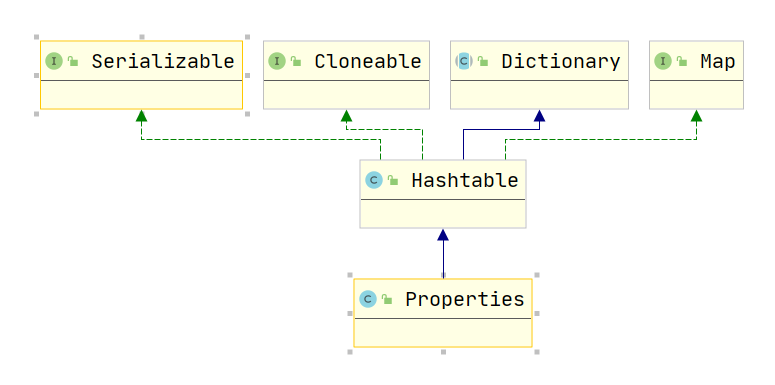
Properties继承了Hashtable 类,以Map 的形式进行放置值,put(key,value) 和 get(key),文本注释信息可以用”#”来注释。
Properties 类表示了一个持久的属性集。Properties 可保存在流中或从流中加载。属性列表中每个键及其对应值都是一个字符串。
Properties 文件内容的格式是:键=值 形式,Key值不能够重复。 例如:
jdbc.driver=com.mysql.jdbc.Driver - Properties类的继承关系图:

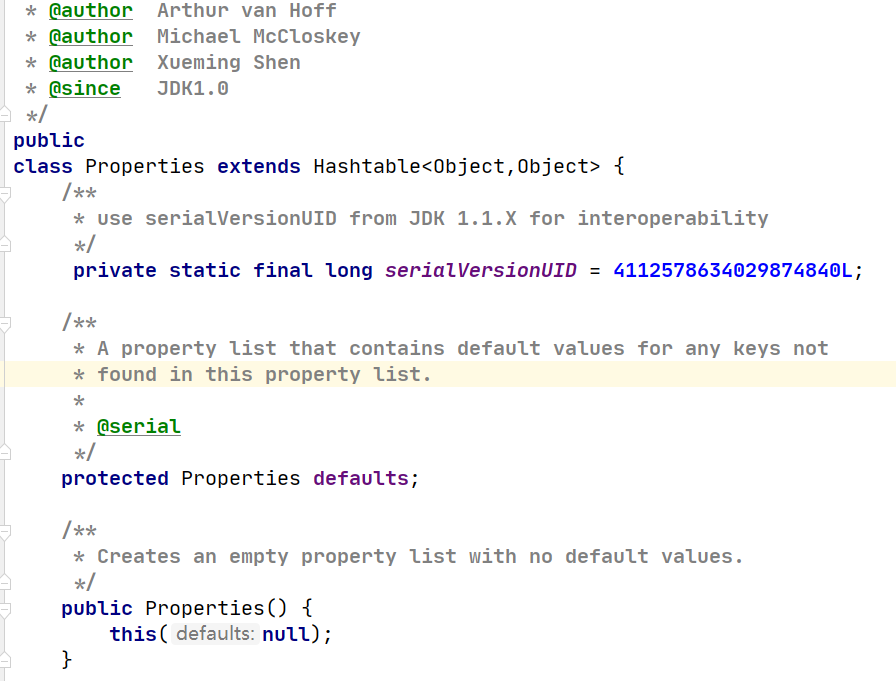
- Properties类的源码关系图:
- 主要方法介绍:
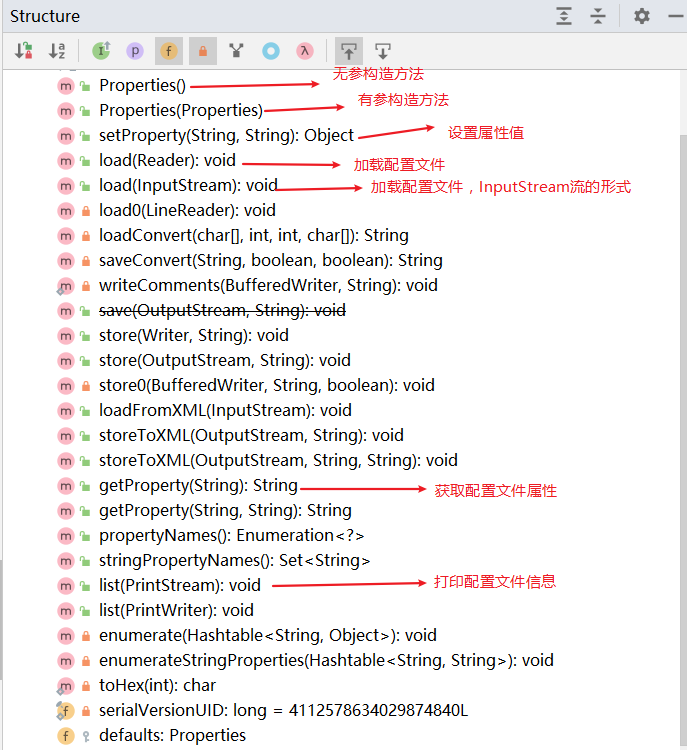
它提供了几个核心的方法:
- getProperty ( String key): 用指定的键在此属性列表中搜索属性。也就是通过参数 key ,得到 key 所对应的 value。
- load ( InputStream inStream): 从输入流中读取属性列表(键和元素对)。通过对指定的文件(比如说上面的 test.properties 文件)进行装载来获取该文件中的所有键 – 值对。以供 getProperty ( String key) 来搜索。
- setProperty ( String key, String value) : 调用 Hashtable 的方法 put 。他通过调用基类的put方法来设置 键 – 值对。
- store ( OutputStream out, String comments): 以适合使用 load 方法加载到 Properties 表中的格式,将此 Properties 表中的属性列表(键和元素对)写入输出流。与 load 方法相反,该方法将键 – 值对写入到指定的文件中去。
- clear (): 清除所有装载的 键 – 值对。该方法在基类中提供。
三、Properties常用方法实践
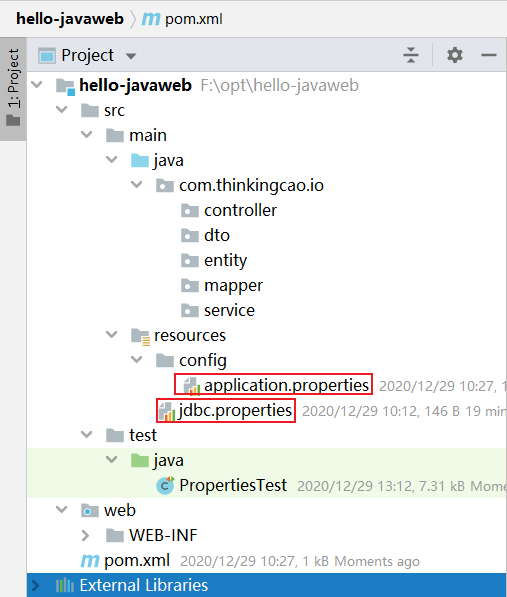
Properties类我们从文件的写入和读取来实践其具体用法,下面演示练习将以下数据库配置信息写入到jdbc.properties文件中
jdbc.driver=com.mysql.jdbc.Driver jdbc.url=jdbc:mysql://localhost:3306/mybatis?characterEncoding=utf8 jdbc.username=root jdbc.password= - 项目目录结构如下
四、Java写入Properties
Properties类调用setProperty方法将键值对保存到内存中,此时可以通过getProperty方法读取,propertyNames方法进行遍历,但是并没有将键值对持久化到属性文件中,故需要调用store方法持久化键值对到属性文件中。
import java.io.FileOutputStream; import java.io.IOException; import java.io.OutputStream; import java.util.Properties; / * @desc: 写入Mysql数据库了连接信息到jdbc.properties中 * @author: cao_wencao * @date: 2020-12-29 13:41 */ public class PropertiesStoreTest {
    public static void main(String[] args) {
    Properties properties = new Properties(); OutputStream output = null; try {
    output = new FileOutputStream("src/main/resources/jdbc.properties"); properties.setProperty("jdbc.driver", "com.mysql.jdbc.Driver"); properties.setProperty("jdbc.url","jdbc:mysql://localhost:3306/mybatis?characterEncoding=utf8" ); properties.setProperty("jdbc.username", "root"); properties.setProperty("jdbc.password", ""); // 保存键值对到文件中 properties.store(output, "Thinkingcao modify"); } catch (IOException io) {
    io.printStackTrace(); } finally {
    if (output != null) {
    try {
    output.close(); } catch (IOException e) {
    e.printStackTrace(); } } } } }
输出结果,在resources目录下多一个文件jdbc.properties,内容如下:
#Thinkingcao modify #Tue Dec 29 13:43:48 CST 2020 jdbc.url=jdbc\:mysql\://localhost\:3306/mybatis?characterEncoding\=utf8 jdbc.username=root jdbc.driver=com.mysql.jdbc.Driver jdbc.password= 五、Java读取Properties
Java读取Properties文件的方法有很多,下面介绍8种方式,分别读取resource目录下的jdbc.properties和resource/config/application.properties。
- application.properties文件内容如下
minio.endpoint=http://localhost:9000 minio.accessKey=minioadmin minio.secretKey=minioadmin minio.bucketName=demo 1. 从当前的类加载器的getResourcesAsStream来获取
/ * 1. 方式一 * 从当前的类加载器的getResourcesAsStream来获取 * InputStream inputStream = this.getClass().getResourceAsStream(name) * * @throws IOException */ @Test public void test1() throws IOException {
    InputStream inputStream = this.getClass().getResourceAsStream("jdbc.properties"); Properties properties = new Properties(); properties.load(inputStream); properties.list(System.out); System.out.println("=============================================="); String property = properties.getProperty("jdbc.url"); System.out.println("property = " + property); }
2. 从当前的类加载器的getClassLoader().getResourcesAsStream来获取
 / * 2. 方式二 * 从当前的类加载器的getResourcesAsStream来获取 * InputStream inputStream = this.getClass().getClassLoader().getResourceAsStream(name) * * @throws IOException */ @Test public void test2() throws IOException {
    InputStream inputStream = this.getClass().getClassLoader().getResourceAsStream("config/application.properties"); Properties properties = new Properties(); properties.load(inputStream); properties.list(System.out); System.out.println("=============================================="); String property = properties.getProperty("minio.endpoint"); System.out.println("property = " + property); }
3. 使用Class类的getSystemResourceAsStream静态方法 和使用当前类的ClassLoader是一样的
 / * 3. 方式三 * 使用Class类的getSystemResourceAsStream方法 和使用当前类的ClassLoader是一样的 * InputStream inputStream = ClassLoader.getSystemResourceAsStream(name) * * @throws IOException */ @Test public void test3() throws IOException {
    InputStream inputStream = ClassLoader.getSystemResourceAsStream("config/application.properties"); Properties properties = new Properties(); properties.load(inputStream); properties.list(System.out); System.out.println("=============================================="); String property = properties.getProperty("minio.endpoint"); System.out.println("property = " + property); }
4. 使用Spring-core包中的ClassPathResource读取
 / * 4. 方式四 * Resource resource = new ClassPathResource(path) * * @throws IOException */ @Test public void test4() throws IOException {
    Resource resource = new ClassPathResource("config/application.properties"); Properties properties = PropertiesLoaderUtils.loadProperties(resource); properties.list(System.out); System.out.println("=============================================="); String property = properties.getProperty("minio.endpoint"); System.out.println("property = " + property); }
5. 从文件中读取,new BufferedInputStream(InputStream in)
/ * 5. 方式五 * 从文件中获取,使用InputStream字节,主要是需要加上当前配置文件所在的项目src目录地址。路径配置需要精确到绝对地址级别 * BufferedInputStream继承自InputStream * InputStream inputStream = new BufferedInputStream(new FileInputStream(name) * 这种方法读取需要完整的路径,优点是可以读取任意路径下的文件,缺点是不太灵活 * @throws IOException */ @Test public void test5() throws IOException {
    InputStream inputStream = new BufferedInputStream(new FileInputStream("src/main/resources/config/application.properties")); Properties properties = new Properties(); properties.load(inputStream); properties.list(System.out); System.out.println("=============================================="); String property = properties.getProperty("minio.endpoint"); System.out.println("property = " + property); }
6.从文件中读取,new FileInputStream(String name)
/ * 6. 方式六 * 从文件中获取,使用InputStream字节,主要是需要加上当前配置文件所在的项目src目录地址。路径配置需要精确到绝对地址级别 * FileInputStream继承自InputStream * InputStream inputStream = new FileInputStream(name) * 这种方法读取需要完整的路径,优点是可以读取任意路径下的文件,缺点是不太灵活 * @throws IOException */ @Test public void test6() throws IOException {
    InputStream inputStream = new FileInputStream("src/main/resources/config/application.properties"); Properties properties = new Properties(); properties.load(inputStream); properties.list(System.out); System.out.println("=============================================="); String property = properties.getProperty("minio.endpoint"); System.out.println("property = " + property); }
7. 使用PropertyResourceBundle读取InputStream流
 / * 7. 方式七 * 使用InputStream流来进行操作ResourceBundle,获取流的方式由以上几种。 * ResourceBundle resourceBundle = new PropertyResourceBundle(inputStream); * @throws IOException */ @Test public void test7() throws IOException {
    InputStream inputStream = ClassLoader.getSystemResourceAsStream("config/application.properties"); ResourceBundle resourceBundle = new PropertyResourceBundle(inputStream); Enumeration<String> keys = resourceBundle.getKeys(); while (keys.hasMoreElements()) {
    String s = keys.nextElement(); System.out.println(s + " = " + resourceBundle.getString(s)); } }
8. 使用ResourceBundle.getBundle读取
 / * 8. 方式八 * ResourceBundle.getBundle的路径访问和 Class.getClassLoader.getResourceAsStream类似,默认从根目录下读取,也可以读取resources目录下的文件 * ResourceBundle rb = ResourceBundle.getBundle("b") //不需要指定文件名的后缀,只需要写文件名前缀即可 */ @Test public void test8(){
    //ResourceBundle rb = ResourceBundle.getBundle("jdbc"); //读取resources目录下的jdbc.properties ResourceBundle rb2 = ResourceBundle.getBundle("config/application");//读取resources/config目录下的application.properties for(String key : rb2.keySet()){
    String value = rb2.getString(key); System.out.println(key + ":" + value); } }
输出结果:
minio.endpoint:http://localhost:9000 minio.bucketName:demo minio.secretKey:minioadmin minio.accessKey:minioadmin 六、Properties配合Spring框架使用
- 加载.properties方式一
<context:property-placeholder location="classpath:jdbc.properties" system-properties-mode="NEVER"/> 除了上面这种方式之外,还有下面这种List集合的方式
- 加载.properties方式二
    <bean id="propertyPlaceholder" class="org.springframework.beans.factory.config.PropertyPlaceholderConfigurer"> <property name="locations"> <list> <value>classpath:/config/jdbc.properties
     value> <value>classpath:/config/application.properties
      value>
       list>
        property>
         bean>
七、完整代码
import org.junit.Test; import org.springframework.core.io.ClassPathResource; import org.springframework.core.io.Resource; import org.springframework.core.io.support.PropertiesLoaderUtils; import java.io.BufferedInputStream; import java.io.FileInputStream; import java.io.IOException; import java.io.InputStream; import java.util.*; / * @desc: Properties读取配置文件属性值的方式 * @author: cao_wencao * @date: 2020-12-29 10:08 */ public class PropertiesTest {
    / * 1. 方式一 * 从当前的类加载器的getResourcesAsStream来获取 * InputStream inputStream = this.getClass().getResourceAsStream(name) * * @throws IOException */ @Test public void test1() throws IOException {
    InputStream inputStream = this.getClass().getResourceAsStream("jdbc.properties"); Properties properties = new Properties(); properties.load(inputStream); properties.list(System.out); System.out.println("=============================================="); String property = properties.getProperty("jdbc.url"); System.out.println("property = " + property); } / * 2. 方式二 * 从当前的类加载器的getResourcesAsStream来获取 * InputStream inputStream = this.getClass().getClassLoader().getResourceAsStream(name) * * @throws IOException */ @Test public void test5() throws IOException {
    InputStream inputStream = this.getClass().getClassLoader().getResourceAsStream("config/application.properties"); Properties properties = new Properties(); properties.load(inputStream); properties.list(System.out); System.out.println("=============================================="); String property = properties.getProperty("minio.endpoint"); System.out.println("property = " + property); } / * 3. 方式三 * 使用Class类的getSystemResourceAsStream方法 和使用当前类的ClassLoader是一样的 * InputStream inputStream = ClassLoader.getSystemResourceAsStream(name) * * @throws IOException */ @Test public void test4() throws IOException {
    InputStream inputStream = ClassLoader.getSystemResourceAsStream("config/application.properties"); Properties properties = new Properties(); properties.load(inputStream); properties.list(System.out); System.out.println("=============================================="); String property = properties.getProperty("minio.endpoint"); System.out.println("property = " + property); } / * 4. 方式四 * Resource resource = new ClassPathResource(path) * * @throws IOException */ @Test public void test2() throws IOException {
    Resource resource = new ClassPathResource("config/application.properties"); Properties properties = PropertiesLoaderUtils.loadProperties(resource); properties.list(System.out); System.out.println("=============================================="); String property = properties.getProperty("minio.endpoint"); System.out.println("property = " + property); } / * 5. 方式五 * 从文件中获取,使用InputStream字节,主要是需要加上当前配置文件所在的项目src目录地址。路径配置需要精确到绝对地址级别 * BufferedInputStream继承自InputStream * InputStream inputStream = new BufferedInputStream(new FileInputStream(name) * 这种方法读取需要完整的路径,优点是可以读取任意路径下的文件,缺点是不太灵活 * @throws IOException */ @Test public void test3() throws IOException {
    InputStream inputStream = new BufferedInputStream(new FileInputStream("src/main/resources/config/application.properties")); Properties properties = new Properties(); properties.load(inputStream); properties.list(System.out); System.out.println("=============================================="); String property = properties.getProperty("minio.endpoint"); System.out.println("property = " + property); } / * 6. 方式六 * 从文件中获取,使用InputStream字节,主要是需要加上当前配置文件所在的项目src目录地址。路径配置需要精确到绝对地址级别 * FileInputStream继承自InputStream * InputStream inputStream = new FileInputStream(name) * 这种方法读取需要完整的路径,优点是可以读取任意路径下的文件,缺点是不太灵活 * @throws IOException */ @Test public void test6() throws IOException {
    InputStream inputStream = new FileInputStream("src/main/resources/config/application.properties"); Properties properties = new Properties(); properties.load(inputStream); properties.list(System.out); System.out.println("=============================================="); String property = properties.getProperty("minio.endpoint"); System.out.println("property = " + property); } / * 7. 方式七 * 使用InputStream流来进行操作ResourceBundle,获取流的方式由以上几种。 * ResourceBundle resourceBundle = new PropertyResourceBundle(inputStream); * @throws IOException */ @Test public void test7() throws IOException {
    InputStream inputStream = ClassLoader.getSystemResourceAsStream("config/application.properties"); ResourceBundle resourceBundle = new PropertyResourceBundle(inputStream); Enumeration<String> keys = resourceBundle.getKeys(); while (keys.hasMoreElements()) {
    String s = keys.nextElement(); System.out.println(s + " = " + resourceBundle.getString(s)); } } / * 8. 方式八 * ResourceBundle.getBundle的路径访问和 Class.getClassLoader.getResourceAsStream类似,默认从根目录下读取,也可以读取resources目录下的文件 * ResourceBundle rb = ResourceBundle.getBundle("b") //不需要指定文件名的后缀,只需要写文件名前缀即可 */ @Test public void test8(){
    //ResourceBundle rb = ResourceBundle.getBundle("jdbc"); //读取resources目录下的jdbc.properties ResourceBundle rb2 = ResourceBundle.getBundle("config/application");//读取resources/config目录下的application.properties for(String key : rb2.keySet()){
    String value = rb2.getString(key); System.out.println(key + ":" + value); } } / * 单独抽取的方法,用户检测能否正确操纵Properties * * @param inputStream * @throws IOException */ private void printKeyValue(InputStream inputStream) throws IOException {
    Properties properties = new Properties(); properties.load(inputStream); Set<Object> keys = properties.keySet(); for (Object key : keys) {
System.out.println(key + " = " + properties.get(key)); } } } 发布者:全栈程序员-站长,转载请注明出处:https://javaforall.net/202476.html原文链接:https://javaforall.net



