
FFmpeg里面有一个模块FFprobe(https://ffmpeg.org/ffprobe.html)专门用来检测多媒体格式数据,它的作用类似Android中的MediaMetadataRetriever。FFprobe支持检测format、streams、frames,用法与FFmpeg类似,我们可以单独使用,也可以结合在一起使用,下面举例说明一下:
1、format
仅是显示format:ffprobe -i xxx.mp4 -show_format
既显示又打印format:ffprobe -i xxx.mp4 -show_format -print_format json
2、streams
显示音视频流:ffprobe -i xxx.mp4 -show_streams
3、frames
显示视频帧:ffprobe -i xxx.mp4 -show_frames
4、format与streams
ffprobe -i xxx.mp4 -show_streams -show_format -print_format json
最终打印出来是json格式(也可以选择xml格式),我们需要解析一下json数据,提取我们需要的信息,最终数据如下图:
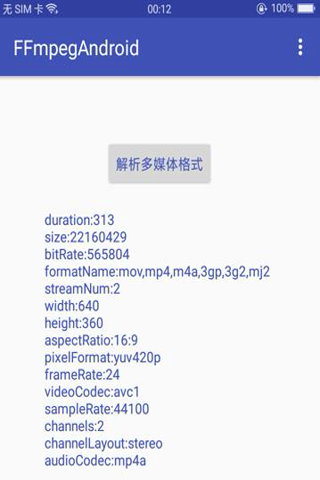

看到上图,伙伴们有木有恍然大悟,感觉到与Android的MediaMetadataRetriever的功能似曾相识呢?FFprobe可以检测的多媒体信息包括:时长、码率、文件大小、封装格式、多媒体流的个数、视频分辨率、宽高比、像素格式、帧率、视频编码器、音频采样率、声道个数、声道布局、音频编码器等等。它比Android自带的MediaMetadataRetriever的优势在于:ffprobe可支持更多多媒体格式,兼容性好;而MediaMetadataRetriever取决于系统的硬解码器,不同手机的MediaCodec编解码能力存在差异。下面我们来具体讨论下FFprobe检测多媒体信息的实现过程:
一、修改ffprobe源码
在ffprobe.c源码中,是没有对外方法提供jni调用的,也没有返回字符串结果。所以我们需要修改下ffprobe.c源码:首先把main方法改为ffprobe_run方法,并且在ffprobe.h里面声明该方法,然后增加字符串打印方法。
//ffprobe主函数入口 char* ffprobe_run(int argc, char argv) { const Writer *w; WriterContext *wctx; char *buf; char *w_name = NULL, *w_args = NULL; int ret, i; //动态申请内存 buffer_length = 0; if(print_buffer == NULL) { print_buffer = av_malloc(sizeof(char) * buffer_size); } memset(print_buffer, '\0', (size_t) buffer_size); ... return print_buffer; }编写打印json字符串方法:
void frank_printf_json(char *fmt, ...) { va_list args; va_start(args, fmt); int length = printf_json(print_buffer + buffer_length, buffer_size - buffer_length, fmt, args); buffer_length += length; va_end(args); }在解析多媒体格式时,调用打印json字符串方法,把数据写入内存里:
static void json_print_section_header(WriterContext *wctx) { JSONContext *json = wctx->priv; AVBPrint buf; const struct section *section = wctx->section[wctx->level]; const struct section *parent_section = wctx->level ? wctx->section[wctx->level-1] : NULL; if (wctx->level && wctx->nb_item[wctx->level-1]) frank_printf_json(",\n"); if (section->flags & SECTION_FLAG_IS_WRAPPER) { frank_printf_json("{\n"); json->indent_level++; } else { av_bprint_init(&buf, 1, AV_BPRINT_SIZE_UNLIMITED); json_escape_str(&buf, section->name, wctx); JSON_INDENT(); json->indent_level++; if (section->flags & SECTION_FLAG_IS_ARRAY) { frank_printf_json("\"%s\": [\n", buf.str); } else if (parent_section && !(parent_section->flags & SECTION_FLAG_IS_ARRAY)) { frank_printf_json("\"%s\": {%s", buf.str, json->item_start_end); } else { frank_printf_json("{%s", json->item_start_end); /* this is required so the parser can distinguish between packets and frames */ if (parent_section && parent_section->id == SECTION_ID_PACKETS_AND_FRAMES) { if (!json->compact) JSON_INDENT(); frank_printf_json("\"type\": \"%s\"%s", section->name, json->item_sep); } } av_bprint_finalize(&buf, NULL); } } static void json_print_section_footer(WriterContext *wctx) { JSONContext *json = wctx->priv; const struct section *section = wctx->section[wctx->level]; if (wctx->level == 0) { json->indent_level--; frank_printf_json("\n}\n"); } else if (section->flags & SECTION_FLAG_IS_ARRAY) { frank_printf_json("\n"); json->indent_level--; JSON_INDENT(); frank_printf_json("]"); } else { frank_printf_json("%s", json->item_start_end); json->indent_level--; if (!json->compact) JSON_INDENT(); frank_printf_json("}"); } } static inline void json_print_item_str(WriterContext *wctx, const char *key, const char *value) { AVBPrint buf; av_bprint_init(&buf, 1, AV_BPRINT_SIZE_UNLIMITED); frank_printf_json("\"%s\":", json_escape_str(&buf, key, wctx)); av_bprint_clear(&buf); frank_printf_json(" \"%s\"", json_escape_str(&buf, value, wctx)); av_bprint_finalize(&buf, NULL); } static void json_print_str(WriterContext *wctx, const char *key, const char *value) { JSONContext *json = wctx->priv; if (wctx->nb_item[wctx->level]) frank_printf_json("%s", json->item_sep); if (!json->compact) JSON_INDENT(); json_print_item_str(wctx, key, value); } static void json_print_int(WriterContext *wctx, const char *key, long long int value) { JSONContext *json = wctx->priv; AVBPrint buf; if (wctx->nb_item[wctx->level]) frank_printf_json("%s", json->item_sep); if (!json->compact) JSON_INDENT(); av_bprint_init(&buf, 1, AV_BPRINT_SIZE_UNLIMITED); frank_printf_json("\"%s\": %lld", json_escape_str(&buf, key, wctx), value); av_bprint_finalize(&buf, NULL); }二、封装jni方法
提供jni方法,供java层调用ffprobe_run(),实现多媒体格式的解析:
FFMPEG_FUNC(jstring , handleProbe, jobjectArray commands) { int argc = (*env)->GetArrayLength(env, commands); char argv = (char)malloc(argc * sizeof(char*)); int i; for (i = 0; i < argc; i++) { jstring jstr = (jstring) (*env)->GetObjectArrayElement(env, commands, i); char* temp = (char*) (*env)->GetStringUTFChars(env, jstr, 0); argv[i] = malloc(1024); strcpy(argv[i], temp); (*env)->ReleaseStringUTFChars(env, jstr, temp); } //execute ffprobe command char* result = ffprobe_run(argc, argv); //release memory for (i = 0; i < argc; i++) { free(argv[i]); } free(argv); return (*env)->NewStringUTF(env, result); }三、java层调用jni方法
在java层使用native关键字声明jni方法,开启子线程调用:
/ * execute probe cmd internal * @param commands commands * @param onHandleListener onHandleListener */ public static void executeProbe(final String[] commands, final OnHandleListener onHandleListener) { new Thread(new Runnable() { @Override public void run() { if(onHandleListener != null) { onHandleListener.onBegin(); } //execute ffprobe String result = handleProbe(commands); int resultCode = !TextUtils.isEmpty(result) ? RESULT_SUCCESS : RESULT_ERROR; if(onHandleListener != null) { onHandleListener.onEnd(resultCode, result); } } }).start(); } private native static String handleProbe(String[] commands);四、监听FFprobe运行状态
传入字符串参数,调用executeFFprobeCmd方法,实现onHandlerListener监听:
/ * execute probe cmd * @param commandLine commandLine */ public void executeFFprobeCmd(final String[] commandLine) { if(commandLine == null) { return; } FFmpegCmd.executeProbe(commandLine, new OnHandleListener() { @Override public void onBegin() { mHandler.obtainMessage(MSG_BEGIN).sendToTarget(); } @Override public void onEnd(int resultCode, String resultMsg) { MediaBean mediaBean = null; if(resultMsg != null && !resultMsg.isEmpty()) { mediaBean = JsonParseTool.parseMediaFormat(resultMsg); } mHandler.obtainMessage(MSG_FINISH, mediaBean).sendToTarget(); } }); }五、封装FFprobe命令
在文章的开头,我们已经介绍过ffprobe命令,更多更详细的命令请参考文档:https://ffmpeg.org/ffprobe.html.ffprobe命令结构分为三部分:ffprobe+(-i filePath)输入文件路径+(-show_streams -show_frames -show_format)执行主体。
public static String[] probeFormat(String inputFile) { String ffprobeCmd = "ffprobe -i %s -show_streams -show_format -print_format json"; ffprobeCmd = String.format(Locale.getDefault(), ffprobeCmd, inputFile); return ffprobeCmd.split(" "); }六、解析json数据
调用FFprobe函数,返回json字符串结果后,我们需要进一步解析,提取我们需要的信息:
public static MediaBean parseMediaFormat(String mediaFormat) { if (mediaFormat == null || mediaFormat.isEmpty()) { return null; } MediaBean mediaBean = null; try { JSONObject jsonMedia = new JSONObject(mediaFormat); JSONObject jsonMediaFormat = jsonMedia.getJSONObject("format"); mediaBean = new MediaBean(); int streamNum = jsonMediaFormat.optInt("nb_streams"); mediaBean.setStreamNum(streamNum); String formatName = jsonMediaFormat.optString("format_name"); mediaBean.setFormatName(formatName); String bitRateStr = jsonMediaFormat.optString("bit_rate"); if (!TextUtils.isEmpty(bitRateStr)) { mediaBean.setBitRate(Integer.valueOf(bitRateStr)); } String sizeStr = jsonMediaFormat.optString("size"); if (!TextUtils.isEmpty(sizeStr)) { mediaBean.setSize(Long.valueOf(sizeStr)); } String durationStr = jsonMediaFormat.optString("duration"); if (!TextUtils.isEmpty(durationStr)) { float duration = Float.valueOf(durationStr); mediaBean.setDuration((long) duration); } JSONArray jsonMediaStream = jsonMedia.getJSONArray("streams"); if (jsonMediaStream == null) { return mediaBean; } for (int index = 0; index < jsonMediaStream.length(); index ++) { JSONObject jsonMediaStreamItem = jsonMediaStream.optJSONObject(index); if (jsonMediaStreamItem == null) continue; String codecType = jsonMediaStreamItem.optString("codec_type"); if (codecType == null) continue; if (codecType.equals(TYPE_VIDEO)) { VideoBean videoBean = new VideoBean(); mediaBean.setVideoBean(videoBean); String codecName = jsonMediaStreamItem.optString("codec_tag_string"); videoBean.setVideoCodec(codecName); int width = jsonMediaStreamItem.optInt("width"); videoBean.setWidth(width); int height = jsonMediaStreamItem.optInt("height"); videoBean.setHeight(height); String aspectRatio = jsonMediaStreamItem.optString("display_aspect_ratio"); videoBean.setDisplayAspectRatio(aspectRatio); String pixelFormat = jsonMediaStreamItem.optString("pix_fmt"); videoBean.setPixelFormat(pixelFormat); String profile = jsonMediaStreamItem.optString("profile"); videoBean.setProfile(profile); int level = jsonMediaStreamItem.optInt("level"); videoBean.setLevel(level); String frameRateStr = jsonMediaStreamItem.optString("r_frame_rate"); if (!TextUtils.isEmpty(frameRateStr)) { String[] frameRateArray = frameRateStr.split("/"); double frameRate = Math.ceil(Double.valueOf(frameRateArray[0]) / Double.valueOf(frameRateArray[1])); videoBean.setFrameRate((int) frameRate); } } else if (codecType.equals(TYPE_AUDIO)) { AudioBean audioBean = new AudioBean(); mediaBean.setAudioBean(audioBean); String codecName = jsonMediaStreamItem.optString("codec_tag_string"); audioBean.setAudioCodec(codecName); String sampleRateStr = jsonMediaStreamItem.optString("sample_rate"); if (!TextUtils.isEmpty(sampleRateStr)) { audioBean.setSampleRate(Integer.valueOf(sampleRateStr)); } int channels = jsonMediaStreamItem.optInt("channels"); audioBean.setChannels(channels); String channelLayout = jsonMediaStreamItem.optString("channel_layout"); audioBean.setChannelLayout(channelLayout); } } } catch (Exception e) { Log.e(TAG, "parse error=" + e.toString()); } return mediaBean; }折腾这么久,终于解析到多媒体格式相关数据了,详细源码可以到Github查看:https://github.com/xufuji456/FFmpegAndroid
发布者:全栈程序员-站长,转载请注明出处:https://javaforall.net/203783.html原文链接:https://javaforall.net



