
前期准备工作
1.云服务器
2.备案的域名
3.本地调试需要修改hosts文件,将域名映射到127.0.0.1
如何修改hosts文件:https://www.cnblogs.com/toSeeMyDream/p/9313440.html
申请互联,并成为开发者
申请互联创建应用时需要备案域名,所以建议提前准备备案域名。
互联:https://connect..com/index.html
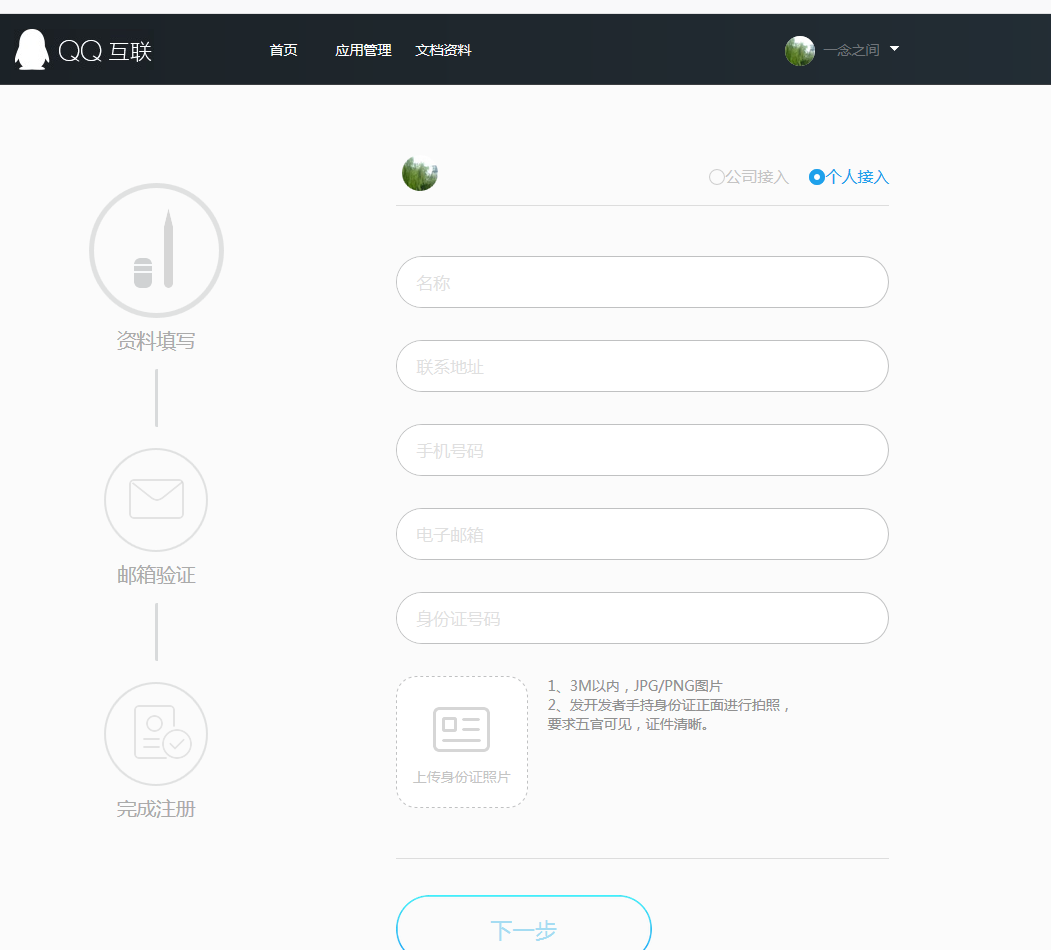
登录后,点击头像,进入认证页面,填写信息,等待审核。

审核通过后创建应用
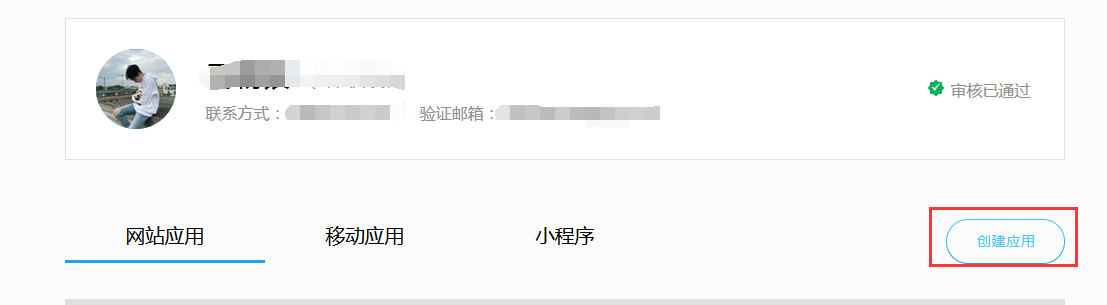
应用创建通过审核后,就可以使用APP ID 和 APP Key

前期工作就这些了,后面可以开始写代码了。
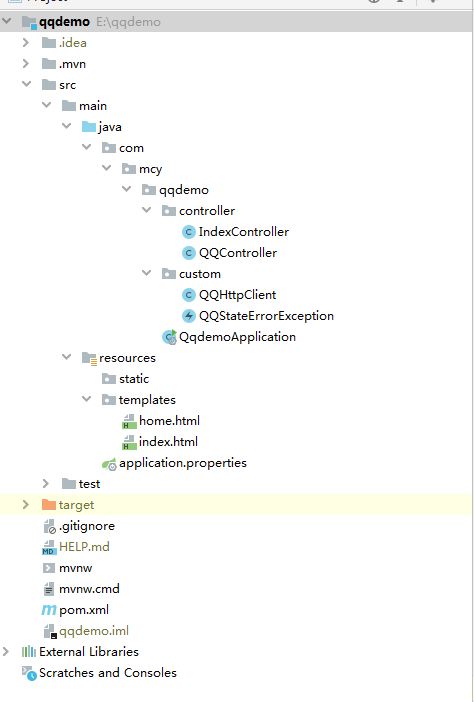
项目结构:
properties或者yml配置文件(这里就是简单的配置了一下,可以自行添加数据库等配置)
server.port=80 server.servlet.context-path=/ #互联 .oauth.http:互联中申请填写的网站地址 
在pom中添加依赖
     org.apache.httpcomponents


     httpclient


     4.5.6


     com.alibaba


     fastjson


     1.2.47
发送登录请求
定义全局变量获取配置文件中的网站地址
@Value("${.oauth.http}") private String http;定义登录回调地址(可以用网站地址拼接或者直接写)
//互联中的回调地址 String backUrl = http + "/index"; 
登录请求方法代码
@GetMapping("//login") public String (HttpSession session) throws UnsupportedEncodingException { //互联中的回调地址 String backUrl = http + "/index"; //用于第三方应用防止CSRF攻击 String uuid = UUID.randomUUID().toString().replaceAll("-",""); session.setAttribute("state",uuid); //Step1:获取Authorization Code String url = "https://graph..com/oauth2.0/authorize?response_type=code"+ "&client_id=" + HttpClient.APPID + "&redirect_uri=" + URLEncoder.encode(backUrl, "utf-8") + "&state=" + uuid; return "redirect:" + url; }回调返回参数信息说明:
| 参数名称 | 描述 |
|---|---|
| ret | 返回码。详见公共返回码说明#OpenAPI V3.0 返回码。 |
| msg | 如果错误,返回错误信息。 |
| is_lost | 判断是否有数据丢失。如果应用不使用cache,不需要关心此参数。 |
| nickname | 昵称。 |
| gender | 性别。 |
| country | 国家(当pf=qzone、pengyou或qplus时返回)。 |
| province | 省(当pf=qzone、pengyou或qplus时返回)。 |
| city | 市(当pf=qzone、pengyou或qplus时返回)。 |
| figureurl | 头像URL。详见:前端页面规范#6. 关于用户头像的获取和尺寸说明。 |
| openid | 用户号码转化得到的ID(当pf=qplus时返回)。 |
| _level | 用户等级(当pf=qplus时返回)。 |
| _vip_level | 用户会员等级(当pf=qplus时返回)。 |
| qplus_level | 用户Q+等级(当pf=qplus时返回)。 |
| is_yellow_vip | 是否为黄钻用户(0:不是; 1:是)。
(当pf=qzone、pengyou或qplus时返回) |
| is_yellow_year_vip | 是否为年费黄钻用户(0:不是; 1:是)。
(当pf=qzone、pengyou或qplus时返回) |
| yellow_vip_level | 黄钻等级,目前最高级别为黄钻8级(如果是黄钻用户才返回此参数)。
(当pf=qzone、pengyou或qplus时返回) |
| is_yellow_high_vip | 是否为豪华版黄钻用户(0:不是; 1:是)。
(当pf=qzone、pengyou或qplus时返回) |
| is_blue_vip | 是否为蓝钻用户(0:不是; 1:是)。
(当pf=game或3366时返回) |
| is_blue_year_vip | 是否为年费蓝钻用户(0:不是; 1:是)。
(当pf=game或3366时返回) |
| blue_vip_level | 蓝钻等级(如果是蓝钻用户才返回此参数)。
(当pf=game或3366时返回) |
| 3366_level | 3366用户的大等级。
(当pf=3366时返回) |
| 3366_level_name | 3366用户的等级名,如小游游、小游仙。
(当pf=3366时返回) |
| 3366_grow_level | 3366用户的成长等级。
(当pf=3366时返回) |
| 3366_grow_value | 3366用户的成长值。
(当pf=3366时返回) |
| is_super_blue_vip | 是否是豪华蓝钻。
(当pf=game或3366时返回) |
正确返回示例:
JSON示例:
Content-type: text/html; charset=utf-8
{
"ret":0,
"is_lost":0,
"nickname":"Peter",
"gender":"男",
"country":"中国",
"province":"广东",
"city":"深圳",
"figureurl":"http://imgcache..com/qzone_v4/client/userinfo_icon/1236153759.gif",
"is_yellow_vip":1,
"is_yellow_year_vip":1,
"yellow_vip_level":7,
"is_yellow_high_vip": 0
}
错误返回示例
Content-type: text/html; charset=utf-8
{
"ret":1002,
"msg":"请先登录"
}
用户资料的接口文档:https://wiki.open..com/wiki/v3/user/get_info
请求成功,用户确认登录后回调方法
@GetMapping("/index") public String callback(HttpServletRequest request, HttpServletResponse response) throws Exception { HttpSession session = request.getSession(); //返回的信息 String code = request.getParameter("code"); String state = request.getParameter("state"); String uuid = (String) session.getAttribute("state"); if(uuid != null){ if(!uuid.equals(state)){ throw new StateErrorException(",state错误"); } } //Step2:通过Authorization Code获取Access Token String backUrl = http + "/index"; String url = "https://graph..com/oauth2.0/token?grant_type=authorization_code"+ "&client_id=" + HttpClient.APPID + "&client_secret=" + HttpClient.APPKEY + "&code=" + code + "&redirect_uri=" + backUrl; String access_token = HttpClient.getAccessToken(url); //Step3: 获取回调后的 openid 值 url = "https://graph..com/oauth2.0/me?access_token=" + access_token; String openid = HttpClient.getOpenID(url); //Step4:获取用户信息 url = "https://graph..com/user/get_user_info?access_token=" + access_token + "&oauth_consumer_key="+ HttpClient.APPID + "&openid=" + openid; //返回用户的信息 JSONObject jsonObject = HttpClient.getUserInfo(url); //也可以放到Redis和mysql中,只取出了部分数据,根据自己需要取 session.setAttribute("openid",openid); //openid,用来唯一标识用户 session.setAttribute("nickname",(String)jsonObject.get("nickname")); //名 session.setAttribute("figureurl__2",(String)jsonObject.get("figureurl__2")); //大小为100*100像素的头像URL //响应重定向到home路径 return "redirect:/home"; }客户端类HttpClient:
主要用于消息返回
import com.alibaba.fastjson.JSONObject; import org.apache.http.HttpEntity; import org.apache.http.HttpResponse; import org.apache.http.client.methods.HttpGet; import org.apache.http.impl.client.CloseableHttpClient; import org.apache.http.impl.client.HttpClients; import org.apache.http.util.EntityUtils; import java.io.IOException; public class HttpClient { //互联中提供的 appid 和 appkey public static final String APPID = "appid"; public static final String APPKEY = "appkey"; private static JSONObject parseJSONP(String jsonp){ int startIndex = jsonp.indexOf("("); int endIndex = jsonp.lastIndexOf(")"); String json = jsonp.substring(startIndex + 1,endIndex); return JSONObject.parseObject(json); } //返回信息:access_token=FE04CCE2&expires_in=&refresh_token=88E4BE14 public static String getAccessToken(String url) throws IOException { CloseableHttpClient client = HttpClients.createDefault(); String token = null; HttpGet httpGet = new HttpGet(url); HttpResponse response = client.execute(httpGet); HttpEntity entity = response.getEntity(); if(entity != null){ String result = EntityUtils.toString(entity,"UTF-8"); if(result.indexOf("access_token") >= 0){ String[] array = result.split("&"); for (String str : array){ if(str.indexOf("access_token") >= 0){ token = str.substring(str.indexOf("=") + 1); break; } } } } httpGet.releaseConnection(); return token; } //返回信息:callback( {"client_id":"YOUR_APPID","openid":"YOUR_OPENID"} ); 需要用到上面自己定义的解析方法parseJSONP public static String getOpenID(String url) throws IOException { JSONObject jsonObject = null; CloseableHttpClient client = HttpClients.createDefault(); HttpGet httpGet = new HttpGet(url); HttpResponse response = client.execute(httpGet); HttpEntity entity = response.getEntity(); if(entity != null){ String result = EntityUtils.toString(entity,"UTF-8"); jsonObject = parseJSONP(result); } httpGet.releaseConnection(); if(jsonObject != null){ return jsonObject.getString("openid"); }else { return null; } } //返回信息:{ "ret":0, "msg":"", "nickname":"YOUR_NICK_NAME", ... },为JSON格式,直接使用JSONObject对象解析 public static JSONObject getUserInfo(String url) throws IOException { JSONObject jsonObject = null; CloseableHttpClient client = HttpClients.createDefault(); HttpGet httpGet = new HttpGet(url); HttpResponse response = client.execute(httpGet); HttpEntity entity = response.getEntity(); if(entity != null){ String result = EntityUtils.toString(entity,"UTF-8"); jsonObject = JSONObject.parseObject(result); } httpGet.releaseConnection(); return jsonObject; } }异常类StateErrorException:
public class StateErrorException extends Exception { public StateErrorException() { super(); } public StateErrorException(String message) { super(message); } public StateErrorException(String message, Throwable cause) { super(message, cause); } public StateErrorException(Throwable cause) { super(cause); } protected StateErrorException(String message, Throwable cause, boolean enableSuppression, boolean writableStackTrace) { super(message, cause, enableSuppression, writableStackTrace); } } 首页controller用于跳转页面
@Controller public class IndexController { @GetMapping({"/index", "/"}) public String index(){ return "index"; } @GetMapping("/home") public String home(HttpSession session, Model model){ String openid = (String) session.getAttribute("openid"); String nickname = (String) session.getAttribute("nickname"); String figureurl__2 = (String) session.getAttribute("figureurl__2"); model.addAttribute("openid",openid); model.addAttribute("nickname",nickname); model.addAttribute("figureurl__2",figureurl__2); return "home"; } }还有两个简单的登录页面和信息页面
index.html
   Title
   登录
home.html
Title
![]()
![]()
最后附上下载地址:https://github.com/machaoyin/demo
发布者:全栈程序员-站长,转载请注明出处:https://javaforall.net/205152.html原文链接:https://javaforall.net



