
aspose-words-15.8.0 完美解决word转pdf
1.写在前面
word转pdf在实际工作中经常需要遇到,我在工作中最常见遇到的需求就是,不仅要导出word文档,还要可以预览word文档。对于这种需求最简单的方式,就是讲word转成pdf,前端套一个iframe就可以预览。
2.集成aspose-words
- 第一步:给jar包找一个安身之处
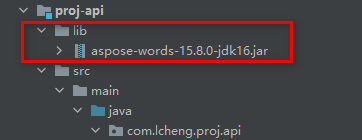
因为是maven项目,先在项目根目录中创建一个lib文件,和src文件夹同级别,这里贴出我的项目结构,让大家一目了然。

- 第二步:给了它房子,就该让它干活了
打开pom.xml,加入如下信息,这样我们就可以在项目中任意使用它了。
<dependency> <groupId>com.aspose groupId> <artifactId>aspose-words artifactId> <version>15.8.0 version> <scope>system scope> <systemPath>${project.basedir}/lib/aspose-words-15.8.0-jdk16.jar systemPath> dependency> - 第三步:配置一下License.xml,和水印说byebye
License.xml百度一大把,这里贴出来博主使用没有问题的。License.xml直接放到resources的根目录下即可。
<License> <Data> <Products> <Product>Aspose.Total for Java Product> <Product>Aspose.Words for Java Product> Products> <EditionType>Enterprise EditionType> <SubscriptionExpiry> SubscriptionExpiry> <LicenseExpiry> LicenseExpiry> <SerialNumber>8bfe198c-7f0c-4ef8-8ff0-acc3237bf0d7 SerialNumber> Data> <Signature> sNLLKGMUdF0r8O1kKilWAGdgfs2BvJb/2Xp8p5iuDVfZXmhppo+d0Ran1P9TKdjV4ABwAgKXxJ3jcQTqE/2IRfqwnPf8itN8aFZlV3TJPYeD3yWE7IT55Gz6EijUpC7aKeoohTb4w2fpox58wWoF3SNp6sK6jDfiAUGEHYJ9pjU= Signature> License> 3.核心的一步,是时候让word转pdf了!
这里就不多说废话了,直接贴代码,解释都在注释里。
/ * @author : LCheng * @date : 2020-12-25 13:47 * description : Aspose工具类 */ public class AsposeUtil {
    / * 加载license 用于激活成功教程 不生成水印 * * @author LCheng * @date 2020/12/25 13:51 */ @SneakyThrows private static void getLicense() {
    try (InputStream is = AsposeUtil.class.getClassLoader().getResourceAsStream("License.xml")) {
    License license = new License(); license.setLicense(is); } } / * word转pdf * * @param wordPath word文件保存的路径 * @param pdfPath 转换后pdf文件保存的路径 * @author LCheng * @date 2020/12/25 13:51 */ @SneakyThrows public static void wordToPdf(String wordPath, String pdfPath) {
    getLicense(); File file = new File(pdfPath); try (FileOutputStream os = new FileOutputStream(file)) {
    Document doc = new Document(wordPath); doc.save(os, SaveFormat.PDF); } } }
4.打包会遇到的一点小坑
当使用
system
<build> <plugins> <plugin> <groupId>org.springframework.boot
     groupId> <artifactId>spring-boot-maven-plugin
      artifactId>
      <configuration> <includeSystemScope>true
       includeSystemScope>
        configuration>
         plugin>
          plugins>
           build>
至此代码全部完成,aspose-words使用起来非常简单,就是集成的时候有点小麻烦,不过按照上面的方法一点点来绝对没问题。
版权声明:本文内容由互联网用户自发贡献,该文观点仅代表作者本人。本站仅提供信息存储空间服务,不拥有所有权,不承担相关法律责任。如发现本站有涉嫌侵权/违法违规的内容, 请联系我们举报,一经查实,本站将立刻删除。
发布者:全栈程序员-站长,转载请注明出处:https://javaforall.net/205325.html原文链接:https://javaforall.net




