
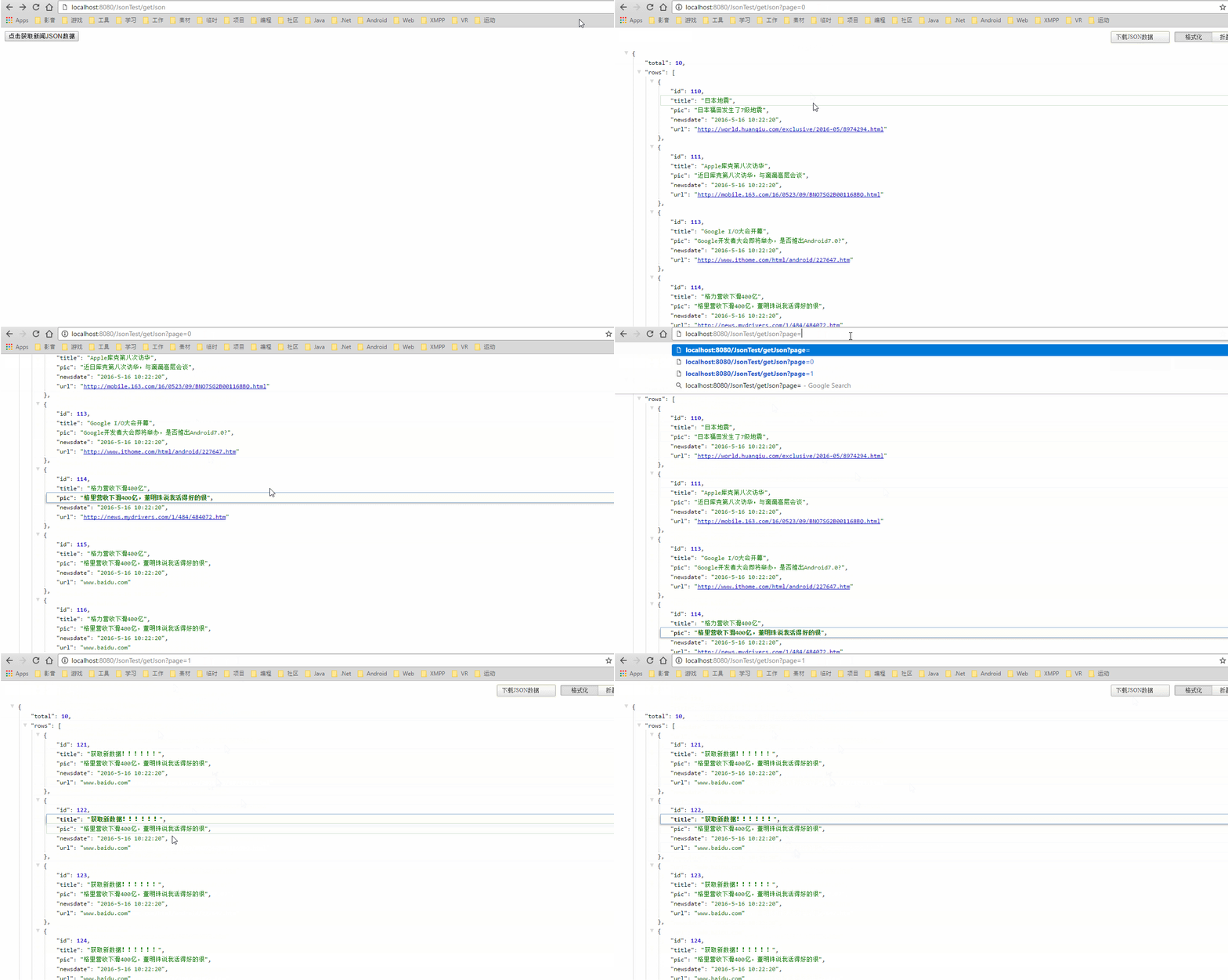
实现效果

实现原因
目前主流的CS结构,数据都是通过RESTful风格接口形式呈现,不管是桌面级应用程序还是手机端,接口是我们获取数据的大多数选择,
主流数据接口呈现形式主要是Json和Xml,后者目前基本渐行渐远。Json的轻量级和可读型成为了大多数公司及个人开发者的第一选择。
主流数据接口呈现形式主要是Json和Xml,后者目前基本渐行渐远。Json的轻量级和可读型成为了大多数公司及个人开发者的第一选择。
主流公司在编写数据接口时大多通过框架实现,如RESTEasy、Retrofit等,在这里通过简单的java web代码写一个简单的接口项目例子供大家参考,后附项目源代码。

实现步骤
在Eclipse中新建项目JsonTest项目,项目结构如下,
此处主要用到的类只有几个,其他类为Json测试用类,此处可以忽略。
在lib下导入或在maven中引用gson-2.6.2.jar包和servlet-api.jar包。
gson此处用于将持久化对象解析为Json,或将Json序列化为对象。
servlet-api用于servlet相关类创建及API运用。

关于gson,是Google开源项目下的一个Java Json解析工具包,具体使用及详细信息可以看这篇文章:Gson简要使用

步骤一:新建测试用Model类
新建新闻测试类News,主要用于数据模型测试显示,Json转换测试等,代码如下:
import java.util.Date; public class News { private int nId; // 新闻ID private String title; // 新闻标题 private String content; // 新闻内容 private String date; // 新闻发布日期 private String url; //新闻地址 private Date nDate; // 新闻日期,Date类型 public News(int nId, String title, String content, String date, String url) { this.nId = nId; this.title = title; this.content = content; this.date = date; this.url = url; } public News() { } public News(int nId, String title, String content, Date nDate, String url) { this.nId = nId; this.title = title; this.content = content; this.nDate = nDate; this.url = url; } public String getUrl() { return url; } public void setUrl(String url) { this.url = url; } public Date getnDate() { return nDate; } public void setnDate(Date nDate) { this.nDate = nDate; } public int getnId() { return nId; } public void setnId(int nId) { this.nId = nId; } public String getTitle() { return title; } public void setTitle(String title) { this.title = title; } public String getContent() { return content; } public void setContent(String content) { this.content = content; } public String getDate() { return date; } public void setDate(String date) { this.date = date; } }新建分页测试类NewTotal,主要用于Json分页显示,代码如下:
import java.util.List; public class NewTotal { private int total; //新闻数量 private List

    rows; //新闻列表 public NewTotal() { } public NewTotal(int total, List

     rows) { this.total = total; this.rows = rows; } public int getTotal() { return total; } public void setTotal(int total) { this.total = total; } public List

      getRows() { return rows; } public void setRows(List

       rows) { this.rows = rows; } }
步骤二:添加测试用Action和JSP界面
新建JsonServlet,继承自HttpServlet,具体代码详解已经在代码中注释:
import java.io.IOException;
import java.io.PrintWriter;
import java.util.ArrayList;
import java.util.List;

import javax.servlet.ServletException;
import javax.servlet.http.HttpServlet;
import javax.servlet.http.HttpServletRequest;
import javax.servlet.http.HttpServletResponse;

import com.google.gson.Gson;
import com.test.model.NewTotal;
import com.test.model.News;

public class JsonServlet extends HttpServlet {

	private static final long serialVersionUID = 1L;

	@Override
	protected void doGet(HttpServletRequest req, HttpServletResponse resp) throws ServletException, IOException {
		// 创建多个新闻类,模拟从数据库获取数据,可将此处改为用JDBC从数据库读取数据
		News new1 = new News(110, "日本地震", "日本福田发生了7级地震", "2016-5-16 10:22:20",
				"http://world.huanqiu.com/exclusive/2016-05/8974294.html");
		News new2 = new News(111, "Apple库克第八次访华", "近日库克第八次访华,与滴滴高层会谈", "2016-5-16 10:22:20",
				"http://mobile.163.com/16/0523/09/BNO7SG2B001168BQ.html");
		News new3 = new News(113, "Google I/O大会开幕", "Google开发者大会即将举办,是否推出Android7.0?", "2016-5-16 10:22:20",
				"http://www.ithome.com/html/android/227647.htm");
		News new4 = new News(114, "格力营收下滑400亿", "格里营收下滑400亿,董明珠说我活得好的很", "2016-5-16 10:22:20",
				"http://news.mydrivers.com/1/484/484072.htm");
		News new5 = new News(115, "格力营收下滑400亿", "格里营收下滑400亿,董明珠说我活得好的很", "2016-5-16 10:22:20", "www.baidu.com");
		News new6 = new News(116, "格力营收下滑400亿", "格里营收下滑400亿,董明珠说我活得好的很", "2016-5-16 10:22:20", "www.baidu.com");
		News new7 = new News(117, "格力营收下滑400亿", "格里营收下滑400亿,董明珠说我活得好的很", "2016-5-16 10:22:20", "www.baidu.com");
		News new8 = new News(118, "格力营收下滑400亿", "格里营收下滑400亿,董明珠说我活得好的很", "2016-5-16 10:22:20", "www.baidu.com");
		News new9 = new News(119, "格力营收下滑400亿", "格里营收下滑400亿,董明珠说我活得好的很", "2016-5-16 10:22:20", "www.baidu.com");
		News new10 = new News(120, "格力营收下滑400亿", "格里营收下滑400亿,董明珠说我活得好的很", "2016-5-16 10:22:20", "www.baidu.com");
		News new11 = new News(121, "获取新数据!!!!!!", "格里营收下滑400亿,董明珠说我活得好的很", "2016-5-16 10:22:20", "www.baidu.com");
		News new12 = new News(122, "获取新数据!!!!!!", "格里营收下滑400亿,董明珠说我活得好的很", "2016-5-16 10:22:20", "www.baidu.com");
		News new13 = new News(123, "获取新数据!!!!!!", "格里营收下滑400亿,董明珠说我活得好的很", "2016-5-16 10:22:20", "www.baidu.com");
		News new14 = new News(124, "获取新数据!!!!!!", "格里营收下滑400亿,董明珠说我活得好的很", "2016-5-16 10:22:20", "www.baidu.com");
		News new15 = new News(125, "格力营收下滑400亿", "格里营收下滑400亿,董明珠说我活得好的很", "2016-5-16 10:22:20", "www.baidu.com");
		News new16 = new News(126, "格力营收下滑400亿", "格里营收下滑400亿,董明珠说我活得好的很", "2016-5-16 10:22:20", "www.baidu.com");
		News new17 = new News(127, "格力营收下滑400亿", "格里营收下滑400亿,董明珠说我活得好的很", "2016-5-16 10:22:20", "www.baidu.com");
		News new18 = new News(128, "格力营收下滑400亿", "格里营收下滑400亿,董明珠说我活得好的很", "2016-5-16 10:22:20", "www.baidu.com");
		News new19 = new News(129, "格力营收下滑400亿", "格里营收下滑400亿,董明珠说我活得好的很", "2016-5-16 10:22:20", "www.baidu.com");
		News new20 = new News(130, "格力营收下滑400亿", "格里营收下滑400亿,董明珠说我活得好的很", "2016-5-16 10:22:20", "www.baidu.com");

		String page = req.getParameter("page");
		// 将数据添加到数组
		List


    newslist = new ArrayList

     (); if (page == null || page.equals("0")) { newslist.add(new1); newslist.add(new2); newslist.add(new3); newslist.add(new4); newslist.add(new5); newslist.add(new6); newslist.add(new7); newslist.add(new8); newslist.add(new9); newslist.add(new10); } else { newslist.add(new11); newslist.add(new12); newslist.add(new13); newslist.add(new14); newslist.add(new15); newslist.add(new16); newslist.add(new17); newslist.add(new18); newslist.add(new19); newslist.add(new20); } // 将数据封装到新闻总计类 NewTotal nt = new NewTotal(newslist.size(), newslist); // 调用GSON jar工具包封装好的toJson方法,可直接生成JSON字符串 Gson gson = new Gson(); String json = gson.toJson(nt); // 输出到界面 System.out.println(json); resp.setContentType("text/plain"); resp.setCharacterEncoding("gb2312"); PrintWriter out = new PrintWriter(resp.getOutputStream()); out.print(json); out.flush(); // 更多Json转换使用请看JsonTest类 } @Override protected void doPost(HttpServletRequest req, HttpServletResponse resp) throws ServletException, IOException { this.doGet(req, resp); } }
修改项目index.jsp页面如下:
<%@ page language="java" contentType="text/html; charset=UTF-8" pageEncoding="UTF-8"%>
<%
String path = request.getContextPath();
String basePath = request.getScheme()+"://"+request.getServerName()+":"+request.getServerPort()+path+"/";
%>


     Test Json
在项目中配置web.xml,注册JsonServlet映射,配置如下:
     JsonTest


      index.jsp


      JsonServlet


      com.test.json.JsonServlet


      JsonServlet


      /getJson
步骤三:添加项目到Tomcat容器,运行服务器
运行服务器,在地址栏输入地址:http://localhost:8080/JsonTest/getJson?page=0,效果如图:
其他关于JSON解析的也可以看我发布的源代码中的JsonTest类,获取源代码:JavaJson解析
声明
版权声明:本文内容由互联网用户自发贡献,该文观点仅代表作者本人。本站仅提供信息存储空间服务,不拥有所有权,不承担相关法律责任。如发现本站有涉嫌侵权/违法违规的内容, 请联系我们举报,一经查实,本站将立刻删除。
发布者:全栈程序员-站长,转载请注明出处:https://javaforall.net/207481.html原文链接:https://javaforall.net


![codereview介绍[通俗易懂]](https://javaforall.net/wp-content/uploads/2020/11/2020110817443450-480x300.jpg)
