
最新 Bitnami redmine4.1.1-6安装与配置
首先登陆官网下载最新版本


1 接下来开始安装:

2选择安装语言:

3 继续下一步:
4 选择安装插件默认就可以,继续下一步:

5 选择安装路径:

6 设置登陆Redmine管理员的用户名和密码:

7 如果出现如此说明你的密码不符合规则,请重新输入密码;

8 设置端口默认是80

9设置加密端口号默认443:

10 设置邮件通知Gmail邮箱:

11设置如下:

12去掉学习对号继续下一步:

13 继续安装:

14 安装及其等待中:

15 安装完成输入地址登陆,如果安装时选择的是默认安装,就不要加默认端口号80:
《一》用ip或者localhost 登陆如下:
或者

16 正常登陆完成

Bitnami redmine常见问题与配置
《一》Bitnami redmine默认用的是80端口如何手动更改端口号;
下面以把端口号8081更改为3000为列:
需要更能两个文件
第一个:httpd.conf文件
F:\Bitnami\redmine-3.2.1-1\apache2\conf\httpd.conf下找到这行
#Listen 12.34.56.78:8081
Listen 8081
更改为
#Listen 12.34.56.78:3000
Listen 3000
在把下面
# If your host doesn’t have a registered DNS name, enter its IP address here.
#
ServerName localhost:8081
更改为
# If your host doesn’t have a registered DNS name, enter its IP address here.
#
ServerName localhost:3000
第二个文件:bitnami.conf文件
F:\Bitnami\redmine-3.2.1-1\apache2\conf\bitnami
# Default Virtual Host configuration.
NameVirtualHost *:8081
NameVirtualHost *:443
DocumentRoot “F:/Bitnami/redmine-3.2.1-1/apache2/htdocs”
Options Indexes FollowSymLinks
AllowOverride All
Order allow,deny
Allow from all
= 2.3 >
Require all granted
更改为:
# Default Virtual Host configuration.
NameVirtualHost *:3000
NameVirtualHost *:443
DocumentRoot “F:/Bitnami/redmine-3.2.1-1/apache2/htdocs”
Options Indexes FollowSymLinks
AllowOverride All
Order allow,deny
Allow from all
= 2.3 >
Require all granted
1 重新启动服务,安装目录下点击 manager-windows
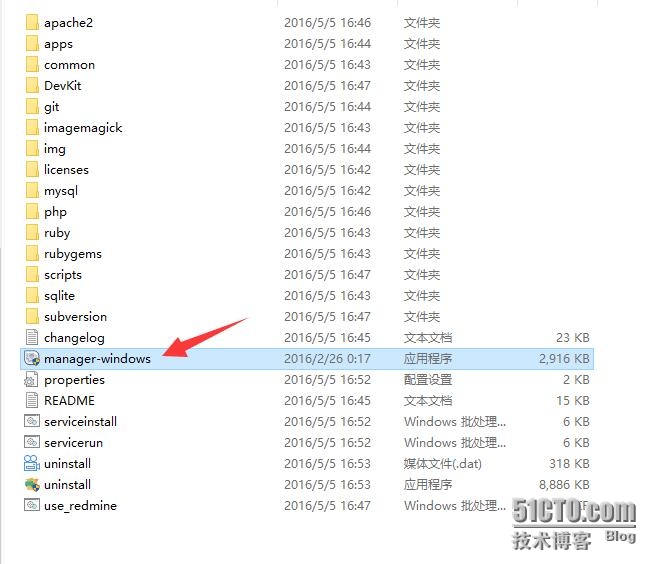
2 重启服务


第二 登陆界面字体太小,如何更改?
1 找到下面的CSS文件
F:\Bitnami\redmine-3.2.1-1\apps\redmine\htdocs\public\stylesheets\application.css
更改文件12px—更改为15px
html {overflow-y:scroll;}
body { font-family: Verdana, sans-serif; font-size: 12px; color:#333; margin: 0; padding: 0; min-width: 900px; }
h1, h2, h3, h4 {font-family: “Trebuchet MS”, Verdana, sans-serif;padding: 2px 10px 1px 0px;margin: 0 0 10px 0;}
#content h1, h2, h3, h4 {color: #555;}
h2, .wiki h1 {font-size: 20px;}
h3, .wiki h2 {font-size: 16px;}
h4, .wiki h3 {font-size: 13px;}
h4 {border-bottom: 1px dotted #bbb;}
pre, code {font-family: Consolas, Menlo, “Liberation Mono”, Courier, monospace;}
html {overflow-y:scroll;}
body { font-family: Verdana, sans-serif; font-size: 15px; color:#333; margin: 0; padding: 0; min-width: 900px; }
h1, h2, h3, h4 {font-family: “Trebuchet MS”, Verdana, sans-serif;padding: 2px 10px 1px 0px;margin: 0 0 10px 0;}
#content h1, h2, h3, h4 {color: #555;}
h2, .wiki h1 {font-size: 20px;}
h3, .wiki h2 {font-size: 16px;}
h4, .wiki h3 {font-size: 13px;}
h4 {border-bottom: 1px dotted #bbb;}
pre, code {font-family: Consolas, Menlo, “Liberation Mono”, Courier, monospace;}
2 看看字体是不是变大了:
1. 修改 安装目录/redmin/apps/redmine/htdocs/config/database.yml,更对对应的用户名,密码,数据库地址,端口号,这里可以查看数据库的登录账户和密码


发布者:全栈程序员-站长,转载请注明出处:https://javaforall.net/207522.html原文链接:https://javaforall.net




