
需求背景
很多时候mysql的表之间是一对多的关系,比如订单表和商品表。一笔订单可以包含多个商品。他们的关系如下图所示。
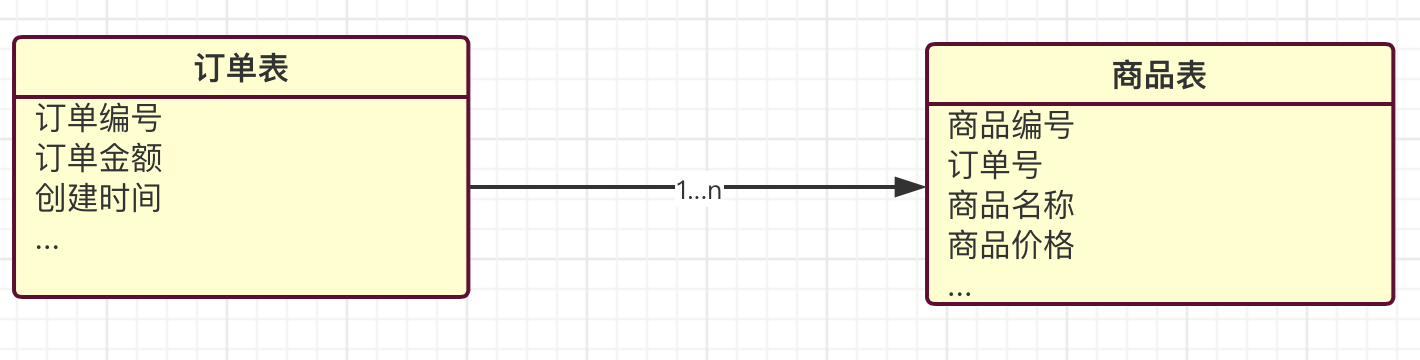

ElasticsSearch(以下简称ES)处理这种关系虽然不是特别擅长(相对于关系型数据库),因为ES和大多数 NoSQL 数据库类似,是扁平化的存储结构。索引是独立文档的集合体。不同的索引之间一般是没有关系的。
不过ES目前毕竟发展到7.x版本了, 已经有几种可选的方式能够高效的支持这种一对多关系的映射。
比较常用的方案是嵌套对象,嵌套文档和父子文档。后两种是我们本文要讲的重点。
我下面聚合分析使用的数据都是kibana自带的,这样方便有些读者实际测试文中的示例。
ES处理一对多关系的方案
普通内部对象
kibana自带的电商数据就是这种方式,我们来看看它的mapping。
"kibana_sample_data_ecommerce" : { "mappings" : { "properties" : { "category" : { "type" : "text", "fields" : { "keyword" : { "type" : "keyword" } } }, "currency" : { "type" : "keyword" }, "customer_full_name" : { "type" : "text", "fields" : { "keyword" : { "type" : "keyword", "ignore_above" : 256 } } }, //省略部分 "products" : { "properties" : { "_id" : { "type" : "text", "fields" : { "keyword" : { "type" : "keyword", "ignore_above" : 256 } } }, "base_price" : { "type" : "half_float" }, "base_unit_price" : { "type" : "half_float" }, "category" : { "type" : "text", "fields" : { "keyword" : { "type" : "keyword" } } }, "created_on" : { "type" : "date" }, "discount_amount" : { "type" : "half_float" }, "discount_percentage" : { "type" : "half_float" }, "manufacturer" : { "type" : "text", "fields" : { "keyword" : { "type" : "keyword" } } }, "min_price" : { "type" : "half_float" }, "price" : { "type" : "half_float" }, "product_id" : { "type" : "long" }, "product_name" : { "type" : "text", "fields" : { "keyword" : { "type" : "keyword" } }, "analyzer" : "english" }, "quantity" : { "type" : "integer" }, "sku" : { "type" : "keyword" }, "tax_amount" : { "type" : "half_float" }, "taxful_price" : { "type" : "half_float" }, "taxless_price" : { "type" : "half_float" }, "unit_discount_amount" : { "type" : "half_float" } } }, "sku" : { "type" : "keyword" }, "taxful_total_price" : { "type" : "half_float" }, //省略部分 我们可以看到电商的订单索引里面包含了一个products的字段,它是对象类型,内部有自己的字段属性。这其实就是一个包含关系,表示一个订单可以有多个商品信息。我们可以查询下看看结果,
查询语句,
POST kibana_sample_data_ecommerce/_search { "query": { "match_all": {} } } 返回结果(我去掉了一些内容方便观察),
"hits" : [ { "_index" : "kibana_sample_data_ecommerce", "_type" : "_doc", "_id" : "VJz1f28BdseAsPClo7bC", "_score" : 1.0, "_source" : { "customer_first_name" : "Eddie", "customer_full_name" : "Eddie Underwood", "order_date" : "2020-01-27T09:28:48+00:00", "order_id" : , "products" : [ { "base_price" : 11.99, "discount_percentage" : 0, "quantity" : 1, "sku" : "ZO0", "manufacturer" : "Elitelligence", "tax_amount" : 0, "product_id" : 6283, }, { "base_price" : 24.99, "discount_percentage" : 0, "quantity" : 1, "sku" : "ZO0", "manufacturer" : "Oceanavigations", "tax_amount" : 0, "product_id" : 19400, } ], "taxful_total_price" : 36.98, "taxless_total_price" : 36.98, "total_quantity" : 2, "total_unique_products" : 2, "type" : "order", "user" : "eddie", "region_name" : "Cairo Governorate", "continent_name" : "Africa", "city_name" : "Cairo" } } }, 可以看到返回的products其实是个list,包含两个对象。这就表示了一个一对多的关系。
这种方式的优点很明显,由于所有的信息都在一个文档中,查询时就没有必要去ES内部没有必要再去join别的文档,查询效率很高。那么它优缺点吗?
当然有,我们还用上面的例子,如下的查询,
GET kibana_sample_data_ecommerce/_search { "query": { "bool": { "must": [ { "match": { "products.base_price": 24.99 }}, { "match": { "products.sku":"ZO0"}}, {"match": { "order_id": ""}} ] } } } 我这里搜索有三个条件,order_id,商品的价格和sku,事实上同时满足这三个条件的文档并不存在(sku=ZO0的商品价格是11.99)。但是结果却返回了一个文档,这是为什么呢?
原来在ES中对于json对象数组的处理是压扁了处理的,比如上面的例子在ES存储的结构是这样的:
{ "order_id": [ ], "products.base_price": [ 11.99, 24.99... ], "products.sku": [ ZO0, ZO0 ], ... } 很明显,这样的结构丢失了商品金额和sku的关联关系。
如果你的业务场景对这个问题不敏感,就可以选择这种方式,因为它足够简单并且效率也比下面两种方案高。
嵌套文档
很明显上面对象数组的方案没有处理好内部对象的边界问题,JSON数组对象被ES强行存储成扁平化的键值对列表。为了解决这个问题,ES推出了一种所谓的嵌套文档的方案,官方对这种方案的介绍是这样的:
The nested type is a specialised version of the object datatype that allows arrays of objects to be indexed in a way that they can be queried independently of each other.
可以看到嵌套文档的方案其实是对普通内部对象这种方案的补充。上面那个电商的例子mapping太长了,我换个简单一些的例子,只要能说明问题就行了。
先设置给索引设置一个mapping,
PUT test_index { "mappings": { "properties": { "user": { "type": "nested" } } } } user属性是nested,表示是个内嵌文档。其它的属性这里没有设置,让es自动mapping就可以了。
插入两条数据,
PUT test_index/_doc/1 { "group" : "root", "user" : [ { "name" : "John", "age" : 30 }, { "name" : "Alice", "age" : 28 } ] } PUT test_index/_doc/2 { "group" : "wheel", "user" : [ { "name" : "Tom", "age" : 33 }, { "name" : "Jack", "age" : 25 } ] } 查询的姿势是这样的,
GET test_index/_search { "query": { "nested": { "path": "user", "query": { "bool": { "must": [ { "match": { "user.name": "Alice" }}, { "match": { "user.age": 28 }} ] } } } } } 注意到nested文档查询有特殊的语法,需要指明nested关键字和路径(path),再来看一个更具代表性的例子,查询的条件在主文档和子文档都有。
GET test_index/_search { "query": { "bool": { "must": [ { "match": { "group": "root" } }, { "nested": { "path": "user", "query": { "bool": { "must": [ { "match": { "user.name": "Alice" } }, { "match": { "user.age": 28 } } ] } } } } ] } } } 说了这么多,似乎嵌套文档很好用啊。没有前面那个方案对象边界缺失的问题,用起来似乎也不复杂。那么它有缺点吗?当然,我们先来做个试验。
先看看当前索的文档数量,
GET _cat/indices?v 查询结果,
green open test_index FJsEIFf_QZW4Q4SlZBsqJg 1 1 6 0 17.7kb 8.8kb 你可能已经注意到我这里查看文档数量并不是用的
GET test_index/_count 而是直接查看的索引信息,他们的区别打算后面专门的文章讲解,现在你只需要知道前者可以看到底层真实的文档数量即可。
是不是很奇怪问啥文档的数量是6而不是2呢?这是因为nested子文档在ES内部其实也是独立的lucene文档,只是我们在查询的时候,ES内部帮我们做了join处理。最终看起来好像是一个独立的文档一样。
那可想而知同样的条件下,这个性能肯定不如普通内部对象的方案。在实际的业务应用中要根据实际情况决定是否选择这种方案。
父子文档
我们还是看上面那个例子,假如我需要更新文档的group属性的值,需要重新索引这个文档。尽管嵌套的user对象我不需要更新,他也随着主文档一起被重新索引了。
还有就是如果某个表属于跟多个表有一对多的关系,也就是一个子文档可以属于多个主文档的场景,用nested无法实现。
下面来看示例。
首先我们定义mapping,如下,
PUT my_index { "mappings": { "properties": { "my_id": { "type": "keyword" }, "my_join_field": { "type": "join", "relations": { "question": "answer" } } } } } my_join_field是给我们的父子文档关系的名字,这个可以自定义。join关键字表示这是一个父子文档关系,接下来relations里面表示question是父,answer是子。
插入两个父文档,
PUT my_index/_doc/1 { "my_id": "1", "text": "This is a question", "my_join_field": { "name": "question" } } PUT my_index/_doc/2 { "my_id": "2", "text": "This is another question", "my_join_field": { "name": "question" } } "name": "question"表示插入的是父文档。
然后插入两个子文档
PUT my_index/_doc/3?routing=1 { "my_id": "3", "text": "This is an answer", "my_join_field": { "name": "answer", "parent": "1" } } PUT my_index/_doc/4?routing=1 { "my_id": "4", "text": "This is another answer", "my_join_field": { "name": "answer", "parent": "1" } } 子文档要解释的东西比较多,首先从文档id我们可以判断子文档都是独立的文档(跟nested不一样)。其次routing关键字指明了路由的id是父文档1, 这个id和下面的parent关键字对应的id是一致的。
需要强调的是,索引子文档的时候,routing是必须的,因为要确保子文档和父文档在同一个分片上。
name关键字指明了这是一个子文档。
现在my_index中有四个独立的文档,我们来父子文档在搜索的时候是什么姿势。
先来一个无条件查询,
GET my_index/_search { "query": { "match_all": {} }, "sort": ["my_id"] } 返回结果(部分),
{ "_index" : "my_index", "_type" : "_doc", "_id" : "3", "_score" : null, "_routing" : "1", "_source" : { "my_id" : "3", "text" : "This is an answer", "my_join_field" : { "name" : "answer", "parent" : "1" } }, 可以看到返回的结果带了my_join_field关键字指明这是个父文档还是子文档。
Has Child 查询,返回父文档
POST my_index/_search { "query": { "has_child": { "type": "answer", "query" : { "match": { "text" : "answer" } } } } } 返回结果(部分),
"hits" : [ { "_index" : "my_index", "_type" : "_doc", "_id" : "1", "_score" : 1.0, "_source" : { "my_id" : "1", "text" : "This is a question", "my_join_field" : { "name" : "question" } } } ] Has Parent 查询,返回相关的子文档
POST my_index/_search { "query": { "has_parent": { "parent_type": "question", "query" : { "match": { "text" : "question" } } } } } 结果(部分),
"hits" : [ { "_index" : "my_index", "_type" : "_doc", "_id" : "3", "_score" : 1.0, "_routing" : "1", "_source" : { "my_id" : "3", "text" : "This is an answer", "my_join_field" : { "name" : "answer", "parent" : "1" } } }, { "_index" : "my_index", "_type" : "_doc", "_id" : "4", "_score" : 1.0, "_routing" : "1", "_source" : { "my_id" : "4", "text" : "This is another answer", "my_join_field" : { "name" : "answer", "parent" : "1" } } } ] Parent Id 查询子文档
POST my_index/_search { "query": { "parent_id": { "type": "answer", "id": "1" } } } 返回的结果和上面基本一样,区别在于parent id搜索默认使用相关性算分,而Has Parent默认情况下不使用算分。
使用父子文档的模式有一些需要特别关注的点:
- 每一个索引只能定义一个 join field
- 父子文档必须在同一个分片上,意味着查询,更新操作都需要加上
routing - 可以向一个已经存在的join field上新增关系
总的来说,嵌套对象通过冗余数据来提高查询性能,适用于读多写少的场景。父子文档类似关系型数据库中的关联关系,适用于写多的场景,减少了文档修改的范围。
总结
- 普通子对象模式实现一对多关系,会损失子对象的边界,子对象的属性之前关联性丧失。
- 嵌套对象可以解决普通子对象存在的问题,但是它有两个缺点,一个是更新主文档的时候要全部更新,另外就是不支持子文档从属多个主文档的场景。
- 父子文档能解决前面两个存在的问题,但是它适用于写多读少的场景。
参考:
*《elasticsearch 官方文档》
发布者:全栈程序员-站长,转载请注明出处:https://javaforall.net/208283.html原文链接:https://javaforall.net



