
在Linux上恢复误删除的文件或目录
linux删除文件还原可以分为两种情况,一种是删除以后在进程存在删除信息,一种是删除以后进程都找不到,只有借助于工具还原,这里分别检查介绍下。
一、误删除文件进程还在的情况。
这种一般是有活动的进程存在持续标准输入或输出,到时文件被删除后,进程PID还是存在。这也就是有些服务器删除一些文件但是磁盘不释放的原因。比如当前举例说明: 通过一个shell终端对一个测试文件做cat追加操作:
[root@21yunwei_backup ~]# echo "hello py" > testdelete.py [root@21yunwei_backup ~]# cat >> testdelete.py hello delete 另外一个终端查看这个文件可以清楚看到内容:
[root@21yunwei_backup ~]# cat testdelete.py hello py hello delete 此时,在当前服务器删除文件rm -f ./testdelete.py
命令查看这个目录,文件已经不存在了,那么现在我们将其恢复出来。
1. lsof查看删除的文件进程是否还存在。
这里用到一个命令lsof,如没有安装请自行yum或者apt-get。类似这种情况,我们可以先lsof查看删除的文件 是否还在:
[root@21yunwei_backup ~]# lsof | grep deleted mysqld 1512 mysql 5u REG 252,3 0 /tmp/ibzW3Lot (deleted) cat 20464 root 1w REG 252,3 23 /root/testdelete.py (deleted) 幸运的是这种情况进程还存在 ,那么开始进行恢复 操作。
2. 恢复。
恢复命令:
cp /proc/pid/fd/1 /指定目录/文件名 进入 进程目录,一般是进入/proc/pid/fd/,针对当前情况:
[root@21yunwei_backup ~]# cd /proc/20464/fd [root@21yunwei_backup fd]# ll total 0 lrwx------ 1 root root 64 Nov 15 18:12 0 > /dev/pts/1 l-wx------ 1 root root 64 Nov 15 18:12 1 > /root/testdelete.py (deleted) lrwx------ 1 root root 64 Nov 15 18:12 2 > /dev/pts/1 恢复操作:
cp 1 /tmp/testdelete.py 查看文件:
[root@21yunwei_backup fd]# cat /tmp/testdelete.py hello py hello delete 恢复完成。
二、误删除的文件进程已经不存在,借助于工具还原。
创建准备删除的目录并echo一个 带有内容的文件:
[root@21yunwei_backup 21yunwei]# tree . ├── deletetest │ └── mail │ └── test.py ├── lost+found └── passwd 3 directories, 2 files [root@21yunwei_backup 21yunwei]# cat /21yunwei/deletetest/mail/test.py hello Dj [root@21yunwei_backup 21yunwei]# tail -2 passwd haproxy:x:500:502::/home/haproxy:/bin/bash tcpdump:x:72:72::/:/sbin/nologin 执行删除操作:
[root@21yunwei_backup 21yunwei]# rm -rf ./* [root@21yunwei_backup 21yunwei]# ll total 0 现在开始进行误删除文件的恢复。这种情况一般是没有守护进程或者后台进程对其持续输入,所以删除就删除了,lsof也看不到。就要借助于工具。这里我们采用的工具是extundelete第三方工具。恢复步骤如下:
dd if=/path/filename of=/dev/vdc1 1.通过umount命令,对当前设备分区卸载。或者fuser 命令。
umount /dev/vdb1 或者 umount /21yunwei 如果提示设备busy,可以用fuser命令强制卸载:
fuser -m -v -i -k /21yunwei 1.下载第三方工具extundelete安装,搜索误删除的文件进行还原。
wget http://nchc.dl.sourceforge.net/project/extundelete/extundelete/0.2.4/extundelete-0.2.4.tar.bz2 tar jxvf extundelete-0.2.4.tar.bz2 cd extundelete-0.2.4 ./configure make make install 扫描误删除的文件:
[root@21yunwei_backup extundelete-0.2.4]# extundelete --inode 2 /dev/vdb1 NOTICE: Extended attributes are not restored. Loading filesystem metadata ... 8 groups loaded. Group: 0 Contents of inode 2: . .省略N行 File name | Inode number | Deleted status . 2 .. 2 lost+found 11 Deleted deletetest 12 Deleted passwd 14 Deleted 通过扫描发现了我们删除的文件夹,现在执行恢复操作。
1.恢复单一文件passwd
[root@21yunwei_backup /]# extundelete /dev/vdb1 --restore-file passwd NOTICE: Extended attributes are not restored. Loading filesystem metadata ... 8 groups loaded. Loading journal descriptors ... 46 descriptors loaded. Successfully restored file passwd 恢复文件是放到了当前目录RECOVERED_FILES。 查看恢复的文件:
[root@21yunwei_backup /]# tail -5 RECOVERED_FILES/passwd mysql:x:497:500::/home/mysql:/bin/false nginx:x:496:501::/home/nginx:/sbin/nologin zabbix:x:495:497:Zabbix Monitoring System:/var/lib/zabbix:/sbin/nologin haproxy:x:500:502::/home/haproxy:/bin/bash tcpdump:x:72:72::/:/sbin/nologin 2.恢复目录deletetest
[root@21yunwei_backup /]# extundelete /dev/vdb1 --restore-directory deletetest NOTICE: Extended attributes are not restored. Loading filesystem metadata ... 8 groups loaded. Loading journal descriptors ... 46 descriptors loaded. Searching for recoverable inodes in directory deletetest ... 5 recoverable inodes found. Looking through the directory structure for deleted files ... [root@21yunwei_backup /]# cat RECOVERED_FILES/deletetest/mail/test.py hello Dj 3.恢复所有
[root@21yunwei_backup /]# extundelete /dev/vdb1 --restore-all NOTICE: Extended attributes are not restored. Loading filesystem metadata ... 8 groups loaded. Loading journal descriptors ... 46 descriptors loaded. Searching for recoverable inodes in directory / ... 5 recoverable inodes found. Looking through the directory structure for deleted files ... 0 recoverable inodes still lost. [root@21yunwei_backup /]# cd RECOVERED_FILES/ [root@21yunwei_backup RECOVERED_FILES]# tree . ├── deletetest │ └── mail │ └── test.py └── passwd 2 directories, 2 files 4.恢复指定inode
[root@21yunwei_backup /]# extundelete /dev/vdb1 --restore-inode 14 NOTICE: Extended attributes are not restored. Loading filesystem metadata ... 8 groups loaded. Loading journal descriptors ... 46 descriptors loaded. [root@21yunwei_backup /]# tail -5 /RECOVERED_FILES/file.14 mysql:x:497:500::/home/mysql:/bin/false nginx:x:496:501::/home/nginx:/sbin/nologin zabbix:x:495:497:Zabbix Monitoring System:/var/lib/zabbix:/sbin/nologin haproxy:x:500:502::/home/haproxy:/bin/bash tcpdump:x:72:72::/:/sbin/nologin 注意恢复inode的时候,恢复 出来的文件名和之前不一样,需要单独进行改名。内容是没问题的。
CentOS下extundelete误删除Linux系统文件
误删除Linux系统文件了?不用急,本文将给你一个恢复Linux文件的方法,让你轻松应对运维中的各风险问题。方法总比问题多~
说在前面的话
Linux下文件误删除,使用extundelete恢复测试过程
1、给虚拟主机添加一块磁盘,磁盘为/dev/sdb,如下:


2、格式化磁盘,并进行挂载
# mkfs.ext4 /dev/sdb # mkdir /usr/local/dbdata/ # mount /dev/sdb /usr/local/dbdata/ 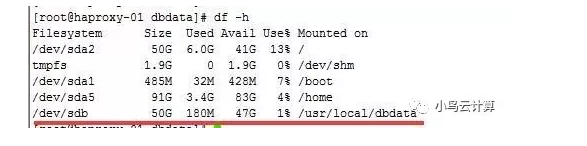
3、测试误操作删除以下文件
/usr/local/dbdata/gperftools-2.4.tar.gz #文件 /usr/local/dbdata/pcre-8.32 #目录 执行误操作:
# rm -rf /usr/local/dbdata/gperftools-2.4.tar.gz /usr/local/dbdata/pcre-8.32 4、将误操作所在分区进行只读保护
如果确定文件被误删,在没有备份的情况下请马上对分区实施写入保护(预防新的写入覆盖误删的块数据,因此权限给只读):
# mount -o remount,ro /dev/sdb # mount -o remount,ro /usr/local/dbdata/ 5、数据恢复工具安装
# wget https://nchc.dl.sourceforge.net/project/extundelete/extundelete/0.2.4/extundelete-0.2.4.tar.bz2 # yum -y install gcc-c++ e2fsprogs.x86_64 e2fsprogs-devel.x86_64 # tar -jxvf extundelete-0.2.4.tar.bz2 # cd extundelete-0.2.4 # ./configure # make && make install 验证安装结果
# extundelete -v 6、文件恢复过程
# extundelete /dev/sdb --inode 2 
从圈出来的可以看到,有以下两个
gperftools-2.4.tar.gz 15 Deleted pcre-8.32 Deleted # extundelete /dev/sdb --restore-file gperftools-2.4.tar.gz 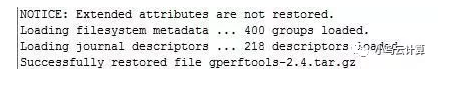
恢复目录(根据目录名恢复):
# extundelete /dev/sdb --restore-directory pcre-8.32 参考链接 :
误删除Linux系统文件了?这个方法教你解决 : https://mp.weixin..com/s/4X0sog_pKpPdpjuK6uW7UA
在Linux上恢复误删除的文件或目录 :https://mp.weixin..com/s/BCizBgvkGClWW8bex-s5tQ
发布者:全栈程序员-站长,转载请注明出处:https://javaforall.net/211126.html原文链接:https://javaforall.net



