
介绍
最近php搞了个博客,需要集成markdown编辑器(富文本的太low了,效率也低),用的是时下比较火的editormd,除了基本的文档编辑我这里还实现了几个自己的需求:
- 使用ctrl-v实现将图片粘贴到markdown编辑器
- 实现前台复制代码(
有需要的找我要)
效果展示
- 编辑器
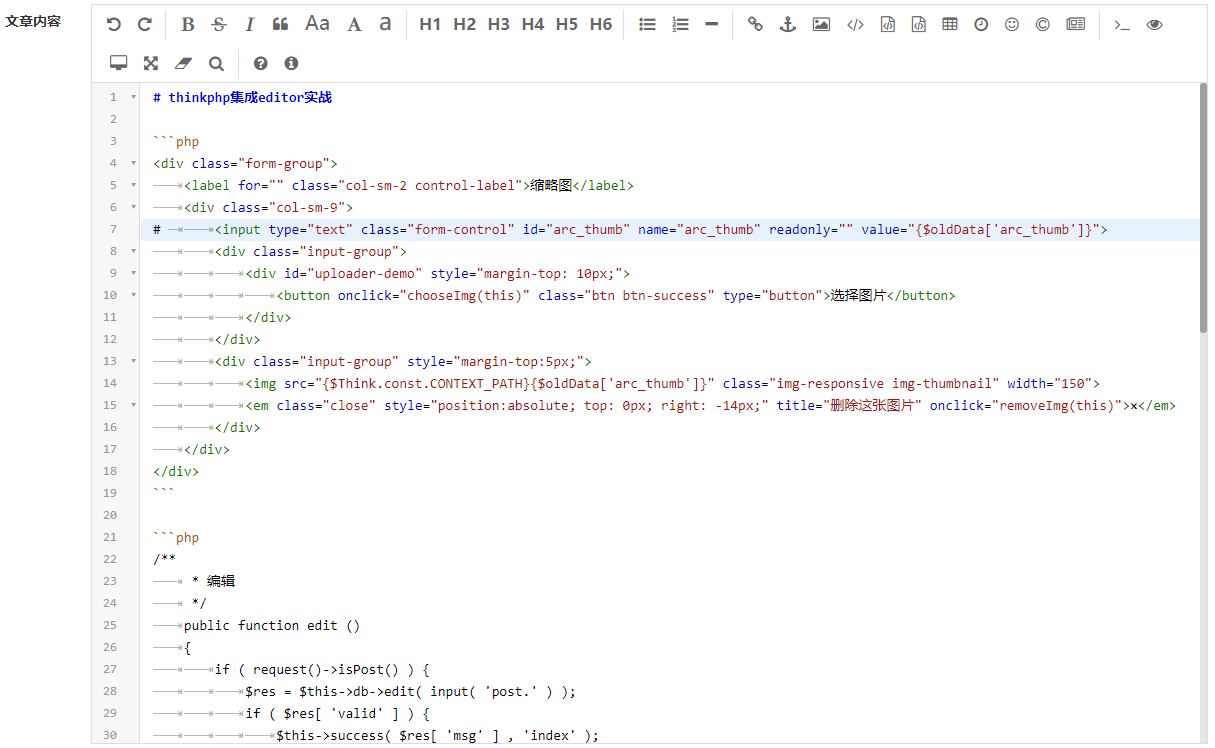

- 前台展示
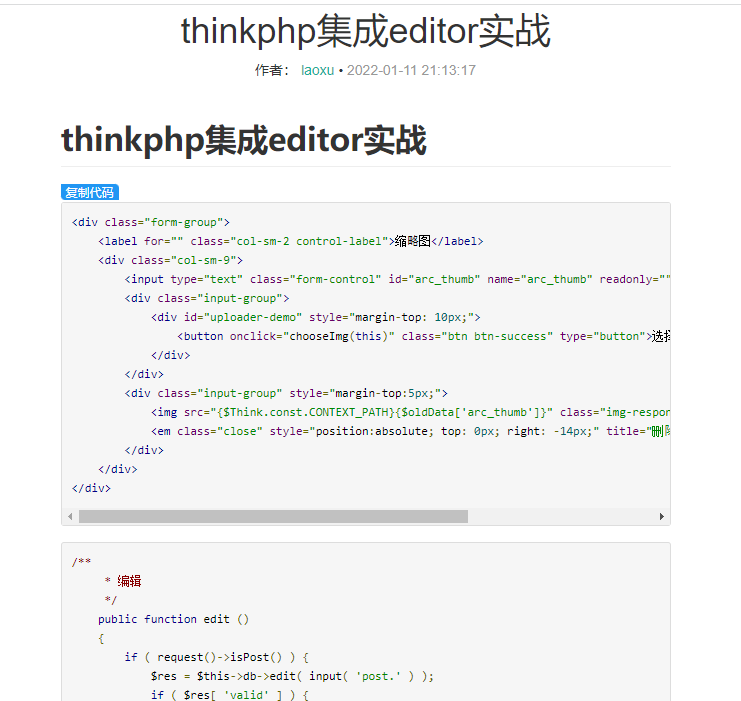
后台集成
引入资源
    <link href="__STATIC__/common/plugin/editormd/css/editormd.min.css" rel="stylesheet"> <script src="__STATIC__/common/plugin/editormd/editormd.min.js">
     script> <script src="__STATIC__/common/plugin/editormd/plugins/image-handle-paste/uploadPasteImg.js">
      script> <script src="__STATIC__/common/plugin/webuploader/webuploader.min.js">
       script>
编写DOM
<div class="form-group"> <label for="" class="col-sm-2 control-label">文章内容
     label> <div class="col-sm-9"> <div id="editor1"> <textarea name="arc_content">
      textarea>
       div>
        div>
         div>
初始化编辑器
// 初始化编辑器 $(function() {
    var editor = editormd("editor1", {
    width: "100%", height: 740, path: "__STATIC__/common/plugin/editormd/lib/", //theme : "dark", //previewTheme : "dark", //editorTheme : "pastel-on-dark", codeFold : true, fullscreen: false, //syncScrolling : false, saveHTMLToTextarea : true, // 保存 HTML 到 Textarea //searchReplace : true, watch : false, // 关闭实时预览 //htmlDecode : "style,script,iframe|on*", // 开启 HTML 标签解析,为了安全性,默认不开启 //toolbar : false, //关闭工具栏 //previewCodeHighlight : false, // 关闭预览 HTML 的代码块高亮,默认开启 emoji : true, taskList : true, tocm : true, // Using [TOCM] lineNumbers : false, //tex : true, // 开启科学公式TeX语言支持,默认关闭 //flowChart : true, // 开启流程图支持,默认关闭 //sequenceDiagram : true, // 开启时序/序列图支持,默认关闭, //dialogLockScreen : false, // 设置弹出层对话框不锁屏,全局通用,默认为true //dialogShowMask : false, // 设置弹出层对话框显示透明遮罩层,全局通用,默认为true //dialogDraggable : false, // 设置弹出层对话框不可拖动,全局通用,默认为true //dialogMaskOpacity : 0.4, // 设置透明遮罩层的透明度,全局通用,默认值为0.1 //dialogMaskBgColor : "#000", // 设置透明遮罩层的背景颜色,全局通用,默认为#fff imageUpload : true, imageFormats : ["jpg","gif", "png"], imageUploadURL : "/system/component/uploadMDImg", onload : function() {
    //console.log('onload', this); //this.fullscreen(); //this.unwantch(); //this.watch().fullscreen(); //this.setMarkdown("#PHP"); //this.width("100%"); //this.height(480); //this.resize("100%", 640); //this.setMarkdow() // 初始化粘贴图片插件 initPasteDragImg(this); } }); });
图片上传接口
//Markdown上传图片 public function uploadMDImg(){
    if(request()->isPost()){
    $file = request()->file('editormd-image-file'); $info = $file->move( ROOT_PATH . 'public' . DS . 'uploads' ); if($info){
    $saved_name = '/uploads/' . str_replace("\\","/",$info->getSaveName()); //$value=config('uploadFiles').'/knowledge/'.$info->getSaveName(); return json(['url'=>$saved_name,'success'=>1,'message'=>'图片上传成功!']); } else{
    echo $file->getError(); } }else{
    $this->error('非法请求'); } }
前台展示
引入资源
<link rel="stylesheet" href="__STATIC__/common/plugin/editormd/css/editormd.min.css" /> <link rel="stylesheet" type="text/css" href="__STATIC__/common/plugin/editormd/css/editormd.preview.min.css"/>
    <script src="__STATIC__/common/plugin/editormd/editormd.min.js" type="text/javascript" charset="utf-8">
     script> <script src="__STATIC__/common/plugin/editormd/lib/marked.min.js" type="text/javascript" charset="utf-8">
      script> <script src="__STATIC__/common/plugin/editormd/lib/prettify.min.js" type="text/javascript" charset="utf-8">
       script> <script src="__STATIC__/common/js/clipboard.min.js" type="text/javascript" charset="utf-8">
        script>
编写DOM
<div id="editmd" class="post-content" >
    <textarea id="content" style="display:none;" name="content">{$articleData['arc_content']}
     textarea>
      div>
初始化文章内容
var Editor; //markdownToHTML 将markdown文本转换为HTML Editor = editormd.markdownToHTML("editmd", {

    htmlDecode      : "style,script,iframe", // you can filter tags decode markdown : $("#content").text() ,//+ "\r\n" + $("#append-test").text(), //htmlDecode : true, // 开启 HTML 标签解析,为了安全性,默认不开启
    htmlDecode      : "style,script,iframe", // you can filter tags decode //toc : false, tocm : true, // Using [TOCM] //tocContainer : "#custom-toc-container", // 自定义 ToC 容器层 //gfm : false, //tocDropdown : true, // markdownSourceCode : true, // 是否保留 Markdown 源码,即是否删除保存源码的 Textarea 标签 path: "__STATIC__/common/plugin/editormd/lib/", lineNumbers : false, emoji : true, taskList : true, tocm : true //对目录解析 });
版权声明:本文内容由互联网用户自发贡献,该文观点仅代表作者本人。本站仅提供信息存储空间服务,不拥有所有权,不承担相关法律责任。如发现本站有涉嫌侵权/违法违规的内容, 请联系我们举报,一经查实,本站将立刻删除。
发布者:全栈程序员-站长,转载请注明出处:https://javaforall.net/212037.html原文链接:https://javaforall.net



