
SpringBoot定时任务@Scheduled注解详解
项目开发中,经常会遇到定时任务的场景,Spring提供了@Scheduled注解,方便进行定时任务的开发
概述
要使用@Scheduled注解,首先需要在启动类添加@EnableScheduling,启用Spring的计划任务执行功能,这样可以在容器中的任何Spring管理的bean上检测@Scheduled注解,执行计划任务
注解定义
@Target({
   ElementType.METHOD, ElementType.ANNOTATION_TYPE}) @Retention(RetentionPolicy.RUNTIME) @Documented @Repeatable(Schedules.class) public @interface Scheduled {
    String cron() default ""; String zone() default ""; long fixedDelay() default -1; String fixedDelayString() default ""; long fixedRate() default -1; String fixedRateString() default ""; long initialDelay() default -1; String initialDelayString() default ""; }
参数说明
| 参数 | 参数说明 | 示例 |
|---|---|---|
| cron | 任务执行的cron表达式 | 0/1 * * * * ? |
| zone | cron表达时解析使用的时区,默认为服务器的本地时区,使用java.util.TimeZone#getTimeZone(String)方法解析 | GMT-8:00 |
| fixedDelay | 上一次任务执行结束到下一次执行开始的间隔时间,单位为ms | 1000 |
| fixedDelayString | 上一次任务执行结束到下一次执行开始的间隔时间,使用java.time.Duration#parse解析 | PT15M |
| fixedRate | 以固定间隔执行任务,即上一次任务执行开始到下一次执行开始的间隔时间,单位为ms,若在调度任务执行时,上一次任务还未执行完毕,会加入worker队列,等待上一次执行完成后立即执行下一次任务 | 2000 |
| fixedRateString | 与fixedRate逻辑一致,只是使用java.time.Duration#parse解析 | PT15M |
| initialDelay | 首次任务执行的延迟时间 | 1000 |
| initialDelayString | 首次任务执行的延迟时间,使用java.time.Duration#parse解析 | PT15M |
源码解析
配置了@Scheduled注解的方法,Spring的处理是通过注册ScheduledAnnotationBeanPostProcessor来执行,将不同配置参数的任务分配给不同的handler处理,核心代码如下
- org.springframework.scheduling.annotation.ScheduledAnnotationBeanPostProcessor#postProcessAfterInitialization
@Override public Object postProcessAfterInitialization(Object bean, String beanName) {
    if (bean instanceof AopInfrastructureBean || bean instanceof TaskScheduler || bean instanceof ScheduledExecutorService) {
    // Ignore AOP infrastructure such as scoped proxies. return bean; } Class<?> targetClass = AopProxyUtils.ultimateTargetClass(bean); if (!this.nonAnnotatedClasses.contains(targetClass) && AnnotationUtils.isCandidateClass(targetClass, Arrays.asList(Scheduled.class, Schedules.class))) {
    Map<Method, Set<Scheduled>> annotatedMethods = MethodIntrospector.selectMethods(targetClass, (MethodIntrospector.MetadataLookup<Set<Scheduled>>) method -> {
    Set<Scheduled> scheduledMethods = AnnotatedElementUtils.getMergedRepeatableAnnotations( method, Scheduled.class, Schedules.class); return (!scheduledMethods.isEmpty() ? scheduledMethods : null); }); if (annotatedMethods.isEmpty()) {
    this.nonAnnotatedClasses.add(targetClass); if (logger.isTraceEnabled()) {
    logger.trace("No @Scheduled annotations found on bean class: " + targetClass); } } else {
    // Non-empty set of methods annotatedMethods.forEach((method, scheduledMethods) -> scheduledMethods.forEach(scheduled -> processScheduled(scheduled, method, bean))); if (logger.isTraceEnabled()) {
logger.trace(annotatedMethods.size() + " @Scheduled methods processed on bean '" + beanName + "': " + annotatedMethods); } } } return bean; } - org.springframework.scheduling.annotation.ScheduledAnnotationBeanPostProcessor#processScheduled
/ * Process the given {@code @Scheduled} method declaration on the given bean. * @param scheduled the @Scheduled annotation * @param method the method that the annotation has been declared on * @param bean the target bean instance * @see #createRunnable(Object, Method) */ protected void processScheduled(Scheduled scheduled, Method method, Object bean) {
    try {
    Runnable runnable = createRunnable(bean, method); boolean processedSchedule = false; String errorMessage = "Exactly one of the 'cron', 'fixedDelay(String)', or 'fixedRate(String)' attributes is required"; Set<ScheduledTask> tasks = new LinkedHashSet<>(4); // Determine initial delay long initialDelay = scheduled.initialDelay(); String initialDelayString = scheduled.initialDelayString(); if (StringUtils.hasText(initialDelayString)) {
    Assert.isTrue(initialDelay < 0, "Specify 'initialDelay' or 'initialDelayString', not both"); if (this.embeddedValueResolver != null) {
    initialDelayString = this.embeddedValueResolver.resolveStringValue(initialDelayString); } if (StringUtils.hasLength(initialDelayString)) {
    try {
    initialDelay = parseDelayAsLong(initialDelayString); } catch (RuntimeException ex) {
    throw new IllegalArgumentException( "Invalid initialDelayString value \"" + initialDelayString + "\" - cannot parse into long"); } } } // Check cron expression String cron = scheduled.cron(); if (StringUtils.hasText(cron)) {
    String zone = scheduled.zone(); if (this.embeddedValueResolver != null) {
    cron = this.embeddedValueResolver.resolveStringValue(cron); zone = this.embeddedValueResolver.resolveStringValue(zone); } if (StringUtils.hasLength(cron)) {
    Assert.isTrue(initialDelay == -1, "'initialDelay' not supported for cron triggers"); processedSchedule = true; if (!Scheduled.CRON_DISABLED.equals(cron)) {
    TimeZone timeZone; if (StringUtils.hasText(zone)) {
    timeZone = StringUtils.parseTimeZoneString(zone); } else {
    timeZone = TimeZone.getDefault(); } tasks.add(this.registrar.scheduleCronTask(new CronTask(runnable, new CronTrigger(cron, timeZone)))); } } } // At this point we don't need to differentiate between initial delay set or not anymore if (initialDelay < 0) {
    initialDelay = 0; } // Check fixed delay long fixedDelay = scheduled.fixedDelay(); if (fixedDelay >= 0) {
    Assert.isTrue(!processedSchedule, errorMessage); processedSchedule = true; tasks.add(this.registrar.scheduleFixedDelayTask(new FixedDelayTask(runnable, fixedDelay, initialDelay))); } String fixedDelayString = scheduled.fixedDelayString(); if (StringUtils.hasText(fixedDelayString)) {
    if (this.embeddedValueResolver != null) {
    fixedDelayString = this.embeddedValueResolver.resolveStringValue(fixedDelayString); } if (StringUtils.hasLength(fixedDelayString)) {
    Assert.isTrue(!processedSchedule, errorMessage); processedSchedule = true; try {
    fixedDelay = parseDelayAsLong(fixedDelayString); } catch (RuntimeException ex) {
    throw new IllegalArgumentException( "Invalid fixedDelayString value \"" + fixedDelayString + "\" - cannot parse into long"); } tasks.add(this.registrar.scheduleFixedDelayTask(new FixedDelayTask(runnable, fixedDelay, initialDelay))); } } // Check fixed rate long fixedRate = scheduled.fixedRate(); if (fixedRate >= 0) {
    Assert.isTrue(!processedSchedule, errorMessage); processedSchedule = true; tasks.add(this.registrar.scheduleFixedRateTask(new FixedRateTask(runnable, fixedRate, initialDelay))); } String fixedRateString = scheduled.fixedRateString(); if (StringUtils.hasText(fixedRateString)) {
    if (this.embeddedValueResolver != null) {
    fixedRateString = this.embeddedValueResolver.resolveStringValue(fixedRateString); } if (StringUtils.hasLength(fixedRateString)) {
    Assert.isTrue(!processedSchedule, errorMessage); processedSchedule = true; try {
    fixedRate = parseDelayAsLong(fixedRateString); } catch (RuntimeException ex) {
    throw new IllegalArgumentException( "Invalid fixedRateString value \"" + fixedRateString + "\" - cannot parse into long"); } tasks.add(this.registrar.scheduleFixedRateTask(new FixedRateTask(runnable, fixedRate, initialDelay))); } } // Check whether we had any attribute set Assert.isTrue(processedSchedule, errorMessage); // Finally register the scheduled tasks synchronized (this.scheduledTasks) {
    Set<ScheduledTask> regTasks = this.scheduledTasks.computeIfAbsent(bean, key -> new LinkedHashSet<>(4)); regTasks.addAll(tasks); } } catch (IllegalArgumentException ex) {
throw new IllegalStateException( "Encountered invalid @Scheduled method '" + method.getName() + "': " + ex.getMessage()); } } - org.springframework.scheduling.config.ScheduledTaskRegistrar#scheduleTasks
/ * Schedule all registered tasks against the underlying * {@linkplain #setTaskScheduler(TaskScheduler) task scheduler}. */ proected void scheduleTasks() {
    if (this.taskScheduler == null) {
    this.localExecutor = Executors.newSingleThreadScheduledExecutor(); this.taskScheduler = new ConcurrentTaskScheduler(this.localExecutor); } if (this.triggerTasks != null) {
    for (TriggerTask task : this.triggerTasks) {
    addScheduledTask(scheduleTriggerTask(task)); } } if (this.cronTasks != null) {
    for (CronTask task : this.cronTasks) {
    addScheduledTask(scheduleCronTask(task)); } } if (this.fixedRateTasks != null) {
    for (IntervalTask task : this.fixedRateTasks) {
    addScheduledTask(scheduleFixedRateTask(task)); } } if (this.fixedDelayTasks != null) {
    for (IntervalTask task : this.fixedDelayTasks) {
    addScheduledTask(scheduleFixedDelayTask(task)); } } }
使用详解
定时任务同步/异步执行
// org.springframework.scheduling.config.ScheduledTaskRegistrar#scheduleTasks if (this.taskScheduler == null) {
    this.localExecutor = Executors.newSingleThreadScheduledExecutor(); this.taskScheduler = new ConcurrentTaskScheduler(this.localExecutor); } // java.util.concurrent.Executors#newSingleThreadScheduledExecutor() public static ScheduledExecutorService newSingleThreadScheduledExecutor() {
    return new DelegatedScheduledExecutorService (new ScheduledThreadPoolExecutor(1)); }
代码示例:
@Slf4j @Component public class RunIntervalTestScheduler {
    @Scheduled(cron = "0/1 * * * * ?") public void singleThreadTest1() {
    log.info("singleThreadTest1"); LockSupport.parkNanos(TimeUnit.SECONDS.toNanos(1)); } @Scheduled(cron = "0/1 * * * * ?") public void singleThreadTest2() {
    log.info("singleThreadTest2"); LockSupport.parkNanos(TimeUnit.SECONDS.toNanos(1)); } @Scheduled(cron = "0/1 * * * * ?") public void singleThreadTest3() {
log.info("singleThreadTest3"); LockSupport.parkNanos(TimeUnit.SECONDS.toNanos(1)); } } 可以看到,默认情况下,三个任务串行执行,都使用pool-1-thread-1同一个线程池,并且线程只有一个
可以通过实现SchedulingConfigurer接口,手动创建线程池,配置期望的线程数量
示例代码:
@Configuration public class ScheduledConfig implements SchedulingConfigurer {
    / * 任务执行线程池大小 */ private static final int TASK_POOL_SIZE = 50; / * 线程名 */ private static final String TASK_THREAD_PREFIX = "test-task-"; @Override public void configureTasks(ScheduledTaskRegistrar scheduledTaskRegistrar) {
    ThreadPoolTaskScheduler taskPool = new ThreadPoolTaskScheduler(); taskPool.setPoolSize(TASK_POOL_SIZE); taskPool.setThreadNamePrefix(TASK_THREAD_PREFIX); taskPool.initialize(); scheduledTaskRegistrar.setTaskScheduler(taskPool); } }
任务执行结果:
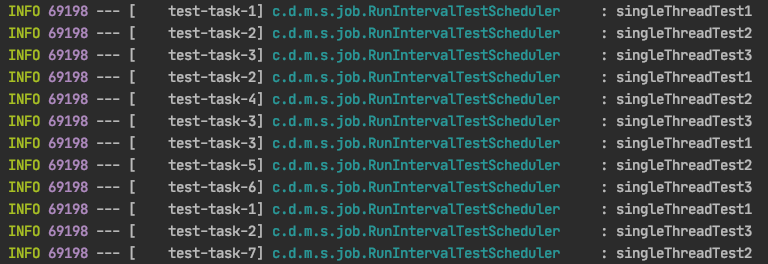

此时任务的执行已经异步化,从自定义线程池中分配线程执行任务,在实际应用中需要考虑实际任务数量,创建相应大小的线程池
fixedRate/fixedDelay区别
- fixedRate是配置上一次任务执行开始到下一次执行开始的间隔时间,不会等待上一次任务执行完成就会调度下一次任务,将其放入等待队列中
代码示例:
@Slf4j @Component public class RunIntervalTestScheduler {
    @Scheduled(initialDelay = 1000, fixedRate = 1000) public void fixedRate() throws Exception {
    log.info("fixedRate run"); TimeUnit.SECONDS.sleep(3); } }
执行结果:

任务配置的fixedRate为1s,执行日志打印的时间间隔都是3s左右,也就是上一次执行完成后,紧接着就执行下一次任务
- fixedDelay是配置的上一次任务执行结束到下一次执行开始的间隔时间,也就是说会等待上一次任务执行结束后,延迟间隔时间,再执行下一次任务
代码示例:
@Slf4j @Component public class RunIntervalTestScheduler {
    @Scheduled(initialDelay = 1000, fixedDelay = 1000) public void fixedDelay() throws Exception {
    log.info("fixedDelay run"); TimeUnit.SECONDS.sleep(3); } }
执行结果:

任务配置的fixedDelay为1s,执行日志打印的时间间隔都是4s左右,也就是上一次执行完成后,延迟1s后执行下一次任务
- cron表达式如果配置为类似每秒执行、每分钟执行(例:0/1 * * * * ?, 每秒执行),调度跟fixedDelay是一致的,也是在上一次任务执行结束后,等待间隔时间
代码示例:
@Slf4j @Component public class RunIntervalTestScheduler {
    @Scheduled(cron = "0/1 * * * * ?") public void cronRun() throws Exception{
    log.info("cron run"); TimeUnit.SECONDS.sleep(3); } }
执行结果:

执行日志打印的时间间隔都是4s左右,也就是上一次执行完成后,延迟1s后执行下一次任务
- cron表达式如果配置为固定时间执行(例:1 * * * * ?, 秒数为1时执行),若上一次任务没有执行完,则不会调度本次任务,跳过本次执行,等待下一次执行周期
代码示例:
@Slf4j @Component public class RunIntervalTestScheduler {
    @Scheduled(cron = "1 * * * * ?") public void cronRun() throws Exception{
    log.info("cron run"); TimeUnit.SECONDS.sleep(70); } }
执行结果:

上一次任务未执行完毕,则跳过了本次执行
版权声明:本文内容由互联网用户自发贡献,该文观点仅代表作者本人。本站仅提供信息存储空间服务,不拥有所有权,不承担相关法律责任。如发现本站有涉嫌侵权/违法违规的内容, 请联系我们举报,一经查实,本站将立刻删除。
发布者:全栈程序员-站长,转载请注明出处:https://javaforall.net/212038.html原文链接:https://javaforall.net




