multipass的使用记录关于 multipass 官网 https multipass run 文档 https multipass run docs 介绍 UbuntuVMsond Multipasscan initlikeapub
关于multipass
文档
https://multipass.run/docs
介绍
Ubuntu VMs on demand for any workstation
Get an instant Ubuntu VM with a single command. Multipass can launch and run virtual machines and configure them with cloud-init like a public cloud. Prototype your cloud launches locally for free.
D:\Test>multipass help Usage: multipass [options] Create, control and connect to Ubuntu instances. This is a command line utility for multipass, a service that manages Ubuntu instances. Options: -?,-h,--help Displays help on commandline options.--help-all Displays help including Qt specific options.-v,--verbose Increase logging verbosity. Repeat the 'v' in the short option for more detail. Maximum verbosity is obtained with 4 (or more) v's, i.e.-vvvv. Available commands: alias Create an alias aliases List available aliases delete Delete instances exec Run a command on an instance find Display available images to create instances from get Get a configuration setting help Display help about a command info Display information about instances launch Create and start an Ubuntu instance list List all available instances mountMount a local directory in the instance networks List available network interfaces purge Purge all deleted instances permanently recover Recover deleted instances restart Restart instances setSet a configuration setting shell Open a shell on a running instance startStart instances stop Stop running instances suspend Suspend running instances transfer Transfer files between the host and instances umount Unmount a directory from an instance unalias Remove an alias version Show version details
get和set配置命令
get获取配置
D:\Test>multipass get -h Usage: multipass get [options]
Get the configuration setting corresponding to the given key
. Keys: client
.apps
.windows
-terminal
.profiles client
.gui
.autostart client
.gui
.hotkey client
.primary
-name local
.bridged
-network local
.driver local
.privileged
-mounts Options:
-?
,-h
,--help Displays help on commandline options
.--help
-all Displays help including Qt specific options
.-v
,--verbose Increase logging verbosity
. Repeat the
'v' in the short option
for more detail
. Maximum verbosity is obtained with 4
(or more
) v's
, i
.e
.-vvvv
.--raw Output in raw format
.For now
, this affects only the representation of empty values
(i
.e
."" instead of
"
"
). Arguments: key Path to the setting whose configured value should be obtained
.
可用的好像就这么几个?
D:\Test>multipass get client.apps.windows-terminal.profiles primary D:\Test>multipass get client.gui.autostart false D:\Test>multipass get client.gui.hotkey Ctrl+Alt+U D:\Test>multipass get client.primary-name primary D:\Test>multipass get local.driver virtualbox D:\Test>multipass get local.privileged-mounts false
set命令
D:\Test>multipass set-h Usage: multipass set[options]
=
Set, to the given value
, the configuration setting corresponding to the given key
. Keys: client
.apps
.windows
-terminal
.profiles client
.gui
.autostart client
.gui
.hotkey client
.primary
-name local
.bridged
-network local
.driver local
.privileged
-mounts Options:
-?
,-h
,--help Displays help on commandline options
.--help
-all Displays help including Qt specific options
.-v
,--verbose Increase logging verbosity
. Repeat the
'v' in the short option
for more detail
. Maximum verbosity is obtained with 4
(or more
) v's
, i
.e
.-vvvv
. Arguments: keyval A key
-value pair
. The key specifies a path to the setting to configure
. The value is its intended value
.
find命令查找镜像
命令的帮助
D:\Test>multipass help find Usage: multipass find [options][][] Lists available images matching
for creating instances
from. With no search string
, lists all aliases
for supported Ubuntu releases
. Options:
-?
,-h
,--help Displays help on commandline options
.--help
-all Displays help including Qt specific options
.-v
,--verbose Increase logging verbosity
. Repeat the
'v' in the short option
for more detail
. Maximum verbosity is obtained with 4
(or more
) v's
, i
.e
.-vvvv
.--show-unsupported Show unsupported cloud images as well
--format
Output list in the requested format
. Valid formats are: table
(default
), json
, csv and yaml Arguments: string An optional value to search
for in
[]
format
, where
can be either ‘release’ or ‘daily’
.If
is omitted
, it will search ‘release‘ first
, and
if no matches are found
, it will then search ‘daily‘
.
can be a partial image hash or an Ubuntu release version
, codename or alias
.
查看镜像list。可用的比较少
D:\Test>multipass find Image Aliases Version Description core core16 Ubuntu Core 16 core18 Ubuntu Core 18 18.04 bionic Ubuntu 18.04 LTS 20.04 focal,lts Ubuntu 20.04 LTS 21.10 impish Ubuntu 21.10 appliance:adguard-home Ubuntu AdGuard Home Appliance appliance:mosquitto Ubuntu Mosquitto Appliance appliance:nextcloud Ubuntu Nextcloud Appliance appliance:openhab Ubuntu openHAB Home Appliance appliance:plexmediaserver Ubuntu Plex Media Server Appliance anbox-cloud-appliance latest Anbox Cloud Appliance charm-dev latest A development and testing environment for charmers docker latest A Docker environment with Portainer and related tools minikube latest minikube is local Kubernetes
launch命令创建并启动实例
D:\Test>multipass launch -h Usage: multipass launch [options][[]|] Create and
start a new instance
. Options:
-?
,-h
,--help Displays help on commandline options
.--help
-all Displays help including Qt specific options
.-v
,--verbose Increase logging verbosity
. Repeat the
'v' in the short option
for more detail
. Maximum verbosity is obtained with 4
(or more
) v
's, i.e. -vvvv. -c, --cpus
Number of CPUs to allocate. Minimum: 1, default: 1. -d, --disk
Disk space to allocate. Positive integers, in bytes, or with K, M, G suffix. Minimum: 512M, default: 5G. -m, --mem
Amount of memory to allocate. Positive integers, in bytes, or with K, M, G suffix. Minimum: 128M, default: 1G. -n, --name
Name for the instance. If it is '
primary
' (the configured primary instance name), the user's home directory is mounted inside the newly launched instance
, in
'Home'.--cloud
-init
Path to a user
-data cloud
-init configuration
, or
'-'for stdin
--network
Add a network interface to the instance
, where
is in the
"key=value,key=value" format
, with the following keys available: name: the network to connect to
(required
), use the networks command
for a list of possible values
, or use
'bridged' to use the interface configured via `multipass
set local
.bridged
-network`
. mode: auto
|manual
(default: auto
) mac: hardware address
(default: random
). You can also use a shortcut of
"
"
to mean
"name=
"
.--bridged Adds one `
--network bridged` network
.--timeout
Maximum time
, in seconds
, to wait
for the command to complete
. Note that some background operations may
continue beyond that
. By default
, instance startup and initialization is limited to 5 minutes each
. Arguments: image Optional image to launch
.If omitted
, then the default Ubuntu LTS will be used
.
can be either ‘release’ or ‘daily‘
.If
is omitted
, ‘release’ will be used
. can be a partial image hash or an Ubuntu release version , codename or alias .
is a custom image URL that is in http:
//, https:
//, or file:
// format
.
创建实例
D:\Test>multipass launch --name ubuntu20 21.10 launch failed: The Hyper-V Windows feature is disabled. Please enable by using the following command in an Administrator Powershell and reboot: Enable-WindowsOptionalFeature-Online -FeatureName Microsoft-Hyper-V -All
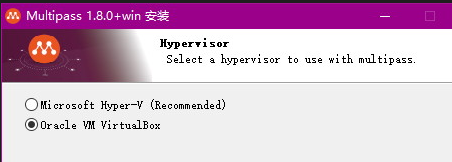
刚刚安装的时候不是选了VirtualBox了吗??
D:\Test>multipass get local.driver virtualbox
难道这个是一定要Hyper-V才行的??
https://multipass.run/docs/installing-on-windows
第一次启动实例需要再设置!!
D:\Test>multipass set local.driver=virtualbox D:\Test>multipass get local.driver virtualbox D:\Test>multipass launch --name ubuntu20 21.10 One quick question before we launch … Would you like to help the Multipass developers, by sending anonymous usage data? This includes your operating system, which images you use, the number of instances, their properties and how long you use them. We’d also like to measure Multipass’s speed. Send usage data(yes/no/Later)? yes Thank you! Retrieving image: 4%
报错了
[2022-02-26T15:34:35.322][error][ubuntu20] Could not unregister VM: VBoxManage.exe: error: Could not find a registered machine named 'ubuntu20' VBoxManage.exe: error: Details: code VBOX_E_OBJECT_NOT_FOUND (0x80bb0001), component VirtualBoxWrap, interface IVirtualBox, callee IUnknown VBoxManage.exe: error: Context: "FindMachine(Bstr(VMName).raw(), machine.asOutParam())" at line 150 of file VBoxManageMisc.cpp launch failed: Could not generate a new UUID: Process operation timed out
D:\Test>multipass list Name State IPv4 Image ubuntu20 Running N/A Ubuntu 21.10
info命令查看实例信息
D:\Test>multipass info ubuntu20 Name: ubuntu20 State: Running IPv4: N/A Release: Ubuntu 21.10 Image hash: 73fe1785c60e (Ubuntu 21.10) Load: 0.01 0.06 0.03 Disk usage: 1.3G out of 4.7G Memory usage: 129.6M out of 971.5M Mounts: --
stop和start
D:\Test>multipass stop ubuntu20 D:\Test>multipass start ubuntu20 Starting ubuntu20 |# 卡住了。。 D:\Test>multipass list Name State IPv4 Image ubuntu20 Starting -- Ubuntu 21.10 D:\Test>multipass start ubuntu20 D:\Test>multipass info ubuntu20 Name: ubuntu20 State: Running IPv4: N/A Release: Ubuntu 21.10 Image hash: 73fe1785c60e (Ubuntu 21.10) Load: 0.20 0.07 0.02 Disk usage: 1.4G out of 4.8G Memory usage: 115.5M out of 971.5M Mounts: -- D:\Test>multipass list Name State IPv4 Image ubuntu20 Running N/A Ubuntu 21.10
networks查看网络
D:\Test>multipass networks -h Usage: multipass networks [options] List host network devices (physical interfaces, virtual switches, bridges) available to integrate with using the `--network` switch to the `launch` command. Options: -?,-h,--help Displays help on commandline options.--help-all Displays help including Qt specific options.-v,--verbose Increase logging verbosity. Repeat the 'v' in the short option for more detail. Maximum verbosity is obtained with 4 (or more) v's, i.e.-vvvv.--format
Output list in the requested format
. Valid formats are: table
(default
), json
, csv and yaml
查看网络,调用powershell,显示的是宿主机的实体网络
D:\Test>multipass networks Name Type Description WLAN wifi Qualcomm WCN685x Wi-Fi 6E Dual Band Simultaneous (DBS) Network Adapter ��̫�� ethernet Realtek PCIe GbE Family Controller
创建带有网络的实例
采用桥接
D:\Test>multipass set local.bridged-network=WLAN D:\Test>multipass get local.bridged-network WLAN
D:\Test>multipass launch --name ubuntua --network bridged 21.10 Launched: ubuntua D:\Test>multipass list Name State IPv4 Image ubuntu20 Running N/A Ubuntu 21.10 ubuntua Running 192.168.31.60 Ubuntu 21.10 D:\Test>multipass info ubuntua Name: ubuntua State: Running IPv4: 192.168.31.60 Release: Ubuntu 21.10 Image hash: 73fe1785c60e (Ubuntu 21.10) Load: 0.31 0.15 0.05 Disk usage: 1.3G out of 4.7G Memory usage: 136.3M out of 971.5M Mounts: --# 主机ping不同 D:\Test>ping 192.168.31.60 Pinging 192.168.31.60 with 32 bytes of data: Reply from 192.168.31.56: Destination host unreachable. Reply from 192.168.31.56: Destination host unreachable. Reply from 192.168.31.56: Destination host unreachable. Reply from 192.168.31.56: Destination host unreachable. Ping statistics for 192.168.31.60: Packets: Sent = 4, Received = 4, Lost = 0 (0% loss),
exec命令执行一次性命令
D:\Test>multipass exec -h Usage: multipass exec [options][--] Run a command on an instance Options: -? ,-h ,--help Displays help on commandline options .--help -all Displays help including Qt specific options .-v ,--verbose Increase logging verbosity . Repeat the 'v' in the short option for more detail . Maximum verbosity is obtained with 4 (or more ) v's , i .e .-vvvv . Arguments: name Name of instance to execute the command on command Command to execute on the instance
可以ping外网
D:\Test>multipass exec ubuntua ping baidu.com PING baidu.com (220.181.38.148) 56(84) bytes of data. 64 bytes from 220.181.38.148 (220.181.38.148): icmp_seq=1 ttl=51 time=45.2 ms 64 bytes from 220.181.38.148 (220.181.38.148): icmp_seq=2 ttl=51 time=50.6 ms ^C --- baidu.com ping statistics --- 2 packets transmitted, 2 received, 0% packet loss, time 1001ms rtt min/avg/max/mdev = 45.201/47.890/50.580/2.689 ms
默认使用了VirtualBox设置的其他网卡?
D:\Test>multipass exec ubuntua -- ip -br a lo UNKNOWN 127.0.0.1/8 ::1/128 enp0s3 UP 10.0.2.15/24 fe80::5054:ff:fe1e:c616/64 enp0s8 UP 192.168.31.60/24 fe80::5054:ff:fe1b:2e9b/64 D:\Test>multipass exec ubuntua -- ip route default via 10.0.2.2 dev enp0s3 proto dhcp src 10.0.2.15 metric 100 default via 192.168.31.1 dev enp0s8 proto dhcp src 192.168.31.60 metric 200 10.0.2.0/24 dev enp0s3 proto kernel scope link src 10.0.2.15 10.0.2.2 dev enp0s3 proto dhcp scope link src 10.0.2.15 metric 100 192.168.31.0/24 dev enp0s8 proto kernel scope link src 192.168.31.60 192.168.31.1 dev enp0s8 proto dhcp scope link src 192.168.31.60 metric 200
shell命令打开交互式shell
D:\Test>multipass shell -h Usage: multipass shell [options][] Open a shell prompt on the instance
. Options:
-?
,-h
,--help Displays help on commandline options
.--help
-all Displays help including Qt specific options
.-v
,--verbose Increase logging verbosity
. Repeat the
'v' in the short option
for more detail
. Maximum verbosity is obtained with 4
(or more
) v
's, i.e. -vvvv. --timeout
Maximum time, in seconds, to wait for the command to complete. Note that some background operations may continue beyond that. By default, instance startup and initialization is limited to 5 minutes each. Arguments: name Name of the instance to open a shell on. If omitted, '
primary'
(the configured primary instance name
) will be assumed
.If the instance is not running
, an attempt is made to
start it
(see `
start`
for more info
).
测试
D:\Test>multipass shell ubuntua Welcome to Ubuntu 21.10 (GNU/Linux 5.13.0-28-generic x86_64)* Documentation: https://help.ubuntu.com * Management: https://landscape.canonical.com * Support: https://ubuntu.com/advantage System information as of Sat Feb 26 16:03:36 CST 2022 System load: 0.0 Processes: 90 Usage of /: 27.2% of 4.67GB Users logged in: 0 Memory usage: 17% IPv4 address for enp0s3: 10.0.2.15 Swap usage: 0% IPv4 address for enp0s8: 192.168.31.60 0 updates can be applied immediately. The list of available updates is more than a week old. To check for new updates run: sudo apt update Last login: Sat Feb 26 16:01:46 2022 from 10.0.2.2 To run a command as administrator (user "root"), use "sudo ". See "man sudo_root"for details. ubuntu@ubuntua:~$ hostname ubuntua ubuntu@ubuntua:~$ ip -br a lo UNKNOWN 127.0.0.1/8 ::1/128 enp0s3 UP 10.0.2.15/24 fe80::5054:ff:fe1e:c616/64 enp0s8 UP 192.168.31.60/24 fe80::5054:ff:fe1b:2e9b/64
mount挂载宿主机文件夹
D:\Test>multipass mount-h Usage: multipass mount[options][...]Mount a local directory inside the instance
.If the instance is not currently running
, the directory will be mounted automatically on next boot
. Options:
-?
,-h
,--help Displays help on commandline options
.--help
-all Displays help including Qt specific options
.-v
,--verbose Increase logging verbosity
. Repeat the
'v' in the short option
for more detail
. Maximum verbosity is obtained with 4
(or more
) v
's, i.e. -vvvv. -g, --gid-map
:
A mapping of group IDs for use in the mount. File and folder ownership will be mapped from
to
inside the instance. Can be used multiple times. -u, --uid-map
:
A mapping of user IDs for use in the mount. File and folder ownership will be mapped from
to
inside the instance. Can be used multiple times. Arguments: source Path of the local directory to mount target Target mount points, in
[:
] format, where
is an instance name, and optional
is the mount point. If omitted, the mount point will be the same as the source'
s absolute path
准备宿主机的文件
D:\Test>mkdir mount D:\Test>echotest-mount > mount\file.txt D:\Test>typemount\file.txt test-mount
挂载
D:\Test>multipass exec ubuntua -- sudo mkdir /mountfile D:\Test>multipass mount D:\Test\mount ubuntua:/mountfile mount failed: Mounts are disabled on this installation of Multipass. See https://multipass.run/docs/set-command#local.privileged-mounts for information on how to enable them.
D:\Test>multipass set local.privileged-mounts=true D:\Test>multipass mount D:\Test\mount ubuntua:/mountfile mount failed: cannot connect to the multipass socket Please ensure multipassd is running and 'localhost:50051' is accessible D:\Test>sc query multipass SERVICE_NAME: multipass TYPE : 10 WIN32_OWN_PROCESS STATE : 4 RUNNING (STOPPABLE, NOT_PAUSABLE, ACCEPTS_SHUTDOWN) WIN32_EXIT_CODE : 0 (0x0) SERVICE_EXIT_CODE : 0 (0x0) CHECKPOINT : 0x0 WAIT_HINT : 0x0 D:\Test>netstat -nt | findstr 50051 TCP [::1]:50051 [::1]:63922 ESTABLISHED InHost TCP [::1]:63922 [::1]:50051 ESTABLISHED InHost # 再执行一次 D:\Test>multipass mount D:\Test\mount ubuntua:/mountfile Enabling support for mounting - D:\Test>multipass exec ubuntua --cat/mountfile/file.txt test-mount D:\Test>multipass info ubuntua Name: ubuntua State: Running IPv4: 192.168.31.60 Release: Ubuntu 21.10 Image hash: 73fe1785c60e (Ubuntu 21.10) Load: 0.02 0.01 0.00 Disk usage: 1.3G out of 4.7G Memory usage: 135.5M out of 971.5M Mounts: D:/Test/mount => /mountfile UID map: -2:default GID map: -2:default
删除
purge删除已删除的实例的配置
delete删除某个实例
D:\Test>multipass purge -h Usage: multipass purge [options] Purge all deleted instances permanently, including all their data. Options: -?,-h,--help Displays help on commandline options.--help-all Displays help including Qt specific options.-v,--verbose Increase logging verbosity. Repeat the 'v' in the short option for more detail. Maximum verbosity is obtained with 4 (or more) v's, i.e. -vvvv. D:\Test>multipass delete -h Usage: multipass delete [options]
[
...] Delete instances, to be purged with the "purge" command, or recovered with the "recover" command. Options: -?, -h, --help Displays help on commandline options. --help-all Displays help including Qt specific options. -v, --verbose Increase logging verbosity. Repeat the '
v' in the short option for more detail. Maximum verbosity is obtained with 4 (or more) v's, i.e.-vvvv.--all Delete all instances -p,--purge Purge instances immediately Arguments: name Names of instances to delete
测试
D:\Test>multipass list Name State IPv4 Image ubuntu20 Running N/A Ubuntu 21.10 ubuntua Running 192.168.31.60 Ubuntu 21.10 # 没有实际删除 D:\Test>multipass purge D:\Test>multipass list Name State IPv4 Image ubuntu20 Running N/A Ubuntu 21.10 ubuntua Running 192.168.31.60 Ubuntu 21.10 D:\Test>multipass delete ubuntu20 D:\Test>multipass list Name State IPv4 Image ubuntu20 Deleted -- Not Available ubuntua Running 192.168.31.60 Ubuntu 21.10 # 类似于先用delete删除实例,在用purge删除配置 D:\Test>multipass purge D:\Test>multipass list Name State IPv4 Image ubuntua Running 192.168.31.60 Ubuntu 21.10