
引子
Master挂了,如何保证可用性,实现继续读写
什么是哨兵
Sentinel(哨兵)是用于监控Redis集群中Master状态的工具,是Redis高可用解决方案,哨兵可以监视一个或者多个redis master服务,以及这些master服务的所有从服务。 某个master服务宕机后,会把这个master下的某个从服务升级为master来替代已宕机的master继续工作。
(顺带提一句,即使后来之前的master重启服务,也不会变回master了,而是作为slave从服务)
哨兵模式原理图
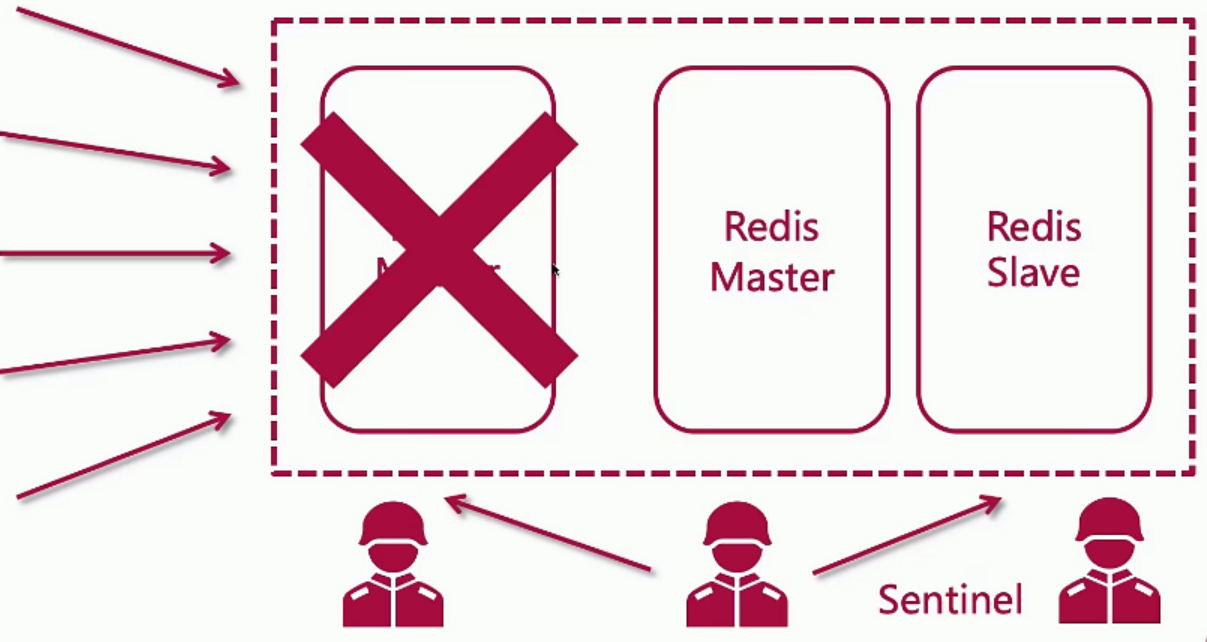

哨兵模式具体实现:
基于之前的搭建redis主从复制(读写分离)_p&f°的博客-CSDN博客

下面进入正题
本节实现哨兵模式示意图
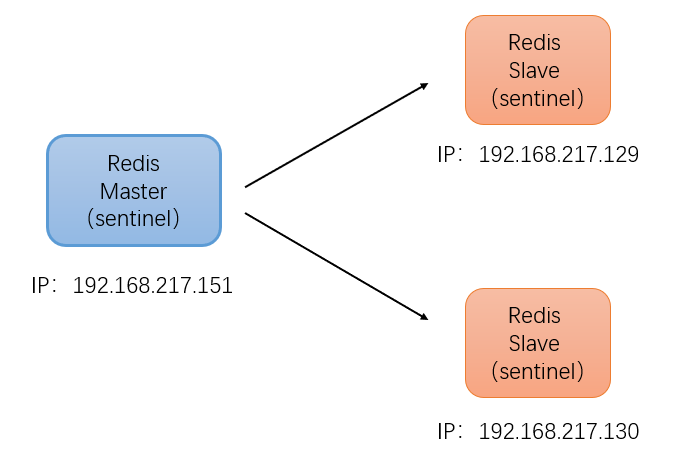
1、 进入151主机的redis的解压目录,拷贝sentinel.conf到redis工作目录/usr/local/redis/ (当然这步看个人的安装情况)
cp sentinel.conf /usr/local/redis/2、修改配置文件
cd /usr/local/redis
vim sentinel.conf
(先贴上全部文件内容,需要修改的都写了中文注释。当然也可以用后面我提供的精简版本,两个内容是一样的,只是精简版本把官方英文注释去除了而已。建议先看精简版本)
# Example sentinel.conf # * IMPORTANT * # # By default Sentinel will not be reachable from interfaces different than # localhost, either use the 'bind' directive to bind to a list of network # interfaces, or disable protected mode with "protected-mode no" by # adding it to this configuration file. # # Before doing that MAKE SURE the instance is protected from the outside # world via firewalling or other means. # # For example you may use one of the following: # # 使用bind,只有指定的ip地址才能访问此redis # bind 127.0.0.1 192.168.1.1 # # 保护模式关闭,这样其他服务起就可以访问此台redis protected-mode no # port

     # The port that this sentinel instance will run on port 26379 # By default Redis Sentinel does not run as a daemon. Use 'yes' if you need it. # Note that Redis will write a pid file in /var/run/redis-sentinel.pid when # daemonized. # 哨兵模式是否后台启动,默认no,改为yes daemonize yes # When running daemonized, Redis Sentinel writes a pid file in # /var/run/redis-sentinel.pid by default. You can specify a custom pid file # location here. pidfile /var/run/redis-sentinel.pid # Specify the log file name. Also the empty string can be used to force # Sentinel to log on the standard output. Note that if you use standard # output for logging but daemonize, logs will be sent to /dev/null # log日志保存位置 logfile /usr/local/redis/sentinel/redis-sentinel.log # sentinel announce-ip

      # sentinel announce-port

       # # The above two configuration directives are useful in environments where, # because of NAT, Sentinel is reachable from outside via a non-local address. # # When announce-ip is provided, the Sentinel will claim the specified IP address # in HELLO messages used to gossip its presence, instead of auto-detecting the # local address as it usually does. # # Similarly when announce-port is provided and is valid and non-zero, Sentinel # will announce the specified TCP port. # # The two options don't need to be used together, if only announce-ip is # provided, the Sentinel will announce the specified IP and the server port # as specified by the "port" option. If only announce-port is provided, the # Sentinel will announce the auto-detected local IP and the specified port. # # Example: # # sentinel announce-ip 1.2.3.4 # dir

        # Every long running process should have a well-defined working directory. # For Redis Sentinel to chdir to /tmp at startup is the simplest thing # for the process to don't interfere with administrative tasks such as # unmounting filesystems. # # 工作目录 dir /usr/local/redis/sentinel # sentinel monitor


            # # Tells Sentinel to monitor this master, and to consider it in O_DOWN # (Objectively Down) state only if at least

             sentinels agree. # # Note that whatever is the ODOWN quorum, a Sentinel will require to # be elected by the majority of the known Sentinels in order to # start a failover, so no failover can be performed in minority. # # Replicas are auto-discovered, so you don't need to specify replicas in # any way. Sentinel itself will rewrite this configuration file adding # the replicas using additional configuration options. # Also note that the configuration file is rewritten when a # replica is promoted to master. # # Note: master name should not include special characters or spaces. # The valid charset is A-z 0-9 and the three characters ".-_". # # 核心配置。 # 第三个参数:哨兵名字,可自行修改。(若修改了,那后面涉及到的都得同步) # 第四个参数:master主机ip地址 # 第五个参数:redis端口号 # 第六个参数:哨兵的数量。比如2表示,当至少有2个哨兵发现master的redis挂了, # 那么就将此master标记为宕机节点。 # 这个时候就会进行故障的转移,将其中的一个从节点变为master sentinel monitor mymaster 192.168.217.151 6379 2 # sentinel auth-pass


               # # Set the password to use to authenticate with the master and replicas. # Useful if there is a password set in the Redis instances to monitor. # # Note that the master password is also used for replicas, so it is not # possible to set a different password in masters and replicas instances # if you want to be able to monitor these instances with Sentinel. # # However you can have Redis instances without the authentication enabled # mixed with Redis instances requiring the authentication (as long as the # password set is the same for all the instances requiring the password) as # the AUTH command will have no effect in Redis instances with authentication # switched off. # # Example: # # master中redis的密码 sentinel auth-pass mymaster # sentinel auth-user


                 # # This is useful in order to authenticate to instances having ACL capabilities, # that is, running Redis 6.0 or greater. When just auth-pass is provided the # Sentinel instance will authenticate to Redis using the old "AUTH

                  " # method. When also an username is provided, it will use "AUTH


                    ". # In the Redis servers side, the ACL to provide just minimal access to # Sentinel instances, should be configured along the following lines: # # user sentinel-user >somepassword +client +subscribe +publish \ # +ping +info +multi +slaveof +config +client +exec on # sentinel down-after-milliseconds


                      # # Number of milliseconds the master (or any attached replica or sentinel) should # be unreachable (as in, not acceptable reply to PING, continuously, for the # specified period) in order to consider it in S_DOWN state (Subjectively # Down). # # Default is 30 seconds. # 哨兵从master节点宕机后,等待多少时间(毫秒),认定master不可用。 # 默认30s,这里为了测试,改成10s sentinel down-after-milliseconds mymaster 10000 # IMPORTANT NOTE: starting with Redis 6.2 ACL capability is supported for # Sentinel mode, please refer to the Redis website https://redis.io/topics/acl # for more details. # Sentinel's ACL users are defined in the following format: # # user

                       ... acl rules ... # # For example: # # user worker +@admin +@connection ~* on >ffa9203c493aa99 # # For more information about ACL configuration please refer to the Redis # website at https://redis.io/topics/acl and redis server configuration # template redis.conf. # ACL LOG # # The ACL Log tracks failed commands and authentication events associated # with ACLs. The ACL Log is useful to troubleshoot failed commands blocked # by ACLs. The ACL Log is stored in memory. You can reclaim memory with # ACL LOG RESET. Define the maximum entry length of the ACL Log below. acllog-max-len 128 # Using an external ACL file # # Instead of configuring users here in this file, it is possible to use # a stand-alone file just listing users. The two methods cannot be mixed: # if you configure users here and at the same time you activate the external # ACL file, the server will refuse to start. # # The format of the external ACL user file is exactly the same as the # format that is used inside redis.conf to describe users. # # aclfile /etc/redis/sentinel-users.acl # requirepass

                        # # You can configure Sentinel itself to require a password, however when doing # so Sentinel will try to authenticate with the same password to all the # other Sentinels. So you need to configure all your Sentinels in a given # group with the same "requirepass" password. Check the following documentation # for more info: https://redis.io/topics/sentinel # # IMPORTANT NOTE: starting with Redis 6.2 "requirepass" is a compatibility # layer on top of the ACL system. The option effect will be just setting # the password for the default user. Clients will still authenticate using # AUTH

                         as usually, or more explicitly with AUTH default

                          # if they follow the new protocol: both will work. # # New config files are advised to use separate authentication control for # incoming connections (via ACL), and for outgoing connections (via # sentinel-user and sentinel-pass) # # The requirepass is not compatable with aclfile option and the ACL LOAD # command, these will cause requirepass to be ignored. # sentinel sentinel-user

                           # # You can configure Sentinel to authenticate with other Sentinels with specific # user name. # sentinel sentinel-pass

                            # # The password for Sentinel to authenticate with other Sentinels. If sentinel-user # is not configured, Sentinel will use 'default' user with sentinel-pass to authenticate. # sentinel parallel-syncs


                              # # How many replicas we can reconfigure to point to the new replica simultaneously # during the failover. Use a low number if you use the replicas to serve query # to avoid that all the replicas will be unreachable at about the same # time while performing the synchronization with the master. # 当替换主节点后,剩余从节点并行同步的数量,默认为 1 sentinel parallel-syncs mymaster 1 # sentinel failover-timeout


                                # # Specifies the failover timeout in milliseconds. It is used in many ways: # # - The time needed to re-start a failover after a previous failover was # already tried against the same master by a given Sentinel, is two # times the failover timeout. # # - The time needed for a replica replicating to a wrong master according # to a Sentinel current configuration, to be forced to replicate # with the right master, is exactly the failover timeout (counting since # the moment a Sentinel detected the misconfiguration). # # - The time needed to cancel a failover that is already in progress but # did not produced any configuration change (SLAVEOF NO ONE yet not # acknowledged by the promoted replica). # # - The maximum time a failover in progress waits for all the replicas to be # reconfigured as replicas of the new master. However even after this time # the replicas will be reconfigured by the Sentinels anyway, but not with # the exact parallel-syncs progression as specified. # # Default is 3 minutes. # 主备切换的时间,若在3分钟内没有切换成功,换另一个从节点切换 sentinel failover-timeout mymaster # SCRIPTS EXECUTION # # sentinel notification-script and sentinel reconfig-script are used in order # to configure scripts that are called to notify the system administrator # or to reconfigure clients after a failover. The scripts are executed # with the following rules for error handling: # # If script exits with "1" the execution is retried later (up to a maximum # number of times currently set to 10). # # If script exits with "2" (or an higher value) the script execution is # not retried. # # If script terminates because it receives a signal the behavior is the same # as exit code 1. # # A script has a maximum running time of 60 seconds. After this limit is # reached the script is terminated with a SIGKILL and the execution retried. # NOTIFICATION SCRIPT # # sentinel notification-script


                                  # # Call the specified notification script for any sentinel event that is # generated in the WARNING level (for instance -sdown, -odown, and so forth). # This script should notify the system administrator via email, SMS, or any # other messaging system, that there is something wrong with the monitored # Redis systems. # # The script is called with just two arguments: the first is the event type # and the second the event description. # # The script must exist and be executable in order for sentinel to start if # this option is provided. # # Example: # # sentinel notification-script mymaster /var/redis/notify.sh # CLIENTS RECONFIGURATION SCRIPT # # sentinel client-reconfig-script


                                    # # When the master changed because of a failover a script can be called in # order to perform application-specific tasks to notify the clients that the # configuration has changed and the master is at a different address. # # The following arguments are passed to the script: # #


                                           # #

                                            is currently always "failover" #

                                             is either "leader" or "observer" # # The arguments from-ip, from-port, to-ip, to-port are used to communicate # the old address of the master and the new address of the elected replica # (now a master). # # This script should be resistant to multiple invocations. # # Example: # # sentinel client-reconfig-script mymaster /var/redis/reconfig.sh # SECURITY # # By default SENTINEL SET will not be able to change the notification-script # and client-reconfig-script at runtime. This avoids a trivial security issue # where clients can set the script to anything and trigger a failover in order # to get the program executed. sentinel deny-scripts-reconfig yes # REDIS COMMANDS RENAMING # # Sometimes the Redis server has certain commands, that are needed for Sentinel # to work correctly, renamed to unguessable strings. This is often the case # of CONFIG and SLAVEOF in the context of providers that provide Redis as # a service, and don't want the customers to reconfigure the instances outside # of the administration console. # # In such case it is possible to tell Sentinel to use different command names # instead of the normal ones. For example if the master "mymaster", and the # associated replicas, have "CONFIG" all renamed to "GUESSME", I could use: # # SENTINEL rename-command mymaster CONFIG GUESSME # # After such configuration is set, every time Sentinel would use CONFIG it will # use GUESSME instead. Note that there is no actual need to respect the command # case, so writing "config guessme" is the same in the example above. # # SENTINEL SET can also be used in order to perform this configuration at runtime. # # In order to set a command back to its original name (undo the renaming), it # is possible to just rename a command to itself: # # SENTINEL rename-command mymaster CONFIG CONFIG # HOSTNAMES SUPPORT # # Normally Sentinel uses only IP addresses and requires SENTINEL MONITOR # to specify an IP address. Also, it requires the Redis replica-announce-ip # keyword to specify only IP addresses. # # You may enable hostnames support by enabling resolve-hostnames. Note # that you must make sure your DNS is configured properly and that DNS # resolution does not introduce very long delays. # SENTINEL resolve-hostnames no # When resolve-hostnames is enabled, Sentinel still uses IP addresses # when exposing instances to users, configuration files, etc. If you want # to retain the hostnames when announced, enable announce-hostnames below. # SENTINEL announce-hostnames no
上述内容的精简版本(推荐使用,修改好后直接用下面文件替换系统的sentinel.conf文件)
普通配置 port 26379 # 保护模式关闭,这样其他服务起就可以访问此台redis protected-mode no # 哨兵模式是否后台启动,默认no,改为yes daemonize yes pidfile /var/run/redis-sentinel.pid # log日志保存位置 logfile /usr/local/redis/sentinel/redis-sentinel.log # 工作目录 dir /usr/local/redis/sentinel 核心配置 # 核心配置。 # 第三个参数:哨兵名字,可自行修改。(若修改了,那后面涉及到的都得同步) # 第四个参数:master主机ip地址 # 第五个参数:redis端口号 # 第六个参数:哨兵的数量。比如2表示,当至少有2个哨兵发现master的redis挂了, # 那么就将此master标记为宕机节点。 # 这个时候就会进行故障的转移,将其中的一个从节点变为master sentinel monitor mymaster 192.168.217.151 6379 2 # master中redis的密码 sentinel auth-pass mymaster # 哨兵从master节点宕机后,等待多少时间(毫秒),认定master不可用。 # 默认30s,这里为了测试,改成10s sentinel down-after-milliseconds mymaster 10000 # 当替换主节点后,剩余从节点重新和新master做同步的并行数量,默认为 1 sentinel parallel-syncs mymaster 1 # 主备切换的时间,若在3分钟内没有切换成功,换另一个从节点切换 sentinel failover-timeout mymaster 3、将上述修改好的配置文件,复制到129和139从机中。我这里直接使用scp命名复制
scp sentinel.conf root@192.168.217.129:/usr/local/redis/ scp sentinel.conf root@192.168.217.130:/usr/local/redis/
4、因为配置文件中设定了自己的log存储位置,所以要把相应的文件创建出来,在151、129和130中都需要执行
mkdir /usr/local/redis/sentinel -p5、分别在151、129和130中执行下面命令,启动哨兵
redis-sentinel sentinel.conf6、可以在151主机中,进入到日志所在的目录下执行如下命令,让日志在前台显示查看监控
tail -f redis-sentinel.log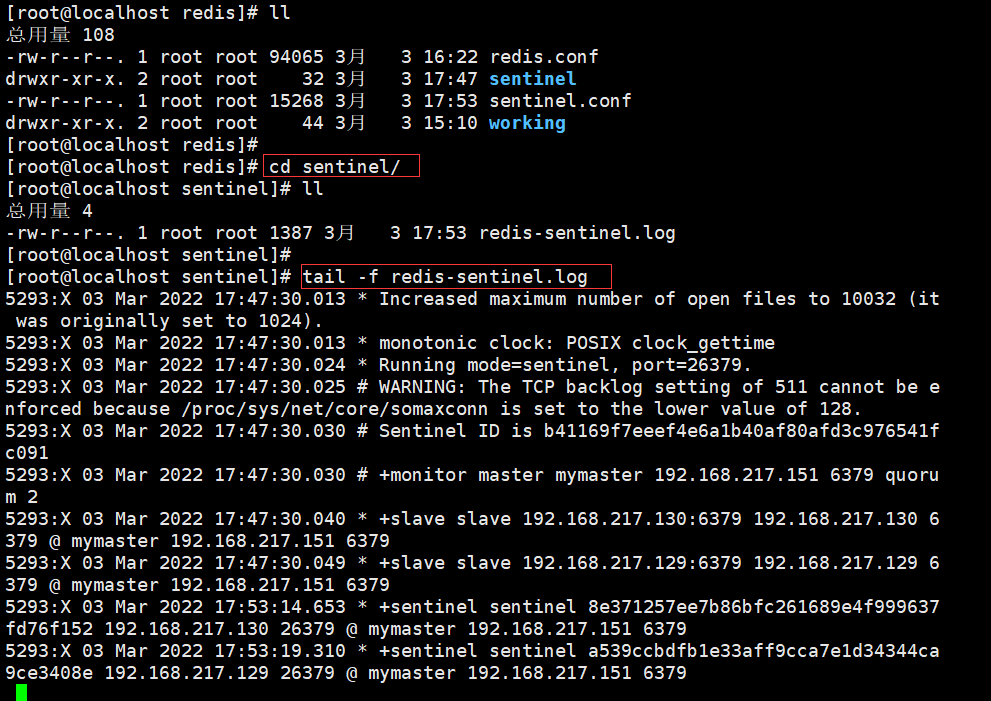
测试:
一、关闭master的redis,查看redis集群主从机切换情况
1、先登录151主机redis,查看redis集群情况info replication

2、此时151为master,同理查看129和130。

3、 模拟151master节点宕机,把redis关闭,

继续查看各个节点的redis集群情况,
先看129

在看130

结果符合预期。
二、重启151节点,查看redis集群情况,看是否还会恢复为主节点,还是作为从节点。
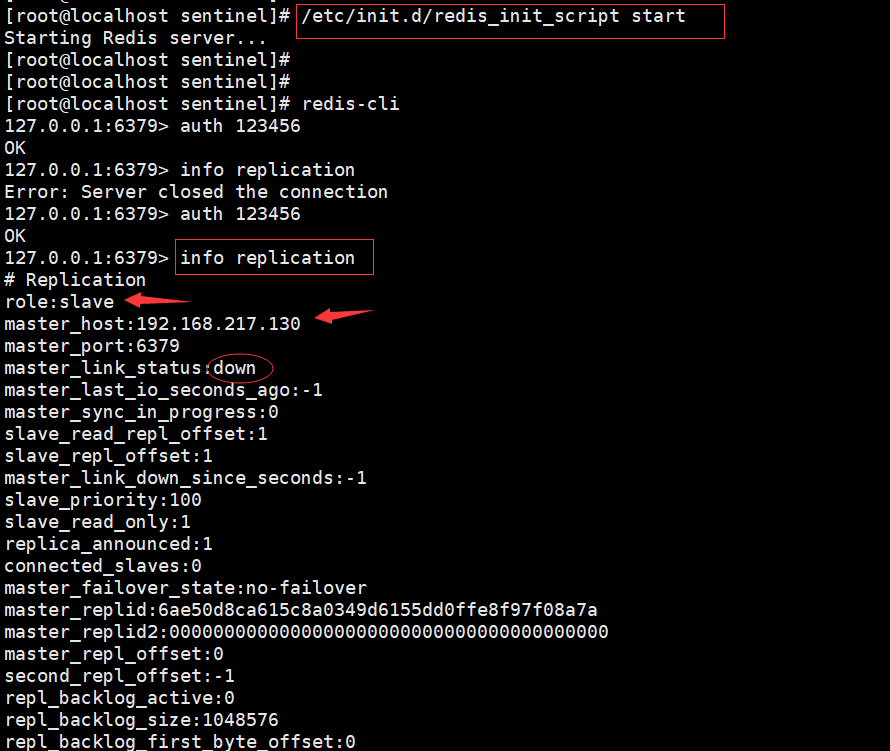
从测试结果可以看到,即使后来重启之前的master,也不会替换,而是作为slave。
相关衍生:解决原Master恢复后不同步问题
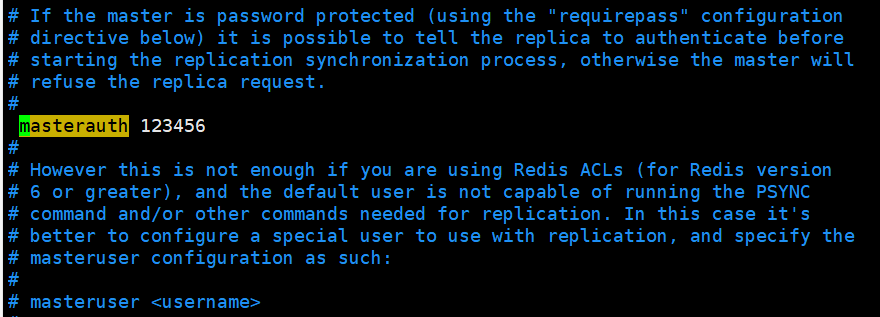
相信细心的同学会发现原来的Master(151)恢复成Slave后,他的同步状态不OK,状态为master_link_status:down,这是为什么呢?这是因为我们只设置了129和130的masterauth(redis密码),这是用于同步master的数据,但是151一开始是master是不受影响的,当master转变为slave后,由于他没有auth,所以他不能从新的master同步数据,随之导致info replication的时候,同步状态为down,所以只需要修改redis.conf中的masterauth为
一般master数据无法同步给slave的方案检查为如下:
- 1.网络通信问题,要保证互相ping通,内网互通。
- 2.关闭防火墙,对应的端口开发(虚拟机中建议永久关闭防火墙,云服务器的话需要保证内网互通)。
- 3.统一所有的密码,不要漏了某个节点没有设置
发布者:全栈程序员-站长,转载请注明出处:https://javaforall.net/213070.html原文链接:https://javaforall.net




