
obj.offsetleft, 此属性是只读的,不能够赋值
此属性可以返回当前元素距离某个父辈元素左边缘的距离:
- 如果父辈元素中有定位的元素,那么就返回距离当前元素最近的定位元素边缘的距离。
- 如果父辈元素中没有定位元素,那么就返回相对于body左边缘距离。
实例一:有定位
    DOCTYPE html> <html> <head> <meta charset="utf-8"> <meta name="author" content="http://www.softwhy.com/" /> <title>demo1
      title> <style type="text/css"> *{
        margin: 0px; padding: 0px; } #main{
        width:300px; height:300px; background:red; position:absolute; left:100px; top:100px; } #box{
        width:200px; height:200px; background:blue; margin:50px; overflow:hidden; } #inner{
        width:50px; height:50px; background:green; text-align:center; line-height:50px; margin:50px; }
       style> <script type="text/javascript"> window.onload=function(){
         var inner=document.getElementById("inner"); document.getElementById("msg").innerHTML = 'offsetLeft='+inner.offsetLeft; }
        script>
         head> <body> <div id="msg">
          div> <div id="main">main(position:absolute) <div id="box">box <div id="inner">
           div>
            div>
             div>
              body>
               html>
结果
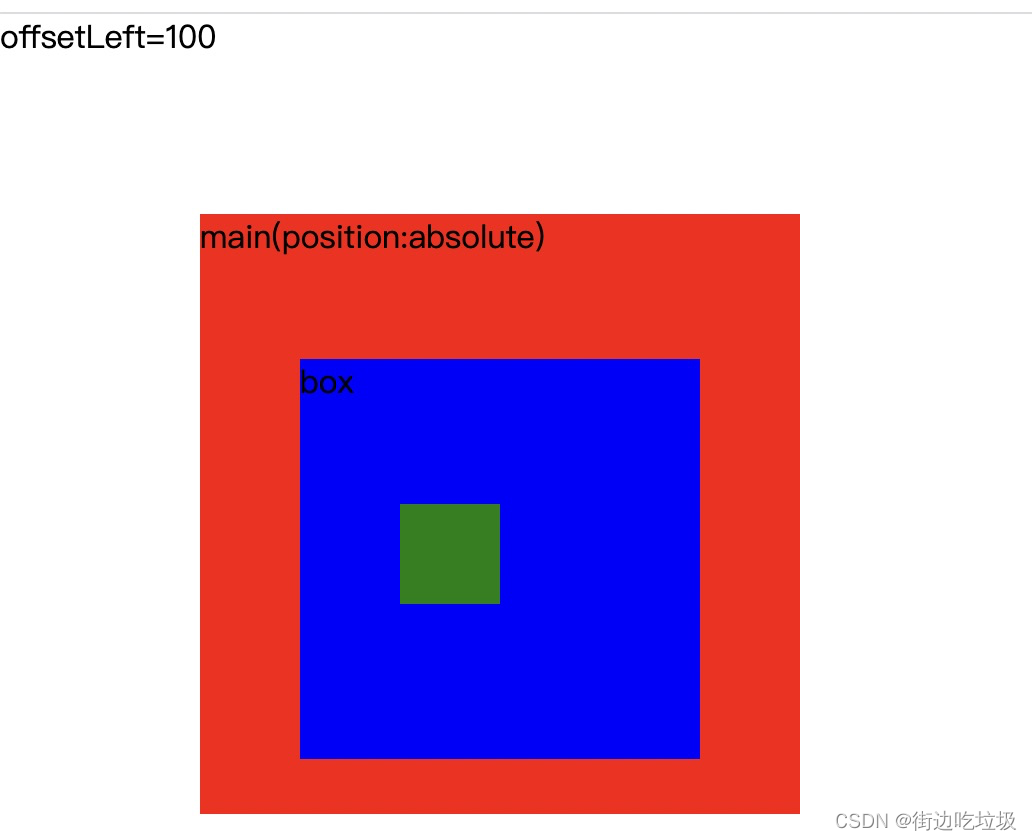

返回inner元素距离main元素的左侧的距离,因为main元素是第一个定位父辈元素。
实例二(无定位)
    DOCTYPE html> <html> <head> <meta charset="utf-8"> <meta name="author" content="http://www.softwhy.com/" /> <title>demo2
      title> <style type="text/css"> *{
        margin: 0px; padding: 0px; } #main{
        width:300px; height:300px; background:red; margin:100px; } #box{
        width:200px; height:200px; background:blue; overflow:hidden; } #inner{
        width:50px; height:50px; background:green; text-align:center; line-height:50px; margin:50px; }
       style> <script type="text/javascript"> window.onload=function(){
         var inner=document.getElementById("inner"); document.getElementById("msg").innerHTML = 'offsetLeft='+inner.offsetLeft; }
        script>
         head> <body> <div id="msg">
          div> <div id="main"> main <div id="box"> box <div id="inner">inner
           div>
            div>
             div>
              body>
               html>
版权声明:本文内容由互联网用户自发贡献,该文观点仅代表作者本人。本站仅提供信息存储空间服务,不拥有所有权,不承担相关法律责任。如发现本站有涉嫌侵权/违法违规的内容, 请联系我们举报,一经查实,本站将立刻删除。
发布者:全栈程序员-站长,转载请注明出处:https://javaforall.net/215161.html原文链接:https://javaforall.net




